

Fix DATEDIF #NUM! in Google Sheets (end before start, or MD / YD units)
Updated
DATEDIF(start_date, end_date, unit) counts whole years, months, or days between two dates. The first date must be on or before the second. Reverse them and the cell is #NUM!. Units are "Y", "M", "D", "MD", "YM", "YD". "MD" (days leftover after whole months) and "YD" (days assuming the dates are within a year) are the hidden-unit bugs: they can look wrong even when the order is legal, and "MD" can go negative or skip a month-end.
This page is DATEDIF order and units. It is not YEARFRAC #NUM! (basis 0–4). It is not WORKDAY #NUM!. It is not out of domain. Keep the Google Sheets UI in English. Format result cells as Number, not Date, or 8 days will display as 1/8/1900.
Recreate it on a blank sheet
Section titled “Recreate it on a blank sheet”- Open a blank spreadsheet. In A1 type
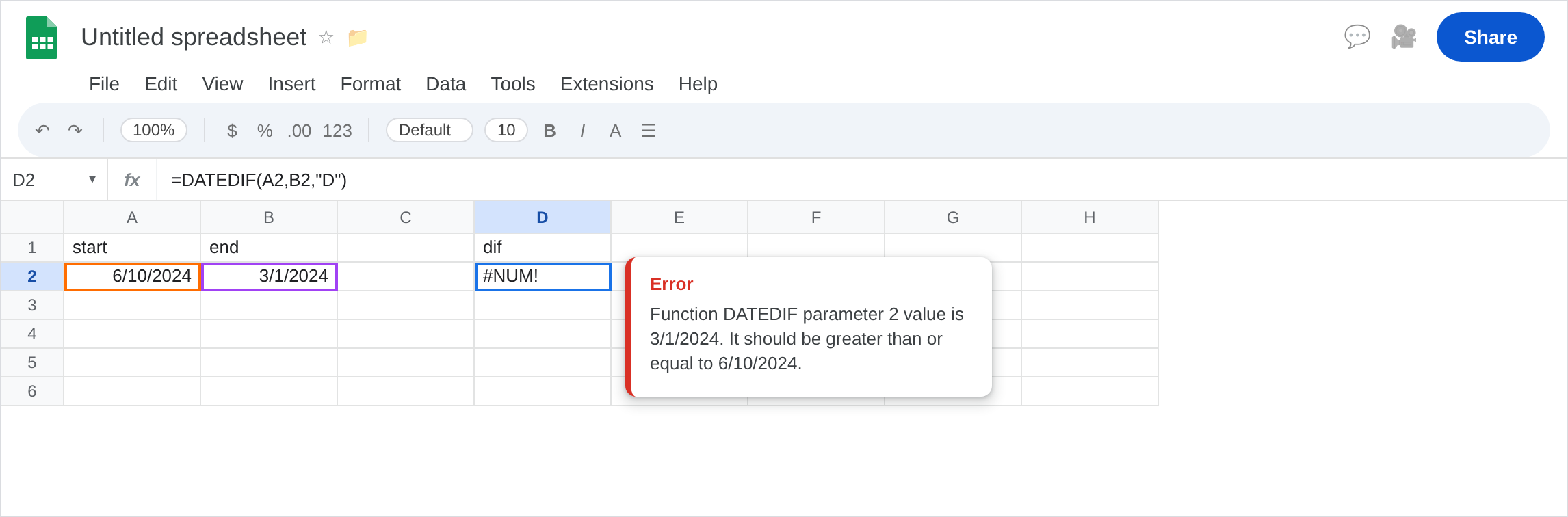
start, B1end. In A2 enter=DATE(2024,6,10). In B2 enter=DATE(2024,3,1). End is before start. Format both as Date.
Reversed dates. In D1 type dif. In D2 enter =DATEDIF(A2,B2,"D"). The cell shows #NUM!. 1 March is before 10 June. Leave D2 broken.
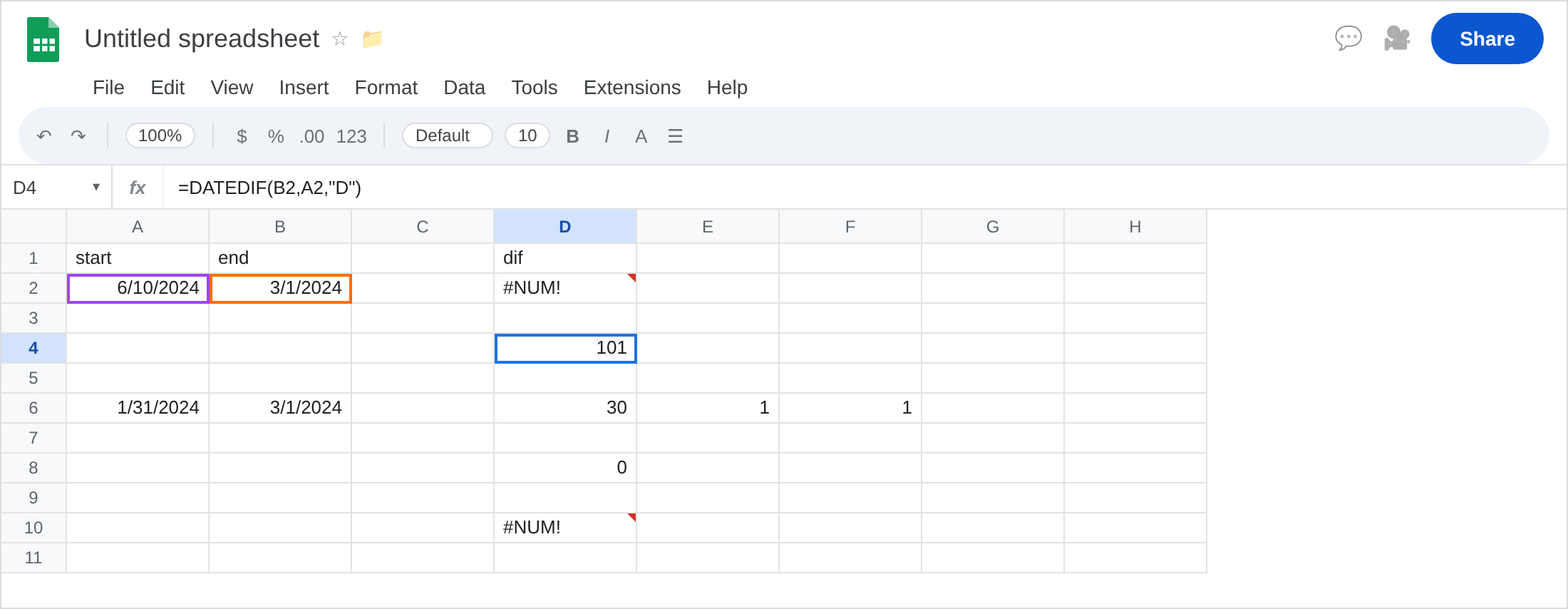
The same pair in the right order. In D4 enter =DATEDIF(B2,A2,"D"). The cell shows 101 (days from 1 March to 10 June 2024). Format D4 as Number. That row is the control: order fixed, unit "D".
Legal order, leftover-day unit. In A6 enter =DATE(2024,1,31). In B6 enter =DATE(2024,3,1). In D6 enter =DATEDIF(A6,B6,"D") (30). In E6 enter =DATEDIF(A6,B6,"M") (1). In F6 enter =DATEDIF(A6,B6,"MD"). "MD" is “days left after subtracting whole months.” On month-end starts this unit is the one people screenshot as a bug (unexpected 0, 1, or a day count that does not match D minus 30). Leave F6 visible even if the number looks odd. Do not treat F6 as #NUM! unless it actually is.
Equal dates. In D8 enter =DATEDIF(A2,A2,"D"). 0. Legal. Not #NUM!.
Bad unit string. In D10 enter =DATEDIF(B2,A2,"W"). "W" is not a unit. #NUM! or #VALUE!. Leave D10 broken. Use "D" and divide by 7 if you wanted weeks.
Leave D2 as the reversed-pair #NUM!. Leave D4 as the working day count.
What is actually wrong
Section titled “What is actually wrong”start_datemust be≤ end_date. Tenure formulas that putTODAY()first and the hire date second explode the day the hire is in the past. Swap the arguments.#NUM!is not “too many days.”Dof a century is fine. The order is the usual cause."MD"/"YD"are inherited Excel units with sharp edges around month ends and leap days. Prefer"D"plusDATEarithmetic, orYEARFRAC, when the leftover units disagree with the calendar you can see.- Formatting the result as Date hides a correct
8as a January 1900 date. That is display, not#NUM!. DATEDIFdoes not take aWEEKDAYtype or aWORKDAYweekend code.
This is not YEARFRAC with basis 5. See YEARFRAC #NUM!.
This is not EOMONTH overflow. See EOMONTH #NUM!.
This is not DATEVALUE locale text. See DATEVALUE locale. A2 and B2 are real dates.
Leave D2 and D10 broken.
Put the earlier date first. Keep D4: =DATEDIF(B2,A2,"D"). For age/tenure: =DATEDIF(hire,TODAY(),"Y") with hire in the first slot.
Unknown order. In G2 enter =IF(B2>=A2,DATEDIF(A2,B2,"D"),DATEDIF(B2,A2,"D")) for an unsigned day gap, or =B2-A2 (negative if reversed) if the sign matters. Prefer the IF over IFERROR(DATEDIF(...),DATEDIF(swapped)) so a bad unit still shows. See IFERROR vs IFNA.
Avoid "MD" unless you have tests. Use "M" for whole months and "D" for days. Document "YM" if you want months-within-year (age months after last birthday).
Format D4 as Number. Do not wrap D2 in IFNA (#NUM! is not #N/A).
If #NUM! and the calendar shows the second date first, swap. If the unit is "W" or a typo, fix the unit. If the number looks like a date in 1900, change format. If "MD" is a surprise and the order is legal, stop using "MD".
End before start vs MD vs YEARFRAC
Section titled “End before start vs MD vs YEARFRAC”Reversed arguments → #NUM! (D2). This page’s main recreate.
"MD" → often a weird number, not an error (F6). Different failure mode, same function.
YEARFRAC with a bad basis → #NUM! on another function. See YEARFRAC #NUM!. Day counts you trust belong on "D" or on end-start.