

QUERY STARTS WITH is case-sensitive and misses Apple
Updated
starts with is a prefix test in the query language. It is case-sensitive. starts with 'a' matches apricot and does not match Apple. If every value is capitalized, the cell is #N/A and the tooltip is Query completed with an empty output. The rows are on the sheet. The prefix’s case is different. startswith as one word does not run the test. It fails to parse.
contains 'pro' missing Pro is QUERY contains. A dot inside matches is QUERY CONTAINS vs MATCHES. This page is the prefix operator and case. Keep the Google Sheets UI in English. Locale United States.
Recreate it on a blank sheet
Section titled “Recreate it on a blank sheet”- Open a blank spreadsheet. In A1 type
item. A2Apple. A3apricot. A4Banana. Two fruits start with an A sound. Only one starts with the charactera.
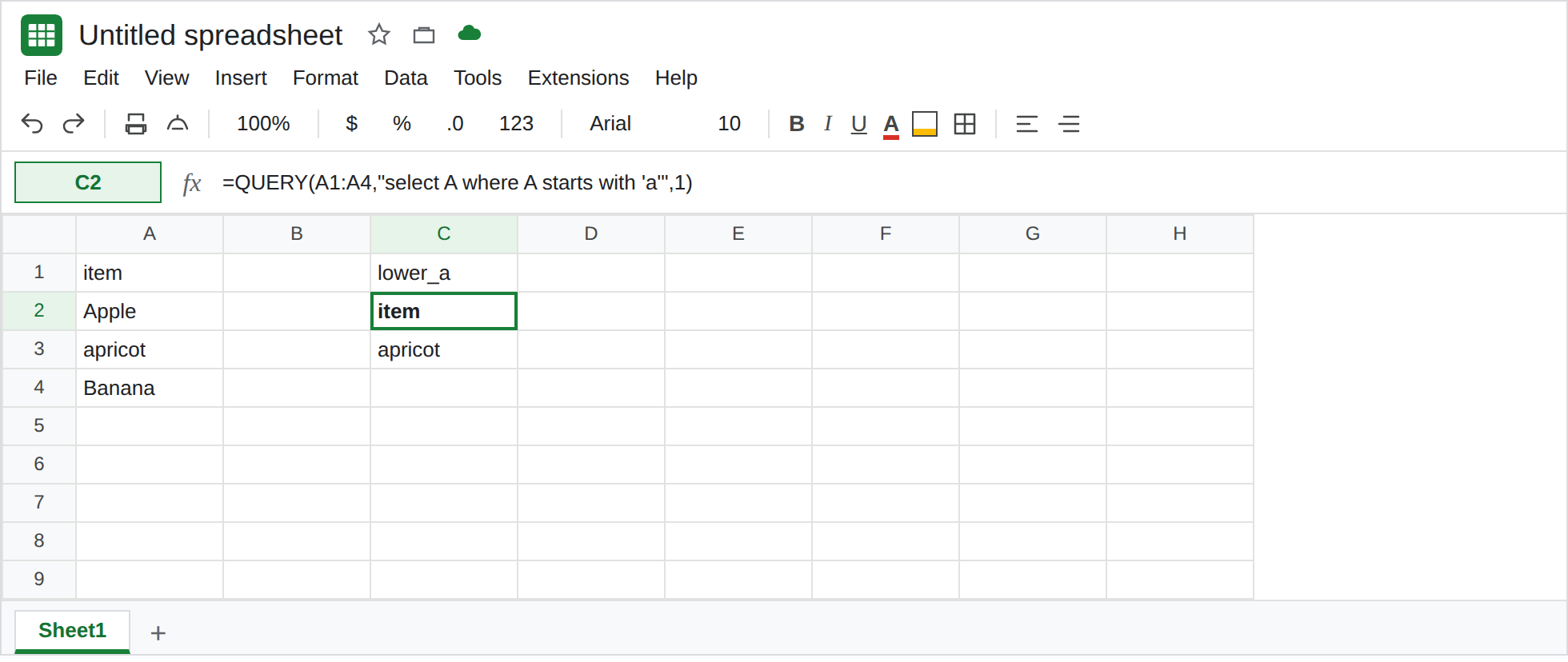
Lowercase prefix. In C1 type lower_a. In C2 enter =QUERY(A1:A4,"select A where A starts with 'a'",1). The spill is item / apricot. Apple is absent. Banana is absent. There is no triangle. Leave C2 as that one row.
The prefix that matches Apple. In C5 type upper_a. In C6 enter =QUERY(A1:A4,"select A where A starts with 'A'",1). The spill is item / Apple. apricot is absent. Same column, other case. Leave C6 as Apple only.
Nothing uses that exact case. In E1 type only_caps. In E2 enter =QUERY(A2:A2,"select A where A starts with 'a'",0). The range is the single cell Apple, and the third argument is 0 because that range has no header. #N/A. Tooltip: Query completed with an empty output. Apple does not start with a. Leave E2 broken. It is easy to read as “QUERY dropped the column.” The column has Apple in it.
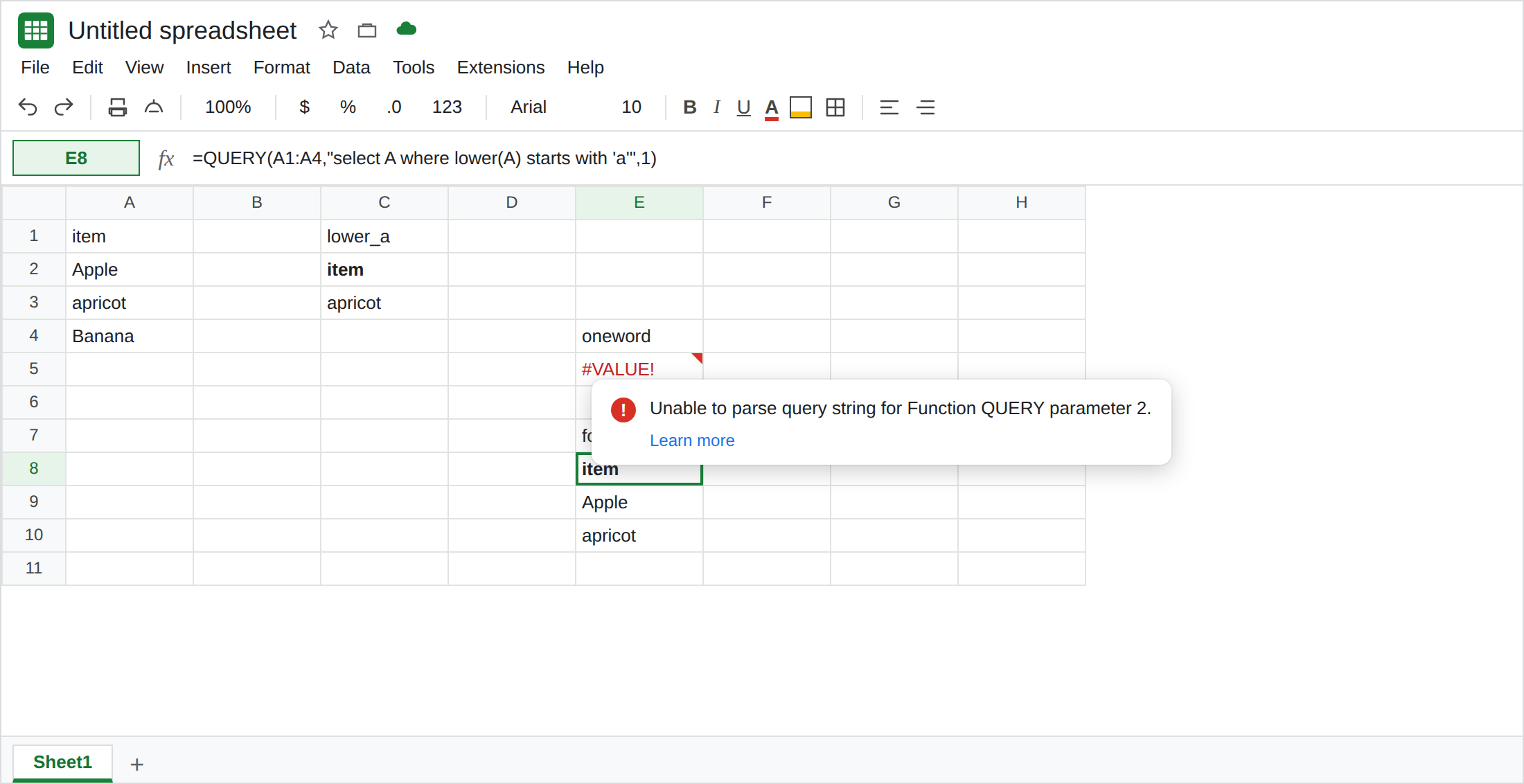
One word does not parse. In E4 type oneword. In E5 enter =QUERY(A1:A4,"select A where A startswith 'A'",1). #VALUE!. Tooltip: Unable to parse query string for Function QUERY parameter 2. The operator is two words, starts with. Leave E5 broken. See QUERY parse string.
Fold case. In E7 type folded. In E8 enter =QUERY(A1:A4,"select A where lower(A) starts with 'a'",1). The spill is item / Apple / apricot. Banana is still out. That block is the control for “either capital A.”
What is actually wrong
Section titled “What is actually wrong”- String compares in this language keep case.
Aandaare different prefixes. C2 and C6 are both successful queries. Each kept a different row. Google’s own example,starts with 'e'matchingengineering, uses the same case on both sides. - Empty output uses the same tooltip as a sku that is not in the table. See QUERY no rows. E2’s range contains
Apple. The prefixais why it is empty. Changing'a'to'A'fills it. Deleting row 2 does not. startswithis not an alias. The parser stops. E5 never compared a prefix.starts withhas a space.starts withdoes not mean “contains.”Applestarts withApp. It does not start withppl. A substring anywhere in the cell iscontains. See QUERY contains.lower(A)is a scalar function on a text column. It does not makeyear(A)legal. Dates mixed with text are QUERY mixed dates. Column A here is words.
Leave C2 as apricot only, so the case split stays visible. Leave E2 and E5 broken.
Match the case you stored, or fold it. C6 is starts with 'A' for Apple. E8 is lower(A) starts with 'a' for both A-rows. upper(A) starts with 'APP' keeps Apple (APPLE starts with APP) and drops apricot.
Quote the prefix. "select A where A starts with '"&G1&"'" when G1 holds App. Without the single quotes, the prefix is parsed as an identifier. See QUERY parse string.
Do not wrap E2 in IFNA. Apple is in the range. The wrapper would hide a case miss. See IFERROR vs IFNA.
If starts with 'a' skipped Apple, the test is case. Use the capital you stored, or lower the column. If the tooltip says Unable to parse and the operator is one word, split it into starts with. If the tooltip says the query completed with an empty output, compare the prefix to the cell character by character, including capitals.