

QUERY WHERE AND/OR returns extra rows when parentheses are missing
Updated
QUERY reads where with a fixed order: and binds tighter than or. The statement where A = 'East' or A = 'West' and B > 5 means “East, whatever the qty, or West only when qty is over 5.” It does not mean “East or West, and in either case qty over 5.” The formula runs. The spill includes a row you thought the and had removed. There is no #VALUE!.
This page is that precedence. It is not QUERY no rows (a where that matches nothing). It is not QUERY parse string (Unable to parse query string). FILTER with the same logic is FILTER OR vs AND. Keep the Google Sheets UI in English. File → Settings → Locale → United States so the formula uses commas.
Recreate it on a blank sheet
Section titled “Recreate it on a blank sheet”- Open a blank spreadsheet. In A1 type
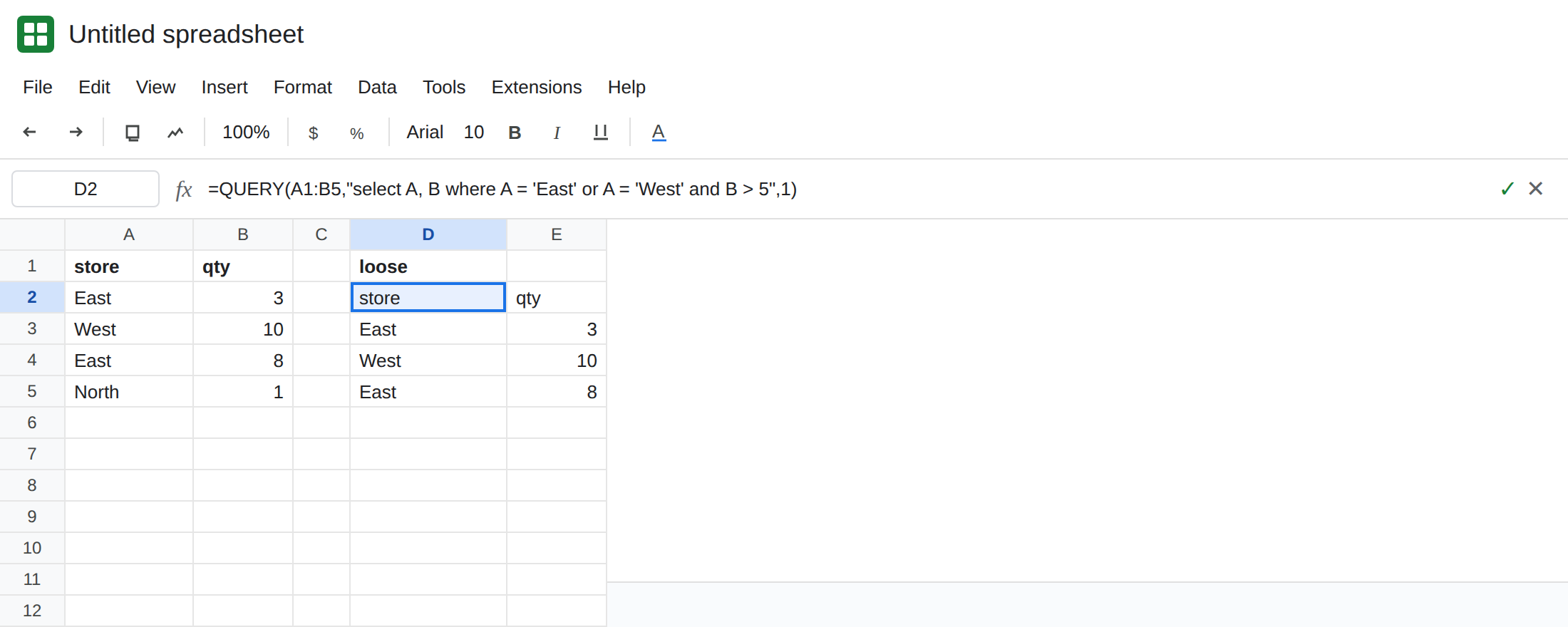
store, B1qty. A2East, B23. A3West, B310. A4East, B48. A5North, B51. Four stores. East appears twice: qty3and qty8.
The statement people write. In D1 type loose. In D2 enter =QUERY(A1:B5,"select A, B where A = 'East' or A = 'West' and B > 5",1). The spill header is store / qty. The data rows are East 3, West 10, and East 8. North is gone. East 3 is still there. You asked, in English, for East or West with qty over 5. The query language heard a different request. Leave D2 as that spill. It is not an error cell.
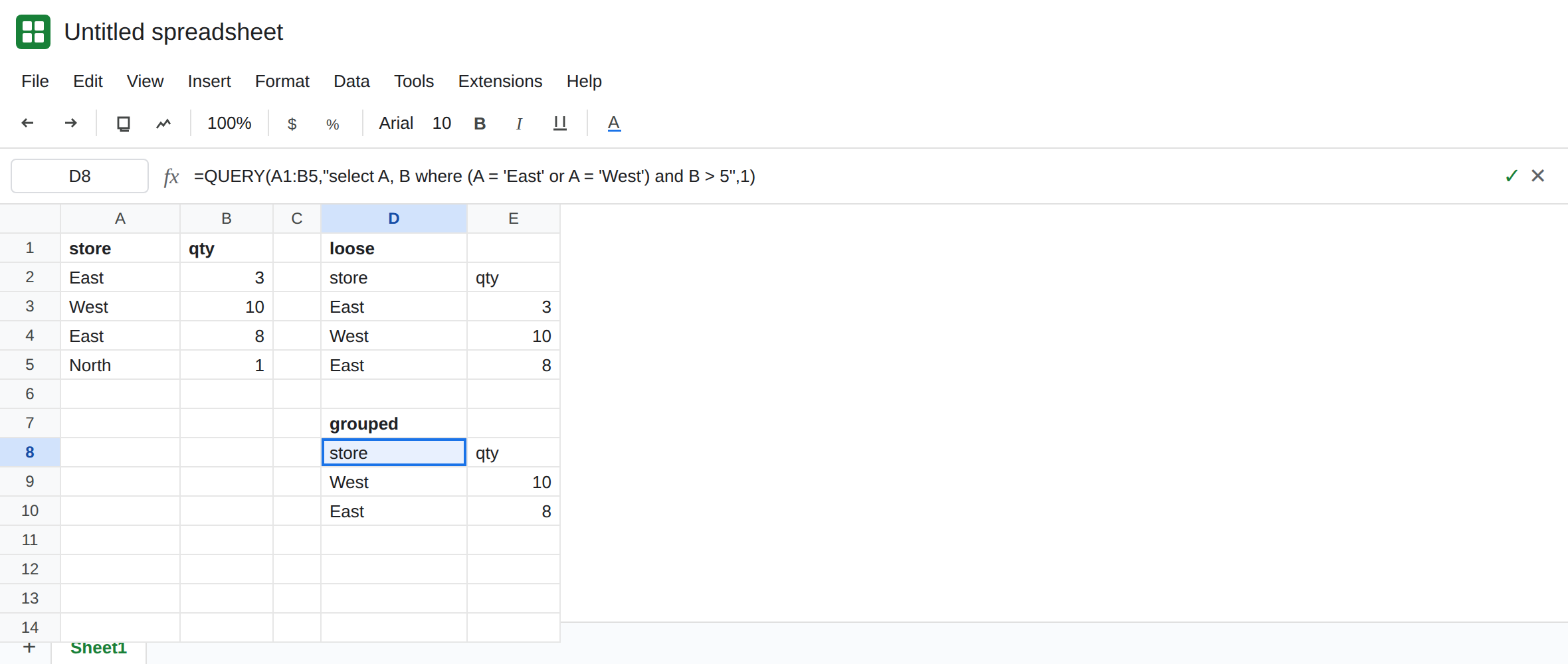
The same words with parentheses. In D7 type grouped. In D8 enter =QUERY(A1:B5,"select A, B where (A = 'East' or A = 'West') and B > 5",1). The spill is West 10 and East 8. East 3 is gone. North is gone. That block is the control for the meaning you wanted.
A parse miss is not this. In F1 type parse. In F2 enter =QUERY(A1:B5,"select A, B where A = East or A = West and B > 5",1). #VALUE!. Tooltip: Unable to parse query string for Function QUERY parameter 2. East without quotes is not a string in this language. Leave F2 broken. That family is QUERY parse string. D2 parsed. F2 did not.
Empty on purpose. In F5 enter =QUERY(A1:B5,"select A where A = 'South'",1). #N/A. Tooltip: Query completed with an empty output. No South row exists. That is QUERY no rows. Leave F5 as the contrast. D2 is full of rows. It is the wrong rows.
Leave D2 as the loose spill. Leave D8 as West 10 and East 8. Leave F2 as parse. Leave F5 as empty.
What is actually wrong
Section titled “What is actually wrong”- In the query language,
andis decided beforeor.A = 'East' or A = 'West' and B > 5isA = 'East'or (A = 'West'andB > 5). East3qualifies on the first branch. TheB > 5never applies to it. - Parentheses change the grouping.
(A = 'East' or A = 'West') and B > 5builds the store set first, then keeps qty over 5. D8 is that statement. D2 is not a buggy engine. It is the statement you sent. orandanddo not follow the order of the words in your head. Writingandlast does not make it apply to both sides.- A successful spill can still be the wrong filter. D2 has no triangle. Checking East
3against the rule you wanted is the test. QUERY no rows is the opposite problem: a triangle and no data. - Unquoted
Eastnever reaches precedence. F2 dies at parse. Fix quotes before you argue aboutand.
This is not FILTER. FILTER uses Sheets functions, and + for or versus * for and is the other page. A QUERY string does not accept OR() as a Sheets function inside the quotes.
Leave D2, F2, and F5 in place.
Parentheses around the or. Keep D8: =QUERY(A1:B5,"select A, B where (A = 'East' or A = 'West') and B > 5",1). West 10 and East 8. If you add another store, put it inside the same parentheses: (A = 'East' or A = 'West' or A = 'North') and B > 5.
Repeat the qty test if you would rather not use parentheses. where (A = 'East' and B > 5) or (A = 'West' and B > 5) is the same two rows. Each or branch carries its own and. That form is longer. It does not depend on remembering which word binds first.
Do not wrap D2 in IFERROR. D2 is not failing. You would hide nothing and keep the extra East row. See IFERROR vs IFNA.
If the spill contains a row that fails the limit you thought you wrote, read and and or from the inside out and add parentheses. If the tooltip says Unable to parse, quote the text first. If the tooltip says the query completed with an empty output, the filter matched nobody. That is not precedence.