

NOW and TODAY follow the spreadsheet time zone, not your clock
Updated
NOW() and TODAY() use the spreadsheet time zone. That setting lives under File → Settings → Time zone. It is not your laptop’s clock, and it is not the time zone in your Google Account profile. If the sheet is set to a zone where the calendar date is already tomorrow, or still yesterday, TODAY() shows that date. Reports that “roll forward overnight” while you are still at your desk are this setting.
Sheet Error is not a Google product. Keep the Google Sheets UI in English.
Recreate it on a blank sheet
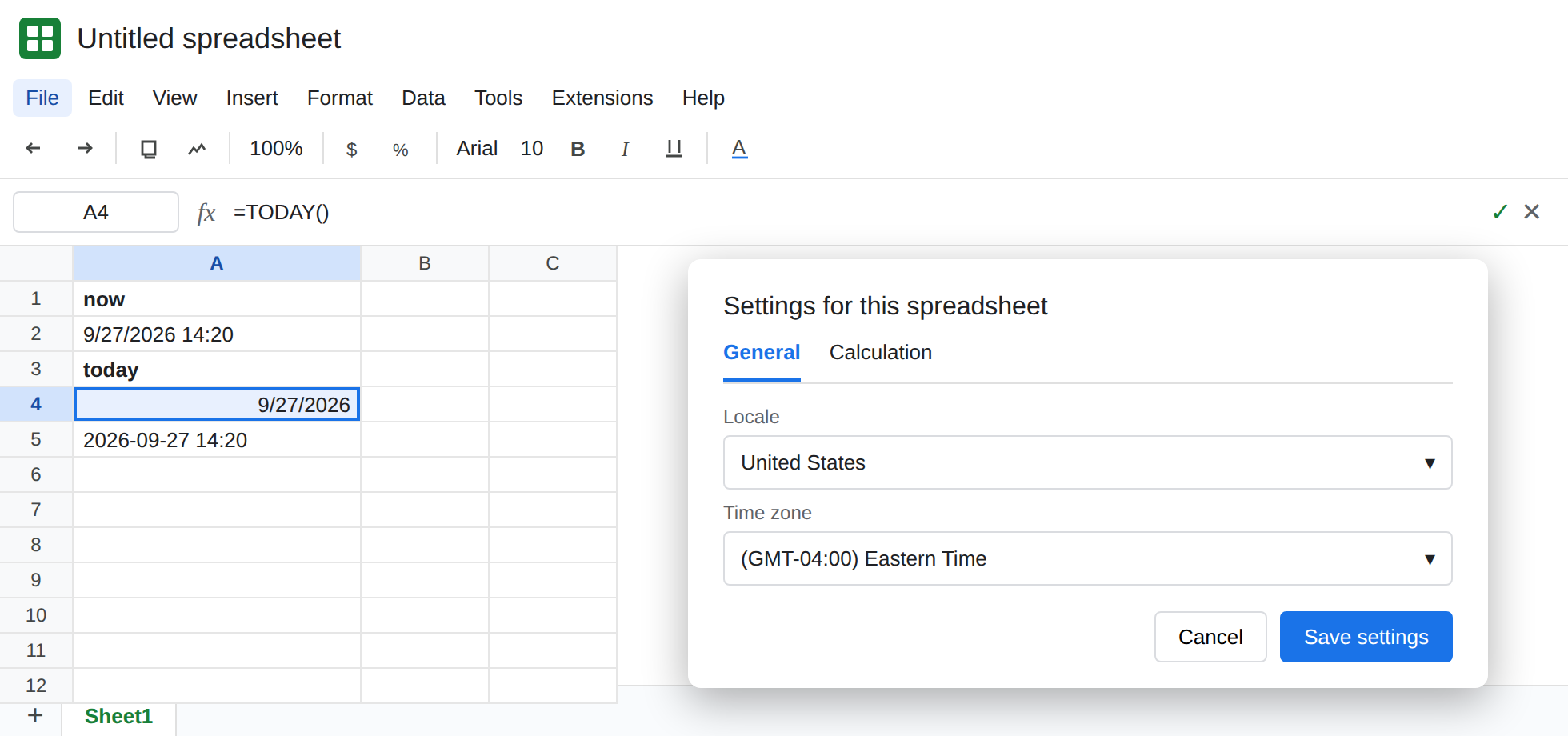
Section titled “Recreate it on a blank sheet”- Open a blank spreadsheet. File → Settings. Read Time zone. The list is an offset plus a place name. Leave the dialog open long enough to write the current zone down, then cancel if you are not ready to change it. Locale is the next control and is a different setting (argument separators and date order). Do not change Locale for this recreate.
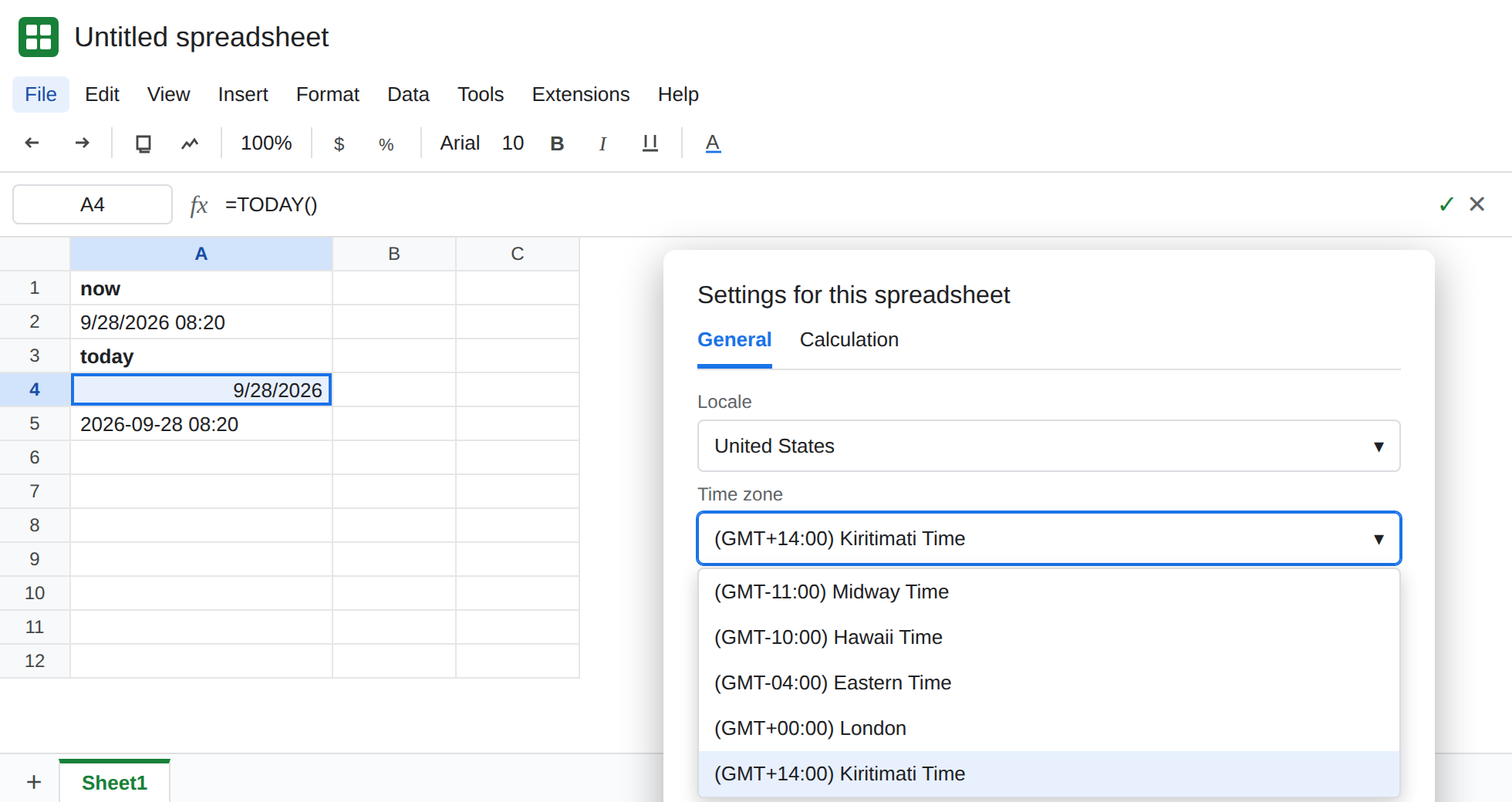
What the sheet thinks “now” is. In A1 type now. In A2 enter =NOW(). In A3 type today. In A4 enter =TODAY(). In A5 enter =TEXT(NOW(),"yyyy-mm-dd hh:mm"). Format A2 as a date-time if it displays as a serial. A2 and A4 are the control for the zone you wrote down. A5 is the same moment as text, so a format change cannot disguise the calendar date.
Move the sheet across the date line relative to you. File → Settings → Time zone. Pick a zone whose offset is many hours from the one you noted (a zone near the top of the list and a zone near the bottom are the usual pair). Save. Look at A4 and A5 again. The clock time moves with the zone. When the two zones are on different civil dates, A4’s day changes and your computer’s clock does not. Put the original zone back when you have seen the day move, if this file is one you use for real dates. If the two zones you tried happen to share a calendar date right now, pick a pair farther apart. The function is not stuck. The date line has not been crossed yet.
A stored date does not move. In C1 type fixed. In C2 enter =DATE(2024,3,4). C2 stays 4 March 2024 when you change the time zone. DATE builds a serial. TODAY asks the zone what day it is. Do not debug C2 as a time-zone bug.
Locale is the other control. File → Settings → Locale decides whether a typed 3/4/2024 is March or April. That is DATEVALUE day order. Changing Locale does not change what NOW() calls “today,” and changing Time zone does not rewrite a text date. See dates stored as text.
Leave A2 and A4 as formulas. Do not copy their displayed values into the article or into a second cell and call that the fix.
What is actually wrong
Section titled “What is actually wrong”- One spreadsheet has one time zone. Every
NOW()andTODAY()on every tab uses it. Two editors in two countries still share that setting. The person whose clock matches the setting thinks the sheet is right. The other person sees a day jump around local midnight. NOW()is a date-time.TODAY()is that zone’s date with no clock time. A filter that compares a midnight timestamp toTODAY()can miss the whole local evening. See FILTER date+time.- Both functions are volatile. They recalculate on edit and on open. They do not tick every second on screen. Staring at A2 will not make it track a broker clock or a second time zone.
- A display format (
Date time) changes how A2 looks. It does not change the zone.TEXTin A5 shows the zone’s wall time. If A5’s date is not the date on your laptop, the setting is the cause. GOOGLEFINANCEquotes are delayed in their own way and are notNOW(). See GOOGLEFINANCE delay.
Set the zone to the place the dates mean. File → Settings → Time zone. Choose the zone the business uses (the office that owns the “as of” date, not each reader’s laptop). A2 and A4 follow. Tell the other editors which zone you picked. Their clocks will not match TODAY() around midnight. That is the setting working.
Stamp a moment once. If a row must remember the instant someone typed it, do not leave =NOW() in the column. NOW() will move the next time the sheet calculates. Enter the value (Ctrl+Shift+V / Cmd+Shift+V after copying A2, or type the date). The formula belongs in a single “as of” cell that you want to keep live.
Do not add a second NOW to convert zones in your head. If you must show another zone, convert with an explicit hour offset you document in a label, and say which cell is the sheet zone. Two unlabeled NOW() calls cannot be two zones. There is only one spreadsheet time zone.
If TODAY() is not the date on your clock, open File → Settings → Time zone before you edit the formula. If a typed 3/4/2024 is the wrong month, that is Locale, not Time zone.