

WRAPCOLS returns #NUM! for a bad wrap count and #REF! when the next row is blocked
Updated
WRAPCOLS reads a list and writes it down the first result column, then starts the next column, every wrap_count cells. #NUM! means wrap_count is not a positive length. #REF! means a cell in that downward rectangle already has a value. The blocked cell is below the formula, not to its right. Clearing the right-hand cell, which fixes WRAPROWS, leaves WRAPCOLS broken.
The row-wise twin, including wrap count 0 on WRAPROWS, is WRAPROWS / WRAPCOLS. This page stays on the column axis so the spill direction is the lesson. Keep the Google Sheets UI in English.
Recreate it on a blank sheet
Section titled “Recreate it on a blank sheet”- Open a blank spreadsheet. In A1 type
codes. A2N12. A3E7. A4W4. A5S9. A6C2. Five dock codes in a column.
Wrap count 0. In C1 type zero. In C2 enter =WRAPCOLS(A2:A6,0). The cell shows #NUM!. The tooltip is Function WRAPCOLS parameter 2 value is 0. It should be greater than 0. Leave C2 broken. wrap_count is how many rows to fill before a new column. Zero rows is not a column.
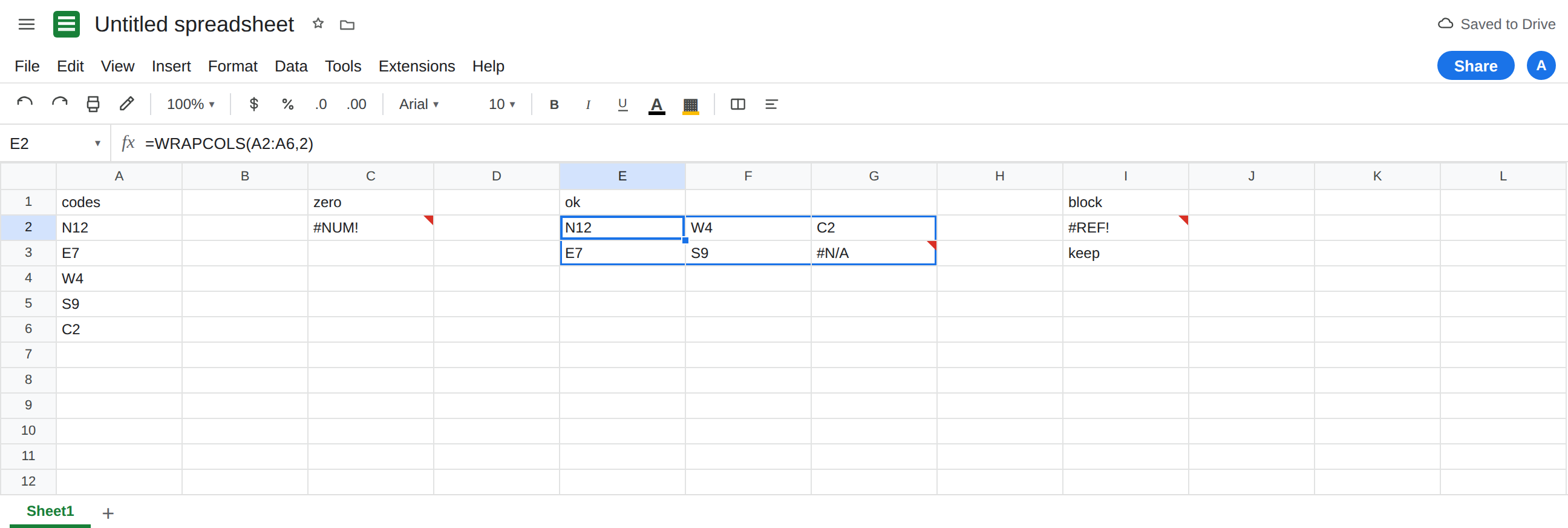
A wrap that works. In E1 type ok. Leave E2:G4 empty. In E2 enter =WRAPCOLS(A2:A6,2). The spill is two rows tall and three columns wide: E2 N12, E3 E7, F2 W4, F3 S9, G2 C2, G3 #N/A. Down, then across. The last slot is the default pad. That block is the control.
Blocked on the next row. In I1 type block. In I3 type keep. Leave I2 empty. In I2 enter =WRAPCOLS(A2:A6,2). Height 2 needs I2 and I3. I3 is occupied. I2 shows #REF!. The tooltip is Array result was not expanded because it would overwrite data in ‘I3’. Leave I2 broken.
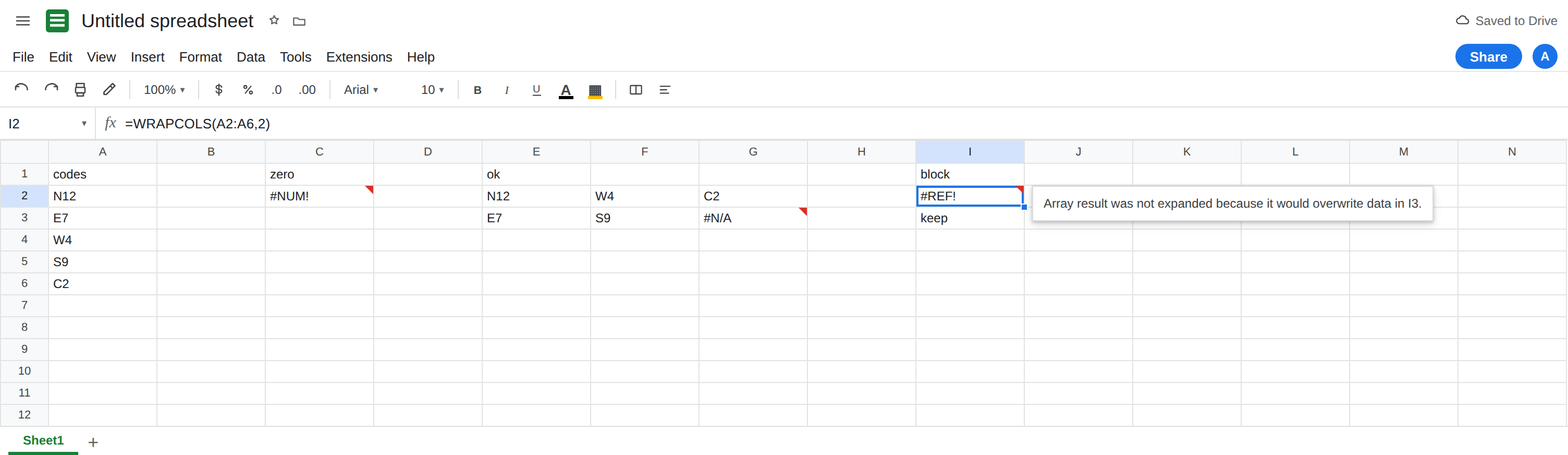
The right-hand cell is free, and it still fails. J2 is empty. People who just fixed a WRAPROWS spill delete the cell to the right and expect I2 to recover. I2 does not look at J2 first. It looks down to I3. Leave keep in I3.
A fraction that becomes 0. In C4 enter =WRAPCOLS(A2:A6,0.9). Non-integers truncate toward zero. 0.9 becomes 0. #NUM! again. Leave C4 broken. 2.9 becomes 2 and matches the E2 layout.
WRAPROWS is the other direction. In E6 enter =WRAPROWS(A2:A6,2). That spill goes right first: N12 / E7 on one row. A blocker for that formula sits in the next column. Do not copy its “clear the cell on the right” fix onto I2. The row page is WRAPROWS / WRAPCOLS.
Leave E2 as the working wrap. Leave C2 and I2 broken.
What is actually wrong
Section titled “What is actually wrong”wrap_countonWRAPCOLSis a height, not a width and not a row index.2means “two cells down, then a new column.”0and negatives are#NUM!before any spill is attempted. C2 never tried to write G3.- The result rectangle for five codes at height 2 is three columns by two rows, with
#N/Ain the unused corner unless you passpad_with. One occupied cell anywhere in that rectangle fails the entire formula. I3 is enough. - Default pad
#N/Ais not a lookup miss. See what #N/A means for the token only. G3 is the pad of a successful wrap. - A 2-D source is still read as a vector in row-major order, then wrapped down. If you need column order from a grid,
TOCOLfirst. See TOCOL / TOROW. CHOOSECOLSindex0is a different function. See CHOOSEROWS negative index.wrap_countis a chunk size.
This is not a deleted name inside the formula. I2 still says WRAPCOLS(A2:A6,2). See after you delete.
Leave C2, C4, and I2 broken.
Pass a positive height. Keep E2: =WRAPCOLS(A2:A6,2). For one column of five and no pad, =WRAPCOLS(A2:A6,5). For a single row of five, use WRAPROWS, not a height of 1 unless a row is what you want (WRAPCOLS with height 1 writes five columns of one cell).
Replace the pad when the corner should be blank. In E8 enter =WRAPCOLS(A2:A6,2,""). G3’s twin on this formula is empty instead of #N/A. Prefer pad_with over wrapping the whole call in IFNA. See IFERROR vs IFNA.
Clear the cell below, or move the formula. Delete I3, or start the wrap where two rows are empty. Do not delete J2 and refresh. Do not wrap I2 in IFERROR. You still have no grid.
If #NUM!, the height truncated to 0 or is negative. If #REF! and the formula says WRAPCOLS, look down by wrap_count - 1 rows, and also across for the later columns. If the corner is #N/A after a successful spill, that is pad, not a miss.