

SWITCH still returns #N/A when the last word is not a real default
Updated
SWITCH uses a default only when the arguments after the expression come in complete pairs plus one leftover. That leftover is the fallback. If you end on a pair, there is no default, even when the last value looks like a catch-all word such as other. A status that matches nothing is #N/A. The tooltip says it did not find the value. You can see other in the formula and still be in that tooltip, because other was paired with a case, not left over.
The short version — two cases and no third token at all — is SWITCH no match. This page is the argument you thought was the fallback. Keep the Google Sheets UI in English.
Recreate it on a blank sheet
Section titled “Recreate it on a blank sheet”- Open a blank spreadsheet. In A1 type
status. In A2 typepending.
A last word that is not a default. In D1 type paired. In D2 enter =SWITCH(A2,"packed","ok","shipped","done","held","other"). Count the arguments after A2: "packed", "ok", "shipped", "done", "held", "other". Six. Three pairs. "other" is what SWITCH returns when A2 is the word held. A2 is pending, which is none of those cases. D2 is #N/A. The tooltip is Did not find value ‘pending’ in SWITCH evaluation. Leave D2 broken.
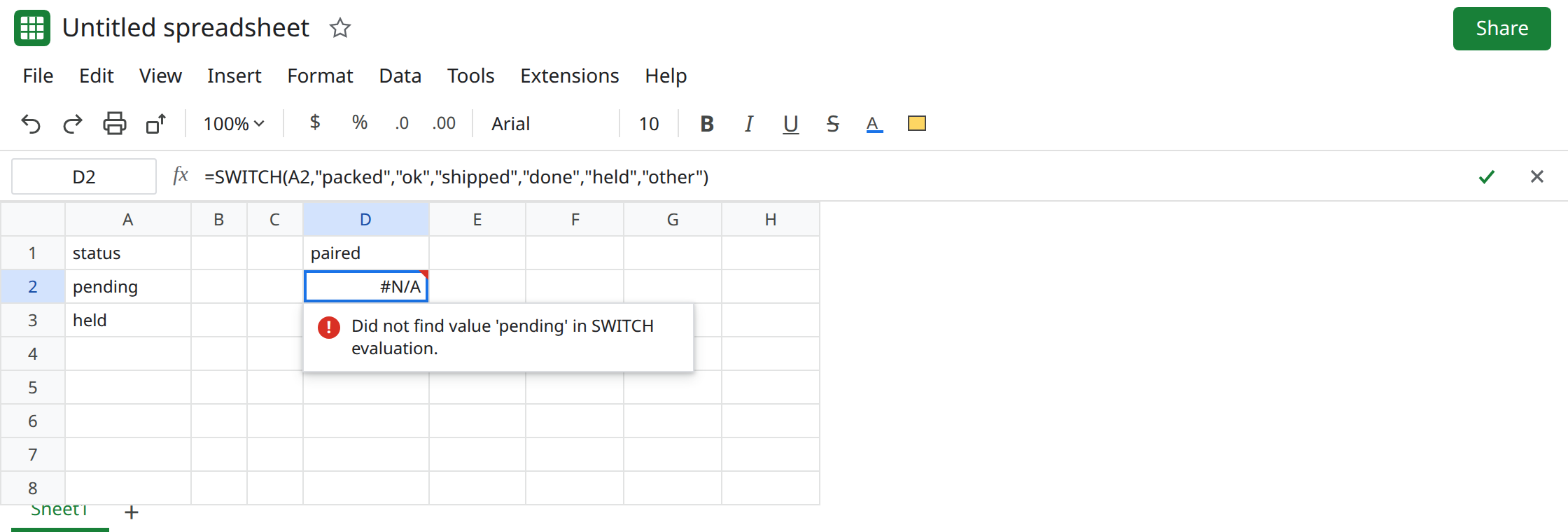
Prove other is a case value. In A3 type held. In D3 enter the same SWITCH as D2. D3 shows other. No triangle. The last token ran only because the case in front of it matched. pending still has nothing. Leave D3 as other so the pair is visible.
A real leftover. In D5 enter =SWITCH(A2,"packed","ok","shipped","done","other"). Five arguments after the expression. Two pairs, then other. D5 shows other while A2 is pending. That row is the control.
No extra token at all. In D7 enter =SWITCH(A2,"packed","ok","shipped","done"). Also #N/A for pending. There is no fake fallback to miscount. That shape is SWITCH no match. Leave D7 as the contrast.
Type mismatch still misses before the default matters. A numeric 1 against the case "1" is SWITCH types. D2’s cases and A2 are all text. The count is the bug.
What is actually wrong
Section titled “What is actually wrong”- Pairs are
(case, value). The default is whatever remains after those pairs, and only then. Six trailing arguments is three cases. Five is two cases and a default. Adding"held","other"to “document the fallback” consumesotheras the value forheld. - Putting the fallback in the middle does not reserve it.
SWITCHdoes not have a named default argument. Position is the whole feature. A leftover that is not last is just another case. IFSwill not accept this tail either. Pasting"other"ontoIFSis an odd argument count, not an else. The else forIFSis a finalTRUEpair. See IFS no default.- A blank A2 is another unmatched value. It needs the same leftover, or a case for
"". It does not becomeotherbecause the formula contains that word.
This is not a lookup miss in a table. See what #N/A means. D2 did not search a range.
Leave D2 as #N/A and D3 as the paired other.
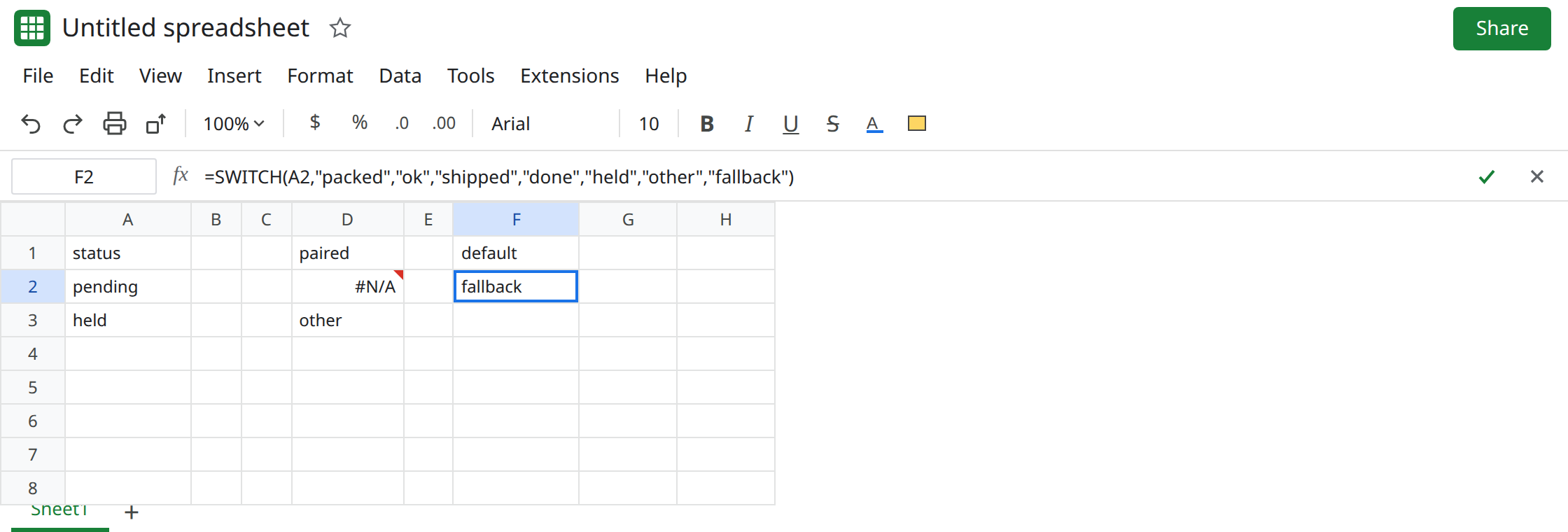
Add one unpaired argument at the end. In F2 enter =SWITCH(A2,"packed","ok","shipped","done","held","other","fallback"). Seven arguments after A2. pending shows fallback. Change A2 to held. F2 shows other, the value for that case, not fallback. Change A2 to packed. F2 shows ok. Put pending back when you are done looking.
Or drop the fake pair. If held is not a status you return other for, use D5’s formula: the last argument is the default and there is no "held" case. Do not keep both shapes and wonder which other is the else.
Do not wrap D2 in IFNA. pending would look handled and held would still be the only path to the word other. See IFERROR vs IFNA.
If SWITCH is #N/A and the formula already ends in a fallback word, count the arguments after the expression. An even count means that word is a case value. One more argument is the default. If the count is even and you never added a last word, you are on the SWITCH no-match page.