

Fix HSTACK #N/A in Google Sheets when the arrays have different heights
Updated
HSTACK places arrays side by side and uses the tallest height. Every shorter array is padded with #N/A in the missing rows. The formula does not stop at the short list, and it does not error the whole cell. The #N/A sits in the spill, usually with no “did not find value” tooltip, because nothing was looked up. A range of the same height with an empty cell pads nothing: that cell is blank. VSTACK’s width problem is a different page.
This page is HSTACK row counts. It is not the combined primer HSTACK / VSTACK pad as the only place the pad is explained, and it is not VSTACK cols. It is not FILTER range size. Keep the Google Sheets UI in English.
Recreate it on a blank sheet
Section titled “Recreate it on a blank sheet”- Open a blank spreadsheet. In A1 type
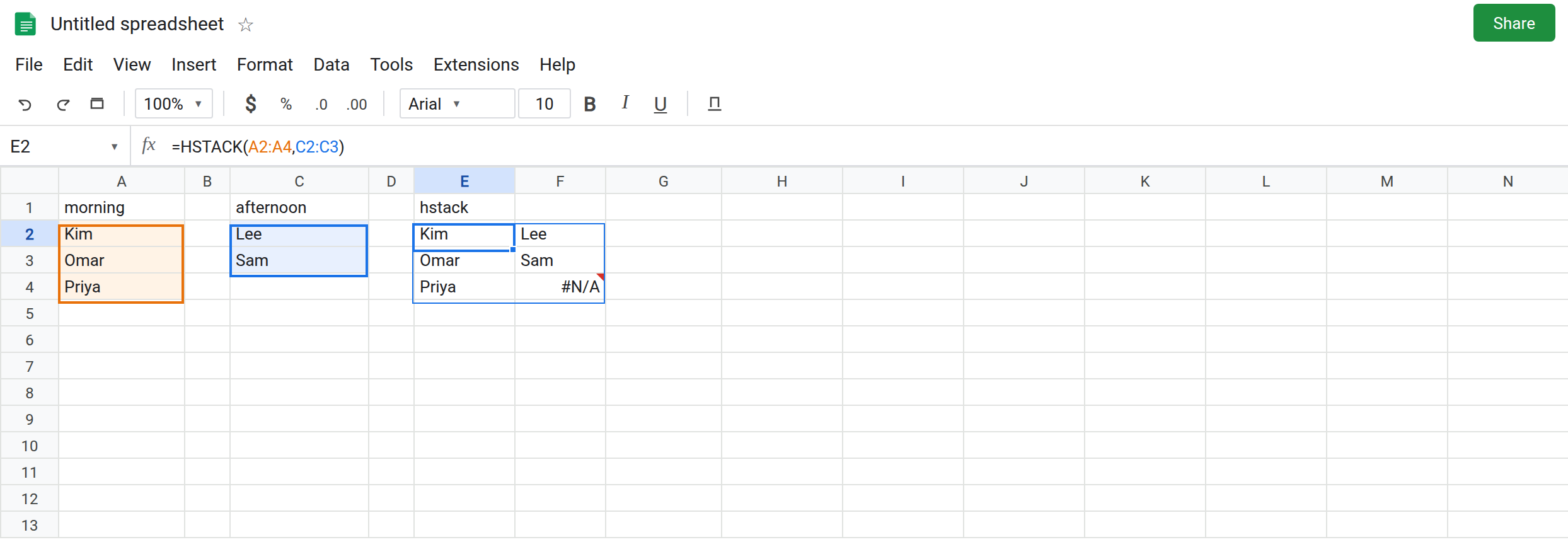
morning. A2Kim. A3Omar. A4Priya. In C1 typeafternoon. C2Lee. C3Sam. Leave C4 empty. Three morning names. Two afternoon names. The empty C4 is not part of the short range you are about to pass.
Uneven HSTACK. In E1 type hstack. Leave E2:F4 empty. In E2 enter =HSTACK(A2:A4,C2:C3). The spill is three rows and two columns. E2:E4 is Kim, Omar, Priya. F2 is Lee. F3 is Sam. F4 is #N/A. There is no third afternoon name. Leave E2 as that spill.
Same height, blank cell. In H1 type blank. In H2 enter =HSTACK(A2:A4,C2:C4). C4 is empty, but the range is three rows. The spill’s third afternoon cell is blank, not #N/A. No error triangle. That block is the control for “the slot exists and is empty.”
Three arrays, one short. In A6 type dock. A7 West. Leave A8 and A9 empty. In E6 enter =HSTACK(A2:A4,C2:C3,A7). Morning is three tall. Afternoon is two. Dock is one. The result is three rows. The afternoon column’s last row is #N/A. The dock column’s last two rows are #N/A. Each array is padded on its own to the max height. Leave E6 as that spill.
FILTER does not pad. In J1 type filter. In J2 enter =FILTER(A2:A4,C2:C3<>""). Morning is three rows. The condition is two. The cell shows #N/A or #VALUE!. The tooltip says FILTER has mismatched range sizes. The whole cell fails. It does not spill Kim next to a pad. Leave J2 broken. That page is FILTER range size.
A header row of a different length. In E10 enter =HSTACK(A1:A4,C1:C3) if E10:F13 is empty. Four morning rows including the header, three afternoon rows. The last afternoon cell is #N/A under the names. Including a header on only one side is the same height bug as E2. Leave it if you built it.
Leave E2 and E6 showing #N/A pads. Leave H2 blank in the third afternoon cell. Leave J2 as the FILTER error.
What is actually wrong
Section titled “What is actually wrong”HSTACKaligns on the first row and extends to the longest array. Missing positions are#N/A, the same token as a failed lookup, without a lookup. F4.- Equal heights do not invent
#N/Afor an empty source cell. H2. If you see#N/A, the ranges you passed are different lengths, or a source cell was already#N/A. - Every argument is padded to the same height. A one-cell third argument does not stay one cell. E6.
- Open ranges (
A2:A) are huge.HSTACK(A2:A,C2:C3)pads the short side for the rest of the column. Limit both sides (A2:A4and a matching afternoon range) or you will fill the sheet with#N/A. - A blocked spill is
#REF!before any pad is visible. If E2 says the array result was not expanded, F4 or another landing cell is occupied. Clear it. You may then see the pad#N/A, which is this page. See SEQUENCE spill for the overwrite tooltip.
This is not VSTACK adding columns of #N/A to the right of a narrow block. See VSTACK cols.
This is not VLOOKUP missing Priya. See what #N/A means. No key was searched.
Leave E2 and J2 broken-looking. Leave H2 as the blank control.
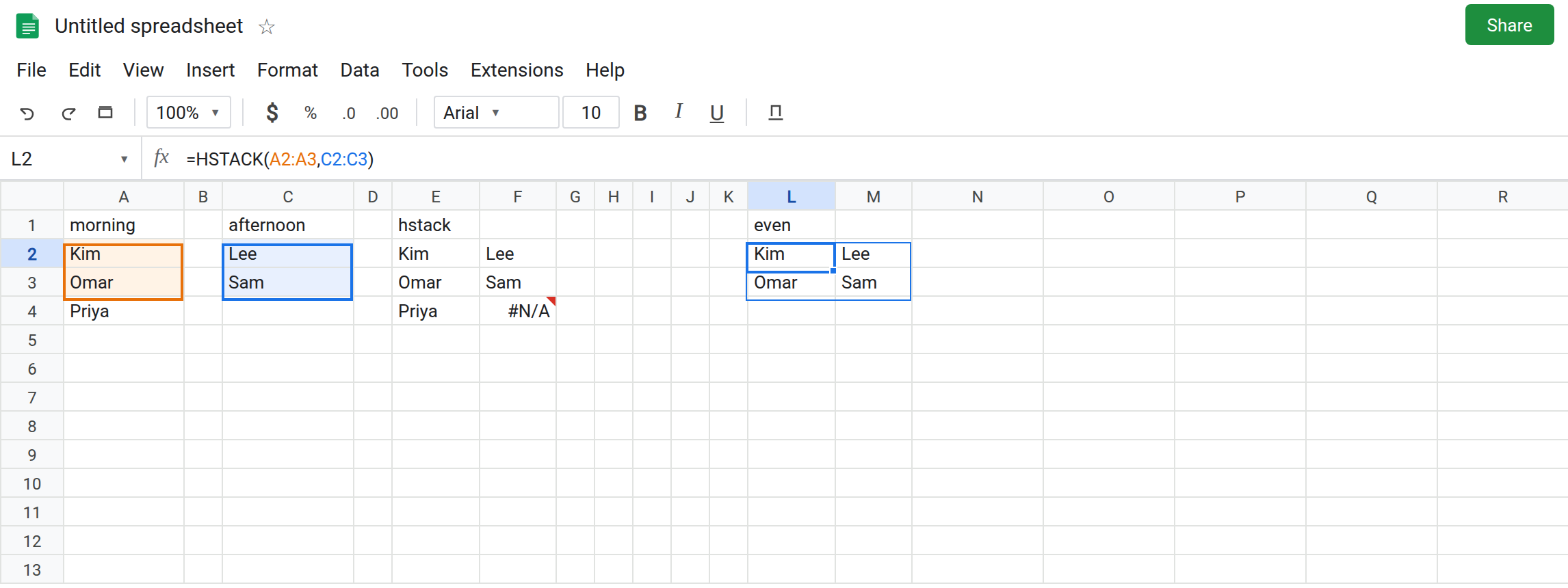
Pass the same number of rows. In L1 type even. In L2 enter =HSTACK(A2:A3,C2:C3). Two and two. Kim/Lee, Omar/Sam. No #N/A. Or keep three rows and include C4, which is H2: the third afternoon cell is honestly blank.
Blank the pad when the dashboard should not say #N/A. In L6 enter =IFNA(HSTACK(A2:A4,C2:C3),""). The corner that was #N/A becomes blank. IFNA does not hide a #REF! overwrite. IFERROR would. See IFERROR vs IFNA. Use IFNA only when the pad is an acceptable empty slot. If the missing afternoon name is a data bug, keep E2 visible and add the name.
Cut the tall side to the overlap. CHOOSEROWS(A2:A4,1,2) stacked with C2:C3 is the same two-row window as L2. See CHOOSEROWS negative if an index in that list is 0.
If #N/A sits at the bottom of the shorter HSTACK column, count rows. Match them, or IFNA the pad. If the tooltip says FILTER and mismatched range sizes, you are on the FILTER page.