

Fix INDEX / MATCH two-criteria #N/A in Google Sheets
Updated
MATCH finds one key in one column. Two conditions (region and sku) need a single position that satisfies both. MATCH(101,sku,0) returns the first 101, even when you meant West. #N/A means that pair never occurs, or you still matched on one column. The reliable sheet pattern is INDEX(result, MATCH(1, (region=East)*(sku=101), 0)) as an array, or FILTER.
This page is two-criteria INDEX/MATCH. It is not two-way lookup (row header and column header into a grid). It is not MATCH no match as a one-column primer. It is not XLOOKUP #N/A. Keep the Google Sheets UI in English.
Recreate it on a blank sheet
Section titled “Recreate it on a blank sheet”- Open a blank spreadsheet. In A1 type
region, B1sku, C1bin. A2East. B2101. C2A. A3West. B3101. C3Z. A4East. B4102. C4B. Sku101exists twice, different bins.
Single MATCH (wrong grain). In E1 type sku_only. In E2 enter =INDEX(C2:C4,MATCH(101,B2:B4,0)). The cell shows A. You wanted West 101 → Z. MATCH stopped at the first 101. Leave E2 as that wrong bin (not #N/A). It is the usual silent failure.
Two MATCH stacked (still wrong). In E4 enter =INDEX(C2:C4,MATCH("West",A2:A4,0),MATCH(101,B2:B4,0)). Extra MATCH as a column index into C2:C4 (one column) → #REF! or a nonsense cell. Leave E4 broken. That shape is for two-way lookup, a 2-D grid, not a fact table.
Boolean MATCH (works). In G1 type pair. In G2 enter =INDEX(C2:C4,MATCH(1,(A2:A4="West")*(B2:B4=101),0)). Confirm with Ctrl+Shift+Enter only on a legacy array sheet; in modern Sheets it usually spills as a scalar Z. If G2 is #N/A, wrap the products in ARRAYFORMULA: =INDEX(C2:C4,MATCH(1,ARRAYFORMULA((A2:A4="West")*(B2:B4=101)),0)). That cell is the control: West + 101 = Z.
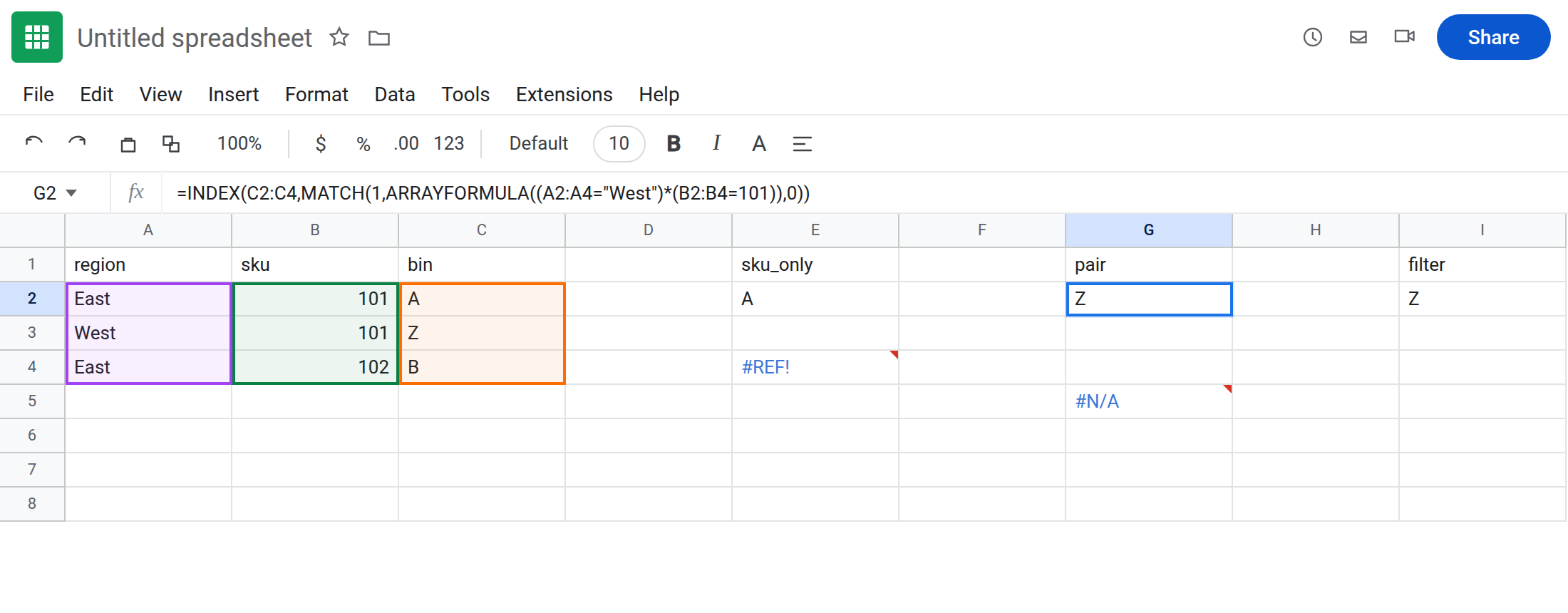
Pair that does not exist. In G5 enter =INDEX(C2:C4,MATCH(1,ARRAYFORMULA((A2:A4="West")*(B2:B4=102)),0)). West has no 102. #N/A. Leave G5 broken. True miss.
FILTER equivalent. In I2 enter =FILTER(C2:C4,(A2:A4="West")*(B2:B4=101)). Z. Zero rows would be FILTER no match.
Leave E2 as the first-sku trap. Leave G5 as pair #N/A. Leave G2 as Z.
What is actually wrong
Section titled “What is actually wrong”- One
MATCHon sku cannot see region. Duplicate skus make E2 look “successful” and still wrong.#N/Ais not the only failure mode; wrong bin is worse. (region="West")*(sku=101)makes a1/0array.MATCH(1, …, 0)finds the first row where both are true. That is one position forINDEX.- Two
MATCHes as row and column belong on a matrix (stores × months). On a single bin column, the secondMATCHis anINDEXcolumn past 1 →#REF!. See INDEX past range and two-way lookup. - A genuine missing pair is
#N/A(G5). Confirm by adding West/102and watching G5 become a bin, then undo.
This is not XLOOKUP of one key. XLOOKUP can take one search column. For two criteria, FILTER or the boolean MATCH (or concatenated keys) still apply. See XLOOKUP #N/A.
This is not number vs text on a single sku. See VLOOKUP no match. Both 101s are numbers.
Leave E2, E4, and G5 as the traps.
Boolean INDEX/MATCH. Keep G2 (with ARRAYFORMULA if needed). Concatenated-key alternative: helper =A2&"|"&B2 copied down, then =INDEX(C2:C4,MATCH("West|101",helpers,0)).
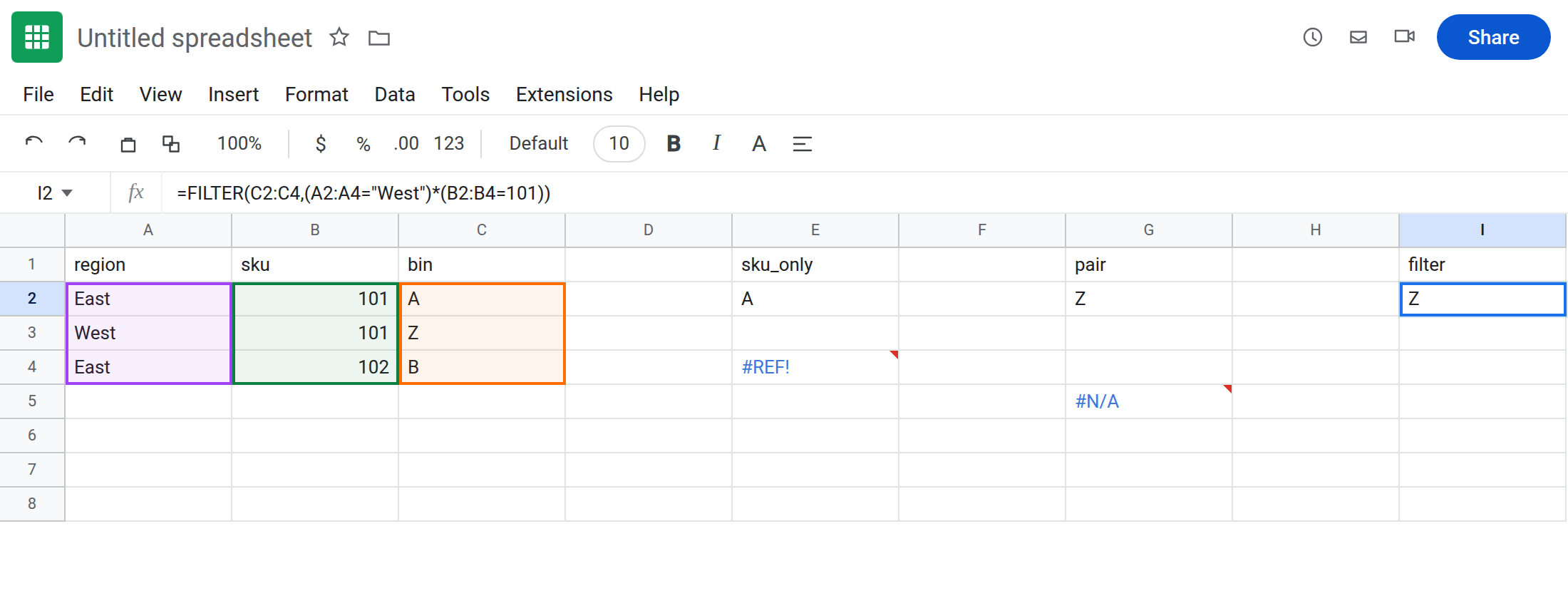
FILTER when you might have two matching rows: =FILTER(C2:C4,(A2:A4="West")*(B2:B4=101)). INDEX/MATCH returns only the first 1.
True miss: put the pair on the table, or =IFNA(G5-pattern,"none") after you have confirmed West/102 should be optional. See IFERROR vs IFNA. Do not IFNA E2 — it is not #N/A.
If the bin is the first duplicate, you matched one column. If #N/A and you can see the pair, check ARRAYFORMULA and exact region spelling. If #REF! with two MATCHes, you used the two-way shape on a list.
One MATCH vs boolean pair vs two-way grid
Section titled “One MATCH vs boolean pair vs two-way grid”Sku-only MATCH → first 101 (E2). Silent.
(region)*(sku) MATCH → one fact-table row (G2). This page.
INDEX(grid, MATCH(row_hdr), MATCH(col_hdr)) → two-way lookup. Headers on both axes, values in the body. Not a region column next to a sku column.