

FIXED writes a thousands separator VALUE cannot parse on a space-separator locale
Updated
FIXED(number, [places], [suppress_separator]) rounds and returns text. The help samples show a comma, as in 1,000. On a locale that groups thousands with a space (France is the one this page uses) and uses a comma as the decimal mark, that US-shaped comma is not a thousands separator VALUE will accept. VALUE of the FIXED string is #VALUE!. The formula FIXED itself did not fail. The next function failed to read its text. If FIXED on your file already used a space and a decimal comma, VALUE can still fail because the space is a non-breaking space, character 160, not a character the parser treats as grouping. Read the formula bar of the FIXED cell before you decide which of those two strings you have.
Sheet Error is an independent formula-error library, not a Google product. FIXED returning text on a United States sheet, where VALUE of 1,234.50 succeeds and SUM still ignores the text, is FIXED is text. The decimal mark inside a number is decimal comma locale. VALUE of a foreign shape is VALUE() locale. Keep the Google Sheets UI in English.
Recreate it on a blank sheet
Section titled “Recreate it on a blank sheet”- Open a blank spreadsheet. File → Settings → Locale → France. You may turn on Always use English function names. In A1 type
n. In A2 type1234,5using the decimal comma, so the cell is the number one thousand two hundred thirty-four and a half.ISNUMBER(A2)is TRUE. If the comma became an argument separator and the cell is#ERROR!, you typed it inside a formula. Type the number in the cell, not after an equals sign, or enter=1234,5.
FIXED, then VALUE. In C1 type fixed. In C2 enter =FIXED(A2;2) with a semicolon if this locale needs semicolons between arguments. See locale semicolons if the comma form is a parse error before FIXED even runs. C2 is text. Read it. In D2 enter =VALUE(C2). In E2 enter =ISNUMBER(D2).
You are looking for one of these, and the formula bar on C2 decides:
- C2’s text contains a comma and a period, like
1,234.50. D2 is#VALUE!. France does not read that comma as thousands and that period as the decimal mark. Leave D2 broken. This is the comma the title is about. - C2’s text uses a space or a non-breaking space and a decimal comma, like
1 234,50. If D2 is already a number,VALUEaccepted the locale’s ownFIXEDoutput. In F2 enter=CODE(MID(C2,2,1)). If the separator’s code is160, and a laterVALUEfails after you copy the text somewhere else, the character is not a normal space. If D2 is#VALUE!even with a visible space, leave D2 broken. Same class of bug: the separatorFIXEDinserted is not oneVALUEwill parse here.
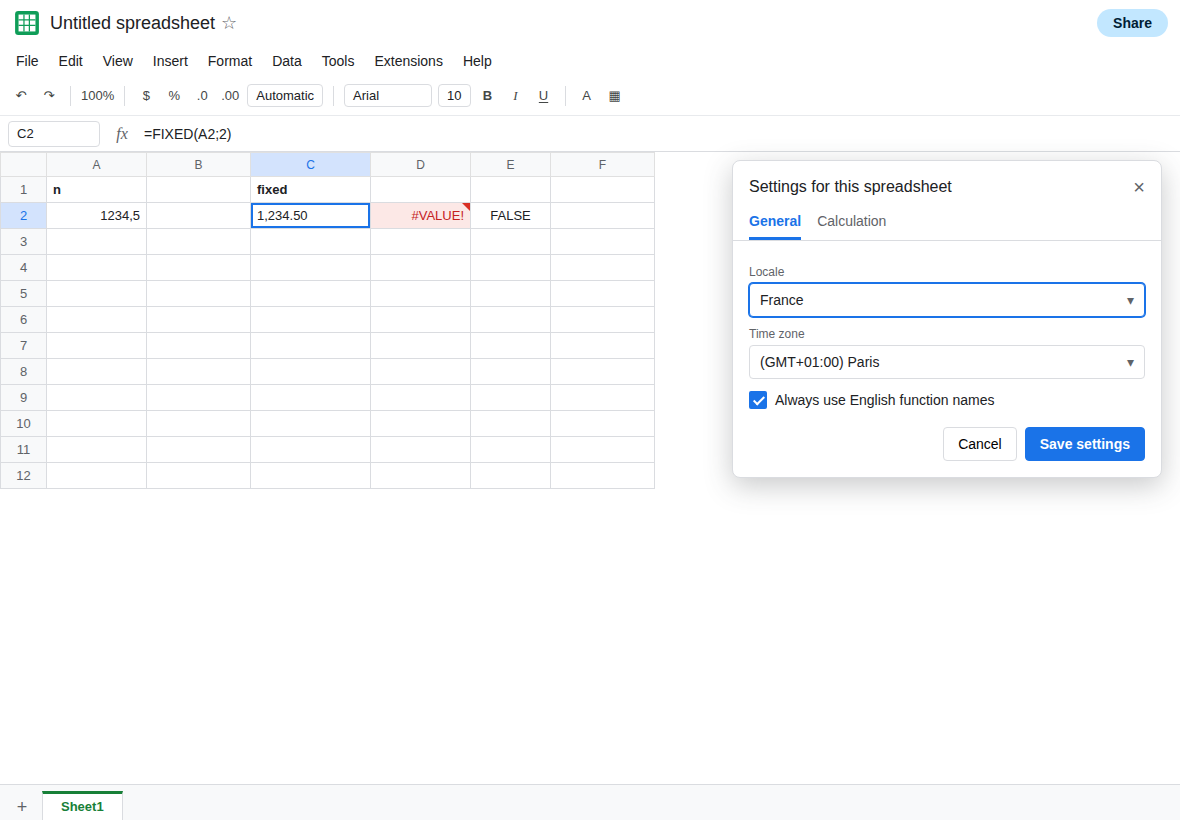
United States is not this failure. If you switch Locale to United States, VALUE of 1,234.50 often becomes 1234.5. That success is FIXED is text. Switch back to France so D2 is the broken parse this page is about, if the comma shape was what C2 showed. Do not leave the file on United States and call France fixed.
suppress_separator removes grouping and can leave the wrong decimal mark. In C4 enter =FIXED(A2;2;TRUE) (or 1 for the third argument, which also suppresses). C4 has no thousands separator. It may still use a period or a comma as the decimal mark. In D4 enter =VALUE(C4). If D4 is #VALUE!, the remaining mark is not this locale’s decimal mark. Leave D4 broken if it errors. If D4 is a number, the third argument was enough on this file. Write down which one you saw. The third argument never changes the return type. ISTEXT(C4) is TRUE either way.
What is actually wrong
Section titled “What is actually wrong”FIXEDbuilds a string. Grouping characters in that string are characters, not number format.VALUEparses text with this locale. A comma-as-thousands, period-as-decimal string is a United States number. France uses a space (often non-breaking) and a decimal comma. The parse fails. D2.- Help text that shows
1,000is a sample from a comma-grouping locale. Pasting that sample is help docs and commas. The stringFIXEDreturns can be that same shape even when the file is France. Believe C2’s formula bar. - Character 160 is not a normal space.
SUBSTITUTEof" "does not remove it.CHAR(160)does. See CLEAN vs NBSP for the same character in imported text. SUMof C2 is0because it is text, even beforeVALUEfails. That quiet zero is FIXED is text. This page is the#VALUE!onVALUE, which US readers of that page do not hit.- Number format on C2 does not make the string numeric. The formula bar still shows
FIXED.
Leave D2 as #VALUE! if that is what France did with C2.
Do the math with ROUND, which returns a number. In H2 enter =ROUND(A2;2). H2 is a number. ISNUMBER(H2) is TRUE. Format H2 with the locale’s number format if you want grouping on screen. SUM of H2 counts it. You do not need FIXED unless a label truly needs text.
If you already have the FIXED string, strip the separator and normalize the decimal mark, then VALUE. When C2 is 1,234.50 (comma thousands, dot decimal) on France, in H4 enter =VALUE(SUBSTITUTE(SUBSTITUTE(C2;",";"");".";",")). The thousands commas go away and the period becomes a decimal comma. H4 is the number. Use this only when you have looked at C2 and seen that US shape. The same substitutions destroy a string that was already 1 234,50.
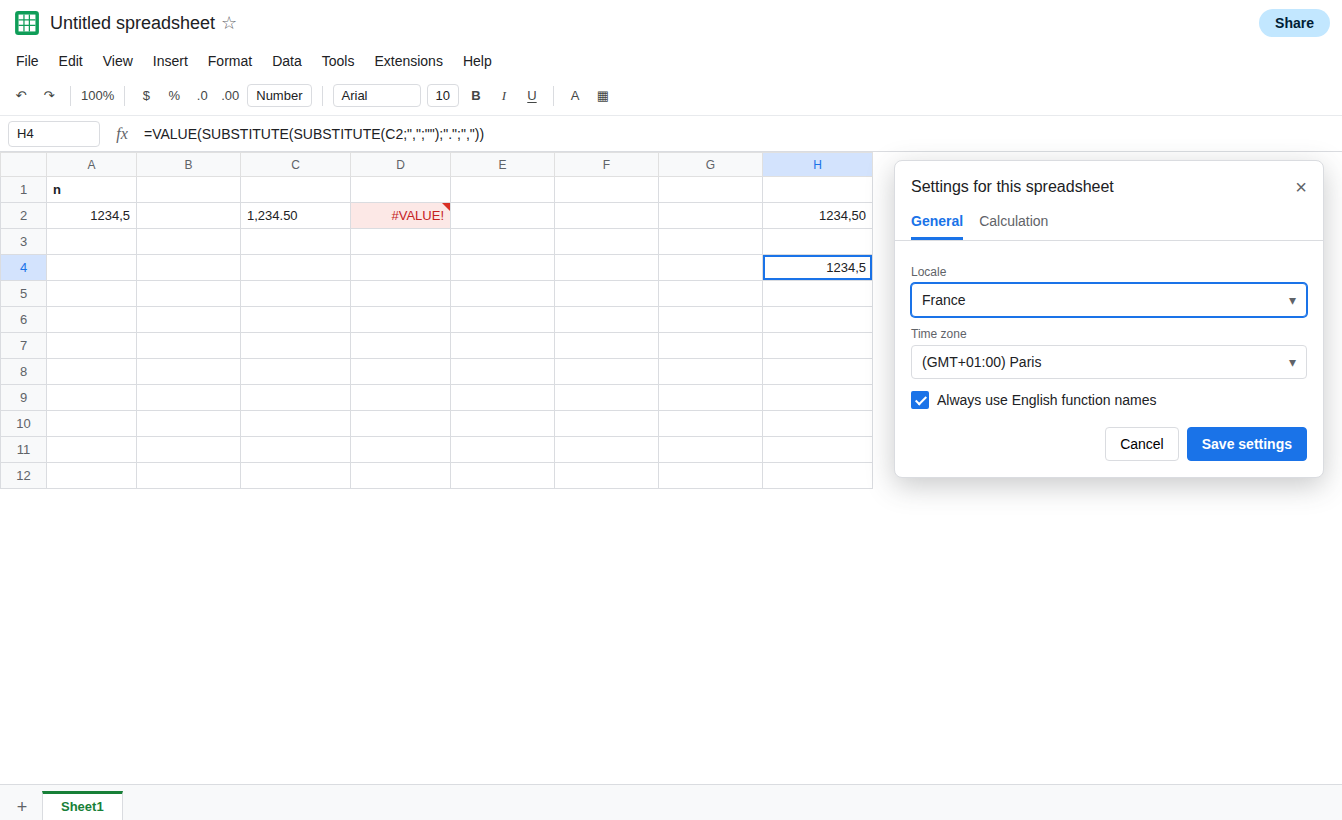
When the separator is character 160, =VALUE(SUBSTITUTE(C2;CHAR(160);"")) removes it. If the decimal mark is already a comma, that can be enough. If a period remains, substitute it too, after you read the string.
Do not wrap D2 in IFERROR. You would turn a bad parse into a blank and keep summing zeros. See IFERROR hides cause.
If VALUE of FIXED is #VALUE! and the string contains a comma or a non-breaking space this locale does not treat as grouping, the separator is the cause. If VALUE works and SUM of the FIXED cell is still 0, the type is text. See FIXED is text. If ISNUMBER is already TRUE, you called ROUND or a later VALUE, not FIXED alone.