

QUERY date literals must be date 'yyyy-mm-dd'
Updated
A QUERY date filter is the word date, a space, and a single-quoted yyyy-mm-dd value: where C > date '2024-01-01'. A bare 2024-01-01 does not parse. Double quotes around the date break the formula. Quotes without the word date compare text, not dates. Concatenating a date cell pastes a serial number.
The one-line version of the bare date sits on QUERY unable to parse. This page is the date literal only: keyword, quotes, serials, and locale display. A column that mixes real dates with the word TBD is QUERY mixed dates.
Recreate it on a blank sheet
Section titled “Recreate it on a blank sheet”- Open a blank spreadsheet. Locale United States, Google Sheets UI in English. In A1 type
name, C1shipped. A2Widget. In C2 enter=DATE(2024,1,15). A3Gadget. In C3 enter=DATE(2023,12,1). Format C2:C3 as a date if they show serials. They must stay real dates, not text.=ISNUMBER(C2)is TRUE.
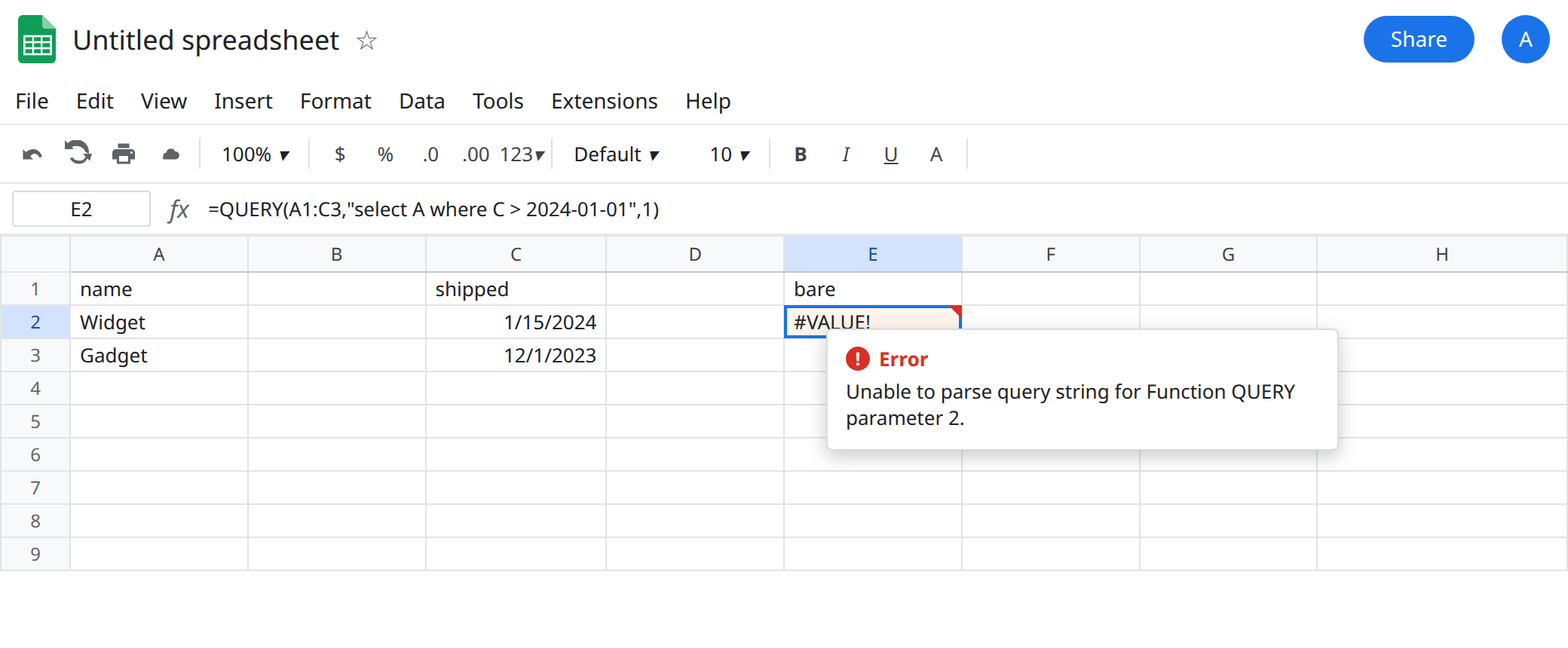
Bare date. In E1 type bare. In E2 enter =QUERY(A1:C3,"select A where C > 2024-01-01",1). The cell shows #VALUE!. The tooltip starts Unable to parse query string for Function QUERY parameter 2. 2024-01-01 is not a query literal. Leave E2 broken.
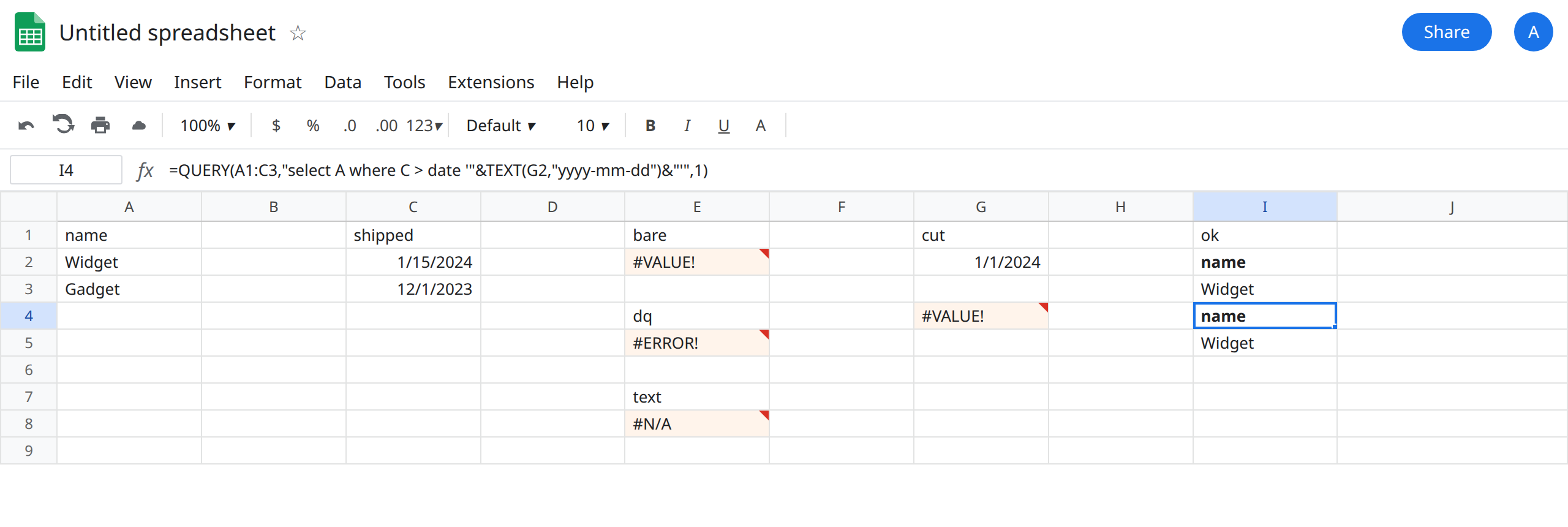
Double quotes. In E4 type dq. In E5 enter =QUERY(A1:C3,"select A where C > date "2024-01-01"",1). The cell shows #ERROR!. Tooltip: Formula parse error. The formula string ended at the quote before 2024. QUERY did not run. Leave E5 broken.
Text compare, no keyword. In E7 type text. In E8 enter =QUERY(A1:C3,"select A where C > '2024-01-01'",1). This formula parses. It compares the date column to the text 2024-01-01. It does not apply the date rule that E2 was reaching for. You get no data rows (often #N/A once the header handling leaves nothing) or a result that is not “Widget shipped after New Year.” Do not “fix” E2 by deleting the word you have not typed yet and keeping the quotes. Leave E8 on the sheet as the wrong success.
Serial concatenation. In G1 type cut. In G2 enter =DATE(2024,1,1). In G4 enter =QUERY(A1:C3,"select A where C > "&G2,1). G2’s value is pasted as a serial (around 45292, depending on the date system). That is not date '2024-01-01'. The cell is #VALUE! with the parse tooltip, or a comparison that is not the calendar cut you typed. Leave G4 broken.
The literal that works. In I1 type ok. In I2 enter =QUERY(A1:C3,"select A where C > date '2024-01-01'",1). The spill includes Widget and does not include Gadget. The word date, then a space, then '2024-01-01' in single quotes. The month and day are zero-padded. The order is year, month, day, even if the cell displays as 1/15/2024.
What is actually wrong
Section titled “What is actually wrong”- The query language does not read a spreadsheet date format.
1/15/2024,15/01/2024, andJanuary 15, 2024are not literals. The literal is alwaysyyyy-mm-ddinside single quotes, with the keyworddatein front. Locale changes how C2 looks. It does not change the literal. Argument separators are a different locale bug. See locale semicolons only when the formula itself is Formula parse error before you look at the date text. E5 is that formula error because of quotes, not because of Germany. - A missing keyword is a parse error (E2), same family as QUERY unable to parse. The tooltip’s detail points at the date token.
- Quotes without
dateare a text comparison (E8). Real date cells are not the text2024-01-01. The query can run and still drop both rows. That empty output is closer to QUERY no rows than to E2. Read the formula before you change the cutover date. - A date cell concatenated with
&becomes a serial. G4 injects digits.TEXT(G2,"yyyy-mm-dd")produces the characters the literal needs.TODAY()written inside the query string is not a function call. The query language does not run Sheets functions in that spot. Build the literal in the formula, then concatenate. - Mixed text and dates in column C (
TBDunder a date) makeyear(C)fail with a tooltip about a column that is not a Date. That is QUERY mixed dates. I2 assumes C2 and C3 are real dates.ISNUMBERis the check.
Leave E2, E5, E8, and G4 broken.
Fixed cutover. Keep I2: =QUERY(A1:C3,"select A where C > date '2024-01-01'",1).
Cutover from a cell. In I4 enter =QUERY(A1:C3,"select A where C > date '"&TEXT(G2,"yyyy-mm-dd")&"'",1). TEXT forces yyyy-mm-dd no matter how G2 is formatted. The single quotes around the concatenated text are required. This is the same quote shape as QUERY string quotes. A date has no apostrophe, so you do not double one. You still must not drop the quotes.
Do not wrap E2 in IFERROR. Do not switch the column to text to make E8 look true. Do not replace date '2024-01-01' with the serial you see in the formula bar.
If the tooltip says Unable to parse query string and the clause is a date, the keyword or the yyyy-mm-dd quotes are missing. If the tooltip says Formula parse error, the double quotes around the whole query are broken. If the query runs and the rows are wrong, you compared text or a serial, not a date literal.