

XLOOKUP search_mode 2 and -2 return the wrong price when the sort direction is wrong
Updated
XLOOKUP’s sixth argument, search_mode, has two binary settings. 2 binary-searches a column that is sorted ascending. -2 binary-searches a column that is sorted descending. Point either mode at an unsorted price list and the cell is #N/A, or it is a price that is not the row default XLOOKUP just found. A wrong price has no triangle. if_not_found does not replace it, because XLOOKUP believes it matched.
Last-to-first on duplicate skus is XLOOKUP last row. The short unsorted binary next to that last-match recreate is XLOOKUP search_mode. This page is the direction: 2 against -2. Keep the Google Sheets UI in English. Sheet Error is an independent formula-error library, not a Google product.
Recreate it on a blank sheet
Section titled “Recreate it on a blank sheet”- Open a blank spreadsheet. In A1 type
qty, B1price. A240, B28. A310, B33. A430, B46. A520, B55. The quantities are not sorted. The price for30is6.
Exact, the control. In D1 type key. D2 30. In F1 type exact. In F2 enter =XLOOKUP(D2,A2:A5,B2:B5). The cell shows 6. Default search walks first to last and match mode is exact. F2 is the price you can defend.
Binary ascending mode on that unsorted column. In F4 type mode2. In F5 enter =XLOOKUP(D2,A2:A5,B2:B5,,0,2). The fifth argument is 0 (exact match mode). The sixth is 2. F5 is #N/A or a price that is not 6. Do not write down a neighbor and call it the band. Sheets does not promise which wrong cell a broken binary returns. Leave F5 as whatever it shows when it is not 6.
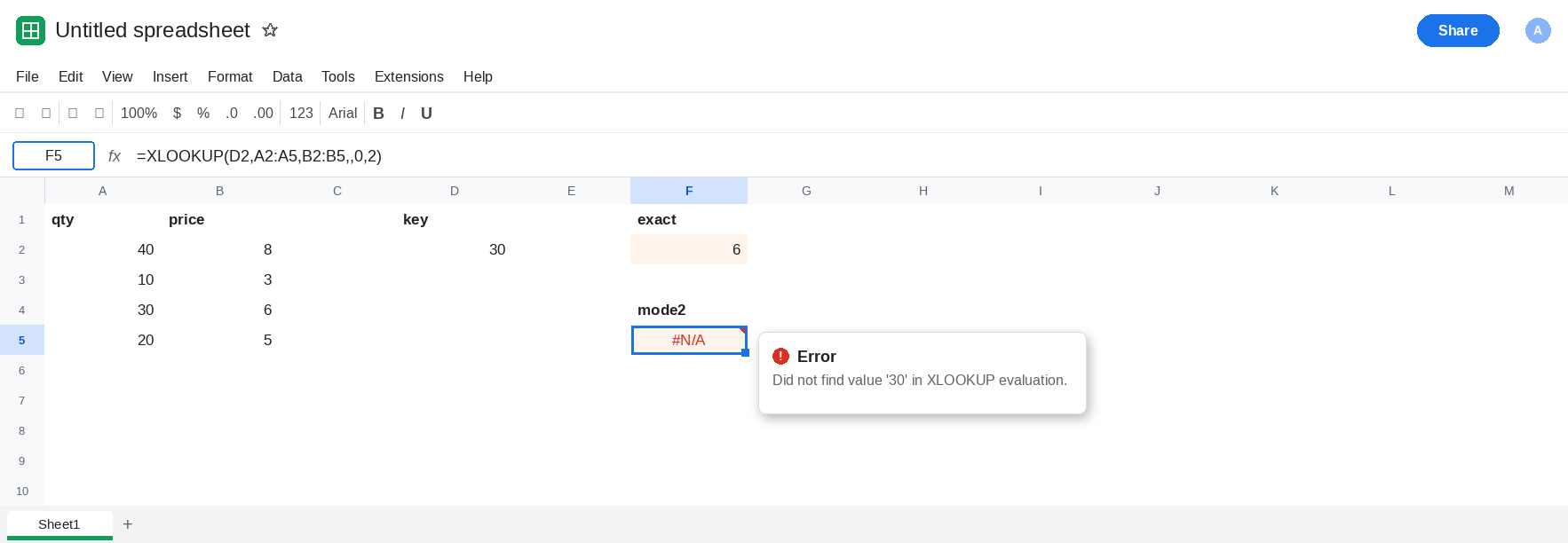
Mode -2 is not a fix for the same column. In F7 enter =XLOOKUP(D2,A2:A5,B2:B5,,0,-2). Descending binary on 40, 10, 30, 20 is the same class of miss. F7 is #N/A or not 6. Leave F7 next to F5.
Ascending, where mode 2 is legal. In H1 type qty, I1 price. H2 10, I2 3. H3 20, I3 5. H4 30, I4 6. H5 40, I5 8. In K2 enter =XLOOKUP(30,H2:H5,I2:I5,,0,2). K2 is 6. The column ascends, so mode 2 agrees with an exact lookup. In K3 enter =XLOOKUP(30,H2:H5,I2:I5,,0,-2). K3 is #N/A or not 6. -2 on an ascending list is the wrong direction. Leave K3 as that failure. K2 stays 6.
Descending, where mode -2 is legal. In H7 type qty, I7 price. H8 40, I8 8. H9 30, I9 6. H10 20, I10 5. H11 10, I11 3. In K8 enter =XLOOKUP(30,H8:H11,I8:I11,,0,-2). K8 is 6. In K9 enter =XLOOKUP(30,H8:H11,I8:I11,,0,2). K9 is #N/A or not 6. Mode 2 does not mean “binary, any sort.” Leave K9 broken or wrong. Leave K8 as 6.
Leave F5 and F7 off the exact price. Leave K2 and K8 as 6.
What is actually wrong
Section titled “What is actually wrong”2assumes ascending order and jumps through the column.-2assumes descending order and jumps the other way. The jump is valid only for that order. A2:A5 is neither order, so F5 and F7 are outside the contract.- A sorted column used with the other mode fails the same way. K3 is
-2on an ascending break table. K9 is2on a descending one. The price6is sitting in both tables. The mode is what misses it. if_not_foundruns when the search reports no match. A wrong price is a match as far as the function is concerned. Passing"none"as the fourth argument will not turn a neighbor’s8intonone. It only covers the#N/Abranch.- The fifth argument is
match_mode.-1there means exact or next smaller. The sixth argument-2is not that. See XLOOKUP match_mode. This recreate passes0so the only change is the search. - Walking duplicates from the bottom is search mode
-1, and it is linear. It is not a faster-2. See XLOOKUP last row.
XMATCH has the same pair of binary modes in its fourth argument. See XMATCH no match. This formula is XLOOKUP.
Leave F5, F7, K3, and K9 as the broken binary results.
Operational lists use the default walk. Keep F2. In F11 enter =XLOOKUP(D2,A2:A5,B2:B5) if you want the repair in a fresh cell. It shows 6. Omit search_mode, or pass 1.
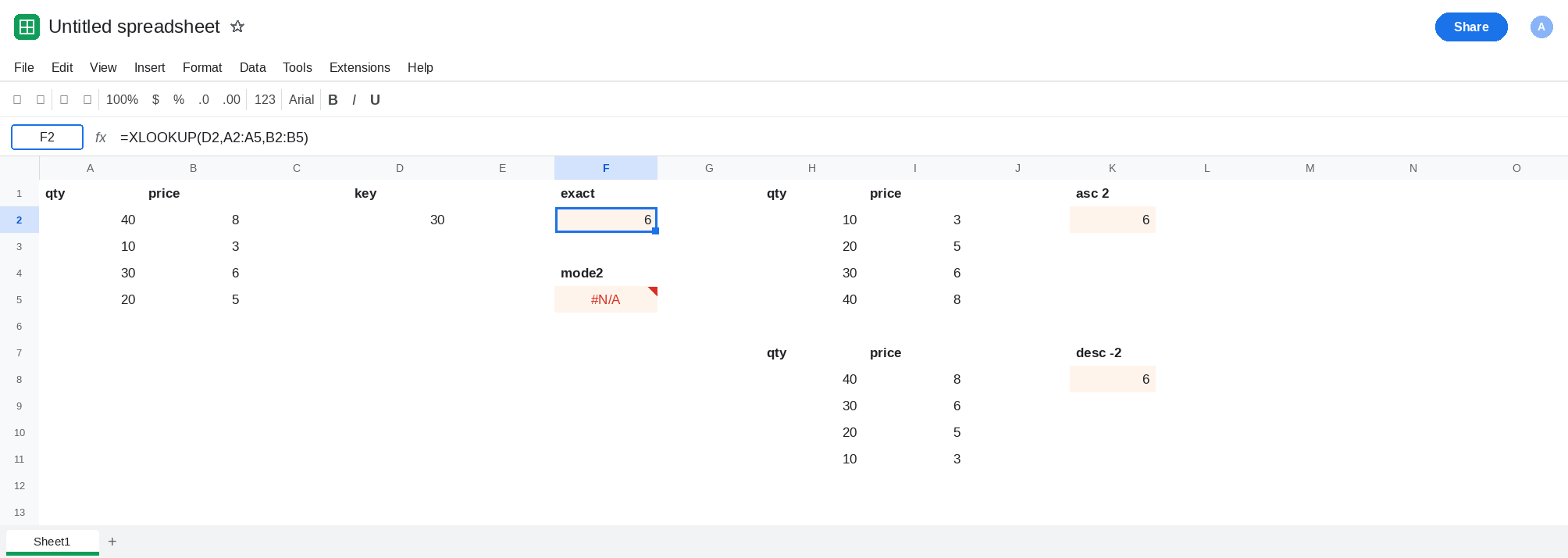
Binary only after the column is sorted for that mode. Keep K2 for ascending data and mode 2. Keep K8 for descending data and mode -2. Sort the range and leave it sorted. Do not point K2’s mode at A2:A5 to save a sort.
Do not wrap F5 in IFNA until you have decided a true miss should be blank. IFNA does nothing when F5 is a wrong price. See IFERROR vs IFNA.
If mode 2 and a default XLOOKUP return different prices for the same key, the lookup column is not ascending. If mode -2 disagrees with the default, the column is not descending. Use the default on a list you have not sorted.