

QUERY LABEL and SELECT aliases fail when Col1 is mixed with column A
Updated
QUERY renames a column with the label clause, not with SQL AS. The name you label has to be the same name you selected. On a sheet range that name is A or sum(B). On an array (IMPORTRANGE, {A1:C10}) that name is Col1 or sum(Col2). label A 'sku' against Col1, or select Col1 as sku, is a parse error or NO_COLUMN. The data can be fine.
select A on an import, with no label at all, is Col1 vs A. This page is the label and the fake alias, including a query that already says Col1 in select and still says A in label. Keep the Google Sheets UI in English.
Recreate it on a blank sheet
Section titled “Recreate it on a blank sheet”- Open a blank spreadsheet. In A1 type
sku, B1qty. A2101, B22. A3102, B35. A4101, B44. Headers in row 1. The third argument ofQUERYwill be1.
Label on a real sheet range. In D1 enter =QUERY(A1:B4,"select A, sum(B) group by A label A 'sku', sum(B) 'units'",1). The spill headers are sku and units, then the grouped rows. 101 totals 6. That block is the control. label names the expressions in select, and those expressions use column letters because A1:B4 is a sheet range.
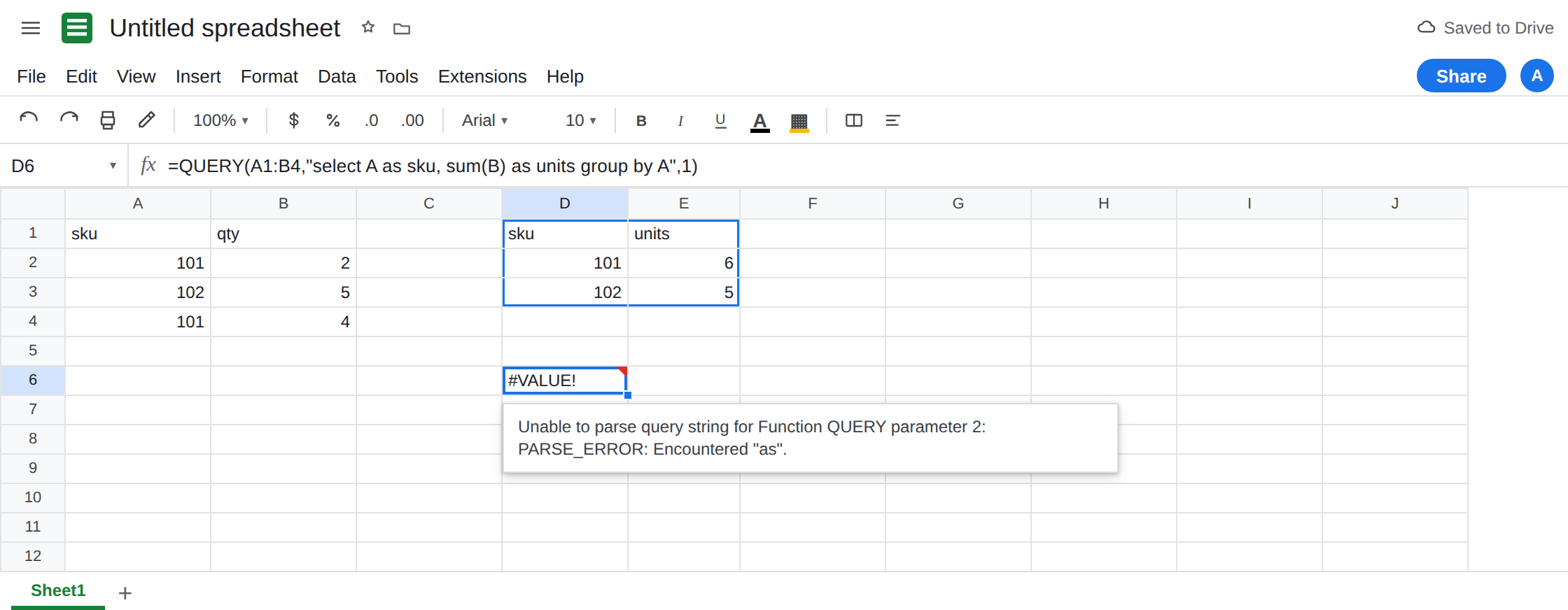
SQL AS is not a label. In D6 enter =QUERY(A1:B4,"select A as sku, sum(B) as units group by A",1). The cell shows #VALUE!. The tooltip is Unable to parse query string for Function QUERY parameter 2. as is not how this language aliases a column. Leave D6 broken.
Array columns are Col1. In F1 enter =QUERY({A1:B4},"select A label A 'sku'",1). The { } makes an array. The cell shows #VALUE! or #N/A, and the tooltip mentions NO_COLUMN: A or unable to parse. Leave F1 broken. In F4 enter =QUERY({A1:B4},"select Col1 label A 'sku'",1). select is correct and label still says A. That is still NO_COLUMN or a label that does not match the selected expression. Leave F4 broken.
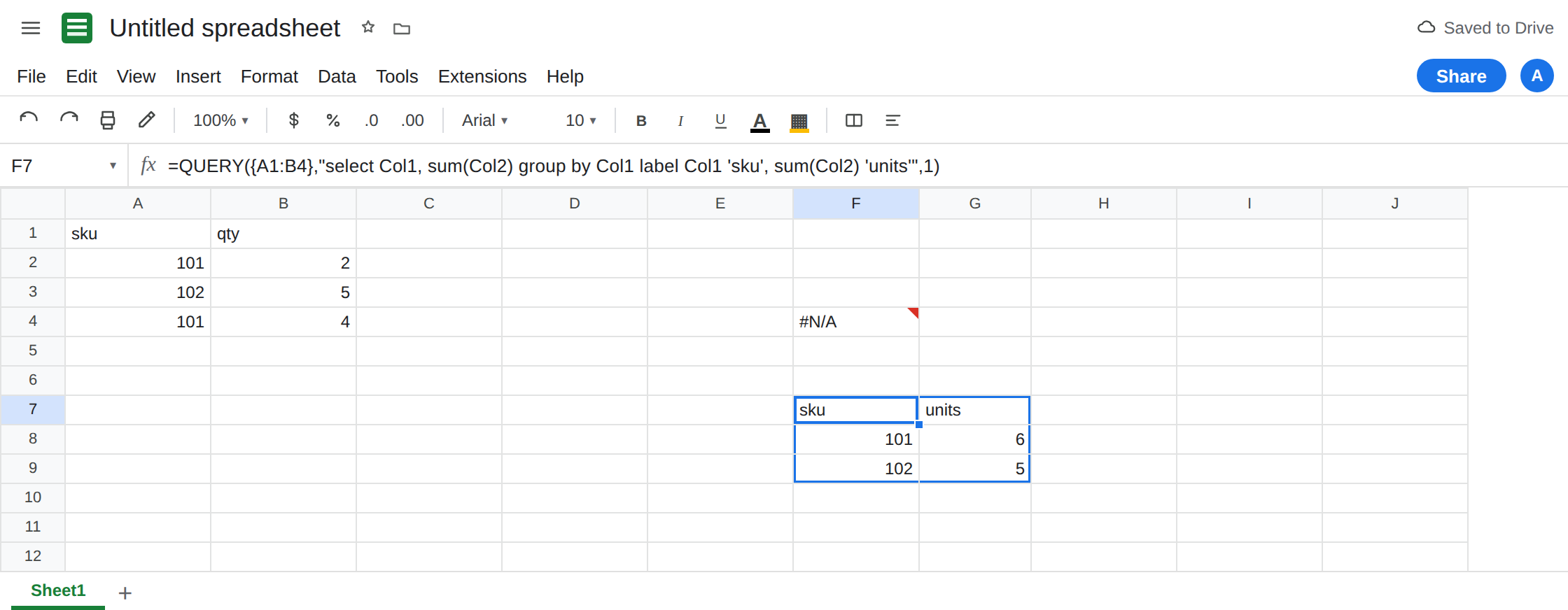
Label the Col name you selected. In F7 enter =QUERY({A1:B4},"select Col1, sum(Col2) group by Col1 label Col1 'sku', sum(Col2) 'units'",1). The spill matches D1’s headers and totals. Col1 is the sku column of the array even though it was column A on the sheet. This cell is the array control.
A label that does not match the aggregate. In H1 enter =QUERY(A1:B4,"select A, sum(B) group by A label sum(B) 'units'",1). This one works: sum(B) is exactly the selected expression. In H6 enter =QUERY(A1:B4,"select A, sum(B) group by A label B 'units'",1). B was not selected. sum(B) was. Leave H6 as the broken label. Copy the select expression into the label clause unchanged.
If { is #ERROR! Formula parse error, the array separator for your locale is not a comma. See array literal locale. That parse error is not NO_COLUMN.
Leave D6, F1, and F4 broken. Leave D1 and F7 as the labeled spills.
What is actually wrong
Section titled “What is actually wrong”- There is no
ASin this query language. Renames go inlabel, aftergroup by/pivot/order by, and each label isexpression 'text'orexpression "text"with a space between the expression and the quoted header. D6 put the rename inselect. The parser stops. - Sheet ranges use letters. Arrays use
Col1,Col2, counting from the left of the array.IMPORTRANGEis an array.{A1:B4}is an array. A query that was written forA1:B4cannot be pasted around an array by changing onlyselect Atoselect Col1whilelabel Astays. F4 is that half-edit. - The label expression must match the select expression.
sum(B)andBare not the same token.sum(Col2)andCol2are not the same token. Copy them. NO_COLUMN: Aon an array is the same family as Col1 vs A and QUERY parse string. This page is the case whereselectis alreadyCol1and the label (or anasalias) putsAback.- Headers in the output are text. They do not create a named range called
sku. The next formula should read the spill, not the label string, unless you meant a header.
This is not QUERY with no rows. See QUERY no matching rows. D1 returns rows. D6 never ran the aggregation.
Leave D6 and F4 broken.
Sheet range: letters in both clauses. Keep D1. Add another rename by appending , A 'item' only if A is in the select. Do not write as.
Array: Col in both clauses. Keep F7: label Col1 'sku', sum(Col2) 'units'. When the source is IMPORTRANGE, use the same Col names you selected. See Col1 vs A for the import that has no label yet.
Do not wrap D6 in IFERROR. You would hide a syntax error and look like an empty report. See IFERROR vs IFNA.
If the tooltip says unable to parse and the query contains as, delete as and use label. If the tooltip says NO_COLUMN: A and the data is inside { } or IMPORTRANGE, change every A / B in select and label to Col1 / Col2. One clause is not enough.