

A checkbox is boolean TRUE; a list item TRUE is text
Updated
A checkbox from Insert → Checkbox puts a boolean in the cell. Checked is TRUE. Unchecked is FALSE. ISLOGICAL is TRUE. A dropdown or a list of items whose item is the word TRUE stores text. The cell can display the same four letters. =A2=TRUE is FALSE, because text is not the boolean. =A2="TRUE" is TRUE. Counts, FILTER, and SUMPRODUCT that test the boolean miss the word, or the other way around.
TRUE and FALSE as Sheets values, versus text, is the same family as SWITCH types. A dropdown whose source range moved is dropdown range. Keep the Google Sheets UI in English. Sheet Error is an independent formula-error library, not a Google product.
Recreate it on a blank sheet
Section titled “Recreate it on a blank sheet”- Open a blank spreadsheet. In A1 type
box, B1word.
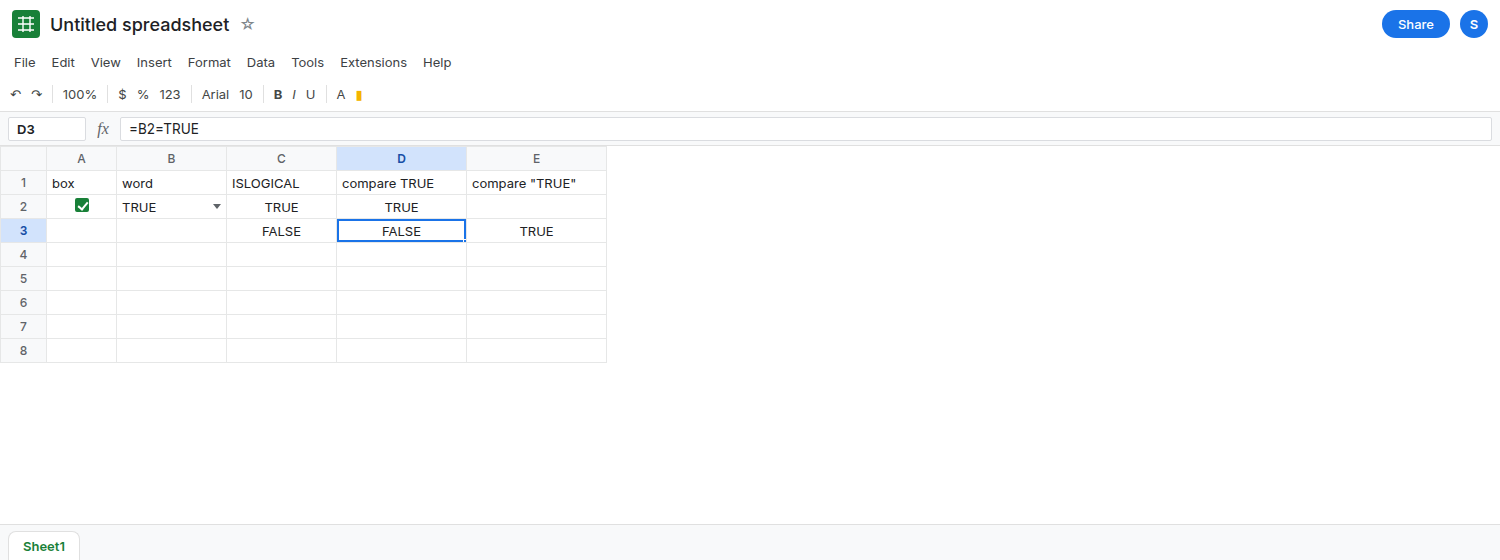
A real checkbox. Select A2. Insert → Checkbox. Check it. The formula bar shows TRUE with no quotes. In C1 type logic. In C2 enter =ISLOGICAL(A2). C2 is TRUE. In D2 enter =A2=TRUE. D2 is TRUE. Uncheck A2. The formula bar is FALSE, and D2 becomes FALSE. Check A2 again and leave it checked.
The word TRUE. Select B2. Data → Data validation (or Insert → Dropdown). Criteria: Dropdown. Add one item: TRUE. Add a second item: FALSE if you want both words. Done. Choose TRUE in B2. The cell shows TRUE. In C3 enter =ISLOGICAL(B2). C3 is FALSE. In D3 enter =B2=TRUE. D3 is FALSE. In E3 enter =B2="TRUE". E3 is TRUE. Leave D3 as FALSE. The word and the checkbox are not equal. In F3 enter =A2=B2. F3 is FALSE while A2 is checked and B2 shows TRUE.
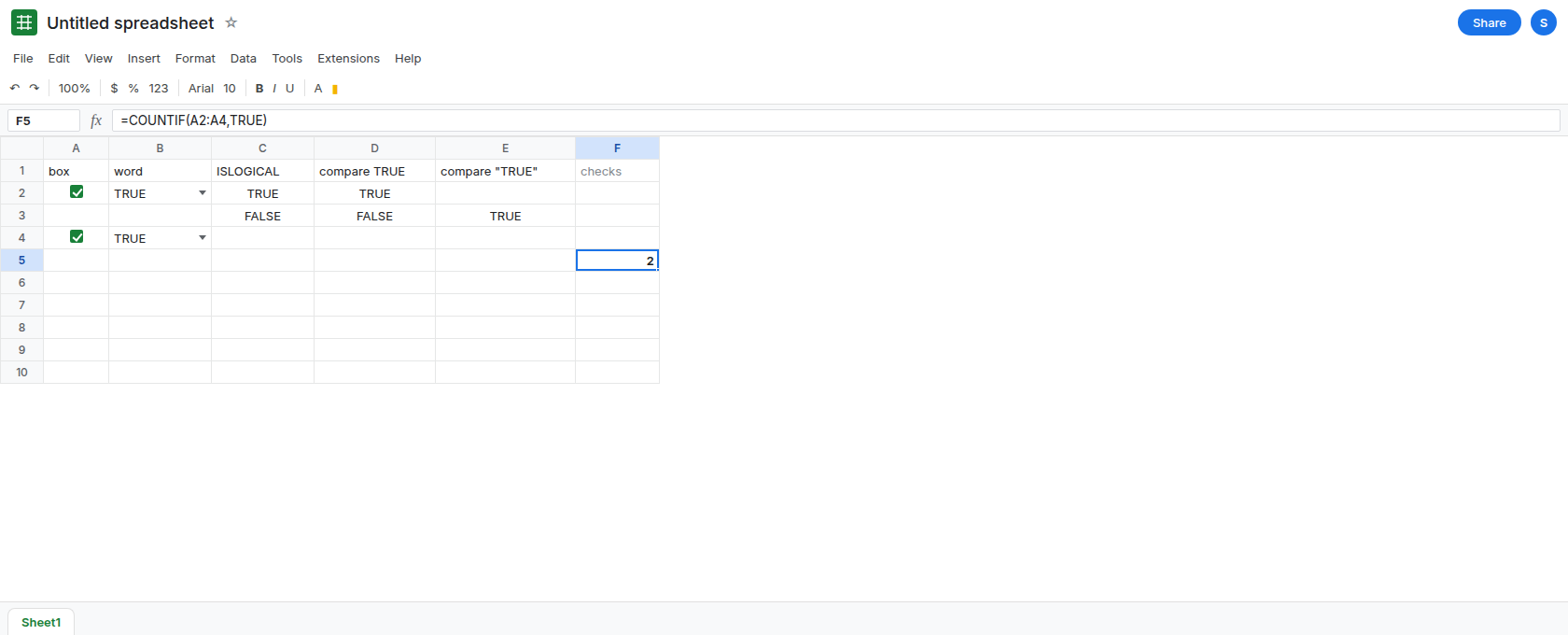
COUNTIF follows the type. In A4 check a second checkbox (Insert → Checkbox on A4). In B4 choose the dropdown TRUE. In C5 enter =COUNTIF(A2:A4,TRUE). The count is the checked boxes only. In C6 enter =COUNTIF(B2:B4,"TRUE"). The count is the text items. In C7 enter =COUNTIF(B2:B4,TRUE). C7 does not count B2. The boolean criterion does not match the word. Leave C7 as 0 if B2:B4 contain only the dropdown.
Custom cell values on a checkbox store what you type. Select A6. Data → Data validation → Checkbox. Turn on Use custom cell values. Checked: TRUE. Unchecked: FALSE. If those boxes store the entries as text, A6 displays a checkbox and ISLOGICAL(A6) is FALSE when checked. =A6=TRUE is then FALSE, and =A6="TRUE" is TRUE. Leave that checkbox if the sidebar offered the fields. The default Insert → Checkbox, with custom values off, is A2’s boolean. Do not turn custom values on hoping to “match the dropdown” and then test with =A6=TRUE.
What is actually wrong
Section titled “What is actually wrong”- Display is not type. Both cells can look like TRUE. The formula bar of a boolean does not show quotes. A dropdown item is text you added to the list. D3 is the comparison that catches the mix.
COUNTIF,SUMIF, andFILTERuse the criterion’s type.TRUEwithout quotes is the boolean."TRUE"is the word. One column should not contain both. A pivot that groups them will show two groups that look identical.- Custom cell values exist so a checkbox can store
YesandNo, or the stringsTRUEandFALSE. That feature is how a checkbox stops being a boolean. Read the rule before you change formulas. N(B2)on the text TRUE is0, not1. Coercing withNor--does not turn the word into the boolean. See N() text to 0.--(B2=TRUE)is0.--(B2="TRUE")is1.
This is not reject versus warning. Both cells can be valid under their own rules and still fail =A2=B2.
Leave B2 as the dropdown and D3 as FALSE.
Use checkboxes and test the boolean. Keep A2. =COUNTIF(A2:A4,TRUE) counts checks. =FILTER(A2:A4,A2:A4=TRUE) spills the checked booleans. Do not point those formulas at column B.
Or use the word everywhere, including the test. If the column must stay a dropdown, every criterion is "TRUE". =COUNTIF(B2:B4,"TRUE"). =FILTER(B2:B4,B2:B4="TRUE"). Delete the checkboxes or stop comparing them to this column.
One column, one type. Do not fill A2 with a checkbox and A3 with the dropdown. Convert text you already stored: a helper =IF(B2="TRUE",TRUE,IF(B2="FALSE",FALSE,)) returns booleans, and a blank stays blank. Then test the helper with =TRUE.
Do not wrap =A2=B2 in IFERROR. The comparison is FALSE, not an error. See IFERROR vs IFNA.
If ISLOGICAL is FALSE on a cell that looks checked, the rule is storing text. If it is TRUE, compare with TRUE and not with "TRUE". The four letters on the screen are not the test.