

SCAN keeps adding across groups when the reset tests the wrong argument
Updated
SCAN(initial, array, LAMBDA) walks a list. The lambda is called as (accumulator, this element) and must return the next accumulator. A running total of qty is acc+v. That total does not restart when the store changes, because the store was never an argument. Putting the reset on the first parameter tests the running number, even if you named that parameter group. Locking the test to A2 tests the first store on every row. The total climbs through West.
A lambda that returns {acc,v}, or that has only one name, is SCAN / REDUCE LAMBDA. This page is a total that will not reset. Keep the Google Sheets UI in English. Helper names stay English: LAMBDA, SCAN.
Recreate it on a blank sheet
Section titled “Recreate it on a blank sheet”- Open a blank spreadsheet. In A1 type
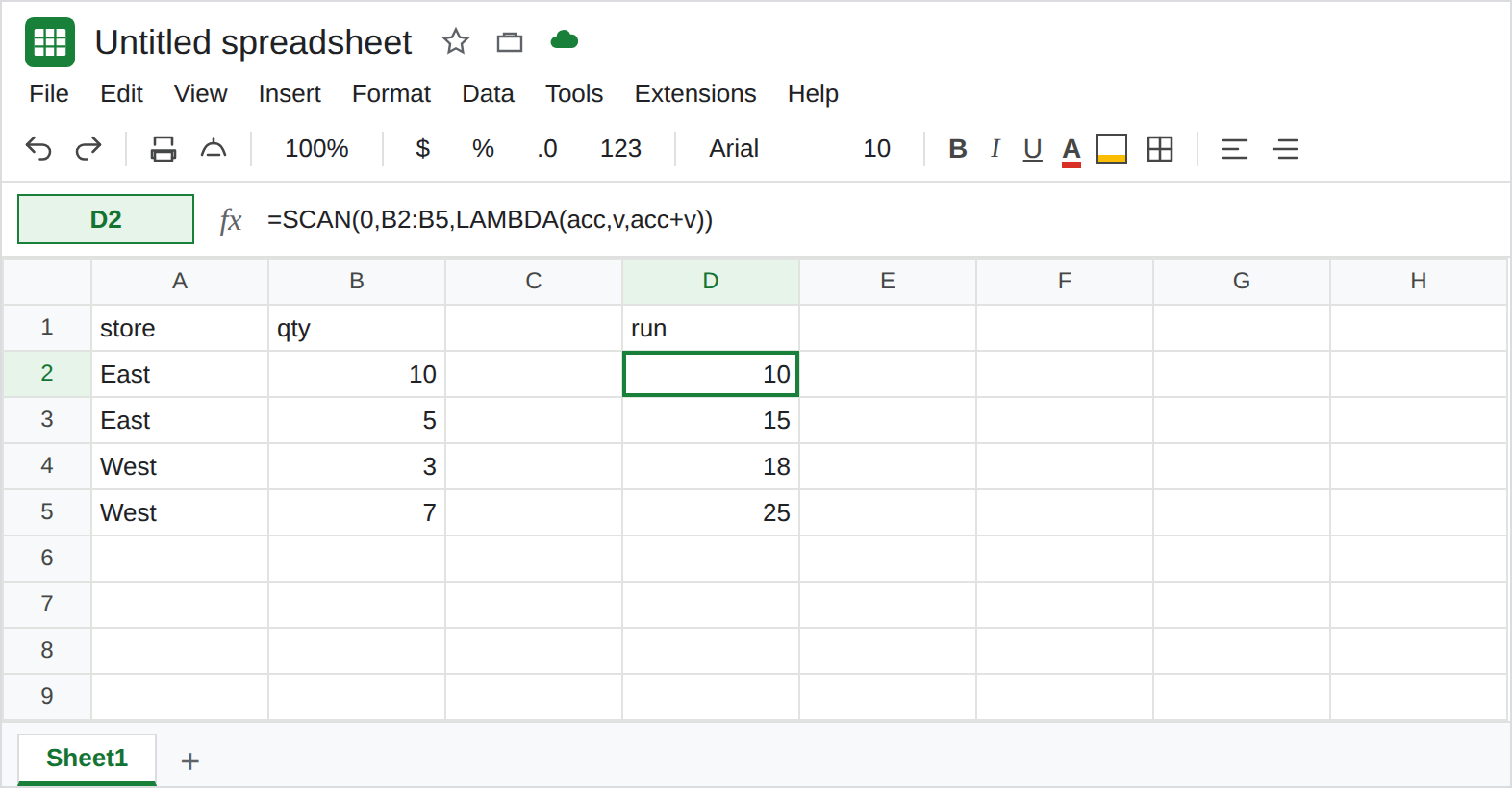
store, B1qty. A2East, B210. A3East, B35. A4West, B43. A5West, B57. The reset you want is East10, East15, West3, West10.
No reset. In D1 type run. In D2 enter =SCAN(0,B2:B5,LAMBDA(acc,v,acc+v)). The spill is 10, 15, 18, 25. West kept East’s total. The lambda is legal. Leave D2 as that column. It is the bug you get when reset logic is simply absent.
The names are backwards, the values are not. In D7 type swapped. In D8 enter =SCAN(0,B2:B5,LAMBDA(v,acc,IF(v=0,acc,v+acc))). Sheets still passes the accumulator first and the qty second. Your name v is 0, then 10, then 15, then 18. It is never the store. The IF does not see East or West. The spill is still a running total (the first step hits v=0 and returns the first qty; after that it keeps adding). Leave D8. Renaming did not reorder the arguments.
The reset is locked to A2. In F1 type locked. In F2 enter =SCAN(0,B2:B5,LAMBDA(acc,v,IF(A2="West",v,acc+v))). A2 is East on every step. The condition is always FALSE. F2:F5 matches D2:D5 (10, 15, 18, 25). You wrote a group test. The test cannot see row 4. Leave F2 as that spill.
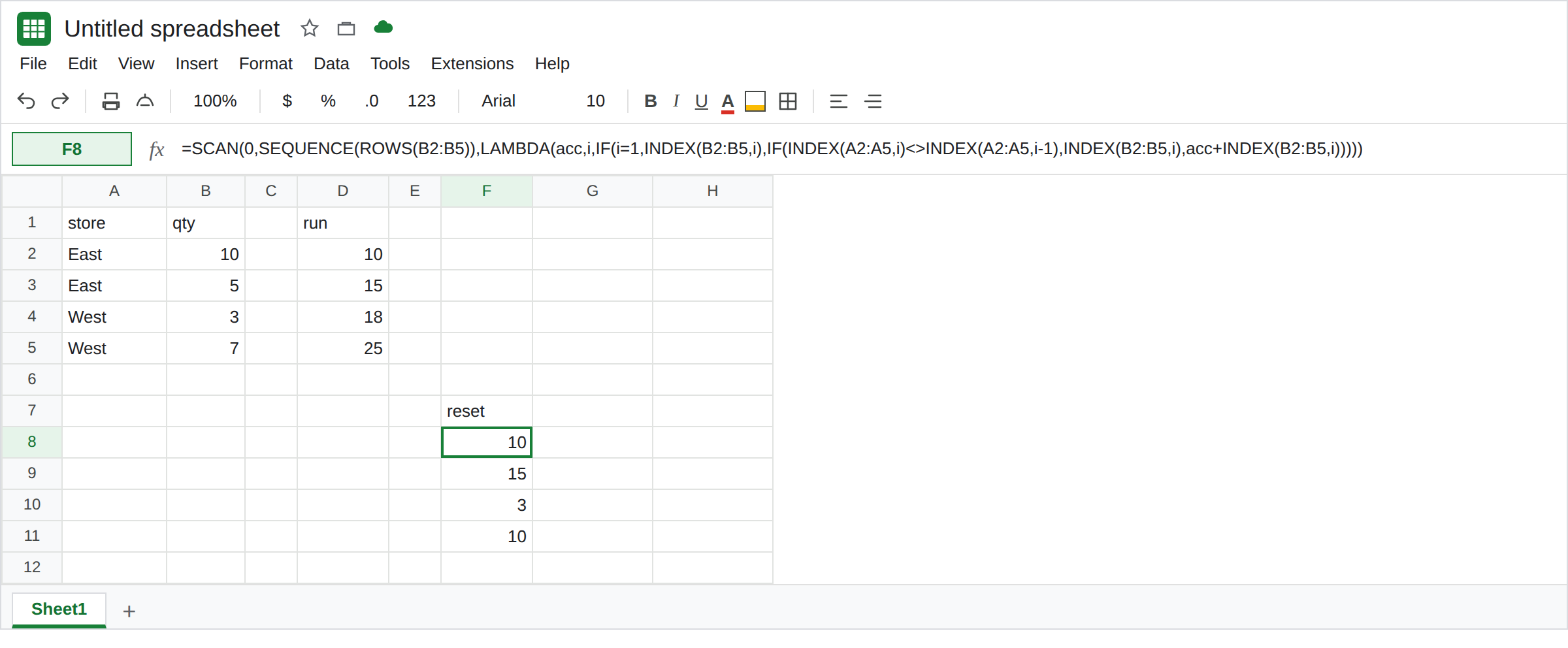
An index can see the previous store. In F7 type reset. In F8 enter =SCAN(0,SEQUENCE(ROWS(B2:B5)),LAMBDA(acc,i,IF(i=1,INDEX(B2:B5,i),IF(INDEX(A2:A5,i)<>INDEX(A2:A5,i-1),INDEX(B2:B5,i),acc+INDEX(B2:B5,i))))). The spill is 10, 15, 3, 10. Row 4 compared West with East and started over at 3. That column is the control.
What is actually wrong
Section titled “What is actually wrong”- Position decides the argument. The first name is the accumulator, whatever you call it. The second name is the current element of the array you passed to
SCAN. D8 scanned qty, so both names are numbers. The store is in column A, whichSCANwas not given. A2does not move whenSCANmoves. It is the cell in row 2 for the whole walk. F2. A relative test has to beINDEXof the currentiand ofi-1.- The array you scan should be the thing the lambda needs as “this element.” Scanning
B2:B5gives you qty and not the store. ScanningSEQUENCE(ROWS(...))gives you a row number you can use to read both columns. The running value still lives inacc. {acc, store}as the return is a nested array, not a reset. See SCAN / REDUCE LAMBDA. F8 returns one number per step.- The first row has no previous store.
i=1must return the first qty. Comparingi-1on that step isINDEXof row 0, which is a whole column. See INDEX row 0. TheIF(i=1,...)is what avoids it.
Leave D2, D8, and F2 as running totals that cross West.
Reset from the group column. Keep F8. The spill is 10, 15, 3, 10. Read it next to A2:A5 before you trust it: the 3 sits on the first West.
One group, one total, no running column. =QUERY(A1:B5,"select A, sum(B) group by A",1) spills East 15 and West 10. That is not a running total. Use it when the row-by-row restart was only a way to get group sums. See QUERY GROUP BY if that statement errors.
Do not wrap D2 in IFERROR. D2 is a real total. It is the wrong shape for groups. See IFERROR vs IFNA.
If the number keeps climbing after the store changes, the lambda is not reading the current group cell. Scan an index, compare INDEX of this row with the previous row, and return the qty alone when they differ. If the tooltip says Single value expected, the lambda returned an array. That is the shape page, and the reset never ran.