

QUERY SELECT Col1 + Col2 fails when the column is text
Updated
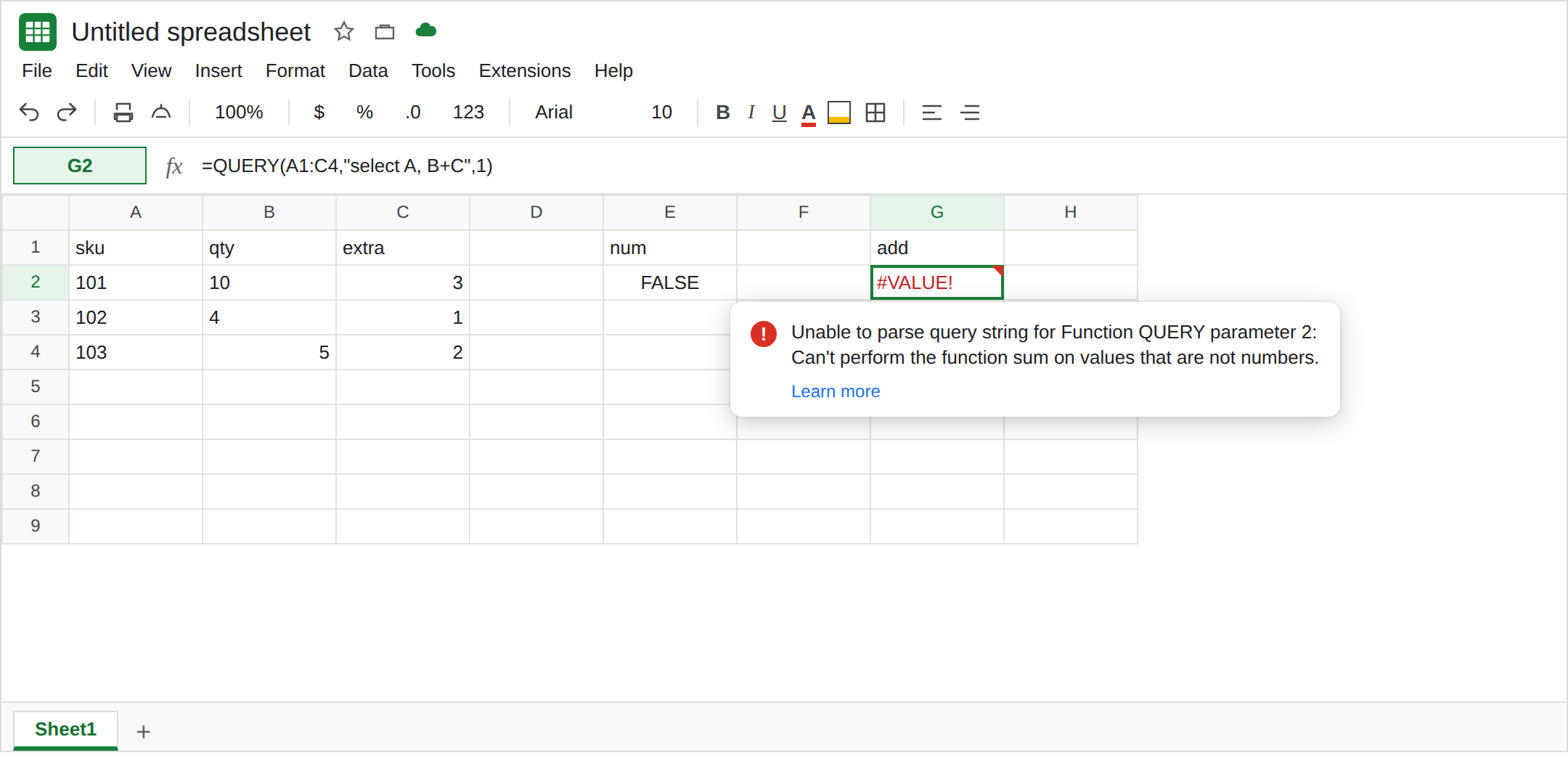
QUERY can add two columns in select: select A, B+C. Both columns have to be numbers. A qty that looks like 10 and is stored as text makes the column a text column when text is the majority. The cell is #VALUE!. The tooltip is Unable to parse query string for Function QUERY parameter 2, and it refuses the addition because the values are not numbers. The sheet still shows 10. ISNUMBER on that cell is FALSE.
sum(B) on a mixed column, with group by, is QUERY GROUP BY (AVG_SUM_ONLY_NUMERIC). This page is row-wise + in select, with no aggregation. Keep the Google Sheets UI in English. Locale United States.
Recreate it on a blank sheet
Section titled “Recreate it on a blank sheet”- Open a blank spreadsheet. In A1 type
sku, B1qty, C1extra. A2101. In B2 type'10(leading apostrophe, so the cell shows10and is text). C23. A3102. In B3 type'4the same way. C31. A4103. B45as a real number. C42. Two text qtys, one number. Text is the majority in column B.
Confirm the type. In E1 type num. In E2 enter =ISNUMBER(B2). E2 is FALSE. In E3 enter =ISNUMBER(B4). E3 is TRUE. B2 is left-aligned if the column format is not forcing right. The apostrophe is not visible in the cell. It is visible in the formula bar. Leave E2 as FALSE.
Add the columns. In G1 type add. In G2 enter =QUERY(A1:C4,"select A, B+C",1). G2 is #VALUE!. The tooltip starts Unable to parse query string for Function QUERY parameter 2 and says the addition cannot run on values that are not numbers. 5+2 on row 4 never appears. Leave G2 broken.
A number column adds. In A5 type sku, B5 qty, C5 extra. A6 101, B6 10, C6 3. A7 102, B7 4, C7 1. A8 103, B8 5, C8 2. Type those qty cells as real numbers, with no apostrophe. In G5 type nums. In G6 enter =QUERY(A5:C8,"select A, B+C",1). The spill is 101 / 13, 102 / 5, 103 / 7. That block is the control. Same B+C. The qty column is numeric.
sum() is the other tooltip. In I1 enter =QUERY(A1:C4,"select sum(B)",1). #VALUE!, and the tooltip names AVG_SUM_ONLY_NUMERIC. That is QUERY GROUP BY. G2’s operator is +, not sum. Leave I1 as the contrast. Do not “fix” G2 by switching to sum until B is numeric. Both fail on this B.
If your copy of G2 returns rows and a blank line for the text qty, text was the minority and QUERY treated those cells as null. The addition did not read the text 10. Check ISNUMBER. The recreate above keeps text in the majority so G2 is #VALUE!. A single apostrophe among a long numeric column is the blank-cell case, not a reason to trust the text as a number.
What is actually wrong
Section titled “What is actually wrong”+,-,*, and/in the query language need number values. A text column fails the addition. The numbers you can see are not numbers toQUERYwhen the column type is text.- A leading apostrophe is how a csv or a hand edit forces text. See CSV text vs number.
VALUEand a format change are sheet operations. They are not a flag inside the query string. B+Cis notsum(B). The GROUP BY page’s AVG_SUM_ONLY_NUMERIC tooltip means an aggregate. If G2’s hover names the addition or says the values are not numbers, you are on this page. If it names AVG_SUM_ONLY_NUMERIC, you wrotesum.- On
{A1:C4}the expression isCol2+Col3, notB+C.B+Cthere isNO_COLUMN. See Col1 vs A. G2 is a sheet range, soBandCare the right ids, and the type is still wrong. - Division by zero in this language returns null, not
#DIV/0!. A blank sum from/is a different surprise. G2 used+.
Leave G2 and I1 broken. Leave E2 as FALSE.
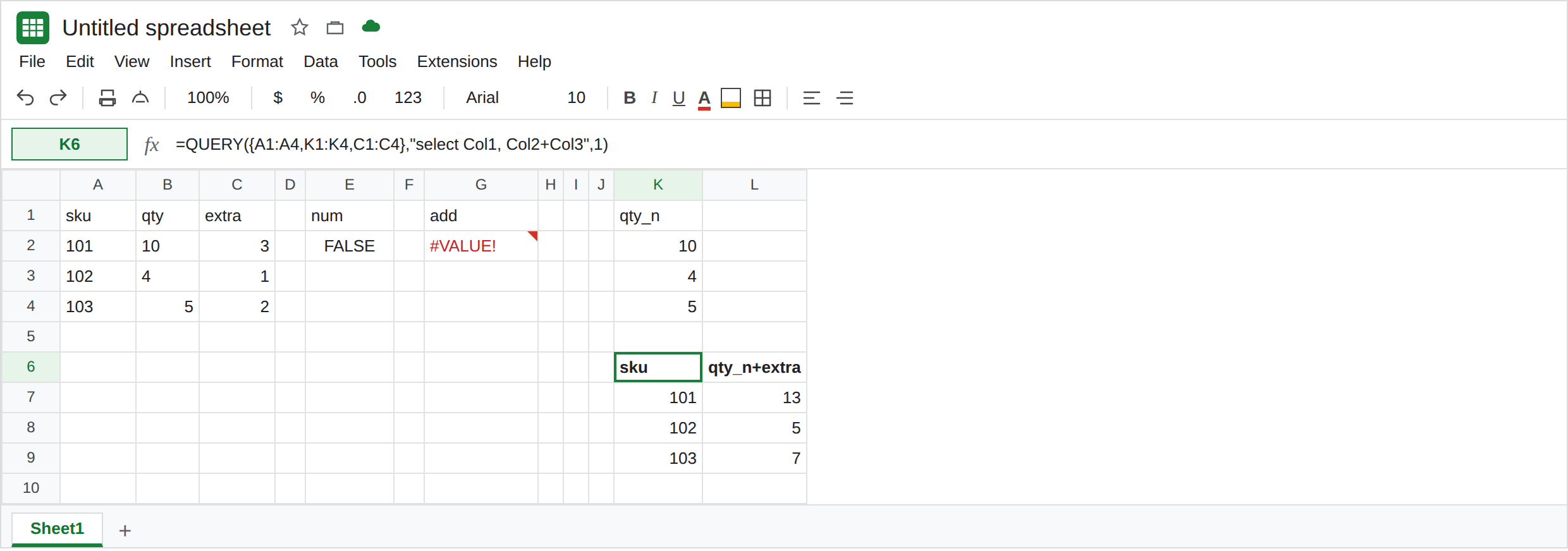
Convert, then add. In K1 type qty_n. In K2 enter =IF(ISNUMBER(B2),B2,IF(B2="",,VALUE(B2))). Fill K2:K4. K2 is 10, K3 is 4, K4 is 5. In K6 enter =QUERY({A1:A4,K1:K4,C1:C4},"select Col1, Col2+Col3",1). The spill is 101 / 13, 102 / 5, 103 / 7. The array uses Col2+Col3 because { } dropped the letters. Headers may show as qty_n math. The totals are the control.
Or add outside QUERY once the column is numeric. =ARRAYFORMULA(IF(A6:A8="",,B6:B8+C6:C8)) spills 13, 5, 7 on the numeric block. That is sheet arithmetic. It still #VALUE! if you point it at apostrophe text. See wrong type.
Do not wrap G2 in IFERROR. The text qty would vanish into a blank report. See IFERROR vs IFNA.
If B+C is #VALUE! and ISNUMBER is FALSE on a cell that shows digits, convert with VALUE and query the helper. If the tooltip names AVG_SUM_ONLY_NUMERIC, the function is sum. If one text cell became a blank total and the other rows added, that text was dropped as null. It was not added.