

Fix ISBLANK vs empty string vs IFBLANK in Google Sheets
Updated
ISBLANK(cell) is TRUE only when the cell has nothing in it — no value, no formula. A formula ="" looks empty and ISBLANK is FALSE. A space looks empty and ISBLANK is FALSE. Google Sheets does not have IFBLANK. Typing =IFBLANK(A2,"none") is #NAME?. The usual substitutes are IF(A2="",…) or IF(ISBLANK(A2),…), and they are not interchangeable.
This page is ISBLANK vs "" vs the missing IFBLANK. It is not IF blank vs 0 (truthiness / =0 / =""). It is not unknown function as a generic VLOKUP primer, though IFBLANK is a #NAME?. It is not ARRAYFORMULA empty 0. Keep the Google Sheets UI in English.
Recreate it on a blank sheet
Section titled “Recreate it on a blank sheet”- Open a blank spreadsheet. In A1 type
kind, B1cell, C1isblank, D1eq_empty, E1len.
Truly empty. In A2 type empty. Leave B2 untouched. In C2 enter =ISBLANK(B2). TRUE. In D2 enter =B2="". TRUE. In E2 enter =LEN(B2). 0.
Formula empty string. In A3 type formula. In B3 enter ="". In C3 enter =ISBLANK(B3). FALSE. In D3 enter =B3="". TRUE. In E3 enter =LEN(B3). 0. Same look as B2. ISBLANK disagrees.
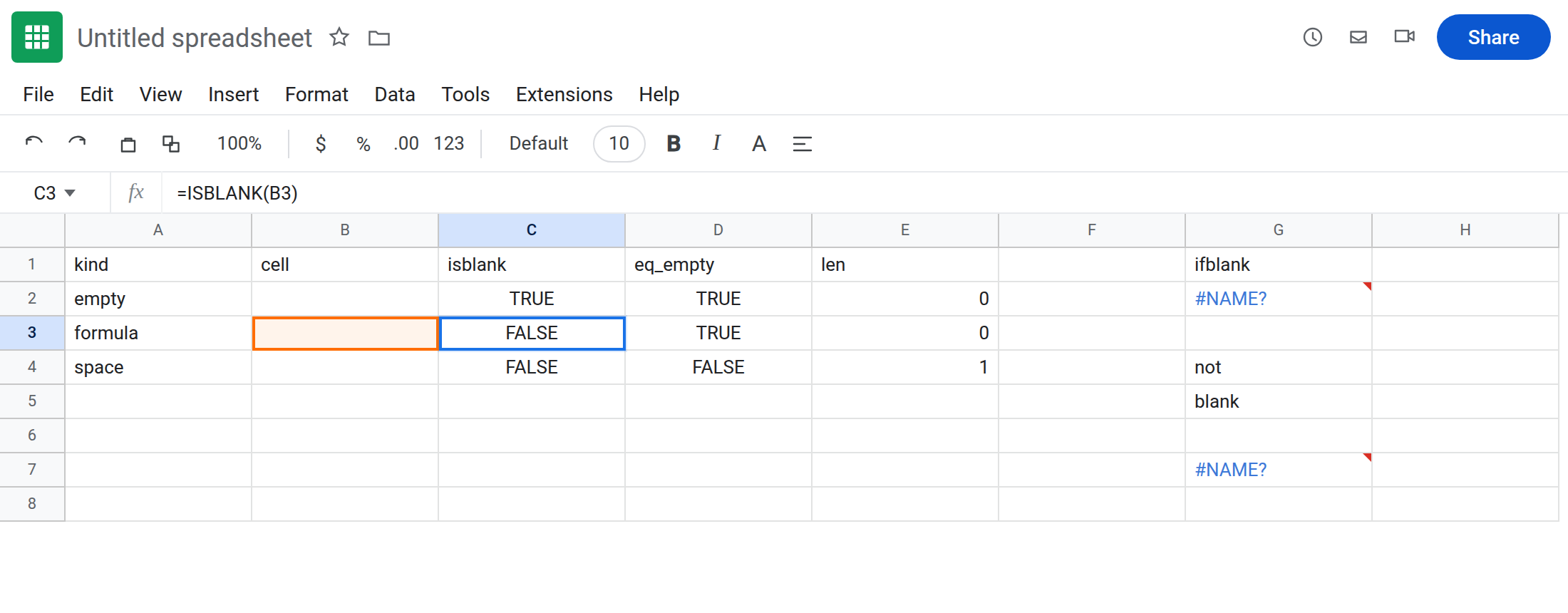
A space. In A4 type space. In B4 type a single space. C4 =ISBLANK(B4) FALSE. D4 =B4="" FALSE. E4 =LEN(B4) 1. TRIM(B4)="" is TRUE. CHAR(160) is a different “space”; see CHAR(160) blanks.
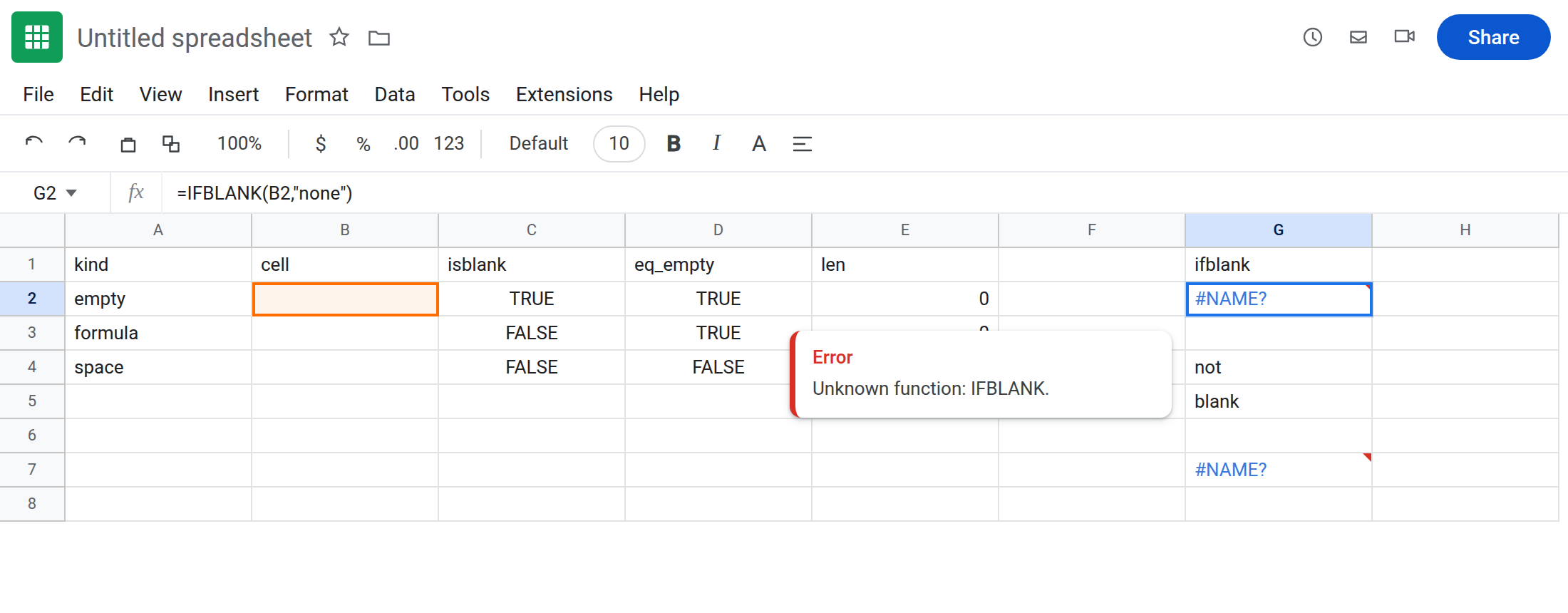
IFBLANK does not exist. In G1 type ifblank. In G2 enter =IFBLANK(B2,"none"). The cell shows #NAME?. Unknown function IFBLANK. Leave G2 broken.
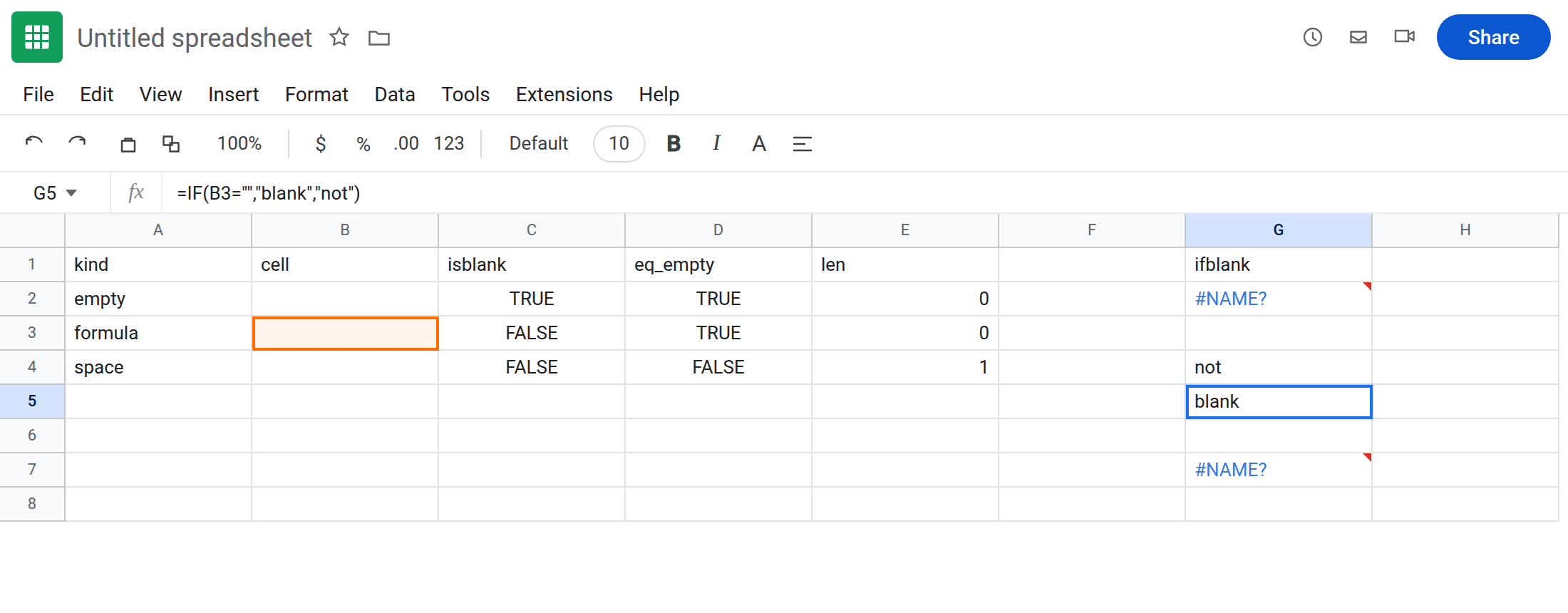
IF(ISBLANK) vs IF(=""). In G4 enter =IF(ISBLANK(B3),"blank","not"). not (B3 has a formula). In G5 enter =IF(B3="","blank","not"). blank. Leave both so the fork stays visible.
NAME? contrast. In G7 enter =VLOKUP(1,A2:B2,2,FALSE). #NAME? from a misspelled VLOOKUP. See unknown function. Leave G7 as contrast. G2 is specifically IFBLANK.
Leave B2 empty, B3 as ="", G2 as #NAME?.
What is actually wrong
Section titled “What is actually wrong”ISBLANKanswers “is this cell uninitialized?” Formulas occupy the cell even when they display nothing.A2=""answers “does this look like empty text?” TRUE for uninitialized and for"". FALSE for0and for a space.IFBLANKis not in Sheets (Excel users reach for it next toIFNA/IFERROR).#NAME?is correct. Do not hunt a locale setting.- A space and CHAR(160) fail both
ISBLANKand="".LENis1(or more).TRIM/SUBSTITUTE/CLEANbelong there, or CHAR(160) blanks. COUNTAcounts""formulas as occupied.COUNTBLANKcounts""as blank. Mixing those withISBLANKis how dashboards disagree.
This is not IF(A2) treating 0 as FALSE. See IF blank vs 0.
This is not LET #NAME?. See LET #NAME?.
This is not a named range miss. See named range #REF! / #NAME?.
Leave G2 broken as the IFBLANK reminder.
Need “display empty” (cell or formula): =IF(B3="","none","hit") (G5’s test). That is the usual dashboard stand-in for IFBLANK.
Need “user has not typed anything”: =IF(ISBLANK(B2),"type hours",B2). B3 will not qualify until you clear the formula.
Replace IFBLANK: never add a named range called IFBLANK to silence G2. Use IF.
See IFERROR vs IFNA only if you were about to wrap G2. Wrapping #NAME? hides a function that does not exist.
If ISBLANK is FALSE on a cell that looks empty, show the formula bar. If you see ="", that is this page. If you see a space, LEN. If #NAME? and the bar says IFBLANK, use IF(A2="",…).
ISBLANK vs ="" vs COUNTBLANK vs IF(A2=0)
Section titled “ISBLANK vs ="" vs COUNTBLANK vs IF(A2=0)”ISBLANK → only uninitialized (C2 TRUE, C3 FALSE).
="" → uninitialized and "" (D2/D3). The practical IFBLANK.
COUNTBLANK → includes "". COUNTA → includes "". Pick the counter that matches the definition you need.
Zero hours: 0 is not blank on any of these tests except the sloppy IF(A2) / A2=0 pair on IF blank vs 0. Keep 0 out of ISBLANK conversations.