

A script reads a formula it just wrote and gets the old value until SpreadsheetApp.flush
Updated
Spreadsheet writes are queued. In one execution, setValue on A1 and getValue on a formula that depends on A1 can still see the number A1 had at the start. The formula has not been calculated against the new input yet. SpreadsheetApp.flush() applies the pending changes and lets that recalculation happen before the next read. The cell on screen can already look right while the variable in the script holds the old product. The bug is the value the script stored, not a #REF! in the formula.
Sheet Error is an independent formula-error library, not a Google product. Two executions losing increments is LockService. A formula string that will not parse on this locale is setFormula separators. Keep the Google Sheets UI in English.
Recreate it on a blank sheet
Section titled “Recreate it on a blank sheet”- Open a blank spreadsheet. In A1 type
5. In A2 enter=A1*2. A2 shows10. That formula is the dependent. The script will change A1 and then read A2.
Extensions → Apps Script. Replace the sample with this. Save.
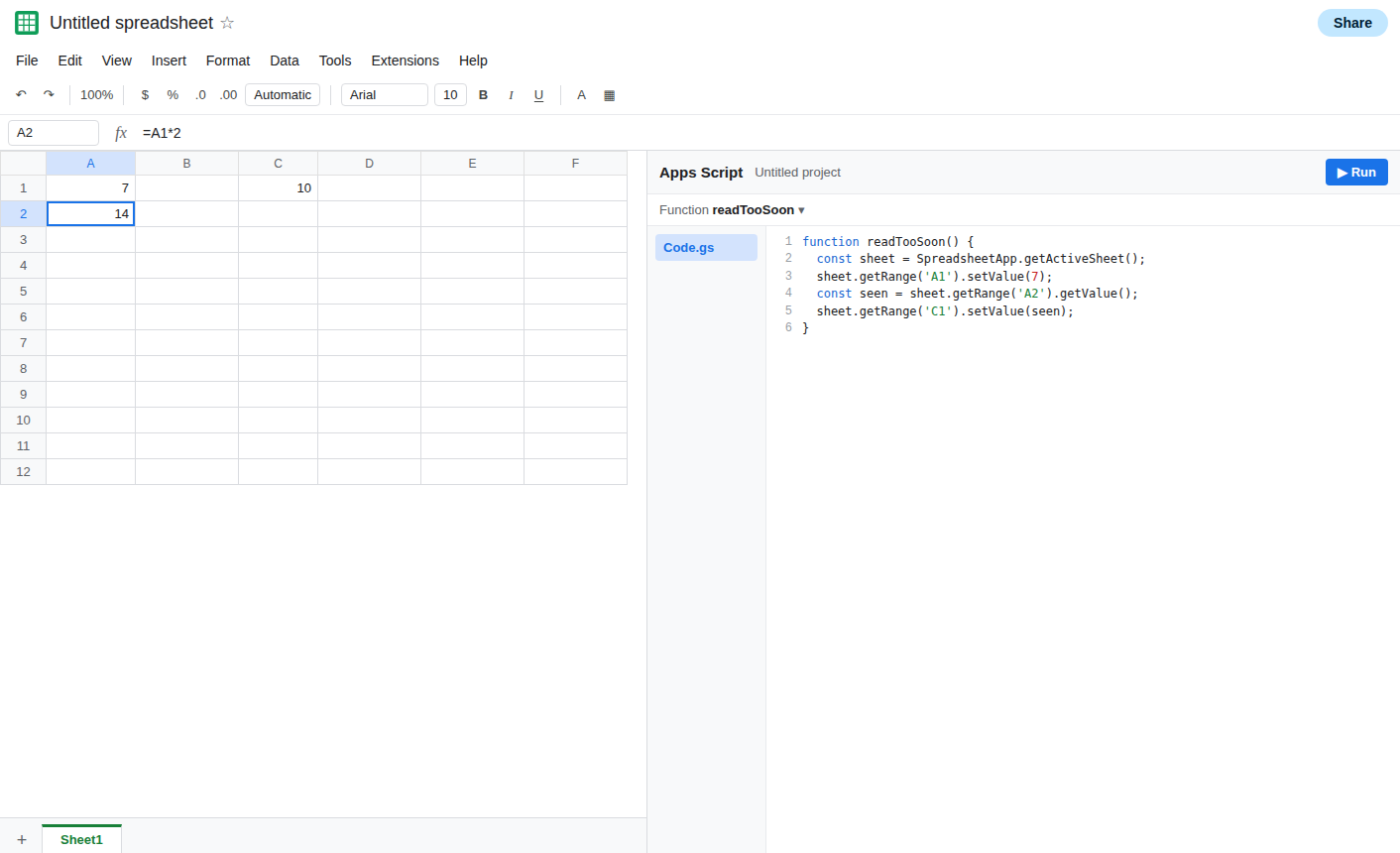
function readTooSoon() { const sheet = SpreadsheetApp.getActiveSheet(); sheet.getRange('A1').setValue(7); const seen = sheet.getRange('A2').getValue(); sheet.getRange('C1').setValue(seen);}Run readTooSoon. A1 is 7. A2 shows 14 once the sheet paints. Look at C1, which is the value the script actually read. If C1 is 10, the read happened before the formula recalculated. 10 is 5*2, the old input. Leave C1 as 10. That is the recreate.
If C1 is already 14, this run applied the write before getValue. The queue is not a promise that every read is stale. Put a heavier dependent in A2, =A1*2+NOW()*0, run again from A1 set back to 5, and read C1. You are looking for a C1 that does not match A1*2 after the script set A1 to 7. If C1 keeps matching, do not invent a failure. The rest of the page is the file where C1 stayed on the previous product.
Reading the same cell you just set is a different test. getValue on A1 after setValue(7) often returns 7 immediately. The stale case is the other cell, the one whose formula depends on the write. Do not “prove” flush with a read of A1 alone.
What is actually wrong
Section titled “What is actually wrong”- Pending changes are applied for speed.
getValuedoes not implicitly flush. A dependent formula still holds the last calculated value until a recalculation runs. C1 recorded that moment. flushaffects this execution. It does not wait for another user’s edit, and it does not serialize two triggers. If the bug is a lost increment, the lock page is the one that applies.- Flushing inside a loop over thousands of rows forces a round trip each time. The sheet gets slow. Batch the writes, flush once before a read that needs the new formulas, and do not flush after every
setValueby habit. setFormulawith the wrong separator never calculates, flushed or not. The formula bar stays a parse error. See setFormula separators.- A custom function in A2 does not become volatile because you flushed. Its cache rules are separate. See custom function cache.
Leave C1 as the stale read if you captured one. Set A1 back to 5 so A2 shows 10 again. Add the flush between the write and the read. Write the new read to C2 so C1 stays as evidence.
function readAfterFlush() { const sheet = SpreadsheetApp.getActiveSheet(); sheet.getRange('A1').setValue(7); SpreadsheetApp.flush(); const seen = sheet.getRange('A2').getValue(); sheet.getRange('C2').setValue(seen);}Run readAfterFlush. A1 is 7. A2 is 14. C2 is 14. C1 is still the old read if you left it. The difference is the flush, not a change to the formula.
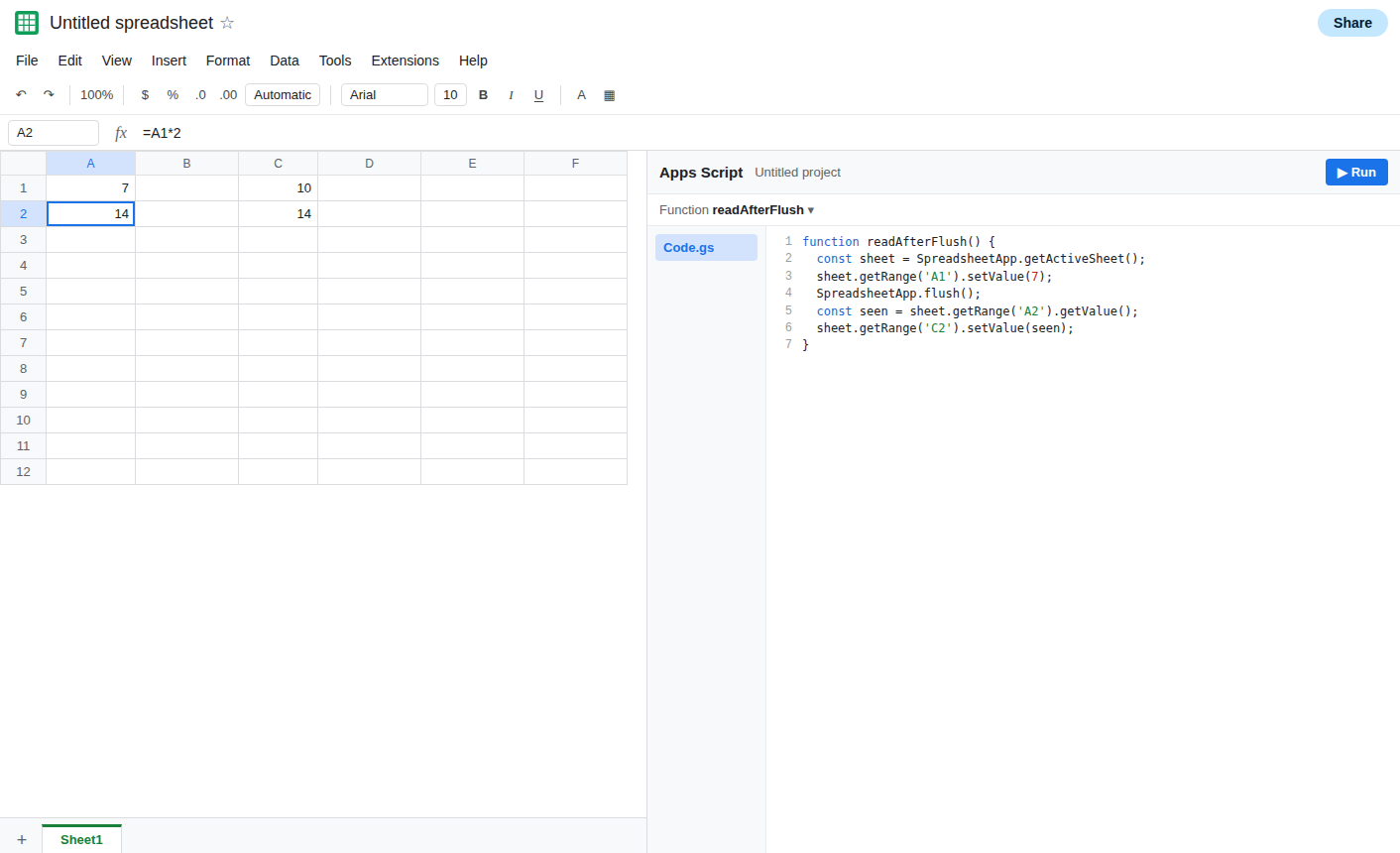
If C2 is still the old product, the formula in A2 does not depend on A1, or it is a custom function that did not recalculate. Read the formula bar. Flush cannot refresh a custom function that has no argument change.
Do not use flush as a lock. Two overlapping readAfterFlush runs can still both read before either write is the one you wanted. See LockService.
If the script’s stored value matches the formula after a flush and did not match before, the read was early. If the stored value was already right without a flush, this file did not queue that read. If the formula bar is #ERROR!, fix the formula before you flush again.