

FILTER around QUERY treats the header row as data and the heights stop matching
Updated
QUERY with a headers argument of 1 puts a label row on the result. That row is part of the array FILTER receives. FILTER does not know it is a label. It tests it like a record, or it refuses the call because your condition range is still the height of the original sheet. The East rows you can see in the grid are not the rows FILTER is counting.
How 0 and 1 treat the first row of a plain QUERY, including on IMPORTRANGE, is QUERY headers 0/1. This page is the wrap: FILTER around that result. Keep the Google Sheets UI in English. Sheet Error is an independent formula-error library, not a Google product.
Recreate it on a blank sheet
Section titled “Recreate it on a blank sheet”- Open a blank spreadsheet. In A1 type
region, B1qty. A2East, B210. A3West, B34. A4East, B420. Two East rows, quantities 10 and 20. West is 4.
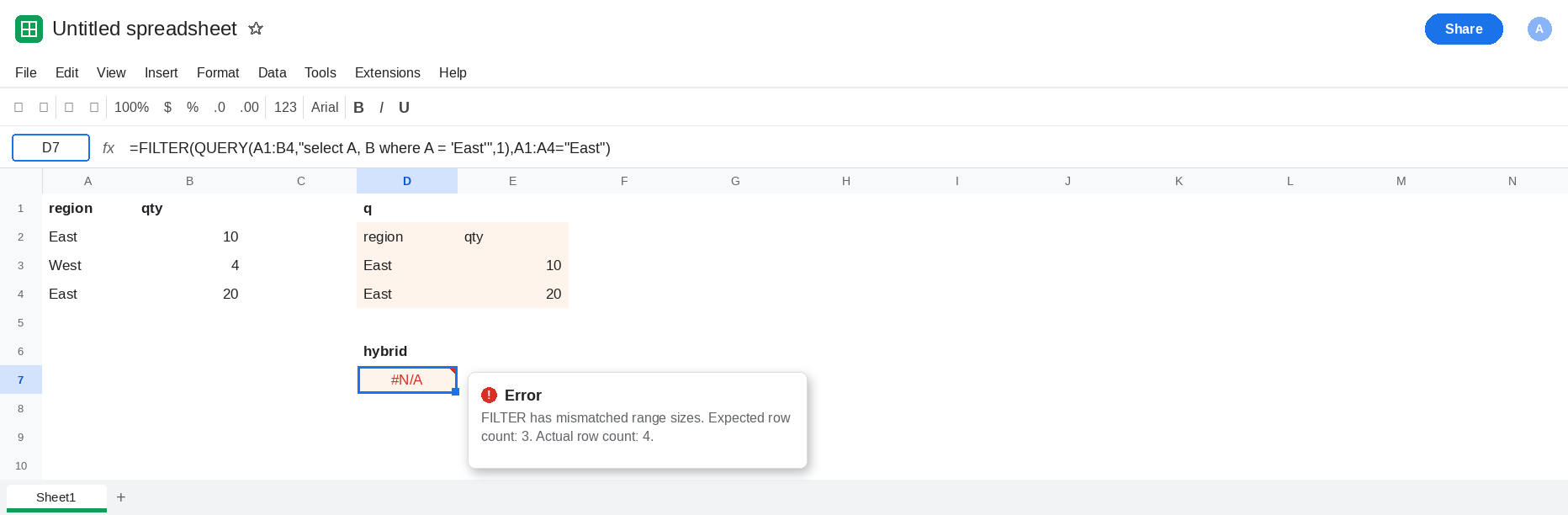
QUERY alone, headers 1. Leave D2:E4 empty. In D1 type q. In D2 enter =QUERY(A1:B4,"select A, B where A = 'East'",1). The spill is three rows: the labels region and qty, then East 10, then East 20. West is gone. The label row was not filtered. It is not a third East. That block is the control for what QUERY actually returned.
FILTER with a condition taken from the sheet. In D6 type hybrid. In D7 enter =FILTER(QUERY(A1:B4,"select A, B where A = 'East'",1),A1:A4="East"). The cell is #N/A. The tooltip says FILTER has mismatched range sizes. The QUERY result is 3 rows. A1:A4 is 4 rows. FILTER will not pad, and it will not drop the label to make the heights agree. Leave D7 broken.
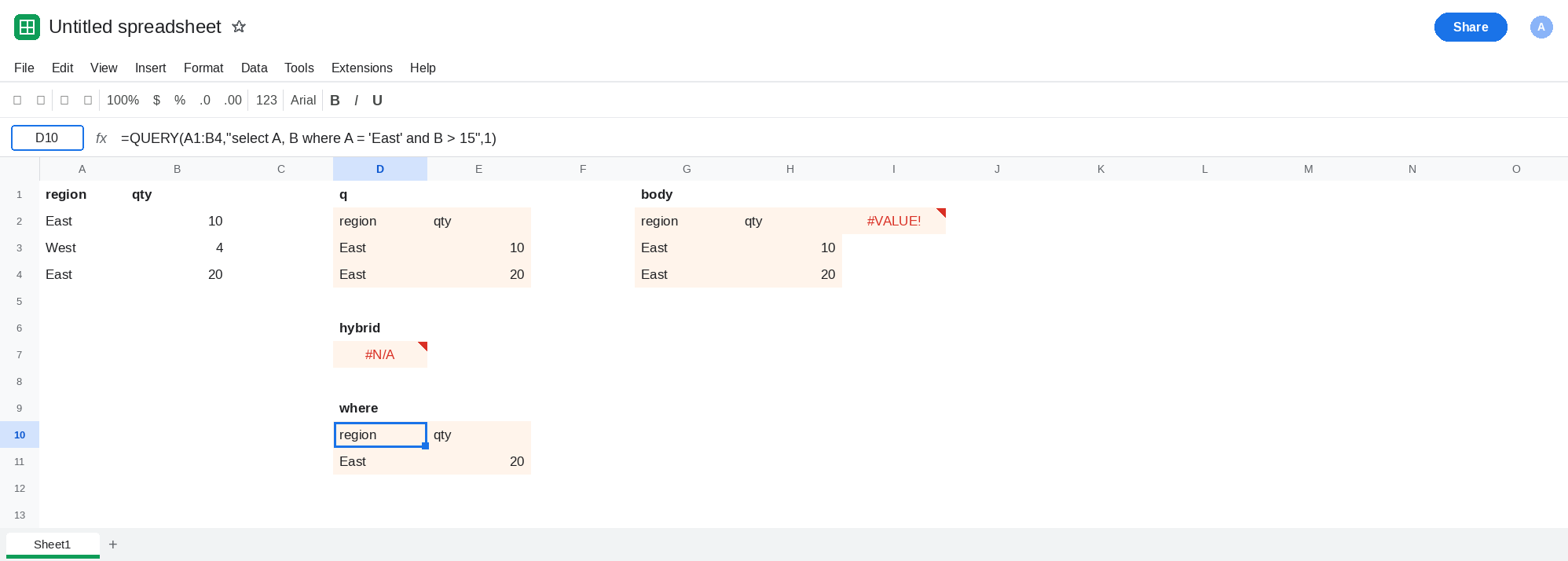
The label is inside the test. In G1 type body. In G2 enter =QUERY(A1:B4,"select A, B where A = 'East'",1). Same spill as D2. In I2 enter =FILTER(G2:H4,H2:H4>15). H2 is the text qty. qty>15 is #VALUE!, so the FILTER errors. The number 20 is on the sheet, in H4. The condition never got a clean column of quantities, because row 2 of the spill is the label. Leave I2 broken.
headers 1 on a range that already starts at the first record. In G6 enter =QUERY(A2:B4,"select A, B where A = 'East'",1). A2:B4 has no title row, but 1 still takes the first row as labels. Those labels are East and 10, and they are not tested by where. The data rows are West 4 and East 20. The spill shows East 10 on top and East 20 under it. The 10 looks like a row that passed the filter. It is the label, copied from A2. Leave G6 as that misleading pair.
Leave D7 and I2 broken. Leave D2 as the honest three-row QUERY.
What is actually wrong
Section titled “What is actually wrong”FILTERmeasures the array it was given. AQUERYwith headers1is one row taller than the matching records. A condition built fromA1:A4is the sheet’s height, including the title and including West. Those two heights are not the same number. D7 is FILTER range size caused by the label row.- Once the spill is on the sheet,
H2:H4includes the wordqty. A numeric comparison against text is#VALUE!, andFILTERfails the whole call. It does not skip the label and keep East20. headers1onA2:B4promotes the first East row into the label.wherenever sees it. The output still prints it. A laterFILTERthat assumes “every row under the formula is a hit” will treat10as a match. The headers primer is QUERY headers 0/1.- Putting both tests in
QUERYavoids the second pass.andin the query string is one array, with one header policy. Splitting the work acrossFILTERandQUERYis what mis-counts the rows.
This is not QUERY returning no rows. See QUERY no rows only when the query language itself reports an empty result. D2 returned East.
Leave D7 and I2 broken.
Keep the test inside QUERY. In D10 enter =QUERY(A1:B4,"select A, B where A = 'East' and B > 15",1). The spill is the labels, then East 20. One array. The label is only the label. West and East 10 are both absent for reasons you can read in the query string.
If you do FILTER, test the body under the label, not the sheet. In G10 enter =QUERY(A1:B4,"select A, B where A = 'East'",1). That is the same spill as D2: label on row 10, East 10 on row 11, East 20 on row 12. In I10 enter =FILTER(G11:H12,H11:H12>15). The condition is two cells, the body only. I10 spills East 20. H10 is the word qty, and it is not in the condition. The range you test is the spill’s records, not A1:A4.
Do not wrap D7 in IFERROR. The mismatch is the diagnosis. See IFERROR vs IFNA.
If FILTER(QUERY(...)) says the ranges are mismatched, the header row is inside one side and not the other. If the first “match” is actually the next row’s values printed as labels, headers is 1 on a range that already starts at the data. Move the predicate into where, or drop the label before FILTER sees it.