

Fix SORTN in Google Sheets when display_ties_mode adds or drops rows
Updated
SORTN(range, n, display_ties_mode, sort_column, is_ascending) returns the top of a sorted list. display_ties_mode decides what “top n” does with a tie. Mode 0 stops at n rows. Mode 1 keeps extra rows that tie the nth. Mode 2 removes duplicate rows, then takes at most n. Mode 3 takes n distinct sort keys and then shows every row that carries those keys. A longer spill is not a broken n. A shorter spill is not a missing sheet row. n of 0 and a mode of 5 are a different page.
This page is the four tie modes. It is not SORTN n / ties (n of 0, mode 5, empty range). It is not SORT / UNIQUE spill. Keep the Google Sheets UI in English.
Recreate it on a blank sheet
Section titled “Recreate it on a blank sheet”- Open a blank spreadsheet. In A1 type
heat, B1sec. A2Kim, B212.1. A3Omar, B311.4. A4Lee, B411.4. A5Priya, B513.0. A6Omar, B611.4. Five data rows. Omar’s11.4line is stored twice, identical. Lee ties that time with a different name.
Mode 0, two rows, stop. In D1 type mode0. Leave D2:E3 empty. In D2 enter =SORTN(A2:B6,2,0,2,TRUE). Sort by seconds ascending. The spill is exactly two rows, both 11.4 (Omar and Lee, in whatever stable order Sheets returns). Priya and Kim are out. The second identical Omar row is out because n is 2 and mode 0 does not go looking for more ties. That block is the control for a hard cap.
Mode 1, n of 1, extra tie. In D6 type mode1. Leave D7:E10 empty. In D7 enter =SORTN(A2:B6,1,1,2,TRUE). You asked for one row. Anyone tied with that nth row on the sort comes too. Both 11.4 identities are in the tie (Omar and Lee), and the duplicate Omar row matches as well. The spill is more than one row. Not #N/A. Leave D7 as that taller spill.
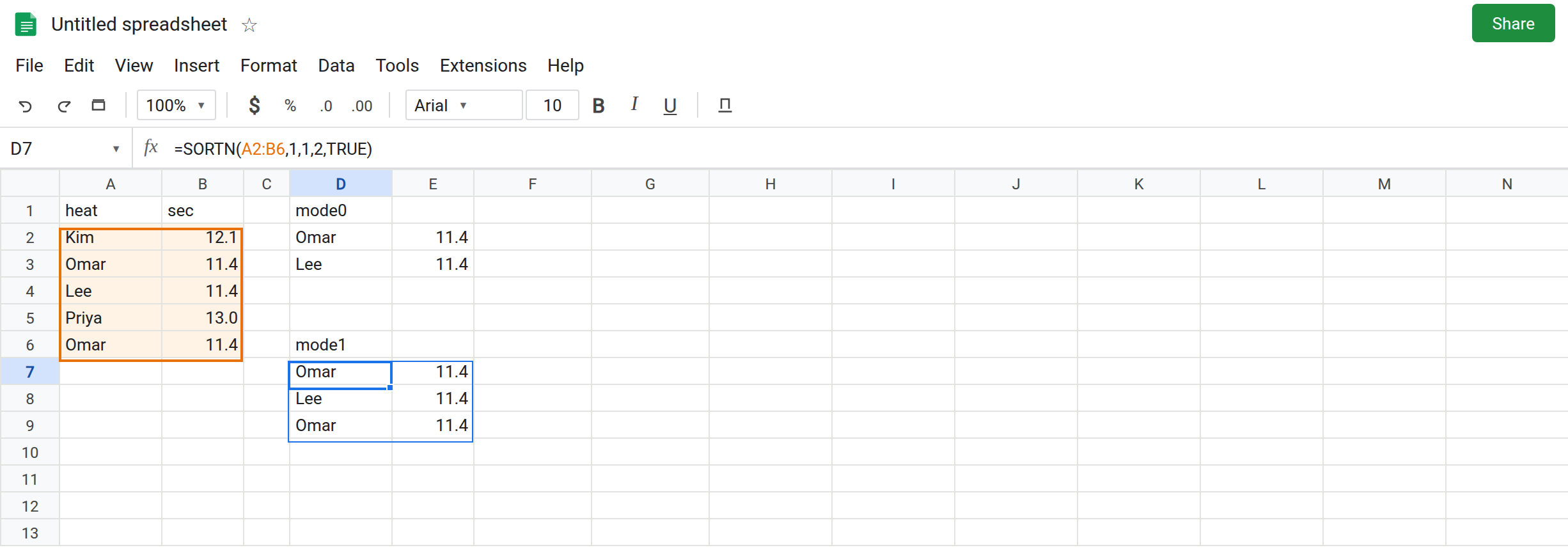
Mode 2 drops the duplicate row first. In G1 type mode2. In G2 enter =SORTN(A2:B6,2,2,2,TRUE). Duplicate rows are removed, then at most two rows remain. The identical Omar/11.4 pair collapses. You still see an 11.4 Omar once, plus Lee’s 11.4, if those are the first two after the collapse. You do not see Omar twice. Leave G2 as that spill.
Mode 3 keeps every copy of the winning keys. In G6 type mode3. In G7 enter =SORTN(A2:B6,1,3,2,TRUE). n is 1, so one distinct key: the fastest time 11.4. Mode 3 then shows every row with that key. Both Omar rows and Lee spill. Kim and Priya stay out. The spill is taller than n again, for a different reason than mode 1: you asked for one key, then every physical row of that key. Leave G7 as that spill.
Wrong column, legal mode. In I1 type names. In I2 enter =SORTN(A2:B6,2,0). No sort column. The default is column 1, the names, not the seconds. The top two names in alphabet order are not the top two times. No error triangle. Leave I2 as the contrast. A ties mode cannot correct a sort column you did not pass.
Leave D7 and G7 taller than n. Leave D2 as two rows.
What is actually wrong
Section titled “What is actually wrong”nis not a promise about the height of the spill once the mode is1or3. Mode1adds ties at the boundary. Mode3expands each kept key to all of its rows. Counting the spill and comparing it tonis how you tell the mode is working.- Mode
0drops the rest, including a person who tied the last kept row if that person did not fit inn. D2 keeps two11.4rows and stops. A third11.4is out. - Mode
2is a distinct-row cap. Identical rows collapse before the cut. It is notexactly_once. A row that appeared twice can still appear once in the output. See UNIQUE exactly_once if the goal is “drop anything that was repeated.” - The sort column is the column the tie is about. I2 sorted names. Seconds never entered the decision. Pass
2, TRUEfor ascending time. - Mode
4or5is#VALUE!. That is SORTN n / ties, not a fifth way to treat ties.
This is not a blocked spill. If D2 is #REF! and the tooltip names E3, the mode already chose the rows and the grid could not hold them. See SORT / UNIQUE spill.
Leave D7 and G7 as the tall spills. Leave I2 as the name sort.
Pick the mode that matches the sentence you mean. Exactly two rows: keep D2, mode 0. One winning time plus whoever tied it, including duplicate lines: mode 1 (D7) or mode 3 with n 1 (G7). At most two rows after identical lines collapse: mode 2 (G2).
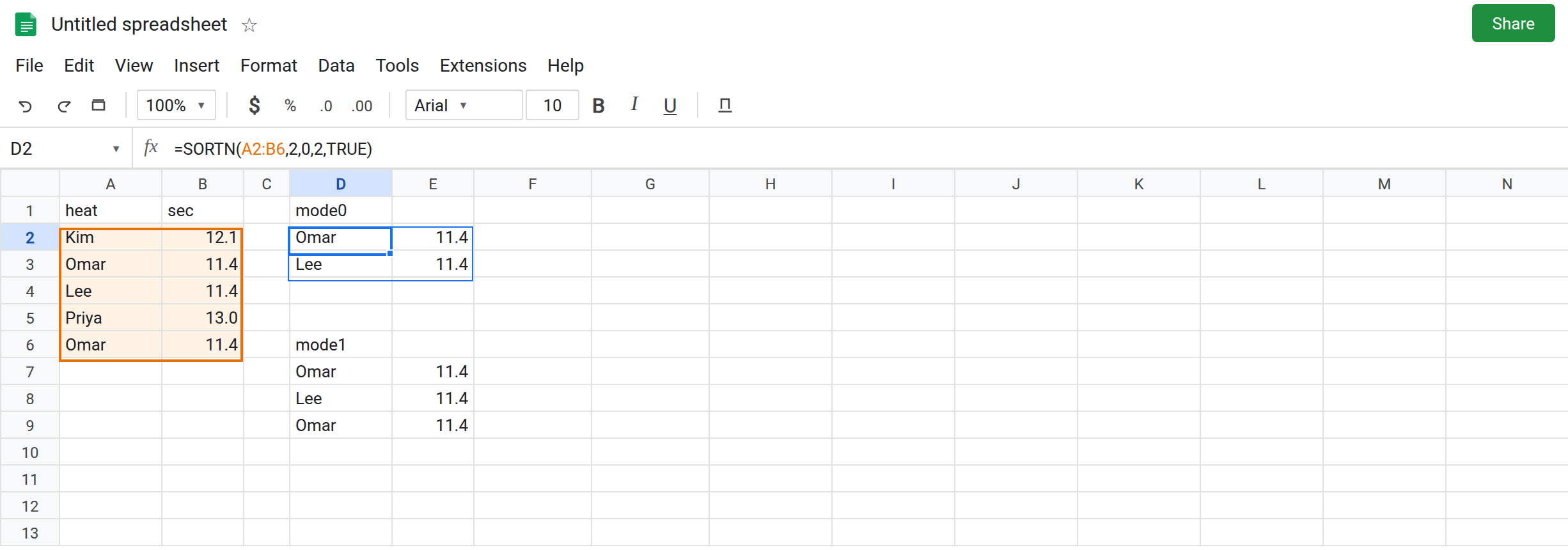
Sort by the column you mean. Copy D2’s ,2,TRUE onto any mode you keep. TRUE is ascending (fastest first). FALSE is descending.
Need the duplicate Omar row gone and the distinct heats kept? Mode 2, or UNIQUE the block and then SORTN mode 0. Do not use mode 1 and then delete rows by hand. The next recalc brings them back.
Do not wrap D7 in IFNA because it returned more rows than n. Nothing failed. See IFERROR vs IFNA.
If you got more rows than n, you are in mode 1 or 3. If a repeated identical row collapsed, you are in mode 2. If the names are alphabetical and the times are not in order, the sort column defaulted to column 1.