

Fix UNIQUE by_col and exactly_once surprises in Google Sheets
Updated
UNIQUE(range, by_col, exactly_once) drops duplicate rows by default (by_col FALSE). Pass TRUE for the second argument and it compares columns instead. Pass TRUE for the third and it no longer means “distinct list”: it means keep only values that occur once. A sku that appears twice vanishes. A blocked spill #REF! is a different page.
This page is by_col and exactly_once. It is not SORT / UNIQUE spill or UNIQUE overwrite (occupied cells under the spill). It is not SORTN n / ties. Keep the Google Sheets UI in English.
Recreate it on a blank sheet
Section titled “Recreate it on a blank sheet”- Open a blank spreadsheet. In A1 type
sku, B1bin. A2101. B2A. A3101. B3A. A4102. B4B. A5103. B5C. Sku101is on two rows.102and103appear once.
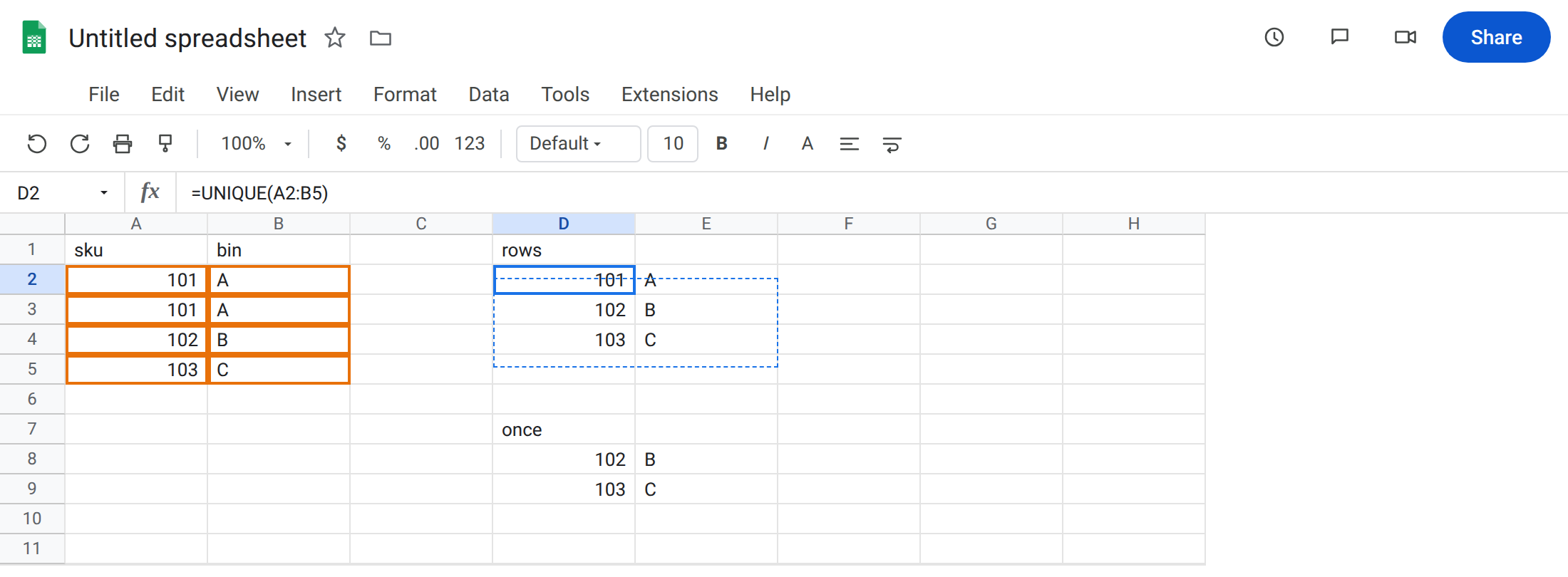
Default UNIQUE (rows). In D1 type rows. Leave D2:E4 empty. In D2 enter =UNIQUE(A2:B5). The spill is three rows: 101/A, 102/B, 103/C. Duplicate row 101/A collapsed. That block is the control people expect.
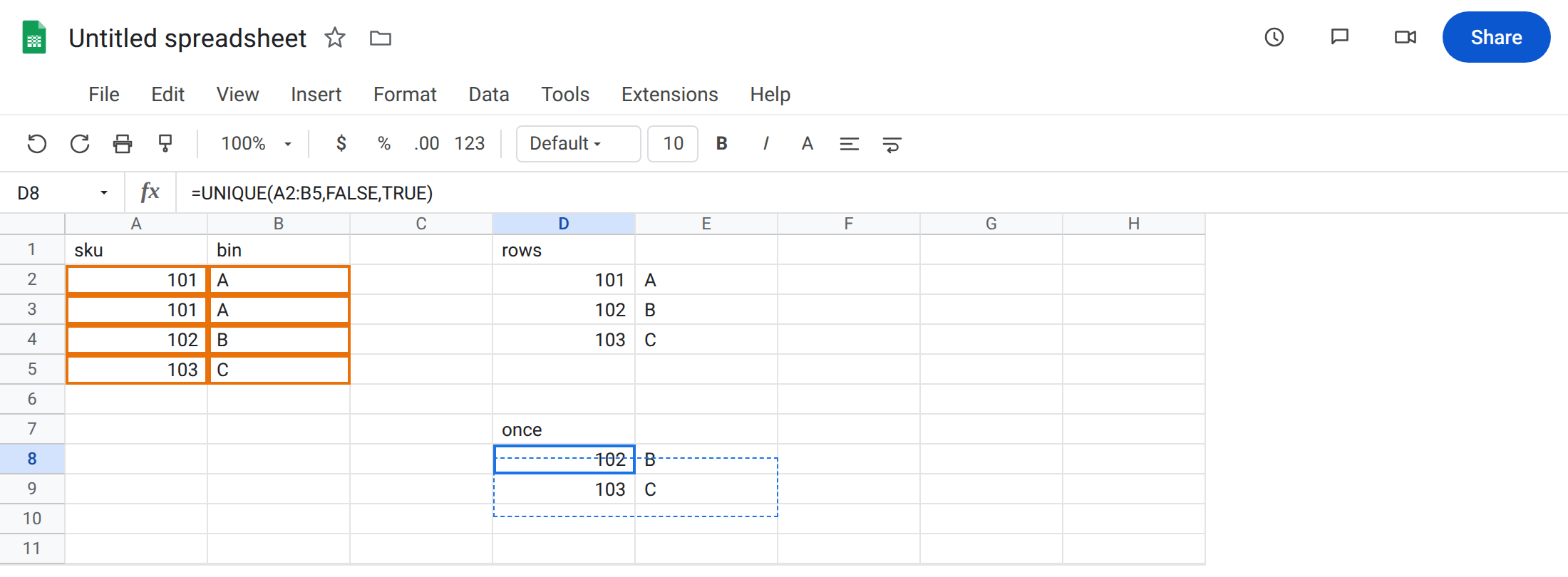
exactly_once drops the duplicate sku. In D7 type once. Leave D8:E9 empty. In D8 enter =UNIQUE(A2:B5,FALSE,TRUE). The spill is 102/B and 103/C only. 101/A appeared twice, so it is gone. Not an error. The “unique list” you wanted is D2, not D8.
by_col on a vertical list looks “wrong.” In G1 type by_col. Leave G2:J3 empty. In G2 enter =UNIQUE(A1:B5,TRUE). TRUE compares columns. You get a wide result: columns that are not duplicates of each other. sku and bin are different columns, so both stay — often as a two-column spill or a transposed-looking unique. It is not a distinct-sku list. Leave G2 as that spill.
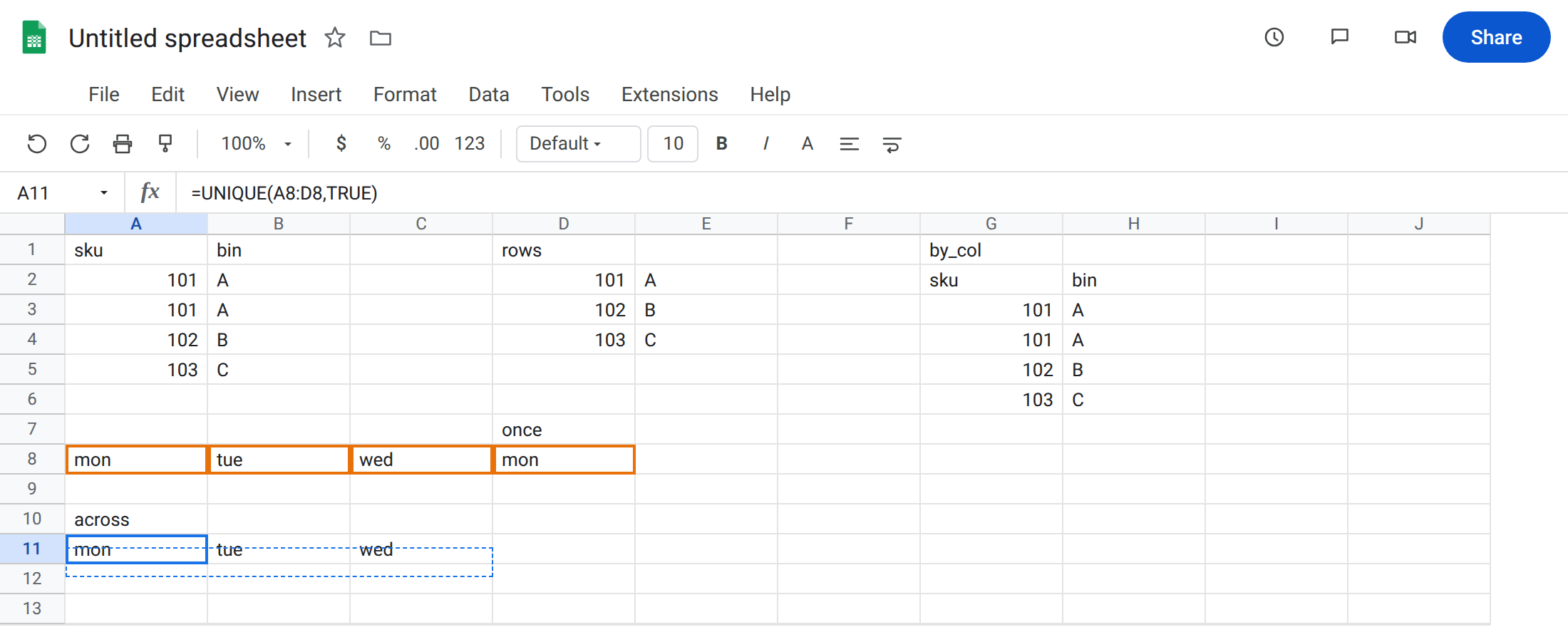
by_col that actually matches the layout. In A8 type mon, B8 tue, C8 wed, D8 mon. A morning header typed across a row, with mon twice. In A10 type across. Leave A11:C11 empty. In A11 enter =UNIQUE(A8:D8,TRUE). The spill is mon, tue, wed across a row. by_col TRUE is the right axis for a row of labels. =UNIQUE(A8:D8) without TRUE treats that row as one row (already unique as a tuple) and does not strip the second mon.
exactly_once on that header. In A13 enter =UNIQUE(A8:D8,TRUE,TRUE). mon appeared twice, so it drops. Spill is tue, wed.
Leave D8 as the “missing 101” surprise. Leave D2 as the ordinary distinct rows.
What is actually wrong
Section titled “What is actually wrong”- Second argument
TRUEis axis, not “strict unique.” Vertical skus wantFALSEor omitted. Horizontal labels wantTRUE. - Third argument
TRUEis frequency = 1, not “distinct.” Anything that appears two or more times is removed entirely. D8 is that filter. D2 is the distinct list. UNIQUEof a 2-column table compares whole rows.101/Atwice is one unique row.101/Aand101/Zwould both stay on D2 because the rows differ.exactly_oncestill drops both if you needed “sku 101 never repeats.”#REF!under UNIQUE is occupancy. If D2 were blocked by a value in D3, that is UNIQUE overwrite. This page’s surprises return real spills.
This is not SORTN ties mode 2 (dedupe after sort). See SORTN n / ties.
This is not FILTER no match. See FILTER no match. D8 is not #N/A; the flag dropped 101.
Leave D8 and G2 as the surprising spills so you can compare.
Distinct rows, keep 101 once. Keep D2: =UNIQUE(A2:B5). Sort it with =SORT(UNIQUE(A2:B5)) if you need order. That is still not exactly_once.
Find rows that appear once (on purpose). Then D8 is correct: =UNIQUE(A2:B5,FALSE,TRUE). Use it for orphan skus, not for a dropdown list.
Match the axis. Headers in a row: =UNIQUE(A8:D8,TRUE). Skus in a column: omit by_col or pass FALSE.
Do not wrap D8 in IFNA looking for the missing 101. It did not miss. The flag dropped it. See IFERROR vs IFNA.
If 101 vanished and the formula shows a third TRUE, that is exactly_once. If a column list spilled across instead of down, by_col is TRUE on a vertical range.
Distinct list vs appears-once vs spill #REF!
Section titled “Distinct list vs appears-once vs spill #REF!”Distinct list = default UNIQUE (D2). Each value appears in the output once, even if it appeared many times in the source.
Appears-once = third argument TRUE (D8). Multiples disappear.
Spill #REF! = a neighbor is filled. Clear it or move the formula. See SORT / UNIQUE spill. Axis and frequency flags never fix an occupied cell.