

Fix BYCOL LAMBDA errors in Google Sheets (array return or wrong arity)
Updated
BYCOL runs a LAMBDA once per column and must get one value back each time. The results spill across a row: one cell per input column. If the lambda returns the column, a FILTER, or any other array, the cell is #N/A (or #VALUE!) with Single value expected. Nested array results are not supported. If the lambda lists two names, the tooltip is Wrong number of arguments to LAMBDA. BYCOL only passes the column.
This page is BYCOL shape and arity. It is not BYROW / MAP LAMBDA (one scalar per row, spilling down). It is not MAKEARRAY LAMBDA (two index names, no source block). Keep the Google Sheets UI in English. Helper names stay English: LAMBDA, BYCOL.
Recreate it on a blank sheet
Section titled “Recreate it on a blank sheet”- Open a blank spreadsheet. In A1 type
mon, B1tue, C1wed. A22, B22, C21. A30, B34, C33. A45, B41, C41. Three day columns. The headers are not inside the numeric block.
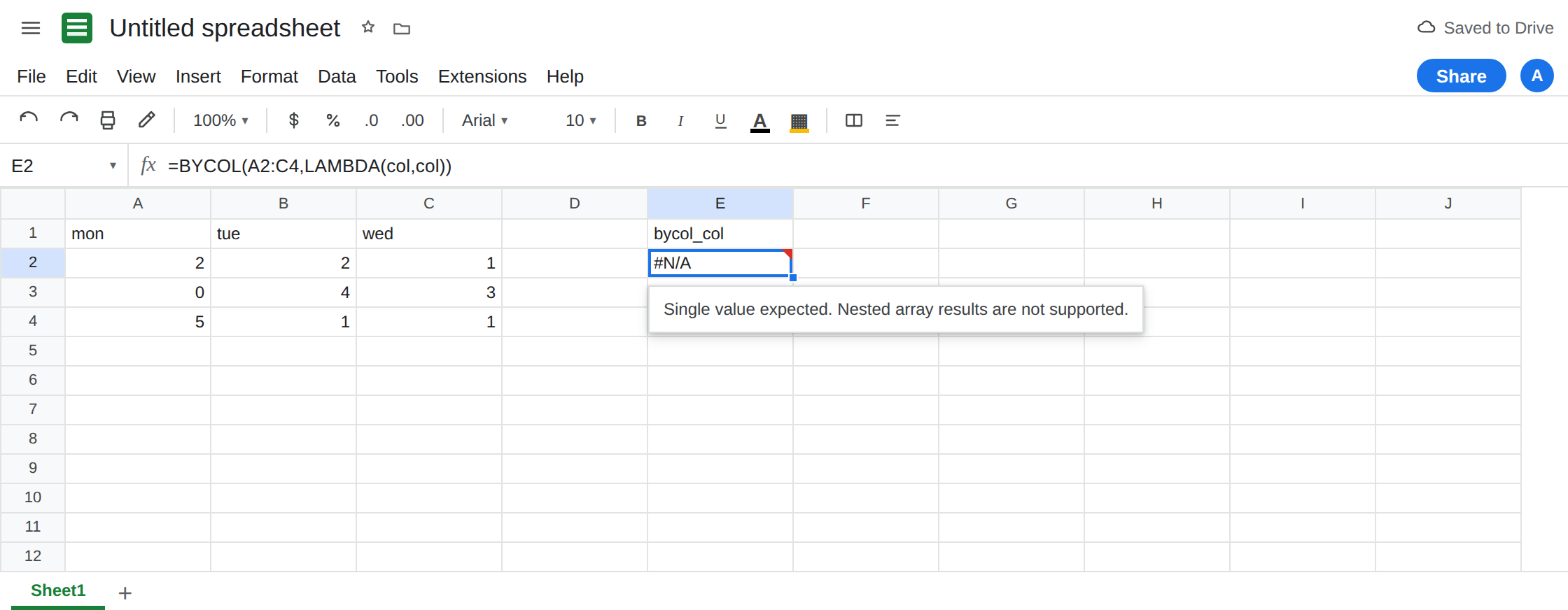
Lambda returning the column. In E1 type bycol_col. In E2 enter =BYCOL(A2:C4,LAMBDA(col,col)). The cell shows #N/A or #VALUE!. The tooltip is Single value expected. Nested array results are not supported. col is already three cells tall. Returning col asks each output cell to become a column. Leave E2 broken.
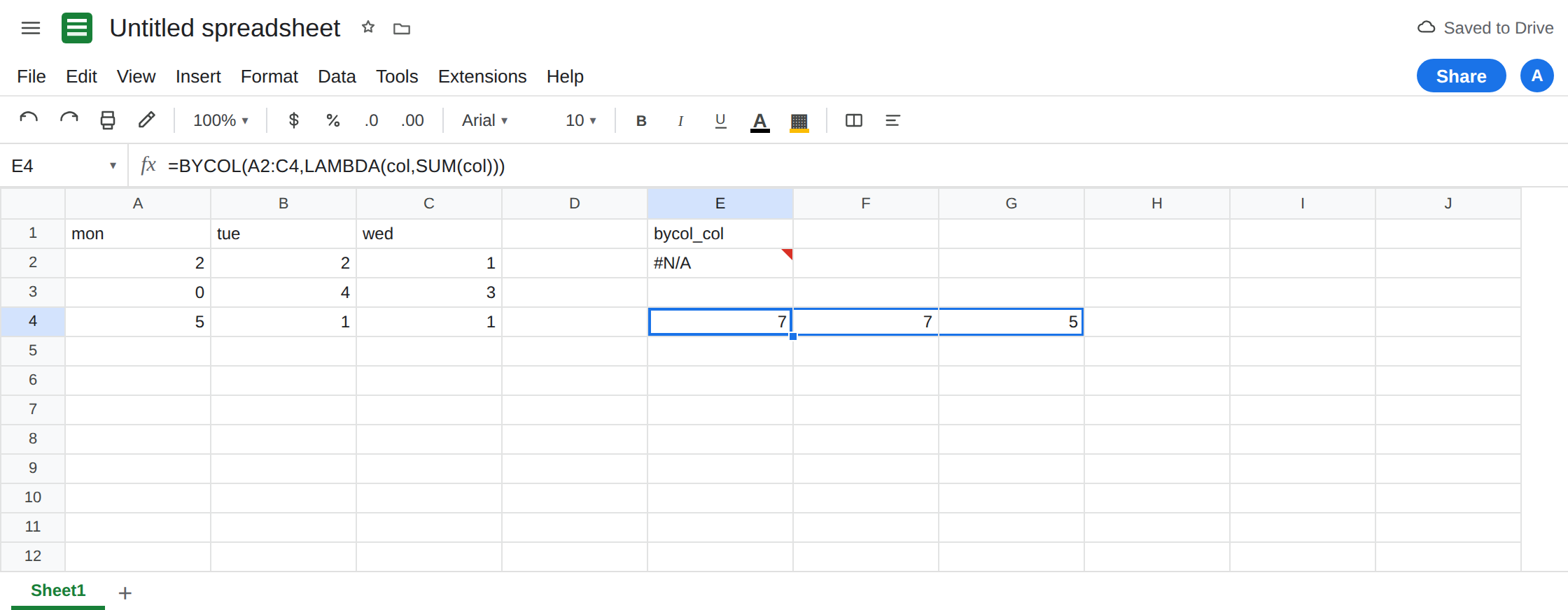
One number per column. In E4 enter =BYCOL(A2:C4,LAMBDA(col,SUM(col))). The spill is a row: E4 7, F4 7, G4 5 (2+0+5, 2+4+1, 1+3+1). That row is the control. BYCOL did not spill down the way BYROW does.
Two names. In E6 type two_names. In E7 enter =BYCOL(A2:C4,LAMBDA(a,b,SUM(a))). The cell shows #N/A. The tooltip is Wrong number of arguments to LAMBDA. Expected 2 arguments, but got 3 arguments. Sheets counts the names plus the expression. BYCOL supplies one array, so the lambda is name + expression. A second name is the extra argument. Leave E7 broken. This is the opposite count from MAKEARRAY, which wants two names.
A row lambda copied onto BYCOL. In E9 enter =BYCOL(A2:C4,LAMBDA(row,SUM(row))). The name row is legal. Names are labels. This one still has one name, so it sums columns, not rows. The spill matches E4. The word row did not make BYCOL into BYROW. In A6 enter =BYROW(A2:C4,LAMBDA(row,SUM(row))). That spills 5, 7, 7 down from A6. Same numbers, other axis. That page is BYROW / MAP LAMBDA.
Scalar lambda, blocked spill. In I1 type keep. Leave I4 empty. In H4 enter =BYCOL(A2:C4,LAMBDA(col,SUM(col))). The row needs H4:J4. I4 is occupied. H4 shows #REF!. The tooltip names I4. The lambda was legal. The landing row was not. Leave H4 broken.
Leave E2 and E7 broken. Leave E4 as 7, 7, 5.
What is actually wrong
Section titled “What is actually wrong”BYCOLcollapses each column to a scalar, then places those scalars in a row.LAMBDA(col,col)hands the column back. Nested arrays are refused.SUM(col),AVERAGE(col),INDEX(col,1),COUNT(col)each return one value.- Arity is one name. The error text “expected 2 arguments, but got 3” is about
LAMBDA, not aboutBYCOLneeding another range. People add a second name becauseMAKEARRAYandMAPof two arrays taught them to. Those functions are different contracts. - The result is horizontal. A
#REF!one cell to the right is a spill block, the same family as SORT / UNIQUE spill. E2 never got that far. E2 failed inside the lambda. - Blank hours:
SUMof a blank column is0, not an error. That zero is the lambda’s math, not a nested array. Return""whenCOUNT(col)=0if a blank total should look blank. BYCOLon a single row (A2:C2) still returns one row of scalars. It does not echo the row unless you illegallyreturnthe row array.
This is not MAP over two ranges of different height. See BYROW / MAP LAMBDA. This is not Excel #CALC!. The Sheets cell is #N/A, #VALUE!, or #REF!.
Leave E2, E7, and H4 broken.
One name, one number. Keep E4: =BYCOL(A2:C4,LAMBDA(col,SUM(col))). If a column of blanks should stay blank, =BYCOL(A2:C4,LAMBDA(col,IF(COUNT(col)=0,"",SUM(col)))). The IF returns one text or one number, not the column.
Need each hour, not the total? Do not return col. Use TRANSPOSE if you want a row, or stay on the source block. Two outputs per column means two BYCOL formulas (a sum row and an average row), not {SUM(col), AVERAGE(col)} inside one lambda. That pair is E2’s error again.
Clear the cell to the right before a three-column BYCOL, or start the formula where I4:K4 is empty. Do not wrap E2 in IFERROR. You would hide a shape bug and publish a blank instead of 7, 7, 5. See IFERROR vs IFNA.
If BYCOL says Single value expected, the lambda returned an array. If it says Wrong number of arguments, count names: there should be one. If it says the array result was not expanded, the totals are fine and the next cell is occupied.