

QUERY format patterns use a dot decimal, and the formatted column comes back as text
Updated
QUERY can end with a format clause. The pattern uses . as the decimal placeholder and , as the thousands placeholder, the same codes a United States TEXT format uses. format B '#,##0.00' on 1234.5 displays 1,234.50. That cell is text. Adding 1 is #VALUE!. A comma decimal inside the query language is a different failure: where B > 10,5 is #VALUE! and the tooltip is Unable to parse query string. File → Settings → Locale changes how B2 looks. It does not turn 10,5 into a legal QUERY number, and it does not make '0,00' mean “two decimal places.”
Numeric literals, quotes, and date 'yyyy-mm-dd' are QUERY parse string and QUERY date literal. The spreadsheet’s own decimal mark is decimal comma locale. TEXT patterns on a United States sheet are TEXT format code. Keep the Google Sheets UI in English. Sheet Error is an independent formula-error library, not a Google product.
Recreate it on a blank sheet
Section titled “Recreate it on a blank sheet”- Open a blank spreadsheet. Leave the locale on United States so the formulas below use commas between arguments. If this file is already on a semicolon locale, the argument separators follow locale semicolons, and the characters inside the query string stay as written here. In A1 type
sku, B1amt. A2101. In B2 type1234.5as a number. A3102. In B3 type10as a number.
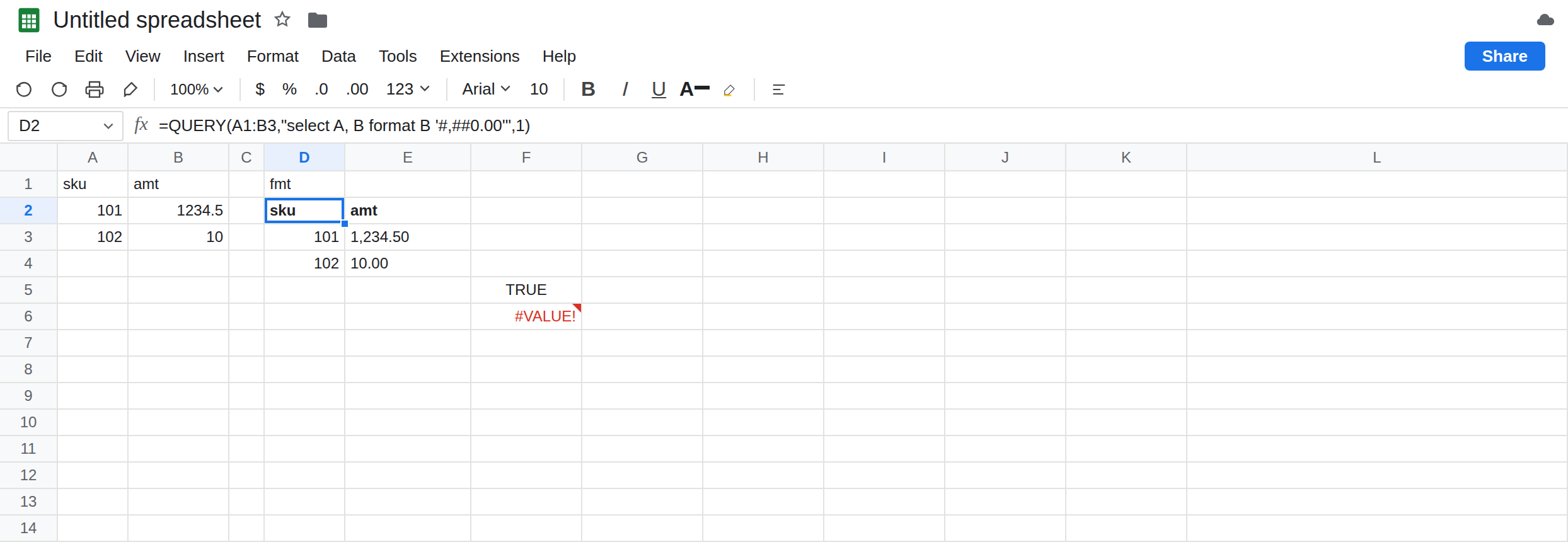
A format that works, and becomes text. In D1 type fmt. In D2 enter =QUERY(A1:B3,"select A, B format B '#,##0.00'",1). The spill headers are sku and amt. Under them: 101 and 1,234.50, then 102 and 10.00. In F5 enter =ISTEXT(E3) if 1,234.50 landed in E3; put the formula on the cell that shows 1,234.50. It is TRUE. In F6 enter =E3+1 pointed at that same cell. F6 is #VALUE!. The amount is no longer a number. B2 still is. =B2+1 is 1235.5. Leave the QUERY spill formatted, and leave F6 broken.
A comma where a decimal belongs. In D8 enter =QUERY(A1:B3,"select A where B > 10,5",1). D8 is #VALUE!. The tooltip starts Unable to parse query string. The comma is not a decimal in the query language. It is read as a break in the statement. B2 can display with a comma if you later change the locale; the characters inside the quotes do not update. Leave D8 broken.
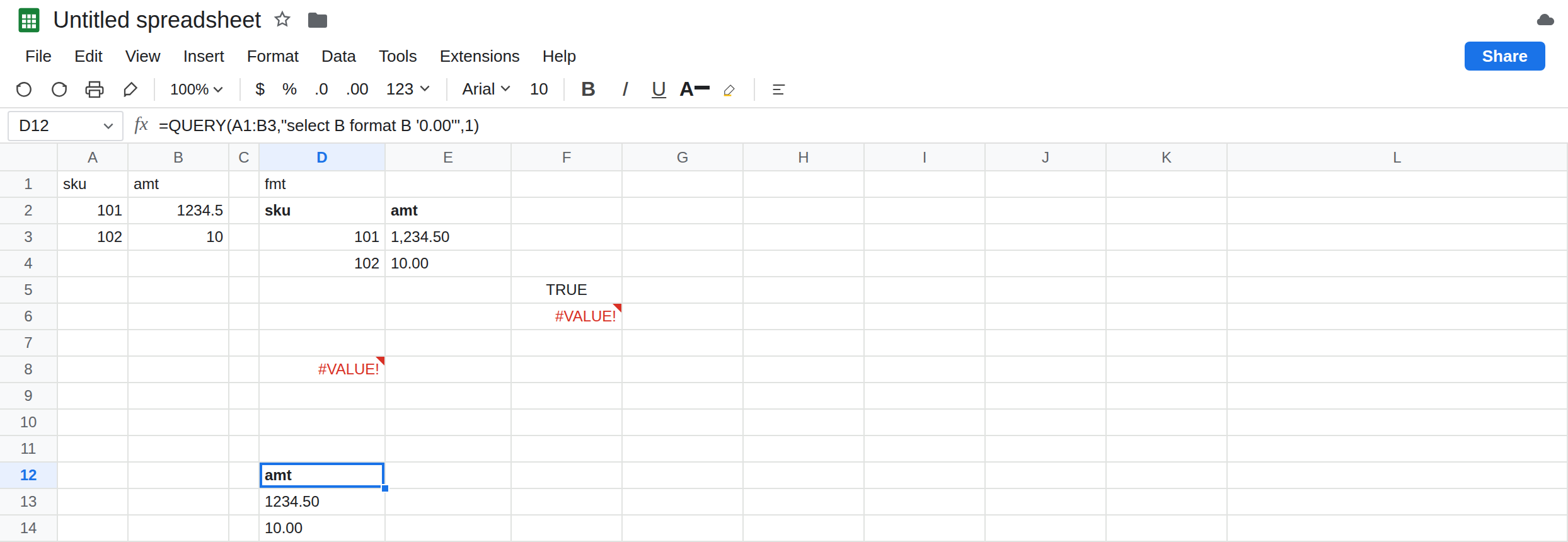
A pattern copied from a comma-decimal habit. In D10 enter =QUERY(A1:B3,"select B format B '0,00'",1). '0,00' is not the German way to ask QUERY for two decimal places. The placeholder for the decimal is still ., as in the control '0.00'. In D12 enter =QUERY(A1:B3,"select B format B '0.00'",1). D12 shows 1234.50 and 10.00 as text. Compare D10’s spill to D12. D10 is not that control, and it is not the display 1.234,50. Leave D10 beside D12. If D10’s tooltip is Unable to parse query string instead of a spill, the pattern was rejected; the fix is still the dot placeholder, not a locale change. See QUERY parse string.
Leave F6 as #VALUE!. Leave D8 as the parse error. Leave D12 as 1234.50. SUM of the formatted spill is not SUM(B2:B3). SUM ignores that text. The format clause changed the type of the result, not the math inside QUERY.
What is actually wrong
Section titled “What is actually wrong”- The
formatclause runs after the query. It applies a pattern and returns text for that column. Headers,where, andgroup byalready used the real numbers. The spill you see is the display string. DownstreamSUM,VLOOKUPof a number, or+1does not see1234.5. - Pattern codes inside the quotes do not follow File → Settings → Locale.
.is the decimal placeholder.,is thousands. That is the same convention as TEXT format code on a United States sheet, and QUERY keeps it even when the file’s locale would write1.234,50in an ordinary number cell.'0,00'does not mean two decimals. - Numeric literals in the query string also use
..10.5is the number.10,5does not parse. Concatenating a cell on a comma-decimal locale injects a comma:"where B > "&B2becomeswhere B > 10,5and you get D8’s tooltip. See decimal comma locale. The format pattern and the literal have the same dot rule for different reasons: one is a format code, one is a QUERY number. - A missing quote around the pattern is QUERY parse string. This recreate uses a sheet range, so the column is
B. OnIMPORTRANGEthe format clause saysCol2. MixingBinto an import is Col1 vs A.
This is not QUERY mixed dates. Column B is numeric. year() is not involved.
This is not VALUE() locale until you try to parse the formatted text back. The #VALUE! on F6 is ordinary addition on text. See wrong type.
Leave D8 and D10 as the mismatched queries. Leave F6 broken.
Format for display, calculate on the number. Keep D12 if you need two decimals as text in a report. Keep SUM(B2:B3) if you need a total that is still a number. Do not SUM the QUERY spill after format.
Decimals inside the statement use a dot. The filter is where B > 10.5. In H8 enter =QUERY(A1:B3,"select A where B > 10.5",1). H8 returns 101 (and the header), because 1234.5 is greater than 10.5 and 10 is not. If the threshold lives in a cell on a comma-decimal file, do not concatenate the localized display. Pass the comparison with a dot literal, or build the number with TEXT only after you know that pattern emits a dot.
The header count is a different switch. See QUERY headers. It is not what turned 1,234.50 into text.
Do not wrap D8 in IFNA. The error is #VALUE! from the parser. See IFERROR vs IFNA. Changing locale to make B2 show a comma will not repair the quotes.
If a formatted QUERY cell is text, drop format for any column you still want to add. If the tooltip is Unable to parse query string and the number contains a comma, switch the literal to a dot. If the pattern was '0,00', use '0.00'. If the column letter is NO_COLUMN on an import, switch to Col1 before you debug the pattern.
format text vs a comma literal
Section titled “format text vs a comma literal”format B '#,##0.00' shows 1,234.50 and +1 is #VALUE!. format B '0.00' shows 1234.50 as text. where B > 10,5 does not parse. where B > 10.5 returns sku 101. '0,00' is not two decimal places. The query string keeps the dot.