

Explore can answer with column names you already renamed
Updated
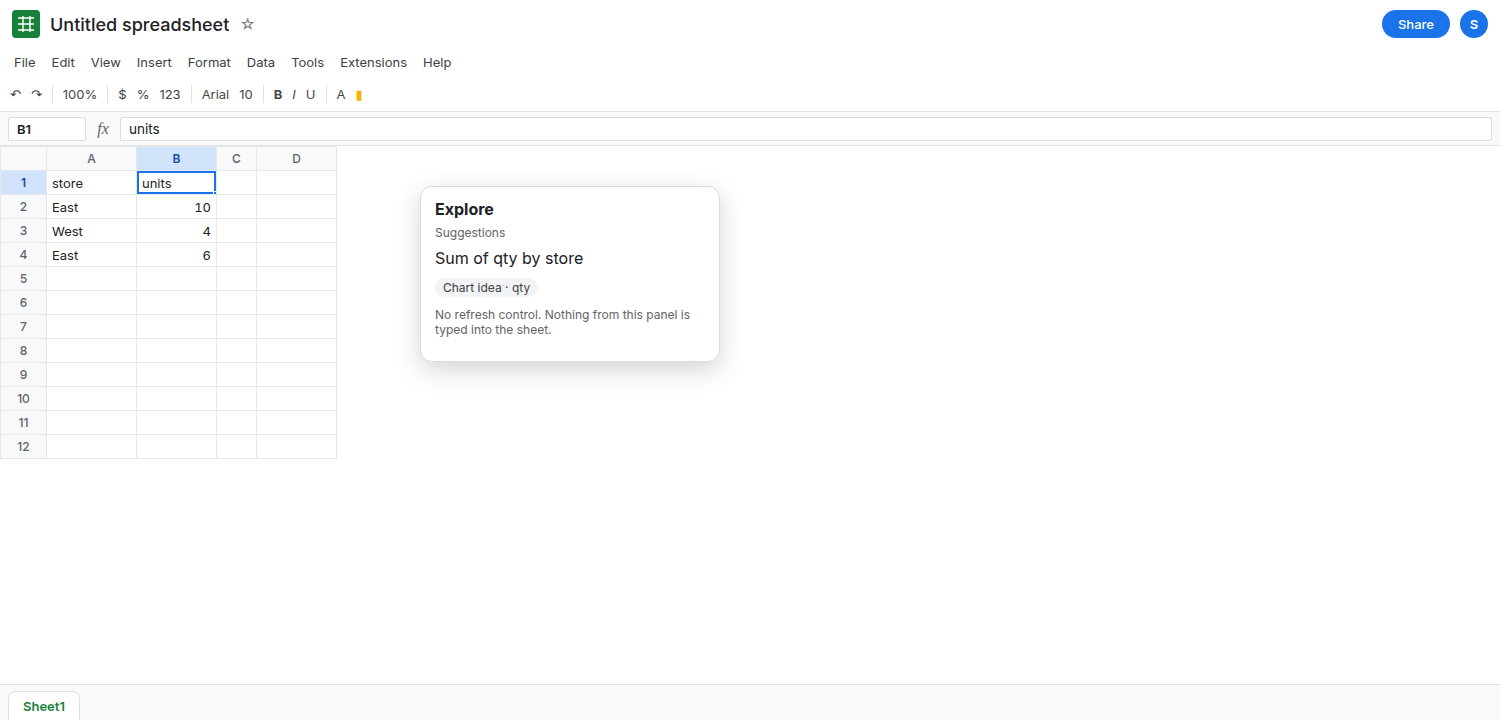
Explore is the Sheets analysis panel (the control at the bottom of the sheet on accounts that still have it). It suggests charts and answers questions from a pass over the grid. That pass can keep a column name you have since changed. You rename qty to units. An answer or a suggested chart still says qty. The header cell is already units. The panel is not a live formula, and this page cannot promise that closing it, editing a cell, or waiting will drop the old name. On many accounts the panel is missing, limited, or replaced by the Gemini side panel. A missing button is not a stale answer. It is availability.
Ask Gemini’s own gates are Gemini side panel. A formula that reads the header you have now is QUERY or a pivot. Sheet Error is not a Google product. This page will not paste a sample Explore answer as if it had run on your file.
Recreate it on a blank sheet
Section titled “Recreate it on a blank sheet”- Open a blank spreadsheet in the account you actually use. Desktop browser. Google Sheets UI in English. In A1 type
store, B1qty. A2East, B210. A3West, B34. A4East, B46.
Find the panel, and stop if it is not there. Look at the bottom of the sheet for Explore, and at the side for Ask Gemini. If neither control exists, stop. Do not type =EXPLORE() — that is not a function, and #NAME? is unknown function. A missing Explore button is plan, admin, region, or a product that no longer shows that panel on this account. Leave the sheet as the three rows. That is a complete recreate for “there is nothing to refresh.”
If Explore is on screen, open it and read whatever questions or chart ideas it offers. You are checking names, not following a suggestion into a business decision. Note whether it says qty. Then change B1 from qty to units. Do not edit B2:B4. Open Explore again, or look at the suggestion that was already open. It may still say qty. It may say units. It may show a chart title from the first pass. All three are this page. There is no control labeled refresh cache that this article can tell you to press, because the panel does not publish one that works the same way on every account. Leave B1 as units. Leave the panel’s wording as you found it. Do not screenshot an answer into a cell and treat the paste as live.
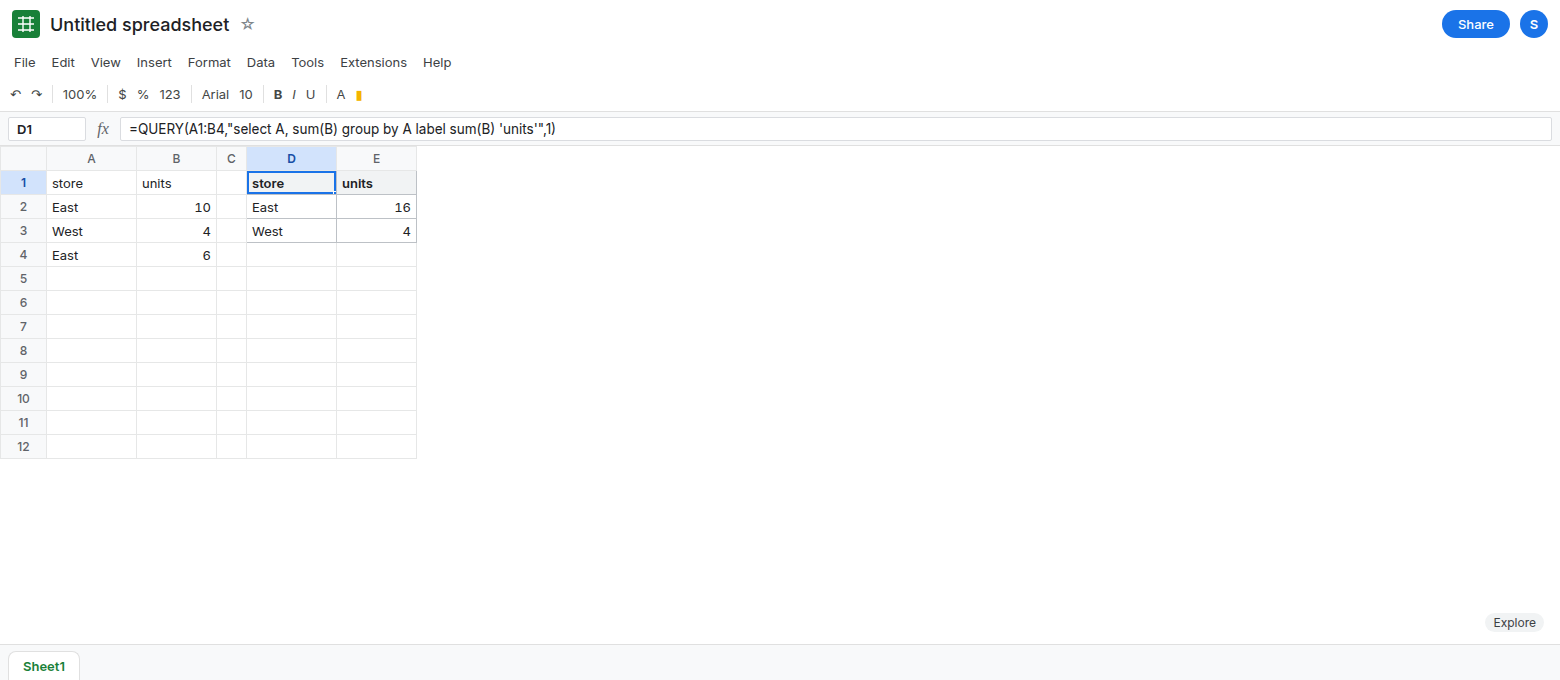
A formula sees the new header. In D1 enter =QUERY(A1:B4,"select A, sum(B) group by A label sum(B) 'units'",1). The spill header you labeled is units. The totals are East 16 and West 4. QUERY did not consult Explore. The label is the current string in the formula. If you had written 'qty' in the label, the header would say qty because you typed that, not because of a cache. Leave D1 as units.
A pivot’s field list uses the headers on the range now. Change B1, open the pivot editor, and the value field follows the new name or asks you to pick the column again. That refresh is the pivot’s range, not Explore. See pivot not refreshing when the numbers are old because the range missed a row. Old numbers and an old suggested name are different problems.
What is actually wrong
Section titled “What is actually wrong”- Explore’s suggestions are a product surface. They are computed when the panel looks at the sheet, and a rename does not edit sentences it already produced. The cell B1 is the only header
QUERYwill see. The panel can lag that cell, and it can also be unavailable. This page will not call the lag a bug you can clear with a documented button. - Closing the panel and opening it, or editing an unrelated cell, sometimes coincides with a new suggestion and sometimes repeats
qty. If it repeats, stop retrying. More edits do not obligate a new analysis. If the button is gone, retries will not bring the old Explore back. - Gemini in the side panel is a different surface with its own quota and admin gates. A stale Explore name is not fixed by Ask Gemini, and a missing Gemini icon is not an Explore cache. See Gemini side panel.
- Suggested charts can insert a real chart that copied the old title. A chart title is text on the chart. Edit the title in the chart editor, or delete the chart and build one from
A1:B4after the rename. The title will not track B1 by itself.
This is not QUERY group header. D1’s header is whatever the label clause says.
Leave B1 as units. Leave Explore alone if the old name is still on screen.
Trust the grid and the formula. Keep D1: =QUERY(A1:B4,"select A, sum(B) group by A label sum(B) 'units'",1). East 16, West 4, header units. If you insert a pivot, set the value to the column that is now units and read the pivot, not the Explore card.
Delete a suggestion you already inserted if its title still says qty. Insert → Chart from A1:B4 picks up units as the series name from the current header. Customize → Chart & axis titles if a title was typed by hand. A hand-typed title does not follow renames. That is a chart setting, not a cache to clear.
Do not wrap D1 in a call to Explore. There is no function to call. Do not paste an Explore paragraph into the sheet as a value you will refresh later. It will not refresh.
If the panel still says qty after B1 says units, the suggestion is stale and this page has no guaranteed refresh. Use QUERY or a pivot. If the panel is not on the sheet, you are on availability, the same kind of limit as the Gemini page, and renaming a column will not create the button.