

Fix IFS #N/A in Google Sheets (no condition was true)
Updated
IFS walks condition/value pairs and returns the value for the first TRUE condition. If none of the conditions are TRUE, there is no value to return. Sheets shows #N/A. The formula ran. You did not give it a default branch.
This page is IFS with no matching condition. It is not IFERROR vs IFNA (wrappers around some other error). It is not FILTER no match (zero rows, or mismatched heights). It is not a lookup miss — see what #N/A means only if the formula is VLOOKUP / XLOOKUP / MATCH.
Recreate it on a blank sheet
Section titled “Recreate it on a blank sheet”- Open a blank spreadsheet. In A1 type
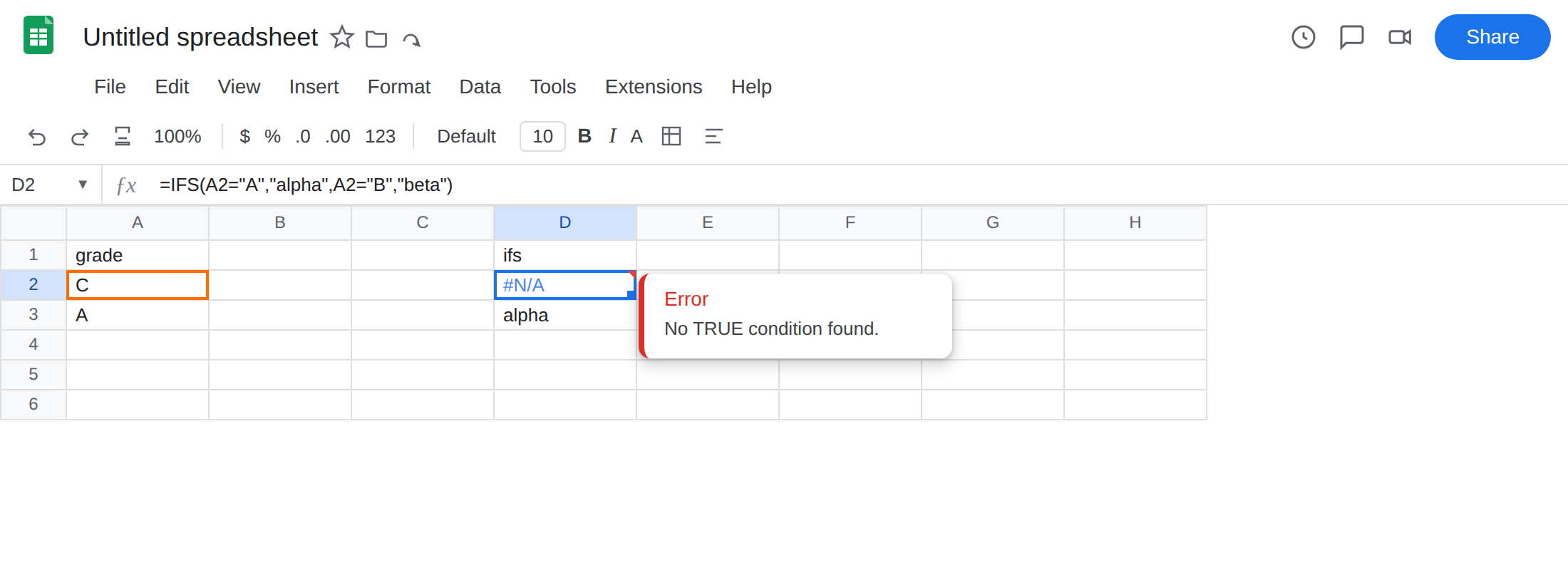
grade. In A2 typeC. D1ifs. - In D2 enter
=IFS(A2="A","alpha",A2="B","beta"). The cell shows#N/A. Both conditions are FALSE.Cis notAand notB. There is no third pair. Leave D2 broken.
-
A branch that hits. In A3 type
A. In D3 enter=IFS(A3="A","alpha",A3="B","beta"). The cell showsalpha. Same formula shape, a condition that is TRUE. That row is the control:IFSworks when a pair matches. -
Every listed condition can be FALSE even when the cell is not blank. In A4 type
B. In D4 enter the same two-pairIFSagainst A4. The cell showsbeta. PutCin A4 and D4 becomes#N/Aagain if you copied D2 down. Keep D2 as the stable miss onC.
Confirm. Type A in A2. D2 becomes alpha. Type B. D2 becomes beta. Type C. #N/A returns. If toggling A2 among A/B/C is the only thing that changes D2, the function is working and C has no branch.
IF with an else is not this error. In F1 type if_else. In F2 enter =IF(A2="A","alpha",IF(A2="B","beta","other")). The cell shows other for C. Nested IF has an else. IFS does not, unless you add one. Leave F2 as the contrast. Do not switch the whole sheet to nested IF until you have seen the TRUE default on IFS.
What is actually wrong
Section titled “What is actually wrong”IFS(cond1, val1, cond2, val2, …)stops at the first TRUE. If everycondis FALSE, Sheets has no val to emit.#N/Ais that hole. It is not a lookup into a table. Nothing is missing from column A. A2 isCon purpose.- A blank A2 is the same hole if you only tested
"A"and"B". Blank is not"A". You still need a default, or a condition that treats blank as its own branch (A2="",TRUE). - Conditions are boolean.
IFS(A2,"alpha")is not “if A2 has text.” A non-zero number is TRUE; the textCcoerced in a boolean context is not a substitute forA2="C". Stick to explicit comparisons on this recreate. IFSdoes not mean “if any error, skip.” A#N/Ainside a condition still poisons the call. That is a different bug. This page is all FALSE, no error in the inputs.
This is not FILTER(...,A2:A4="C") with zero rows. FILTER #N/A is an empty spill or a size mismatch. See FILTER no match. D2 is one cell, not a spill.
This is not a wrapper question. Wrapping D2 in IFNA will print none and hide the missing branch. Wrapping in IFERROR will also hide a #NAME? from IFSS. See IFERROR vs IFNA. The fix is a final TRUE pair, not a wrapper.
This is not XLOOKUP / MATCH missing a key. See XLOOKUP #N/A and MATCH #N/A.
Leave D2 as the two-pair IFS so #N/A stays on the sheet.
Add a final TRUE default. In D6 enter =IFS(A2="A","alpha",A2="B","beta",TRUE,"other"). The cell shows other. TRUE is always true, so it runs only when every earlier condition was FALSE. That is the else branch IFS does not have on its own.
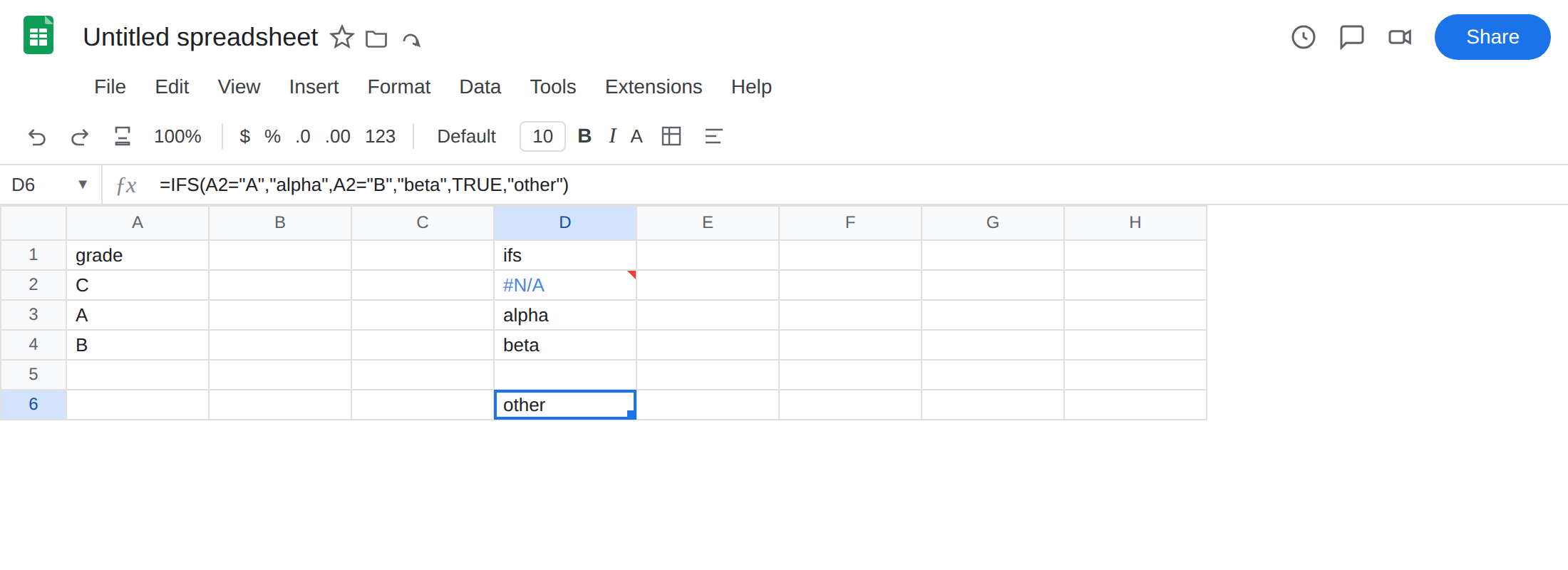
Put TRUE last. =IFS(TRUE,"other",A2="A","alpha") always returns other. The first TRUE wins. The default is the last pair.
When every input must match a list. Do not add TRUE,"other". Fix A2. If C is invalid data, #N/A is a signal. Keep D2. Add the default only when an unmatched value is a valid business result (unknown grade → other).
SWITCH is an alternative when you are testing one cell against constants. =SWITCH(A2,"A","alpha","B","beta","other") returns other for C. The last argument is the default. Use IFS when conditions are not a single cell’s equality (A2>=90, AND(...)).
Do not wrap D2 in IFNA and call the grades complete. You still have no branch for C. Add TRUE, or add A2="C","gamma", or reject C in the input.
If IFS is #N/A and the conditions you can see are all FALSE, you did not provide a default. The last pair should be TRUE, fallback when a fallback is allowed.