

A Gemini formula suggestion uses an Excel-only name and shows #NAME?
Updated
Ask Gemini and Help me organize are a side panel, not a cell function. On an account that has the panel, a formula suggestion can still be an Excel formula. Sheets then shows #NAME? with Unknown function, or a parse error, because that name or that # spill mark is not a Sheets formula. The suggestion being fluent does not make GROUPBY exist here.
Sheet Error is not a Google product. This page will not paste a model reply as a control. If the sparkle icon is missing, or the panel shows a quota, region, or admin banner, stop and read Gemini side panel. A cell named AI is AI() or Gemini(). This page starts when a formula has already been inserted and the cell is an error.
Recreate it on a blank sheet
Section titled “Recreate it on a blank sheet”- Open a blank spreadsheet. File → Settings → Locale → United States so arguments use commas. Keep the Google Sheets UI in English. In A1 type
store, B1qty. A2East, B210. A3West, B34. A4East, B46.
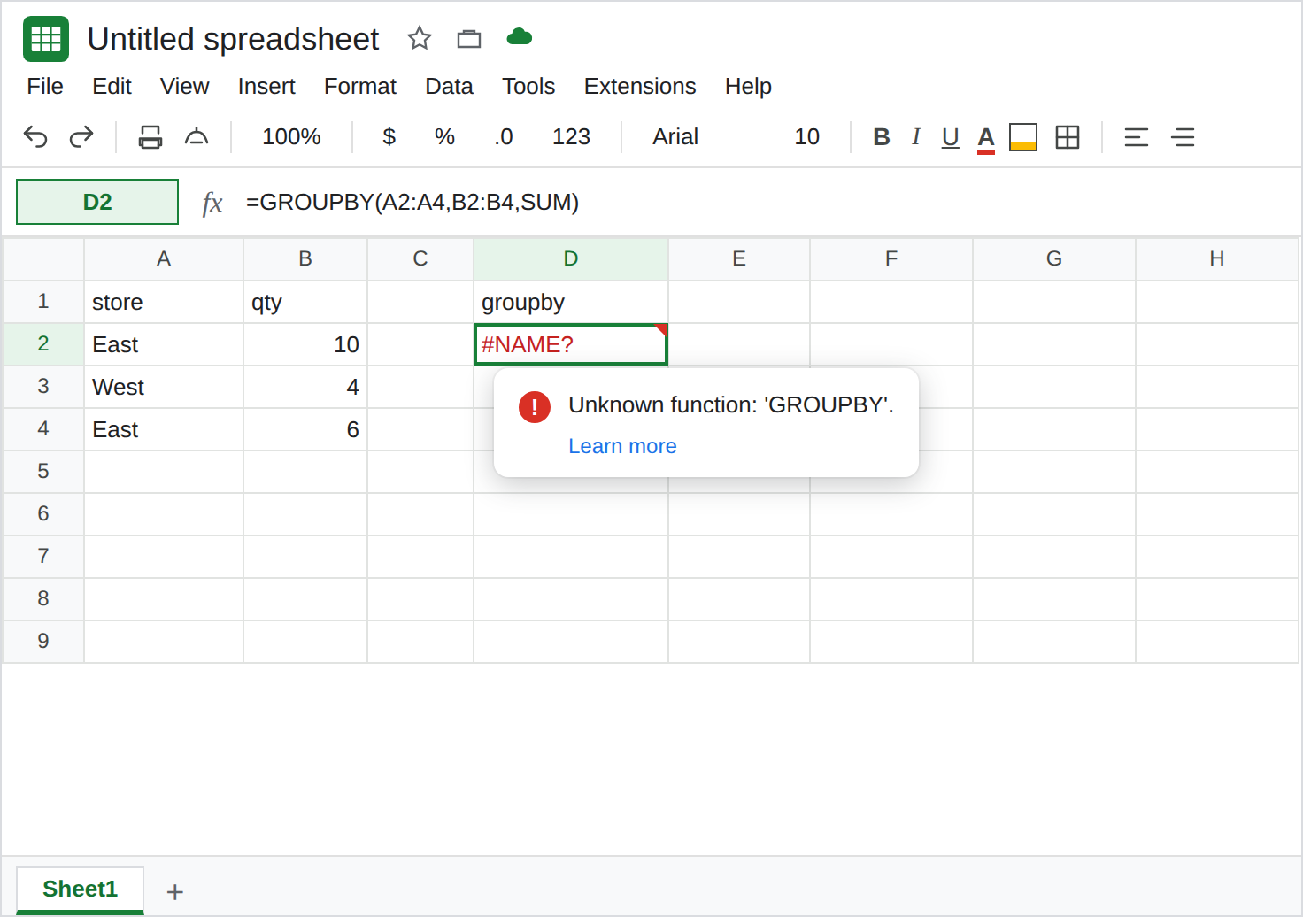
You do not need the panel to see the broken name. Suggestions that fail in Sheets often call a function Sheets does not have. In D1 type groupby. In D2 enter =GROUPBY(A2:A4,B2:B4,SUM). D2 is #NAME?. The tooltip is Unknown function: ‘GROUPBY’. East and West are on the sheet. SUM is real. GROUPBY is not a Sheets function. Leave D2 broken.
TAKE and DROP are the same family. In D4 type take. In D5 enter =TAKE(A2:B4,2). #NAME?. Tooltip: Unknown function: ‘TAKE’. In D7 enter =DROP(A2:B4,1). Unknown function: ‘DROP’. Leave both broken. Sheets has CHOOSEROWS and CHOOSECOLS. It does not turn TAKE into those.
A spill mark copied from Excel. In F1 type spill. In F2 enter =B2#. The cell errors. Sheets does not use Excel’s # spill operator. The tooltip is a parse error or #ERROR! / #NAME?, depending on how the character landed. Leave F2 broken. That operator is Excel spill to values.
Other names that produce the same tooltip. =PIVOTBY(A2:A4,A2:A4,B2:B4,SUM), =STOCKHISTORY("GOOG",DATE(2024,1,1)), =AGGREGATE(9,6,B2:B4), and =WEBSERVICE("https://example.com") are #NAME? on Sheets. You do not need one of each. D2 is enough to learn the tooltip. If a suggestion inserts one of those names, the repair is a Sheets function, not a regenerate that hopes the same name appears.
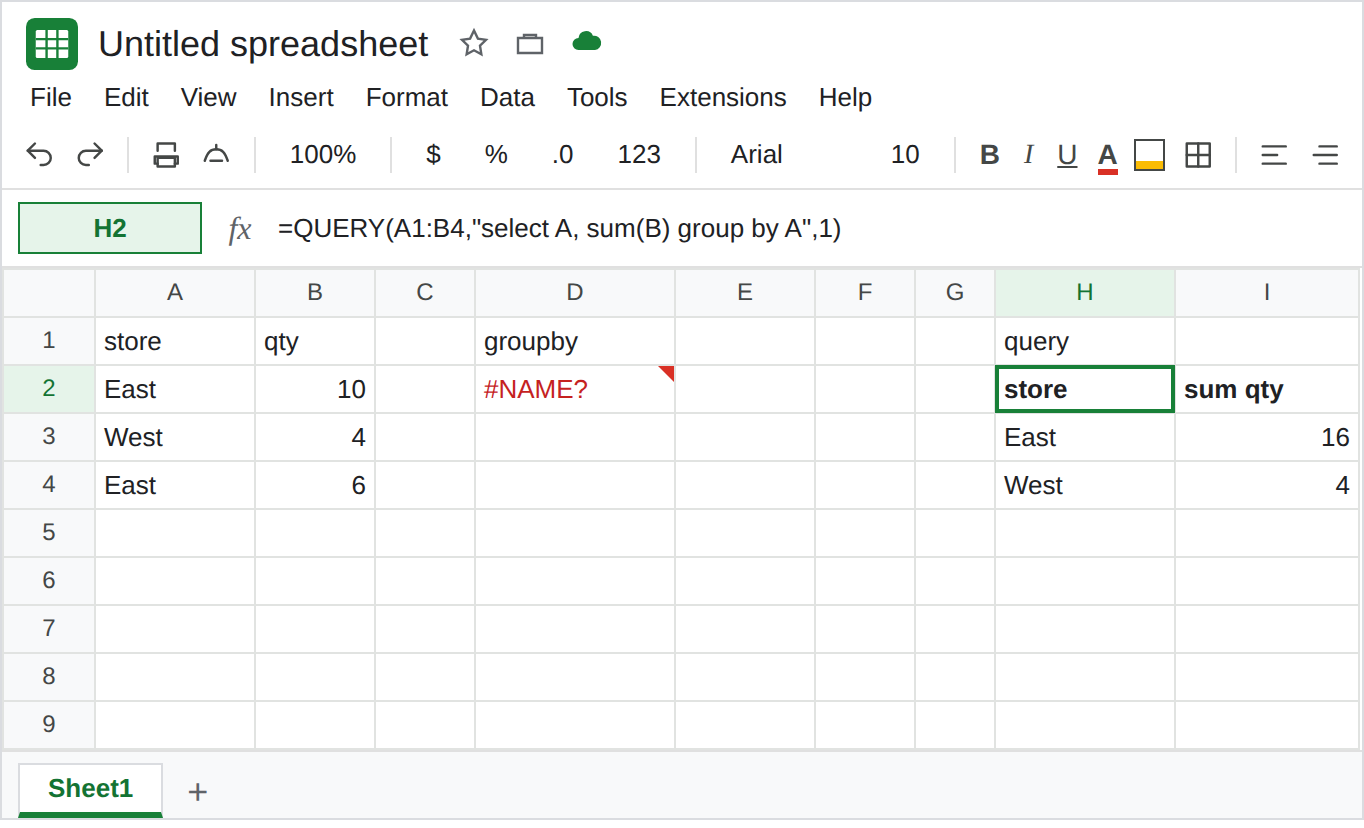
A Sheets formula that does this job. In H1 type query. In H2 enter =QUERY(A1:B4,"select A, sum(B) group by A",1). The spill is East 16 and West 4. That block is the control: grouping qty by store does not require GROUPBY.
The panel is optional for this recreate. If Ask Gemini is on the toolbar, you may ask it for a formula that totals qty by store. If it inserts QUERY or SUMIF, that suggestion can be legal. If it inserts GROUPBY or TAKE, you are looking at D2. If the icon is absent, do not wait for it. D2 already shows the failure. See Gemini side panel.
What is actually wrong
Section titled “What is actually wrong”#NAME?means Sheets has no function by that name.GROUPBY,PIVOTBY,TAKE,DROP,STOCKHISTORY,AGGREGATE, andWEBSERVICEare Excel names. The tooltip is the same family as unknown function (VLOKUP). Spelling them the way Excel spells them does not add them to Sheets.- A suggestion can mix a real function with an illegal one.
SUMinsideGROUPBY(...)does not rescue the outer name. The parser stops onGROUPBY. B2#is not “the spill of B2.” The#is Excel. Sheets dynamic arrays spill from the formula cell without that mark. See Excel spill to values.- Semicolons are a locale problem, not an Excel-name problem.
=SUM(B2;B3)on a United States locale is Formula parse error. See locale parse error. D2 used commas and still failed. The name is the bug. - Help me organize builds a table from a prompt. It is not required to emit
GROUPBY. A missing icon is availability, not a formula typo. See Gemini side panel.
Nothing here grants the panel. A colleague’s screenshot of a generated formula is not a function list for your file.
Leave D2, D5, D7, and F2 broken so the unknown names stay visible. Leave H2 as East 16 and West 4.
Replace the name with a Sheets function. Keep H2 for the group total. For the first two data rows, =CHOOSEROWS(A2:B4,1,2) spills East 10 and West 4. That is the job TAKE was aimed at. See CHOOSEROWS negative if the index itself is #REF!.
Read the inserted formula before you click Generate again. If the formula bar contains QUERY, FILTER, SUMIF, or CHOOSEROWS, test that formula. If it contains GROUPBY, TAKE, DROP, or a trailing #, the next prompt in the panel is not the repair. Type the Sheets function.
Do not wrap D2 in IFERROR. You would hide Unknown function and show a blank total. See IFERROR vs IFNA.
If the tooltip says Unknown function: ‘GROUPBY’ (or TAKE, DROP, PIVOTBY), use a Sheets function. If the panel never opened, the formula was never the missing piece. Neither outcome means the next account will get the same suggestion.