

IFERROR on a spill hides #DIV/0!, and IFNA only hides #N/A
Updated
A spill can hold #N/A and #DIV/0! in different rows. IFERROR around that spill turns both into the fallback. The column looks finished. IFNA turns only the #N/A rows into the fallback and leaves #DIV/0! on the sheet. Same grid, two wrappers, and only one of them still shows the broken divisor.
One cell at a time, that choice is IFERROR vs IFNA. IFERROR inside ARRAYFORMULA masking a whole rate column is ARRAYFORMULA IF mask. This page is the two wrappers on one spill that mixes both errors. Keep the Google Sheets UI in English.
Recreate it on a blank sheet
Section titled “Recreate it on a blank sheet”- Open a blank spreadsheet. In A1 type
units, B1hours, C1sku. A210, B22, C2101. A310, B30, C3999. A48, B44, C4102. In E1 typename. E2101, F2Widget. E3102, F3Gadget. There is no999.
A spill with both errors. In H1 type raw. In H2 enter =ARRAYFORMULA(IF(C2:C4="",,VLOOKUP(C2:C4,E2:F3,2,FALSE))). H2 is Widget. H3 is #N/A (sku 999). H4 is Gadget. In I2 enter =ARRAYFORMULA(A2:A4/B2:B4). I2 is 5. I3 is #DIV/0!. I4 is 2. Leave H3 and I3 broken. See divide by zero for I3 and what #N/A means for a miss you have confirmed.
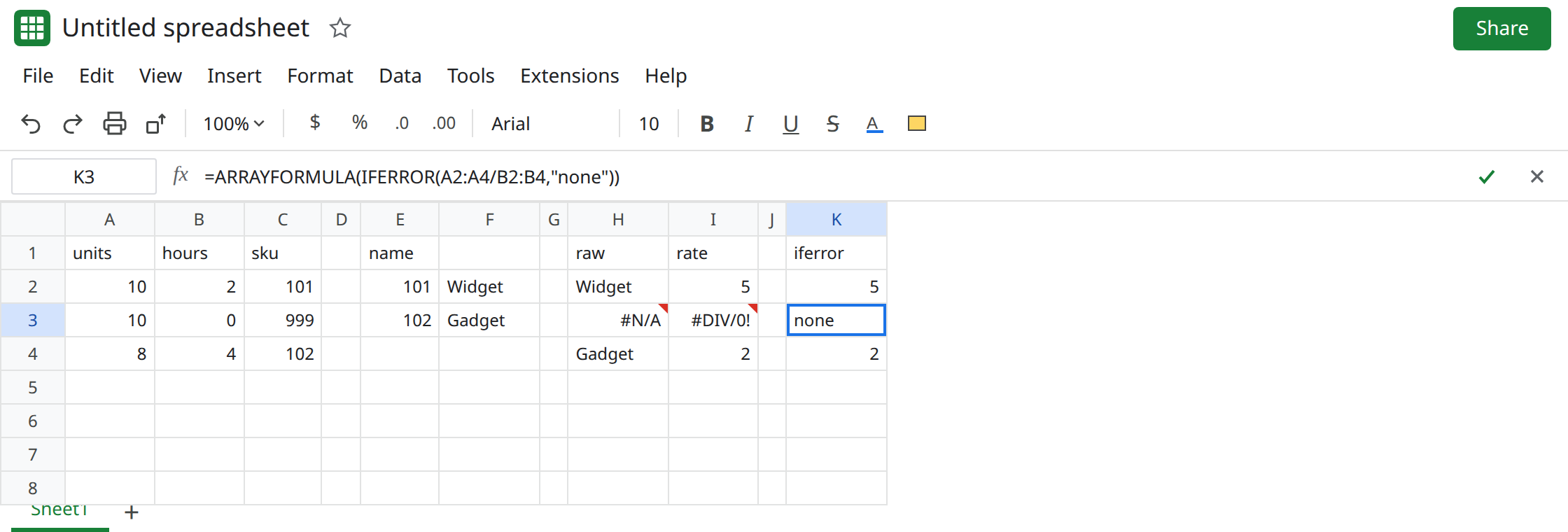
IFERROR on the divide spill. In K1 type iferror. In K2 enter =ARRAYFORMULA(IFERROR(A2:A4/B2:B4,"none")). K2 is 5. K3 is none. K4 is 2. The #DIV/0! is gone. No triangle on K3.
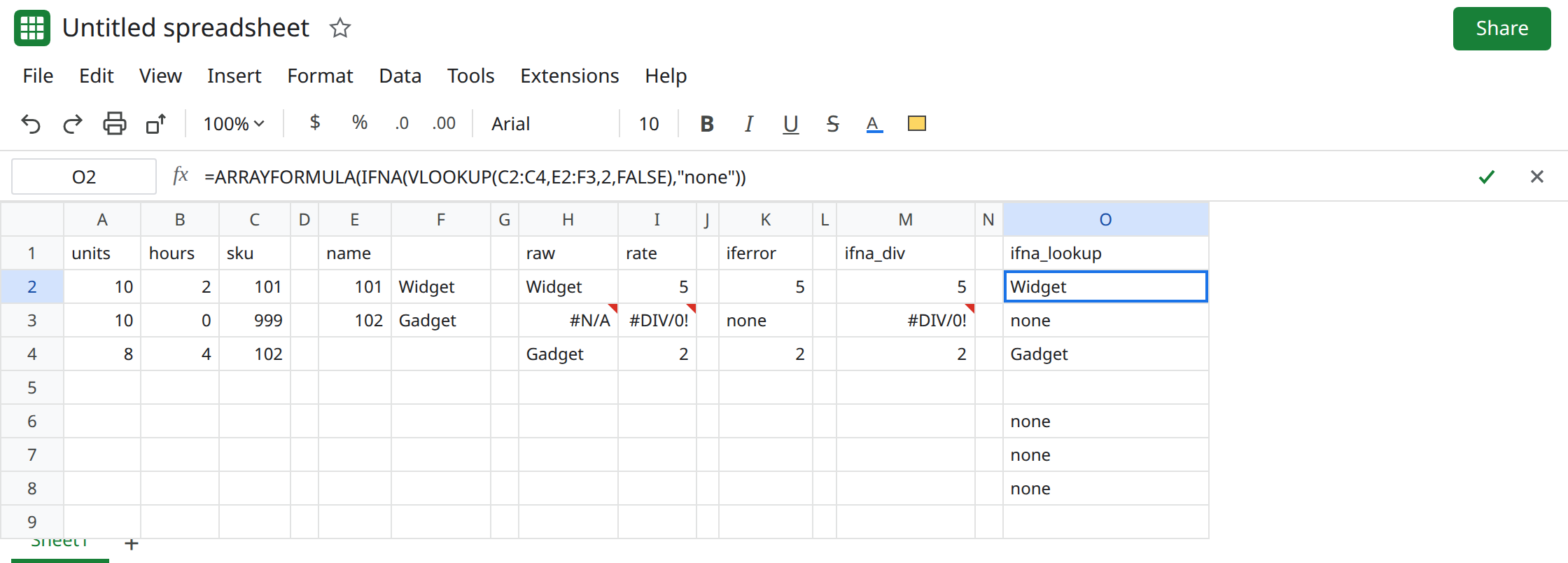
IFNA on the same divide spill. In M1 type ifna_div. In M2 enter =ARRAYFORMULA(IFNA(A2:A4/B2:B4,"none")). M2 is 5. M3 is still #DIV/0!. M4 is 2. IFNA did not treat the divisor as a missing key. Leave M3 broken.
IFNA on the lookup spill. In O1 type ifna_lookup. In O2 enter =ARRAYFORMULA(IFNA(VLOOKUP(C2:C4,E2:F3,2,FALSE),"none")). O2 is Widget. O3 is none. O4 is Gadget. Only the miss was replaced.
IFERROR on the lookup spill, which also eats a bad index. In O6 enter =ARRAYFORMULA(IFERROR(VLOOKUP(C2:C4,E2:F3,3,FALSE),"none")). Index 3 is past two columns, so every row would be #REF! without the wrapper. O6:O8 show none three times. Sku 101 exists. The index is wrong. IFERROR made that look like three misses. See VLOOKUP bad index. Leave O6 as that mask.
What is actually wrong
Section titled “What is actually wrong”IFERRORreplaces any error in the array it wraps:#N/A,#DIV/0!,#REF!,#VALUE!,#NUM!,#NAME?. On a spill, that is every row that errored, not the first row only.IFNAreplaces#N/Aonly. I3 stays#DIV/0!under M2. A dashboard that should say “no sku” wants O2. A dashboard that should show a broken rate wants M3’s triangle, not K3’snone.- The fallback is written once and applied per row.
"none"does not mean “none on the first error, raw values after.” K3 and a future#REF!in that same array becomenonetoo. - Blanking errors changes charts. A
#N/Ain a series is often a gap.IFERROR(...,"")orIFERROR(...,0)turns the gap into an empty or a zero. See charts gap on error cells before you wrap a column the chart reads.
This is not IFERROR around one VLOOKUP of a single key, except that the rule is the same. The scalar walkthrough is IFERROR vs IFNA. O6 is the array form of hiding #REF!.
Leave I3, H3, K3, and O6 as they are so the mask stays comparable.
Lookups: IFNA on the spill. Keep O2. 999 is none. A bad index left unwrapped stays #REF!. If you need the index to stay visible, do not copy K2’s wrapper onto the lookup.
Divides: do not use IFERROR unless every error in that spill is allowed to look the same. Keep I2 as the raw spill. Fix B3, or show the error. IFNA is not a fix for #DIV/0!. M3 is the proof.
Do not add IFERROR around O2 “just in case.” You would start hiding the #REF! that O6 already hides.
If the spill should blank only #N/A, use IFNA. If #DIV/0! became none or 0, the wrapper is IFERROR. Unwrap it and read the raw row.