

Fix WEEKDAY #NUM! or wrong numbering in Google Sheets (return_type)
Updated
WEEKDAY(date, [type]) returns a number for the day of the week. Default type 1 is Sunday = 1 … Saturday = 7. type 2 is Monday = 1 … Sunday = 7. type 3 is Monday = 0 … Sunday = 6. #NUM! means type is not a numbering system Sheets accepts (for example 99). A legal but wrong type is not an error: Sunday as 1 vs Sunday as 7 looks like a “bug” in a weekend test.
This page is WEEKDAY type. It is not WORKDAY #NUM! (weekend code 99 on WORKDAY.INTL, a different function). It is not out of domain (SQRT(-1)). It is not TO_DATE slash division, though WEEKDAY(10/10/2000) has the same division trap. Keep the Google Sheets UI in English.
Recreate it on a blank sheet
Section titled “Recreate it on a blank sheet”- Open a blank spreadsheet. In A1 type
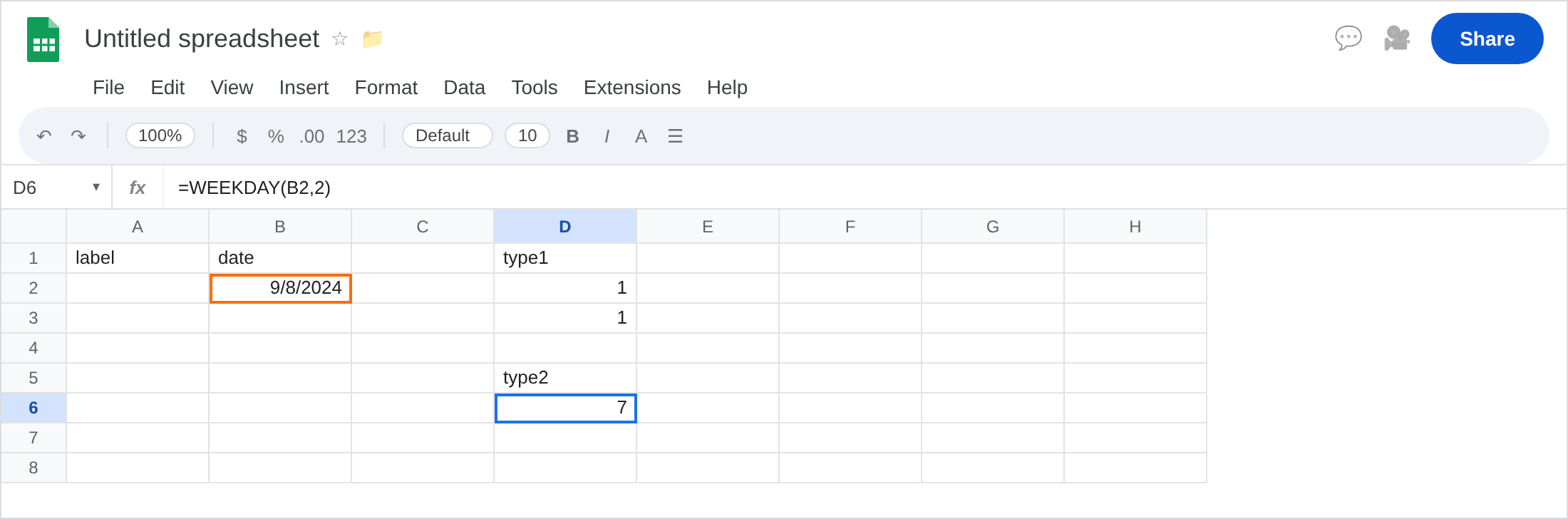
label, B1date. In B2 enter=DATE(2024,9,8)(Sunday 8 September 2024). Format B2 as Date.
Type 1 (default) on Sunday. In D1 type type1. In D2 enter =WEEKDAY(B2,1). The cell shows 1. Sunday = 1. In D3 enter =WEEKDAY(B2). Same 1 (default). That pair is the control.
Type 2 on the same Sunday. In D5 type type2. In D6 enter =WEEKDAY(B2,2). The cell shows 7. Sunday = 7 when the week starts Monday. No error. A test like WEEKDAY(B2)=1 for “weekend start” is now FALSE.
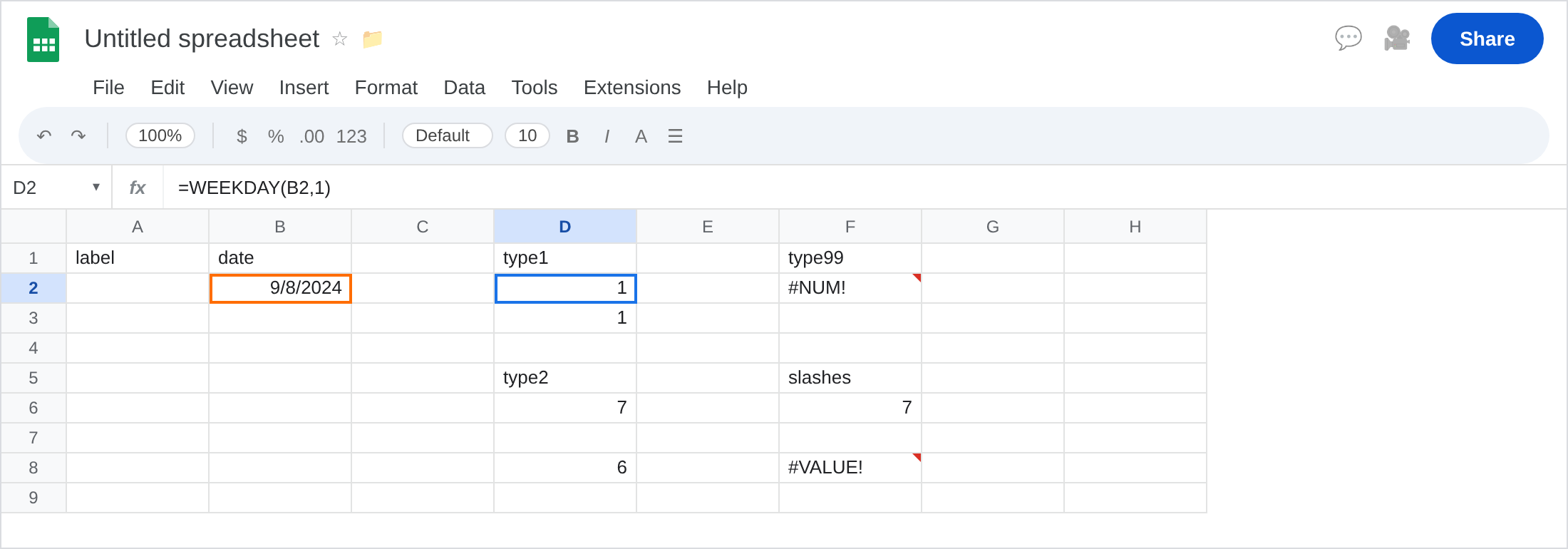
Type 3. In D8 enter =WEEKDAY(B2,3). Sunday = 6. Monday would be 0. Legal.
Illegal type. In F1 type type99. In F2 enter =WEEKDAY(B2,99). The cell shows #NUM!. 99 is not a WEEKDAY numbering system (and is not a WORKDAY.INTL weekend code either). Leave F2 broken.
Slash division trap. In F5 type slashes. In F6 enter =WEEKDAY(10/10/2000,1). 10/10/2000 divides first. You get the weekday of a tiny serial (1899/1900), not 10 October 2000. Leave F6 as that wrong number (or #NUM! if the serial is rejected). The date you meant is DATE(2000,10,10).
Text that is not a date. In F8 enter =WEEKDAY("Sunday",1). Often #VALUE!, not #NUM!. Wrong type of argument. Leave F8 if it errors. Dates belong in DATE / a date cell, not as the English word Sunday.
Leave F2 as #NUM!. Leave D2 and D6 as the two legal Sundays.
What is actually wrong
Section titled “What is actually wrong”typeselects a numbering system, not “how many weekdays.”99is#NUM!.1,2, and3are the usual Sheets systems. Some Excel types (11–17) may work or#NUM!depending on the Sheets build — do not assume Excel’s list.- Default is
1. Omittingtypeis Sunday = 1. Copying a formula from a Monday-first region without bringing2along is D2 vs D6. WEEKDAYreturns a number, notMon. UseTEXT(B2,"ddd")for a label. Formatting theWEEKDAYcell as a date will show a 1900-era date for1–7and look insane. Format as Number.WEEKDAY(10/10/2000)is the same slash trap asTO_DATE. See TO_DATE.WORKDAY.INTLweekend99is#NUM!on a different function. See WORKDAY #NUM!. Do not “fix” F2 by changing a holiday list.
This is not DATEDIF end-before-start. See DATEDIF #NUM!.
This is not NETWORKDAYS.INTL weekend codes. See NETWORKDAYS #NUM!.
Leave F2 and F6 as the bad type and the slash trap.
Pick one type and keep it. Weekend test with default numbering: =OR(WEEKDAY(B2,1)=1,WEEKDAY(B2,1)=7) (Sun/Sat). Monday-first: =WEEKDAY(B2,2)>=6 (Sat=6, Sun=7). Do not mix 1 and 2 in the same column.
Illegal type: pass 1, 2, or 3. Keep F2 broken as the 99 reminder.
Real dates: =WEEKDAY(DATE(2000,10,10),1) or a date cell. Never WEEKDAY(10/10/2000).
Do not wrap F2 in IFERROR so a typo type looks like day 0. See IFERROR vs IFNA. IFNA will not catch #NUM!.
If #NUM! and you see WEEKDAY, the second argument is out of range. If the number is 1 vs 7 for a Sunday you can see on the calendar, the type disagrees with your weekend rule. If the date is in 1899, you divided.
Type 1 vs 2 vs WORKDAY 99
Section titled “Type 1 vs 2 vs WORKDAY 99”WEEKDAY 1 / 2 / 3 are numbering systems. Sunday moves. No error.
WEEKDAY 99 is #NUM!. This page.
WORKDAY.INTL 99 is also #NUM!, meaning weekend pattern, not weekday numbering. That is WORKDAY #NUM!. Read the function name in the formula bar before you change 99 to 1.