

Help samples use commas, and a semicolon locale reports Formula parse error
Updated
Official help shows samples such as =FIXED(3.141592653,2) and =IF(A2>1, "yes", "no"). Those commas are correct on a locale that uses a period as the decimal mark. On a locale that uses a comma as the decimal mark, the same paste is #ERROR!. The tooltip is Formula parse error. The function name is already English. The help page did not switch your file to semicolons, and your file will not read the help page’s commas. You translate separators when you paste, or you set the locale to the one the sample assumes.
Sheet Error is an independent formula-error library, not a Google product. The checkbox that keeps English function names, and still requires semicolons, is locale semicolons. A VLOOKUP paste with the same commas is locale parse error. Separators inside { } are array literal locale. Keep the Google Sheets UI in English.
Recreate it on a blank sheet
Section titled “Recreate it on a blank sheet”- Open a blank spreadsheet. File → Settings → Locale → Germany. Turn on Always use English function names. Keep the menus in English. Locale and menu language are different. In A1 type
n. In A2 type2.
Paste a help sample with commas. The FIXED help sample is =FIXED(3.141592653,2). In C2 paste that, commas included. The cell shows #ERROR!. The tooltip is Formula parse error. FIXED is a real function. The comma between the number and 2 is an argument separator in the help text and a decimal mark on this locale. The period inside 3.141592653 is a second problem on Germany. Leave C2 broken. One illegal character is enough. Both are present.
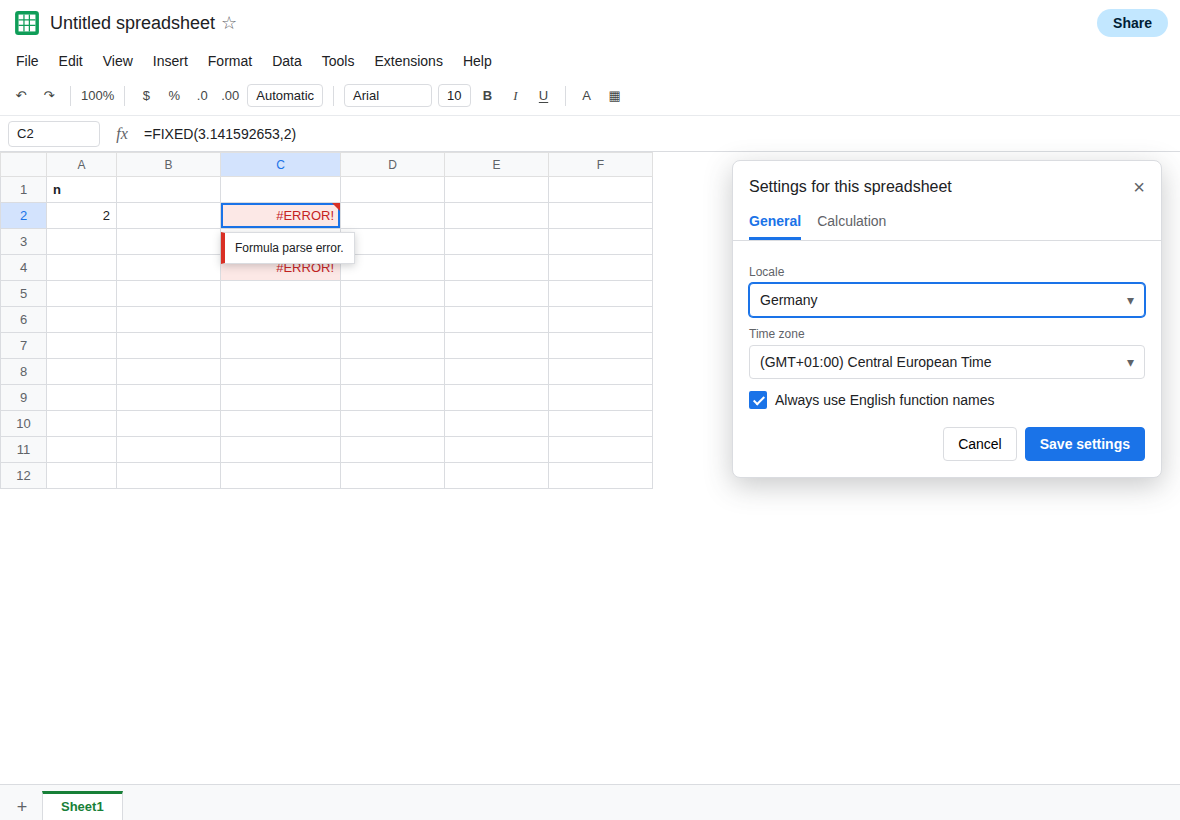
A sample that is only separators. In C4 paste =IF(A2>1, "yes", "no") with commas, the shape US docs use. C4 is #ERROR!. Same tooltip. There is no decimal period in this one. The commas alone are the failure. Leave C4 broken.
The semicolon form of that IF. In C6 enter =IF(A2>1; "yes"; "no"). C6 shows yes. Same function name as C4. The help page’s commas were the difference. C6 is the control.
An array sample from a US page. In C8 paste ={1,2,3} if you want to see the other separator. On Germany that comma is not the column separator inside braces. The cell is #ERROR!. The repair inside braces is a backslash, and it is a different page. See array literal locale. Do not “fix” C4 by editing C8.
Toggling Always use English function names does not rewrite C2 or C4. The help text is still commas. The sheet is still Germany.
What is actually wrong
Section titled “What is actually wrong”- Help is written with the separators of a comma-argument locale. It is a sample, not a file setting. Germany cannot use comma both as the decimal mark and as the gap between arguments. The parser stops. The tooltip does not say “this came from the docs.”
- English function names do not imply English separators.
IFandFIXEDstay spelled that way. The separator stays the locale’s. See locale semicolons. - Numbers inside the sample use a decimal point. On Germany,
3.141592653is not the number pi. Even after you change the argument comma to a semicolon, that period can still be a parse error. The decimal mark is decimal comma locale. Two translations, not one. {1,2,3}in a doc is columns on a US sheet and a parse error on Germany. Argument semicolons do not fix braces. See array literal locale.- A script that writes the help string with
setFormulastores the same illegal commas. See setFormula separators.
This is not #NAME?. The name FIXED exists. See unknown function when the tooltip says the name is unknown.
Leave C2 and C4 as the comma pastes.
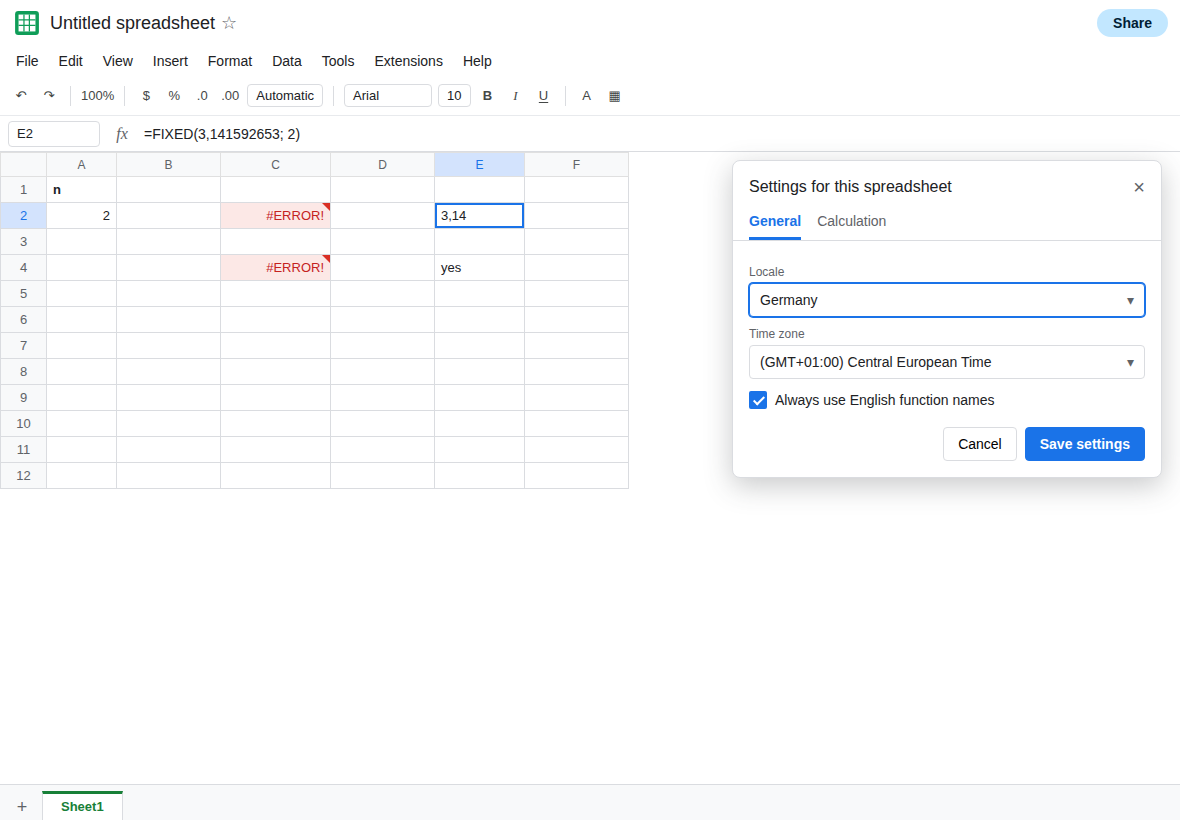
Retype the sample with this locale’s separators and decimal mark. In E4 enter =IF(A2>1; "yes"; "no"). E4 shows yes. In E2 enter =FIXED(3,141592653; 2). E2 returns text (FIXED returns text) using Germany’s marks. The argument gap is a semicolon. The number uses a decimal comma. If E2 is still #ERROR!, read the formula bar and replace whichever mark you copied from the help page.
Or set the locale to the sample’s locale before you paste. File → Settings → Locale → United States. A new =IF(A2>1, "yes", "no") then parses. Existing Germany formulas are not all rewritten for you. Use this when the whole file should be US, not when one help paste annoyed you and the rest of the sheet is in decimal commas.
Do not wrap C2 in IFERROR. The formula never ran. See IFERROR hides cause. FIXED itself returning text is FIXED is text, after the formula parses.
If the tooltip is Formula parse error and the bar matches a help sample comma for comma, this locale wanted semicolons. If the names are English and the bar already uses semicolons, the remaining period or brace comma is the other locale page.