

A pivot table stays on old totals after the source changes
Updated
A pivot shows the rows inside its source range. In Google Sheets, a value you change inside that range updates the total. A row you add under a fixed range such as A1:B4 does not. The pivot is not frozen. It was never pointed at the new row. Excel is stricter: the pivot cache can keep the old total even for an edit inside the range until you Refresh.
GETPIVOTDATA pulling the wrong field is GETPIVOTDATA. A QUERY pivot clause is QUERY PIVOT. Keep the Google Sheets UI in English.
Recreate it on a blank sheet
Section titled “Recreate it on a blank sheet”- Open a blank spreadsheet. Stay on
Sheet1. In A1 typestore, B1qty. A2East, B210. A3West, B34. A4East, B46. East’s qty is16. West’s is4.
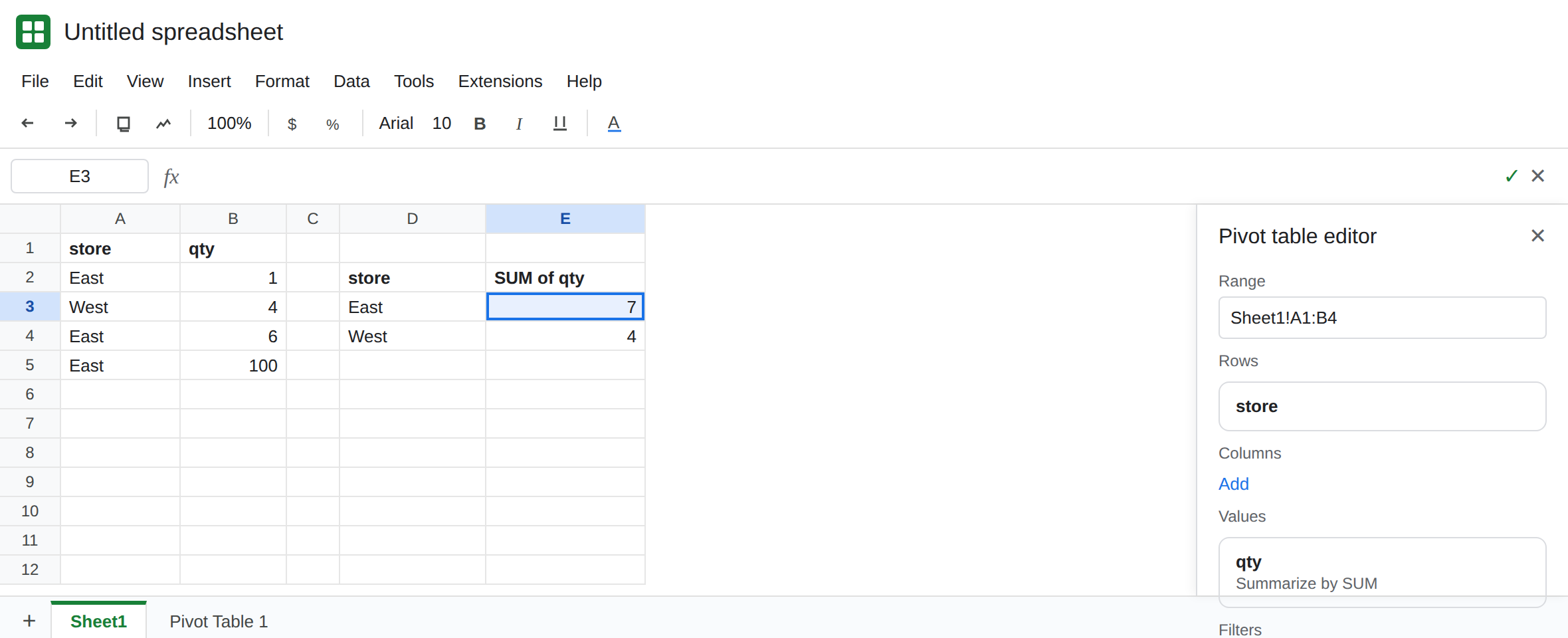
Build the pivot on that rectangle. Select A1:B4. Insert → Pivot table. Put the pivot on a new sheet. In the Pivot table editor, add Rows: store. Add Values: qty, summarized by SUM. The pivot shows East 16 and West 4. The editor’s range box reads Sheet1!A1:B4 (or the equivalent with quotes if the sheet name needs them). That pivot is the control.
An edit inside the range moves. On Sheet1, change B2 from 10 to 1. Return to the pivot. East is 7 (1+6). Sheets recalculated from the same range. If East is still 16, confirm you edited Sheet1, the tab named in the range box, and not a second copy of the numbers. Leave East at 7 before the next step.
A row below the range does not move. On Sheet1, A5 East, B5 100. The pivot still shows East 7. B5 is outside A1:B4. Nothing is wrong with SUM. The range ended at row 4. Leave the pivot stale on purpose.
A filter on the pivot can hide the row you just included. In the editor, Filters on store that excludes East will show only West even after you widen the range. Clear the filter before you decide the range is wrong. The row is in the source. The pivot is dropping it.
Excel’s cache is the other product. In Excel, change a cell inside the source and the pivot can keep the old total until you right-click the pivot and choose Refresh, or use PivotTable Analyze → Refresh. Google Sheets does not use that cache button for a normal in-grid source. Do not hunt a Refresh item in the Sheets Data menu to fix B5. Widen the range.
What is actually wrong
Section titled “What is actually wrong”- The range in the Pivot table editor is the whole source.
A1:B4is four rows including the header. Row 5 does not exist for this pivot. Inserting a row insideA1:B4usually expands the range. Pasting below it does not. - An in-range edit should change the total without a button. If it does not, you are looking at another tab, a copied pivot that points elsewhere, or a filter. The editor’s range box is the check.
- Values that are text do not enter SUM. If B2 is the characters
10and the total ignores it, that is type, not a stale cache. See dates stored as text for the date version of a value that looks right and is skipped. GETPIVOTDATAreads the pivot that is already on the sheet. It does not widen the source. A#REF!from that function is GETPIVOTDATA.- A
QUERYwithgroup byis a formula, not this pivot object. It spills into cells. See QUERY GROUP BY.
Leave the pivot pointed at A1:B4 until you have seen East stay 7 while B5 is 100.
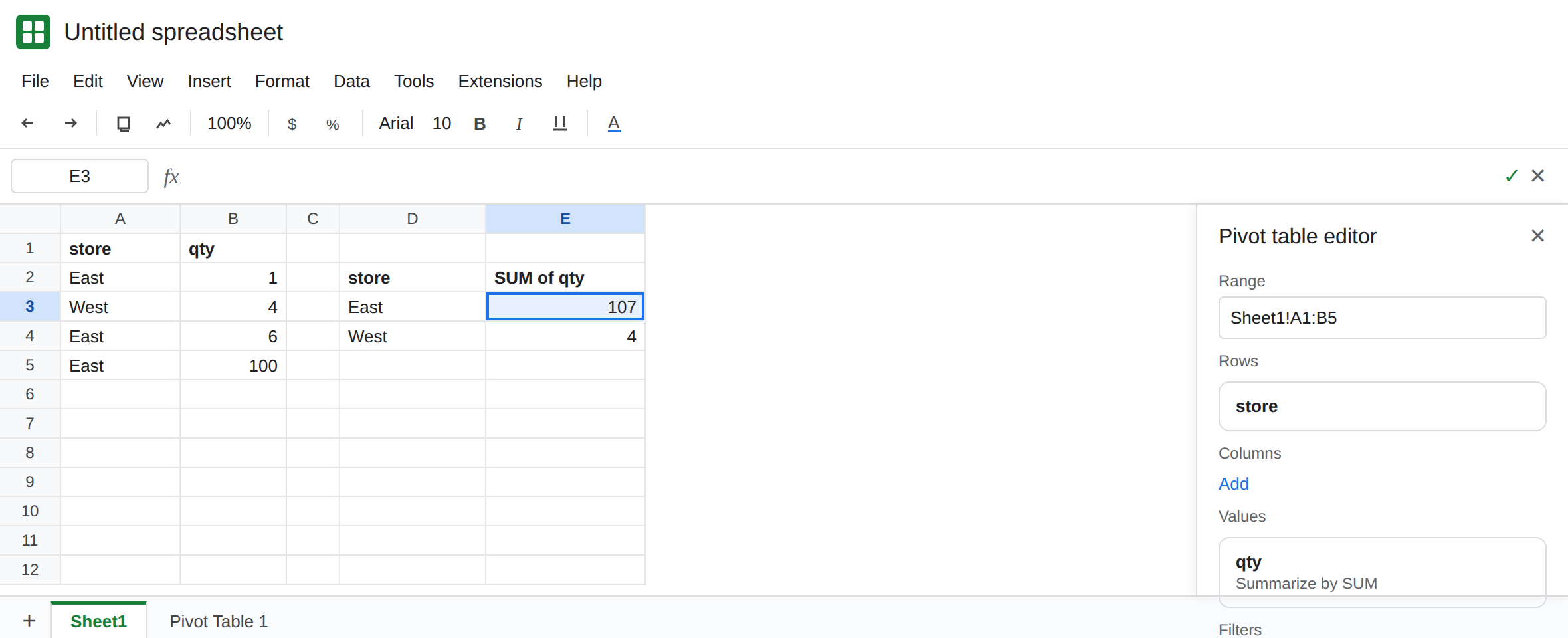
Widen the range to include the new row. Click the pivot. In the Pivot table editor, change the range from Sheet1!A1:B4 to Sheet1!A1:B5. East becomes 107 (1+6+100). West stays 4.
If rows will keep arriving, set the source to the columns (Sheet1!A:B) or to a range taller than today’s data, and filter out blanks in the pivot if the empty rows create a blank store. A range that is the entire column will also see notes you type under the table. Prefer a bounded range you extend on purpose when the sheet has other lists below.
In Excel, after the source cell itself changed and the total did not, right-click the pivot → Refresh. Then, if new rows still missing, change the source on PivotTable Analyze the same way: the cache was refreshed and the range was still short.
Do not rebuild the pivot from scratch until the range box and the filter list have been read. The old total is usually one of those two.
If East moved when you edited B2 and did not move when you typed B5, extend the range. If an in-range edit stays old in Excel, Refresh. If the cell is a GETPIVOTDATA formula, you are on that page, not this one.