

Fix OFFSET #REF! in Google Sheets (offset walks off the sheet)
Updated
OFFSET starts at a cell and walks a number of rows and columns, then returns a range of a given height and width. #REF! means the walk left the sheet, or Sheets rejected the height/width. The formula bar still shows OFFSET and a real starting cell. Nothing was deleted. The result range is not a valid place on the grid.
This page is OFFSET off the sheet (or a height/width Sheets will not build). It is not after you delete. It is not INDEX past the range. It is not SORT / UNIQUE spill or UNIQUE overwrite.
Recreate it on a blank sheet
Section titled “Recreate it on a blank sheet”- Open a blank spreadsheet. In A1 type
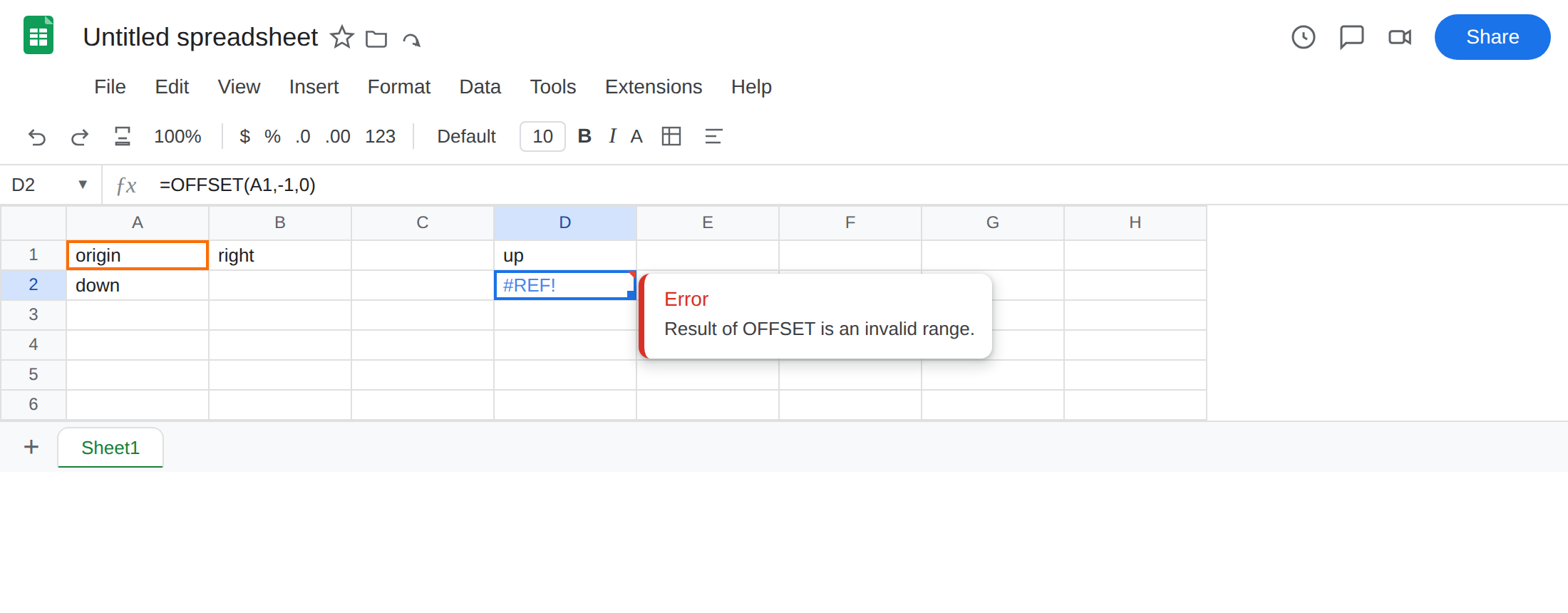
origin. In A2 typedown. In B1 typeright. - Walk off the top of the sheet. In D1 type
up. In D2 enter=OFFSET(A1,-1,0). The cell shows#REF!. Row offset-1from A1 is row 0. There is no row 0. Leave D2 broken.
-
Walk off the left of the sheet. In D4 type
left. In D5 enter=OFFSET(A1,0,-1). The cell shows#REF!. Column offset-1from A1 is left of column A. Leave D5 broken. -
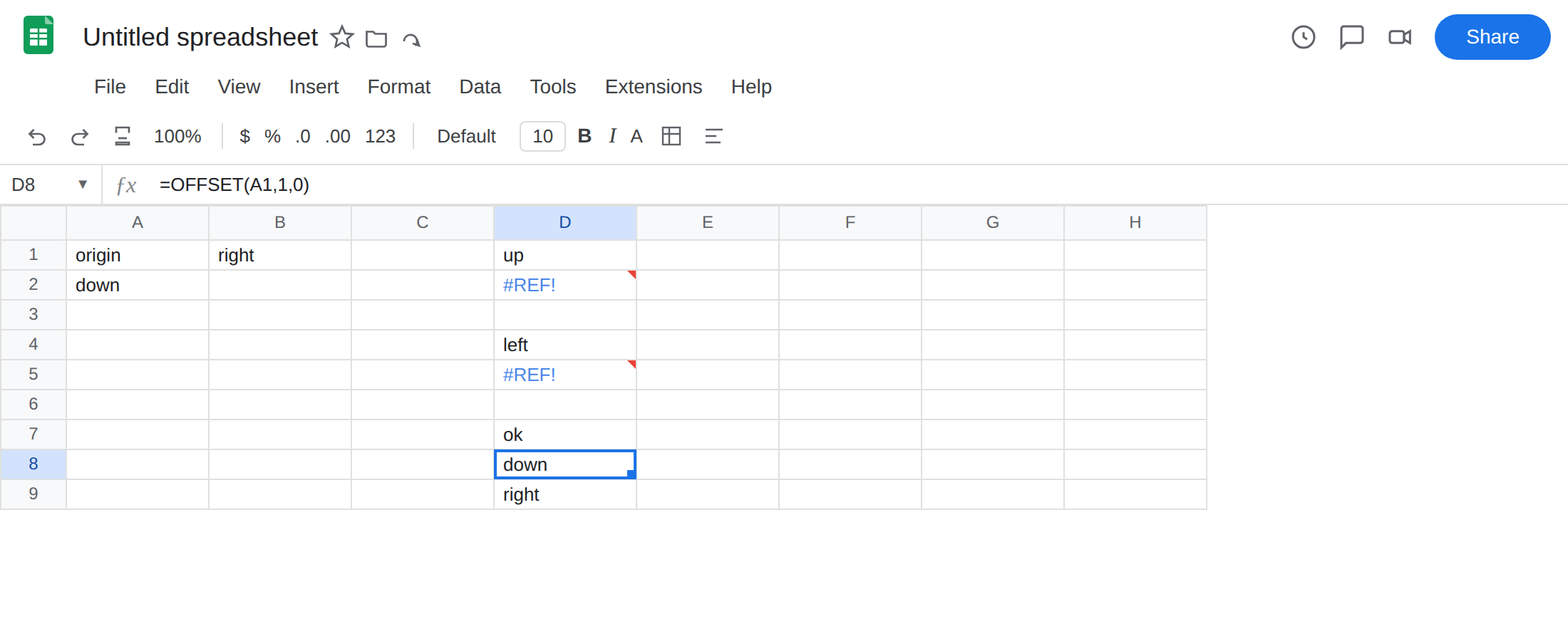
A control that stays on the grid. In D7 type
ok. In D8 enter=OFFSET(A1,1,0). The cell showsdown(A2). In D9 enter=OFFSET(A1,0,1). The cell showsright(B1). Same function, a walk that lands on the sheet.
Zero or negative height / width. In F1 type height0. In F2 enter =OFFSET(A1,0,0,0,1). Height 0 is not a one-cell range. The cell shows #REF!. Leave F2 broken. In F4 type neg. In F5 enter =OFFSET(A1,0,0,-1,1). Negative height is the same refusal. Leave F5 broken.
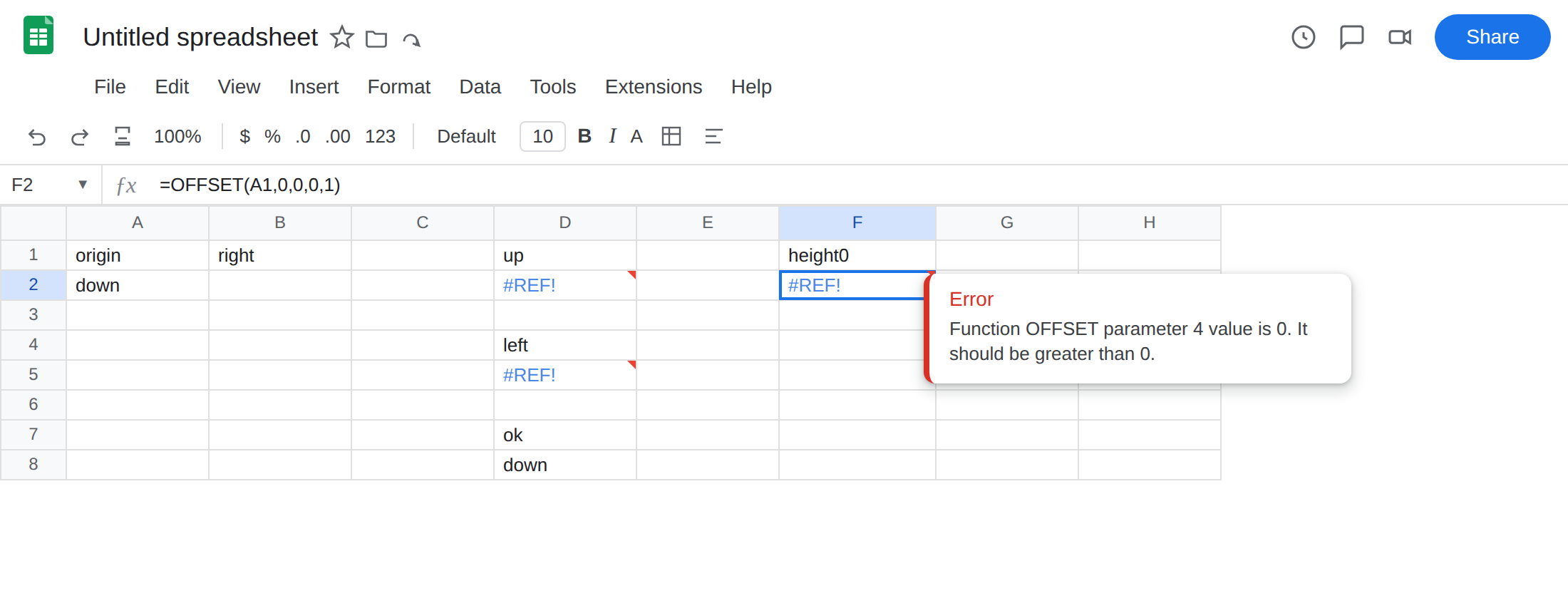
Past the last column. In F7 type far. In F8 enter =OFFSET(A1,0,20000). Google Sheets has a last column. An offset that would land past it is #REF!. Leave F8 if it errors. Do not hunt for the exact column cap; the recreate you need is already D2 and F2.
Select D2. The formula bar is still =OFFSET(A1,-1,0). There is no #REF! token inside the formula. That is the tell versus a delete.
What is actually wrong
Section titled “What is actually wrong”OFFSET(cell, rows, cols, [height], [width])builds a range. If the top-left of that range is not a real cell, or height/width is not a positive size Sheets accepts, the result is#REF!.- Negative
rows/colsare legal until they cross A1.OFFSET(A2,-1,0)is A1 and works.OFFSET(A1,-1,0)does not. - Height and width default to 1. Passing
0or a negative size is not “return nothing.” It is an invalid range.#REF!. OFFSETdoes not wrap around the grid. There is no torus. Past the last row or last column is#REF!, same as above A1.
This is not a deleted reference. After a delete, #REF! appears inside the formula (=A1+#REF!). See after you delete. D2 still names A1.
This is not INDEX asking for relative row 4 of a three-row range. INDEX stays inside a range you already named; the index is too big for that range, which may still be well inside the sheet. See INDEX #REF!. OFFSET can leave the sheet entirely.
This is not a spill #REF!. OFFSET(A1,1,0) returns one cell here. A blocked SORT / UNIQUE / FILTER keeps a readable formula and Array result was not expanded. See SORT / UNIQUE spill. This is not a circular loop. See circular dependency.
This is not INDIRECT("not an address"). See INDIRECT #REF!. This is not VLOOKUP column index. See VLOOKUP bad index.
Leave D2, D5, F2, and F5 broken so #REF! stays on the sheet.
Land on a real cell. Keep D8: =OFFSET(A1,1,0) returns down. If the offsets live in cells, guard them: in G1 type r, G2 1. H1 c, H2 0. In G4 enter =OFFSET(A1,G2,H2). The cell matches D8. Change G2 to -1 and G4 becomes #REF! like D2. Put 1 back.
Use positive height and width. In G6 enter =OFFSET(A1,0,0,1,1). The cell shows origin. To return A1:A2: =OFFSET(A1,0,0,2,1). Height 2, width 1. Do not pass 0 to mean “default.” Omit the argument instead.
If you wanted INDEX, use INDEX. =INDEX(A1:B2,2,1) is A2 without walking off the sheet: an oversized INDEX is #REF! inside the named range, which is easier to bound. OFFSET is the volatile walk. Use it when the start cell and the step are the point. Do not wrap D2 in IFERROR to print none for “above the sheet.” That hides a bad step. Fix rows / cols / height / width.
If OFFSET is #REF! and the formula still reads OFFSET, the result range is not on the grid, or height/width is not a positive size. Step back onto the sheet. Do not delete cells to “match” this error — that is a different #REF!.