

Fix GOOGLETRANSLATE #N/A / #VALUE! / loading in Google Sheets
Updated
GOOGLETRANSLATE(text, source_language, target_language) sends a string to Google Translate and returns text. #N/A / #VALUE! here is usually a language code Sheets does not accept (xx), swapped source/target, or a number passed where text is required. Loading… is the same family of wait as other Google services: a slow or blocked call, not a ticker. Empty source "" means auto-detect.
This page is GOOGLETRANSLATE. It is not GOOGLEFINANCE #N/A (symbols, attributes). It is not IMPORTXML / IMPORTHTML. It is not what #N/A means as a VLOOKUP primer. Sheet Error is a formula-error library, not a translation product. Keep the Google Sheets UI in English. Language codes are short ISO strings (en, es, ja), not English.
Recreate it on a blank sheet
Section titled “Recreate it on a blank sheet”- Open a blank spreadsheet. In A1 type
kind, B1text, C1tr. In B2 typedock closed.
A pair that works. In A2 type ok. In C2 enter =GOOGLETRANSLATE(B2,"en","es"). After a short load, C2 shows Spanish text for dock closed (for example muelle cerrado). That row is the control. Click Allow access if the spreadsheet banner asks — same first-use banner as IMAGE / IMPORTXML.
Bad language code. In A3 type xx. In C3 enter =GOOGLETRANSLATE(B2,"en","xx"). The cell shows #N/A or #VALUE!. xx is not a target language this function serves. Leave C3 broken.
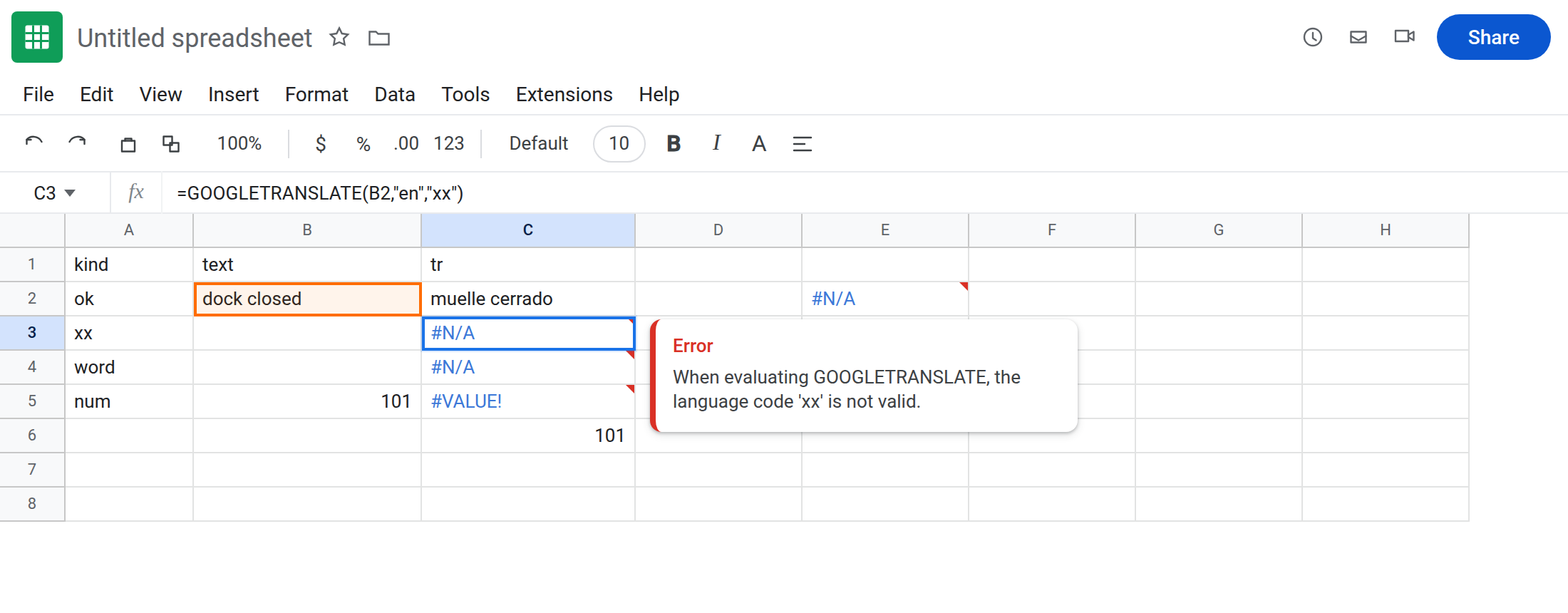
English word instead of a code. In A4 type word. In C4 enter =GOOGLETRANSLATE(B2,"English","Spanish"). Often #N/A / #VALUE!. The arguments are codes, not labels. Leave C4 broken.
Number without TEXT. In A5 type num. In B5 type 101 as a number. In C5 enter =GOOGLETRANSLATE(B5,"en","es"). #VALUE! if the function insists on text. Leave C5 broken. In C6 enter =GOOGLETRANSLATE(TEXT(B5,"0"),"en","es"). That row can succeed (101 as text).
Auto source. In C8 enter =GOOGLETRANSLATE(B2,"","es"). Empty source = detect. Working when the network allows. If C8 loads forever, leave it as Loading… contrast — do not refresh-spam. Narrow the text; do not add a second GOOGLETRANSLATE on every row of a 50,000-cell column.
GOOGLEFINANCE contrast. In E2 enter =GOOGLEFINANCE("NOTATICKER"). #N/A for a symbol. See GOOGLEFINANCE #N/A. Leave E2 as contrast. Do not change a language code because a ticker failed.
Leave C3, C4, and C5 broken. Leave C2 as the working translation.
What is actually wrong
Section titled “What is actually wrong”- Target/source must be codes the service knows.
xx,eng, andEnglishfail in different ways; none of them ises. - The first argument is text. A numeric sku is a type error until
TEXT/TO_TEXT. - Allow access is a spreadsheet banner for external calls. It is not IMPORTRANGE’s You need to connect these sheets. See IMPORTRANGE access only for that prompt.
- Loading… is delay or throttle. A wall of
GOOGLETRANSLATEformulas will sit on Loading… the same way a wideIMPORTXMLdoes. See IMPORTXML / IMPORTHTML for Result too large / Loading… on imports. Here, translate fewer cells. - Auto-detect with
""still needs a valid target.GOOGLETRANSLATE(B2,"","xx")is still a bad target.
This is not a lookup miss. See what #N/A means. B2 is on the sheet.
This is not REGEXREPLACE unchanged text. See REGEXREPLACE miss.
Leave C3, C4, C5, and E2 broken.
Use ISO codes and text. Keep C2: =GOOGLETRANSLATE(B2,"en","es"). Auto: =GOOGLETRANSLATE(B2,"","es"). Numbers: TEXT as C6.
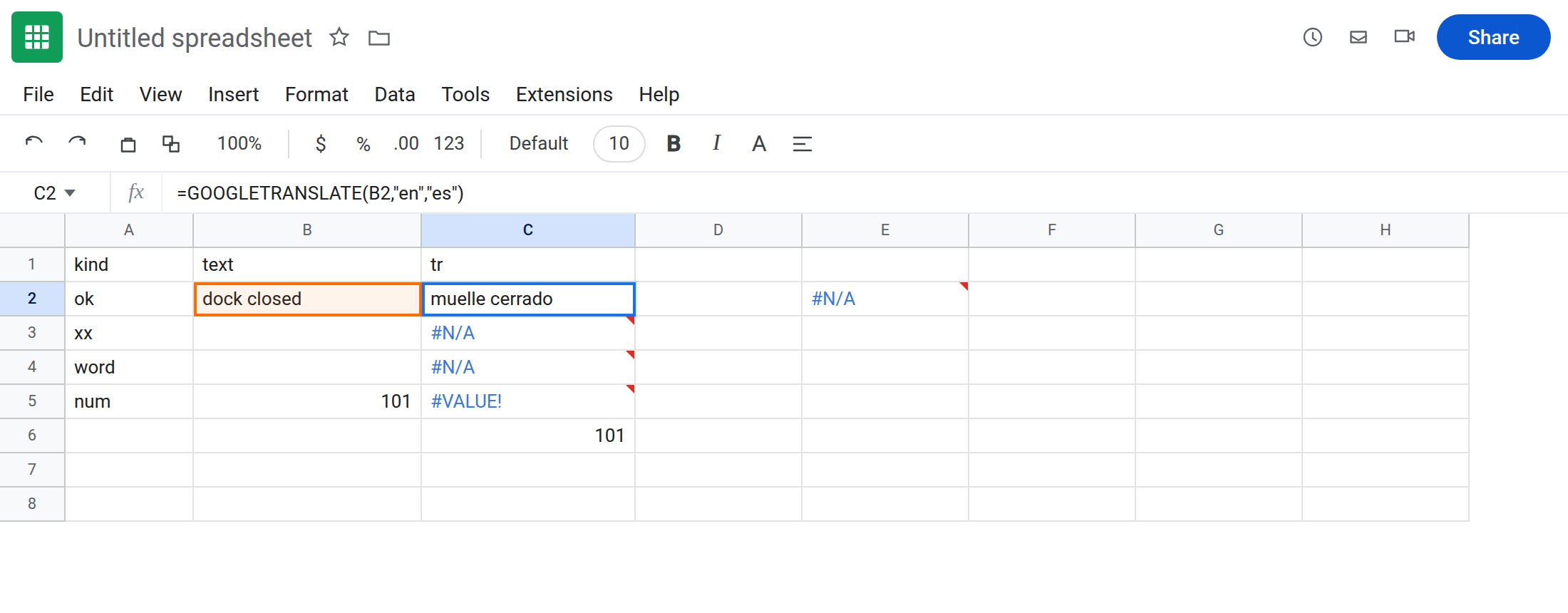
If Loading… persists: wait once after Allow access. Cut duplicate formulas. Translate a single helper cell, then XLOOKUP the result. Do not F5-refresh a whole column.
Do not wrap C3 in IFERROR until the code is es/ja/fr/…. See IFERROR vs IFNA. IFNA hides a bad code and looks like “no translation.”
If the error names a language, fix the code. If #VALUE! and B5 is a number, wrap TEXT. If #N/A and the formula is GOOGLEFINANCE, leave this page. If the banner is Allow access, click it once.
GOOGLETRANSLATE vs GOOGLEFINANCE vs IMPORTXML
Section titled “GOOGLETRANSLATE vs GOOGLEFINANCE vs IMPORTXML”GOOGLETRANSLATE → text in, text out, language codes. This page.
GOOGLEFINANCE → tickers and attributes. GOOGLEFINANCE #N/A.
IMPORTXML / IMPORTFEED → URLs. IMPORTXML / IMPORTHTML and IMPORTFEED fetch. Same Allow access banner, different function names in the bar.