

A trailing space on a month header makes two-way INDEX/MATCH return #N/A
Updated
A two-way lookup is INDEX of the body, with one MATCH on the row labels and one MATCH on the column labels. Both matches are exact when you pass type 0. The label Feb and the label Feb plus a space are different strings. MATCH returns #N/A. INDEX never runs, so the whole cell is #N/A. The number under that header is on the sheet. The header text is not the text you looked up.
A month that is truly absent, and a MATCH range that includes the corner cell and shifts the index into #REF!, are two-way lookup. This page is a header you can see, with a space you cannot. Keep the Google Sheets UI in English. Sheet Error is an independent formula-error library, not a Google product.
Recreate it on a blank sheet
Section titled “Recreate it on a blank sheet”- Open a blank spreadsheet. In A1 type
store. B1Jan. In C1 typeFebfollowed by a space. D1Mar. A2East. B210, C212, D29. A3West. B34, C38, D37. A4North. B45, C46, D43. The grid is stores down, months across. West / Feb is8, in C3. The header in C1 looks like Feb.
The lookup that should be 8. In F1 type row. F2 West. G1 col. G2 Feb. In I1 type two. In I2 enter =INDEX(B2:D4,MATCH(F2,A2:A4,0),MATCH(G2,B1:D1,0)). The cell shows #N/A. West is in A3. The value 8 is in C3. G2 is the three characters F, e, b. C1 is those three characters and a space. The column MATCH does not find G2. Leave I2 broken.
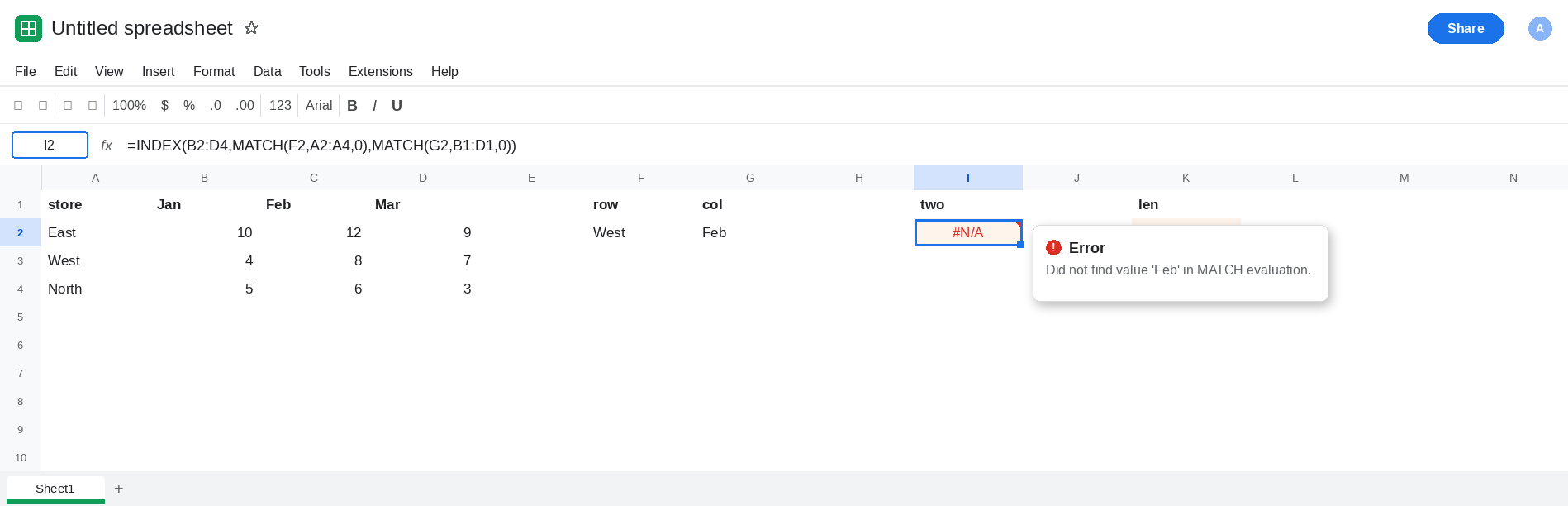
Prove the space. In K1 type len. In K2 enter =LEN(C1). K2 is 4. In K3 enter =LEN(G2). K3 is 3. In K4 enter =MATCH(G2,B1:D1,0). K4 is #N/A, the same miss, without INDEX. Leave K2 as 4 and K4 broken.
A clean header works. In C6 type Feb with no space. Copy B1 to B6, D1 to D6. In I6 enter =INDEX(B2:D4,MATCH(F2,A2:A4,0),MATCH(G2,B6:D6,0)). The body is still B2:D4. Only the header row changed. I6 is 8. That cell is the control. Leave I6 as 8.
The same space on the store. In A8 type West followed by a space. In I8 enter =INDEX(B2:D4,MATCH(A8,A2:A4,0),MATCH(G2,B6:D6,0)). The column headers are the clean row. The row key has the space. I8 is #N/A. Either header can sink the formula. Leave I8 broken.
Leave I2 and K4 as #N/A. Leave I6 as 8. Leave K2 as 4.
What is actually wrong
Section titled “What is actually wrong”- Type
0compares the whole string. A trailing space is a character.LEN4 versusLEN3 is the evidence. The grid can look aligned while K2 says it is not. INDEXhas nothing to do once eitherMATCHis#N/A. The tooltip on I2 is the match miss, not an index past the body. CleaningINDEXwill not find Feb.TRIMremoves ordinary spaces. It does not remove a non-breaking space,CHAR(160). IfLENstays high after you delete a visible gap, see CHAR(160) blanks.- A header that is simply the wrong month, such as
Apr, is a real miss on a clean row. That recreate, and the#REF!from matchingMaracross a range that starts atstore, is two-way lookup. I6 already shows a clean Feb. Do not addAprhere. - Approximate
MATCH(type1or omitted) on unsorted month names is a different wrong answer, often a neighbor rather than#N/A. This formula passes0. See MATCH approx unsorted.
Leave I2 broken, with the space still in C1, so the miss stays visible.
Look up the trimmed headers. In I10 enter =INDEX(B2:D4,MATCH(F2,A2:A4,0),MATCH(G2,ARRAYFORMULA(TRIM(B1:D1)),0)). TRIM on C1 yields Feb. The column match finds it. I10 is 8. The body did not change.
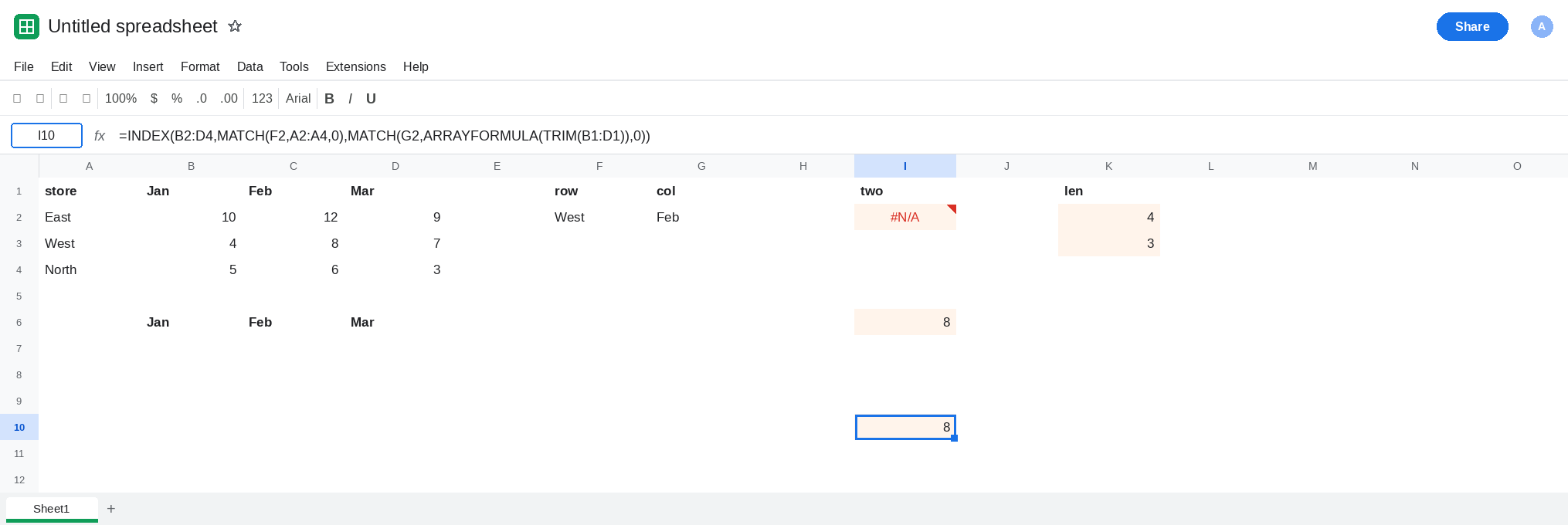
Clean the cell when the space is junk. Select C1. Delete the trailing space so LEN(C1) is 3. I2 becomes 8, the same formula that failed. Do that when you own the header. Use the TRIM form when the header is imported and will come back padded.
Do not wrap I2 in IFNA until a missing store should be blank. A space is not a missing store. IFNA hides both. See IFERROR vs IFNA.
If two-way INDEX/MATCH is #N/A and you can see the month, compare LEN on the header and on the key. A difference of one is a space or another invisible character. If the month is not on the row at all, you are on the two-way primer. If the formula returns the next month with no error, the MATCH range includes the corner cell.