

CONVERT returns #N/A when the unit pair is unknown or incompatible
Updated
CONVERT(value, from_unit, to_unit) changes a number from one unit code to another. Both codes must be on Sheets’ list, and they must measure the same kind of thing. Meters to feet succeeds. Meters to kilograms is #N/A. The word meter is also #N/A, because the code is m, not the English name. The spreadsheet is not missing a conversion table you can edit. The strings are the whole contract.
This page is that #N/A. It is not what #N/A means (VLOOKUP / MATCH / FILTER). It is not GOOGLEFINANCE #N/A (a ticker). Keep the Google Sheets UI in English. Unit codes stay the short forms Google documents (m, ft, kg, lbm, C, F).
Recreate it on a blank sheet
Section titled “Recreate it on a blank sheet”- Open a blank spreadsheet. In A1 type
value. A21.
A pair that works. In C1 type m_to_ft. In C2 enter =CONVERT(A2,"m","ft"). C2 is about 3.28084. One meter in feet. That cell is the control. The codes are lowercase m and ft.
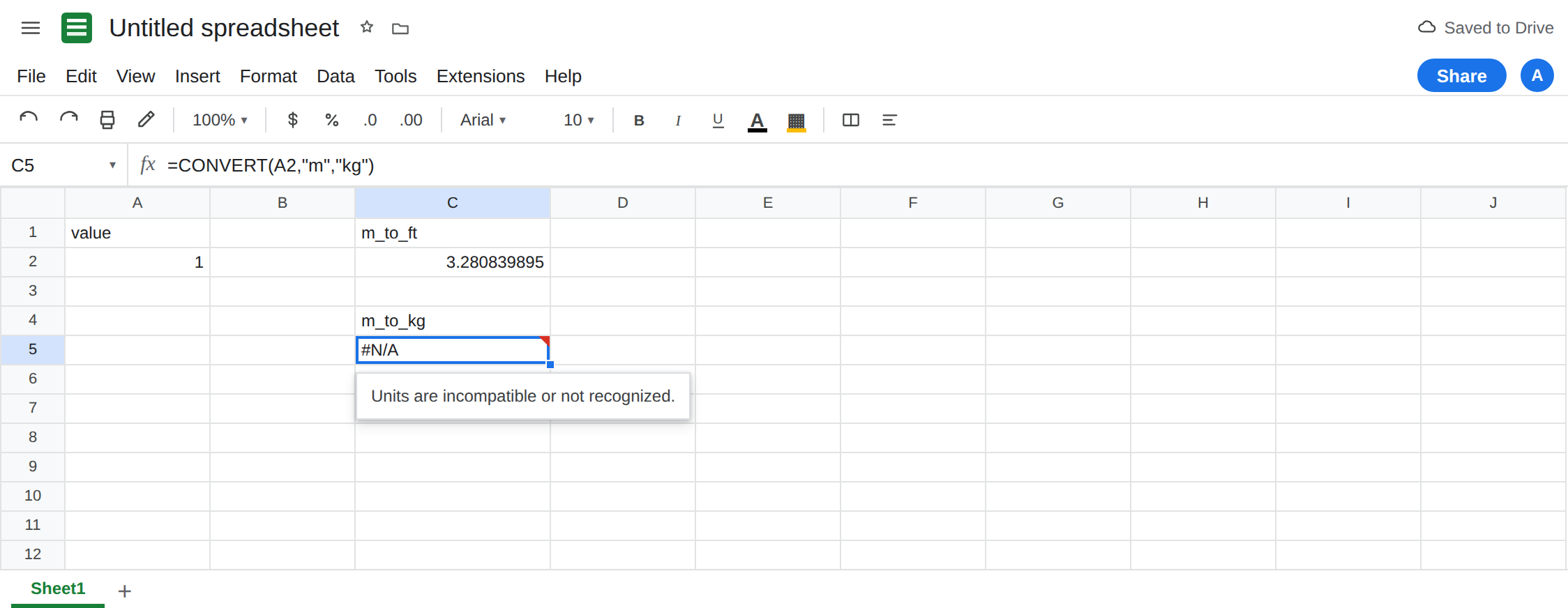
Incompatible dimensions. In C4 type m_to_kg. In C5 enter =CONVERT(A2,"m","kg"). Length and mass. The cell shows #N/A. The tooltip says the units are incompatible or not recognized. Leave C5 broken.
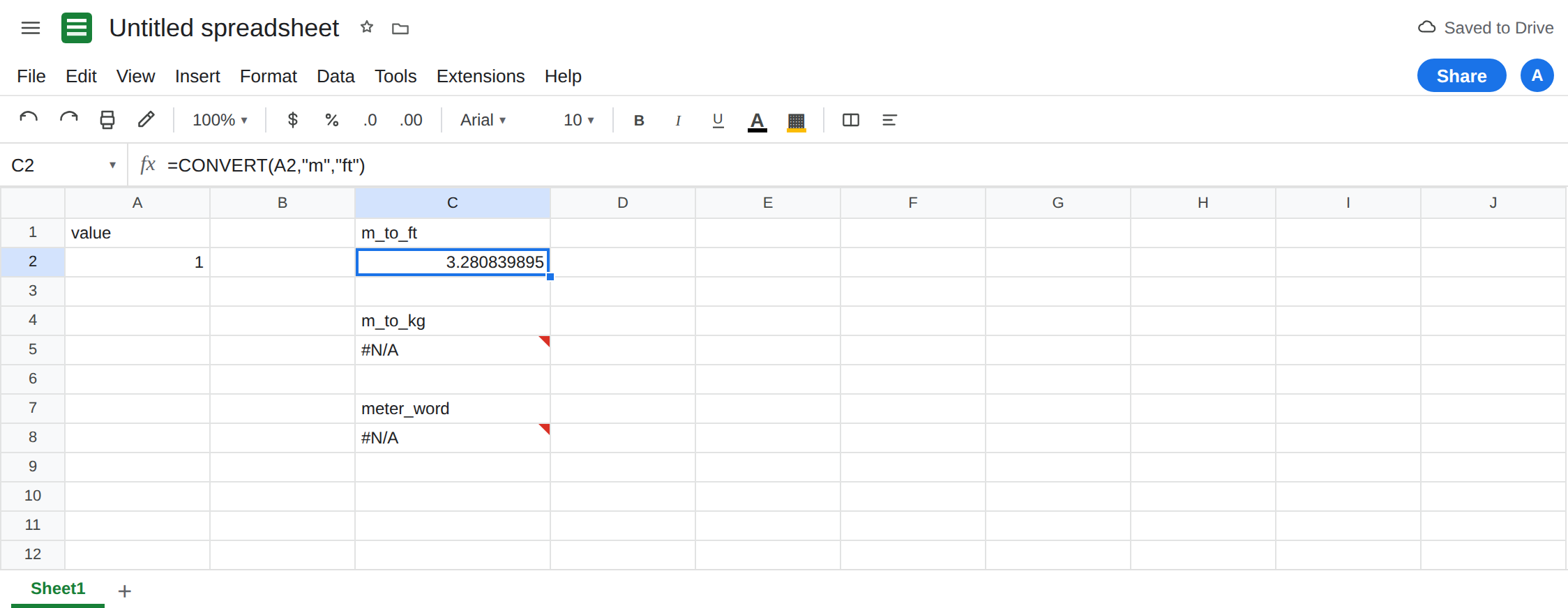
A unit name instead of a code. In C7 type meter_word. In C8 enter =CONVERT(A2,"meter","ft"). The cell shows #N/A. meter is not the code. m is. metre, meters, and feet fail the same way. Leave C8 broken. In C9 enter =CONVERT(A2,"M","ft"). Codes are case-sensitive in the cases that matter: try m if M is #N/A. Do not “fix” C8 by changing ft to feet.
Temperature point versus a delta. In E1 type temp. In E2 enter =CONVERT(0,"C","F"). E2 is 32. That is the freezing point, not a difference of zero. In E3 enter =CONVERT(10,"C","F"). E3 is 50. A rise of 10 degrees Celsius is 18 degrees Fahrenheit, not 50. CONVERT shifted the point by 32. Leave E3 as 50 so the silent wrong delta stays visible. It is not #N/A. In E5 enter =CONVERT(10,"C","kg"). Temperature to mass is #N/A. Leave E5 broken.
A value that is text. In E7 enter =CONVERT("1m","m","ft"). #VALUE! or #N/A depending on the string. The number and the unit are separate arguments. "1m" is not 1 plus "m". That is wrong type if the tooltip talks about a number. Do not mix it with C5.
Leave C5, C8, and E5 broken. Leave C2 as the meter-to-feet result. Leave E3 as 50.
What is actually wrong
Section titled “What is actually wrong”from_unitandto_unitare codes. Length includesm,ft,km,mi,in,cm. Mass includeskg,g,lbm. Volume includesl,gal,pt. Temperature includesC,F,K. Area codes look likem2andft2. A code from one family with a code from another family is#N/A, even when both codes are real. C5 is meters (real) and kilograms (real) and still#N/A.- Unknown strings are the same
#N/Aas incompatible pairs. The tooltip does not always say which of the two problems you hit. Test the codes one at a time against a known partner:CONVERT(1,"m","ft")provesm,CONVERT(1,"kg","g")proveskg. If each of those works and the cross pair fails, the dimensions differ. If"meter"fails against"ft", the code is wrong. - Temperature conversion includes the offset.
CtoFis multiply by 9/5 and add 32. For a difference, do the scale yourself:=10*9/5is18. Do not callCONVERTon a delta unless you subtract the converted zeros:=CONVERT(10,"C","F")-CONVERT(0,"C","F")is18. E3 alone is the point 10°C, which is 50°F. CONVERTreturns one number. It does not label the cell withft. The header is yours. A format code will not turn#N/Ainto feet.- There is no locale where
meterbecomes a legal code. Display language can be English and C8 still fails. See DATEVALUE locale only for date text. Units are not dates.
This is not a lookup miss on a unit table you forgot to import. VLOOKUP of "m" is a different design. See what #N/A means.
Leave C5, C8, and E5 broken.
Use two codes from one family. Keep C2: =CONVERT(A2,"m","ft"). Mass: =CONVERT(1,"kg","lbm"). Do not pass a full word. If you are unsure of the code, look up Google’s CONVERT unit list rather than guessing lbs or feet. A wrong guess is #N/A again.
Deltas. In E9 enter =CONVERT(10,"C","F")-CONVERT(0,"C","F"). E9 is 18. Keep E3 as 50 so the point conversion stays on the sheet. Label E3 point and E9 delta in the cells beside them if you need the distinction later.
Do not wrap C5 in IFNA until you know an incompatible pair should display as blank. A typo "ftt" would become blank too. See IFERROR vs IFNA. IFNA does catch this #N/A. Prefer a visible error while you are still choosing codes.
If CONVERT is #N/A, the two strings are not a supported pair. Prove each code against a partner in the same family, then stop crossing families. If the result is a temperature that looks 32 degrees too high, you converted a point and wanted a difference.