

ARRAYFORMULA hits the calculation limit or looks truncated in Google Sheets
Updated
ARRAYFORMULA applies one formula to a range and spills the results. A short range finishes. The same shape over a huge grid can sit on Loading… and then stop. The tooltip Google documents for that stop is Calculation limit was reached while trying to compute this formula. The formula parsed. Sheets refused to finish the work. A column that looks shorter than the source is a different check: an IF that returns blanks, a range that is not as tall as you think, or a cell blocking the spill.
This page is that expand and calculation wall. The lambda version of the same tooltip is calculation limit. A spill blocked by a typed cell is array result was not expanded (#REF!, Array result was not expanded because it would overwrite data). Cutting a result down on purpose is ARRAY_CONSTRAIN. Keep the Google Sheets UI in English. File → Settings → Locale can stay United States.
Recreate it on a blank sheet
Section titled “Recreate it on a blank sheet”- Open a blank spreadsheet. Do not stack this on a file that already struggles to calculate. In A1 type
qty. A22. A34. A41.
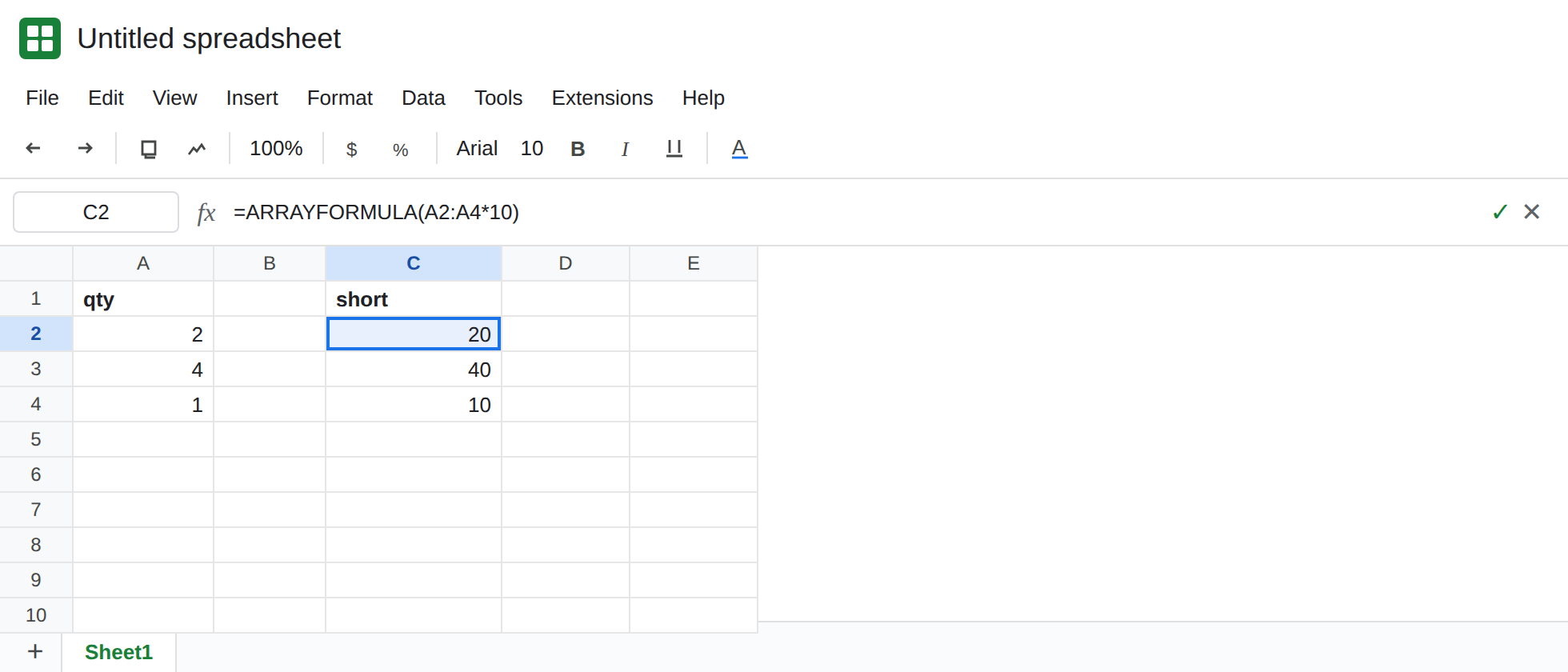
A short ARRAYFORMULA. In C1 type short. In C2 enter =ARRAYFORMULA(A2:A4*10). The spill is 20, 40, 10. One formula, three results. That block is the control.
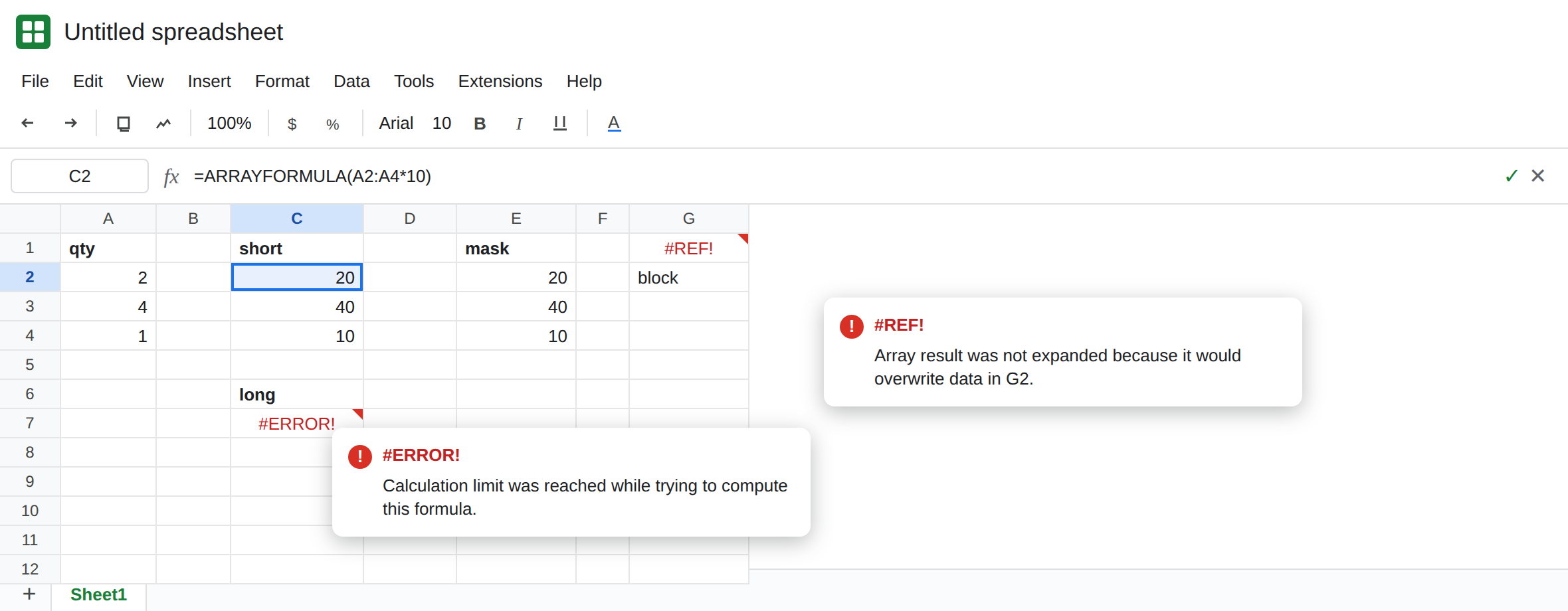
The same idea, far past a normal list. In C6 type long. In C7 enter =ARRAYFORMULA(SEQUENCE(2000000)*SEQUENCE(2000000)). The cell sits on Loading…, then errors. The tooltip is Calculation limit was reached while trying to compute this formula. It may show as #ERROR! with that sentence in the hover. It is not Formula parse error, and it is not Array result was not expanded. Leave C7 broken. If your account still returns a grid, add work inside the product rather than inventing a cutoff: SEQUENCE(2000000)*SEQUENCE(2000000)*SEQUENCE(2000000). The limit depends on steps and memory. The lesson is the tooltip.
A blank mask is not truncation. In E1 type mask. In E2 enter =ARRAYFORMULA(IF(A2:A="",,A2:A*10)). E2:E4 match C2:C4. Rows below look empty because the IF returned a blank wherever column A is blank. The formula finished. It did not drop A4. Leave E2 as that contrast.
Overwrite is the other #REF!. In G2 type block. In G1 enter =ARRAYFORMULA(A2:A4*10). G1 is #REF!. The tooltip names G2: Array result was not expanded because it would overwrite data in G2. The list is three rows. Nothing about calculation limit. Leave G1 broken. That family is array result was not expanded.
Leave C7 on the limit. Leave C2 as 20 / 40 / 10. Leave G1 as the overwrite.
What is actually wrong
Section titled “What is actually wrong”ARRAYFORMULAstill spends the sheet’s calculation budget.SEQUENCE(2000000)asks for two million products. Google’s help describes the failure as time or memory. The user-visible sentence is the calculation limit, the same one on calculation limit.Loading…means the cell started. A parse error never gets that far. Read the hover before you edit commas. Semicolons on a United States locale are locale parse error.- An open column is a common way to arrive here without typing
2000000.A:Ais every row on the tab. A heavy expression onA:Acan hit the same tooltip on a grid that looks short. - A spill that stops early is not automatically the engine “cutting” rows. E2’s blanks are the
IF. A typedblockis#REF!with the overwrite sentence. Count the source (A2:A4is three numbers) before you decide the formula gave up. - The cell is not a circular reference unless the formula mentions its own output. See circular dependency.
Wrapping C7 in IFERROR hides the limit and looks like an empty column. See IFERROR vs IFNA.
Leave C7 and G1 broken so both tooltips stay visible.
Keep the short range. C2 is the formula to copy from: =ARRAYFORMULA(A2:A4*10). If new rows will appear, bound them (A2:A500) instead of A:A. Two shorter formulas added in an ordinary cell cost less than one formula that walks the whole tab.
Clear a real blocker only when the tooltip names a cell. G1 needs G2 empty, or the formula moved. That repair does not raise the calculation budget, and shrinking SEQUENCE does not clear the word block.
Do not hide the limit. IFERROR around C7 turns “too much work” into blanks. The mask in E2 is fine when you mean “skip empty source rows.” It is not a fix for C7.
If the hover says Calculation limit was reached, the array is doing too much. Shorten the range or split the work. If the hover names a cell that would be overwritten, clear that cell. If the lower rows are blank and the IF returns "" for empty source cells, the formula finished.