

IMPORTDATA splits on the delimiter it was given, and locale is not an encoding
Updated
IMPORTDATA(url, [delimiter], [locale]) fetches a CSV or TSV and spills it. If you omit delimiter, Sheets infers it from the file name: comma for .csv, tab for .tsv. A file that is semicolon-separated and named .csv is then split on commas. European rows that use ; between fields and , inside numbers land in the wrong columns, or in one column. Passing ";" on a real comma file does the reverse: each line sits in column A because the line contains no semicolons. The third argument is a locale for parsing numbers and dates inside fields. It is not a character encoding. UTF-16 bytes are not repaired by de_DE.
Could not fetch url, and a URL that is not a delimited file, are IMPORTDATA fetch. Types after File → Import are CSV text vs number. Keep the Google Sheets UI in English. Sheet Error is an independent formula-error library, not a Google product.
Recreate it on a blank sheet
Section titled “Recreate it on a blank sheet”- Open a blank spreadsheet. The control is a small public comma-separated file. In A1 type
comma. In A2 enter:
=IMPORTDATA("https://raw.githubusercontent.com/plotly/datasets/master/mtcars.csv")
Click Allow access if asked. A2 spills a header row (model, mpg, and the rest) across columns, then one row per car. That spill is the control: the URL is a comma CSV, and the default delimiter matches it. If the host is down, A2 is Could not fetch url and you are on IMPORTDATA fetch. Stop and use another comma CSV you can open in a browser as plain text. Do not debug the delimiter until A2 has several columns.
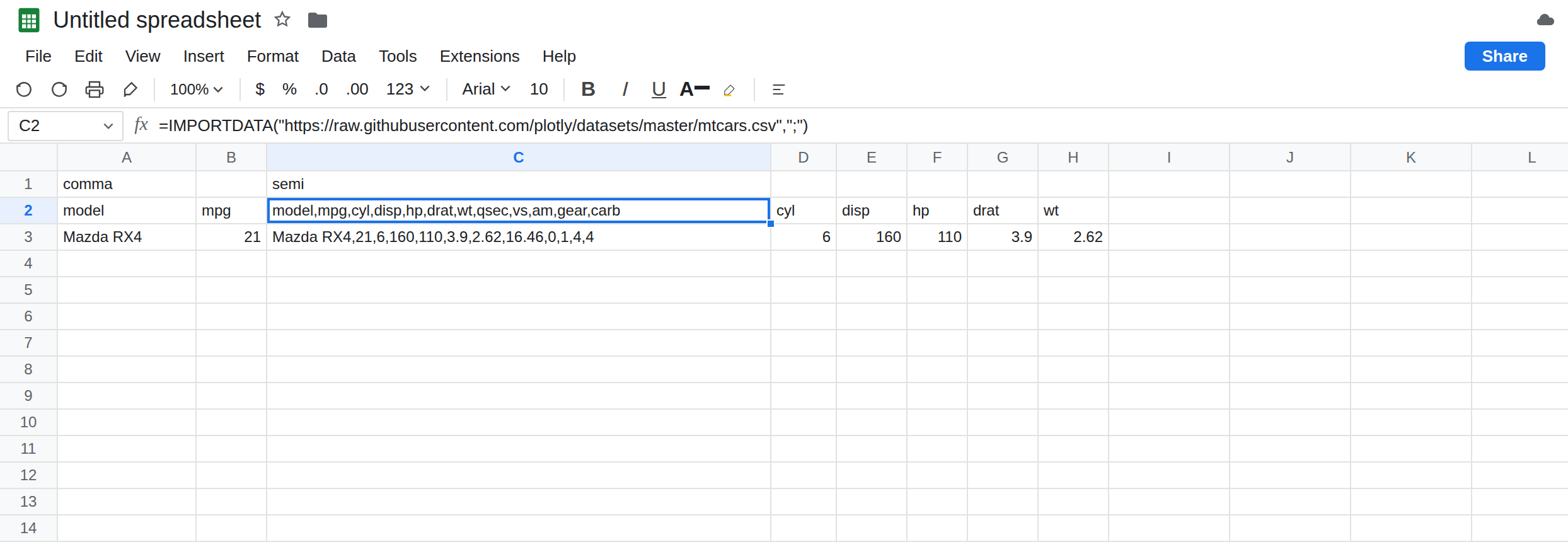
Force a semicolon on a comma file. In C1 type semi. In C2 enter:
=IMPORTDATA("https://raw.githubusercontent.com/plotly/datasets/master/mtcars.csv",";")
C2 does not repeat A2’s columns. Each record is one cell, because the lines are separated with commas and you told Sheets to cut on semicolons. The header is a long string in C2 instead of model in one cell and mpg in the next. That is the scramble: the fetch worked, the cut did not. Leave C2 as that single-column spill.
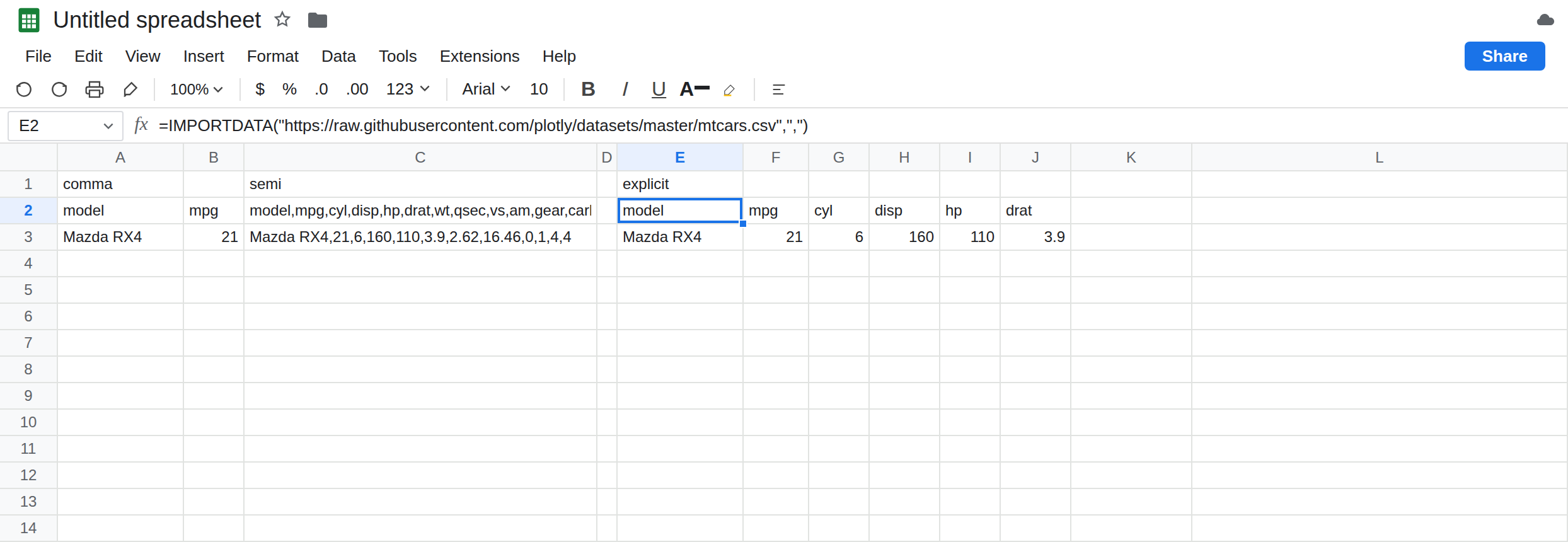
Say the comma out loud. In E1 type explicit. In E2 enter:
=IMPORTDATA("https://raw.githubusercontent.com/plotly/datasets/master/mtcars.csv",",")
E2 matches A2’s shape. The second argument "," is what the file name already implied. Leave E2 as the control that proves the delimiter slot is real.
A semicolon file named .csv. A line 101;Widget;10 in stock.csv contains no comma. The omitted delimiter still means comma, so the spill is one column, the same picture as C2. On that file, ";" is what creates columns. On mtcars, ";" is what removes them. Pass the separator the bytes use.
Locale is not encoding. In G2 enter:
=IMPORTDATA("https://raw.githubusercontent.com/plotly/datasets/master/mtcars.csv",",","de_DE")
The third argument tells Sheets how to read numbers once fields exist. It does not change the comma delimiter you already passed. A field 21.4 may parse as a number or as text depending on that locale. It will not turn UTF-16 into letters. A file whose preview looks like s then a gap then k then a gap, or like replacement characters, is an encoding problem. IMPORTDATA has no encoding parameter. Re-save the file as UTF-8 and import that URL. Do not pass de_DE to fix mojibake. Leave G2 as a numeric-locale experiment next to E2, and compare one mpg cell. If both are numbers and they differ, the locale ate the decimal. If they match, this particular file’s dots survived de_DE; the parameter is still not an encoding.
Leave C2 as one column. Leave A2 as many columns.
What is actually wrong
Section titled “What is actually wrong”- Delimiter first, locale second. Fields are cut on the delimiter, then numbers inside fields are parsed with the locale. A thousands comma in
1,234with delimiter comma splits the number into two fields before any locale can see it. Quote those fields in the file, or do not use comma as both the delimiter and the thousands mark. - The file extension is only the default.
.csvmeans “try commas” when the second argument is omitted. It does not mean the bytes are commas. Open the URL and look at one line. The character betweenmodelandmpgon mtcars is a comma. The character between fields in a European export is often a semicolon. - The delimiter is one character. A multi-character cut after the text is already in a cell is SPLIT by each character. Encoding is outside
IMPORTDATA.de_DEanden_USchange decimal marks. They do not select UTF-16. Re-save as UTF-8. - A successful spill can still be the wrong types: text skus, dates as strings. That is CSV text vs number and it starts after the columns are actually columns. C2 never got that far.
This is not IMPORTXML XPath. mtcars is not HTML. //h1 will not split it.
This is not IMPORTHTML index. There is no table index on a CSV.
Leave C2 as the semicolon-on-commas spill.
Pass the separator the file uses. Keep A2 or E2 for mtcars. For a semicolon export, =IMPORTDATA(url,";"). For a tab file that is not named .tsv, =IMPORTDATA(url,CHAR(9)). Look at one raw line before you change the formula a second time.
Set the locale to the file’s numbers, not your display preference. If the CSV says 1.5 and means one and a half, en_US is the third argument. If it says 1,5 and the delimiter is already semicolon so the comma is inside the field, de_DE can parse it. G2 is how you test. Do not change File → Settings → Locale for the whole spreadsheet just to parse one import; that locale also changes argument separators. See locale semicolons.
UTF-8 before another argument. If the letters are garbage, replace the file. A fourth argument does not exist on IMPORTDATA.
Do not wrap C2 in IFERROR. One column of text is a successful import of the wrong cut. See IFERROR vs IFNA.
If the spill is one column and the raw line contains semicolons, pass ";". If the spill is one column and the raw line contains commas, you passed the wrong delimiter, which is C2. If the tooltip is Could not fetch url, stop changing the delimiter. If numbers are text after the columns look right, the locale or the CSV types are next, not the XPath page.
Comma vs semicolon vs locale
Section titled “Comma vs semicolon vs locale”Default IMPORTDATA on the mtcars .csv spills model and mpg into separate cells. The same URL with ";" puts the header in one cell. "," restores the columns. The third argument parses numbers inside fields. It does not decode UTF-16. A .csv full of semicolons needs ";" because the extension’s default is the comma.