

Iterative calculation is on and the circular cell is still #REF!
Updated
A circular formula is #REF! while iterative calculation is off. The tooltip says Circular dependency detected. To resolve with iterative calculation, see File > Settings. Turning that setting on is not the same as finishing the model. Max number of iterations and Threshold decide whether Sheets keeps going. A max of 0 or 1 can leave the cell as #REF!, or as a number that is only the first step. The fixed point never appears. Saving the dialog is part of the setting. An unsaved toggle does nothing.
This page is an intentional loop that still errors because the cap is too low. An accidental self-sum is circular dependency. Do not raise the cap to hide that one. Keep the Google Sheets UI in English.
Recreate it on a blank sheet
Section titled “Recreate it on a blank sheet”- Open a blank spreadsheet. In A1 type
model. In B1 enter=(B1+8)/2. The cell shows#REF!. The tooltip is Circular dependency detected. B1 is defined from B1. The algebra settles at8, because8 = (8+8)/2. Sheets will not do that algebra in one pass while iteration is off. Leave B1 as#REF!for this step.
Turn the setting on, and keep the cap tiny. File → Settings → Calculation. Turn Iterative calculation on. Set Max number of iterations to 1. Set Threshold to 0.05 if the field is empty. Click Save settings. Go back to B1. If the tooltip is still Circular dependency detected, the cap did not buy a completed value. If B1 became a number near 4 (one step from a zero seed: (0+8)/2), that number is not 8. Either outcome is the recreate. Write down what you see.
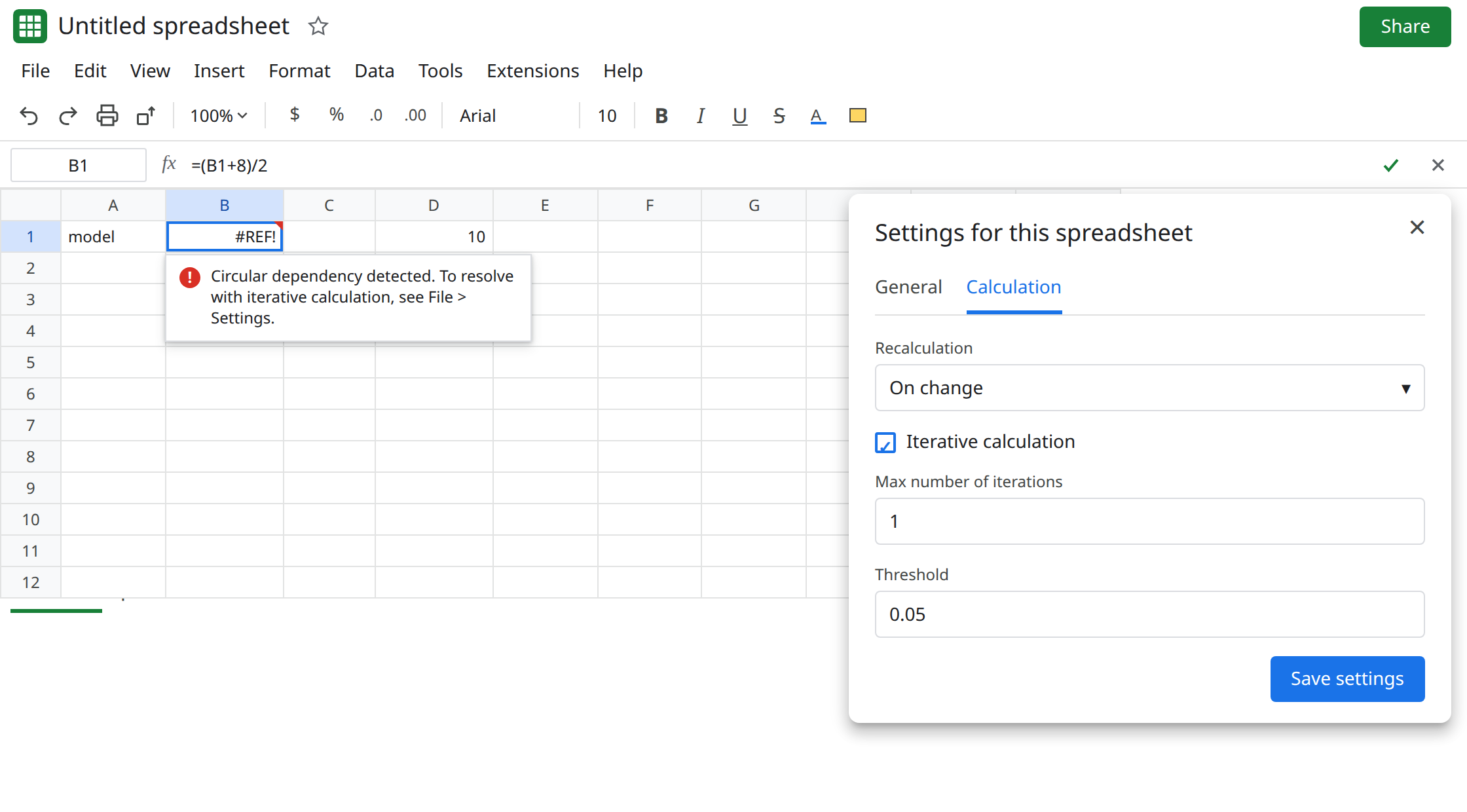
Confirm the dialog actually saved. Open File → Settings → Calculation again. If Iterative calculation is off, the first save did not stick, and #REF! is the off state, not a short cap. Turn it on, set the max to 1 again, and save. A second spreadsheet has its own setting. Enabling iteration on another file does not change this one.
An accidental loop, so you do not “fix” it here. In D1 type 10. In D2 type 20. In D3 enter =SUM(D1:D3). D3 is #REF! with the same circular tooltip. That range includes itself. Iteration will invent a number. It will not be 30. Leave D3 broken. The repair is circular dependency.
What is actually wrong
Section titled “What is actually wrong”- Iterative calculation replays the formula up to the max, stopping early when the change between passes is smaller than the threshold. It does not rewrite B1 into
=8. With a max of1, Sheets gets at most one replay. That is not enough to walk(0+8)/2, then(4+8)/2, then onward to8. A max of0does not replay, so the circular#REF!stays. - The setting is per spreadsheet, under File → Settings → Calculation, and it applies after you click Save settings. A stale
#REF!after a real save usually clears on the next edit. Click B1 and press Enter once before you decide the cap is wrong. - Threshold
0.05can also stop early once the steps get small, short of the last digit you wanted. If the max is high and B1 sits near8but not on it, lower the threshold (for example0.001) instead of adding thousands of iterations. - Turning the setting on is file-wide. D3’s self-sum stops announcing itself and starts showing a meaningless total. That is why the circular-dependency page tells you to leave iteration off for accidental loops.
This is not Calculation limit was reached. That tooltip is a formula that ran too long, often a LAMBDA. See calculation limit. B1’s tooltip names a circular dependency.
This is not #REF! from a deleted address. The formula bar still says B1. See after you delete.
Leave D3 as the accidental #REF!. Do not enable iteration to clear D3. If you already did, turn it back off, fix D3 as =SUM(D1:D2), and only then turn iteration on for B1.
Raise the max on the model that is supposed to converge. File → Settings → Calculation. Iterative calculation on. Max number of iterations 50 (use 100 if B1 is still moving). Threshold 0.001. Save settings. Select B1 and press Enter. B1 shows 8, or a value that matches 8 at the threshold you set. Change the 8 in the formula to 10. The fixed point becomes 10. If it does, the loop is doing the algebra.
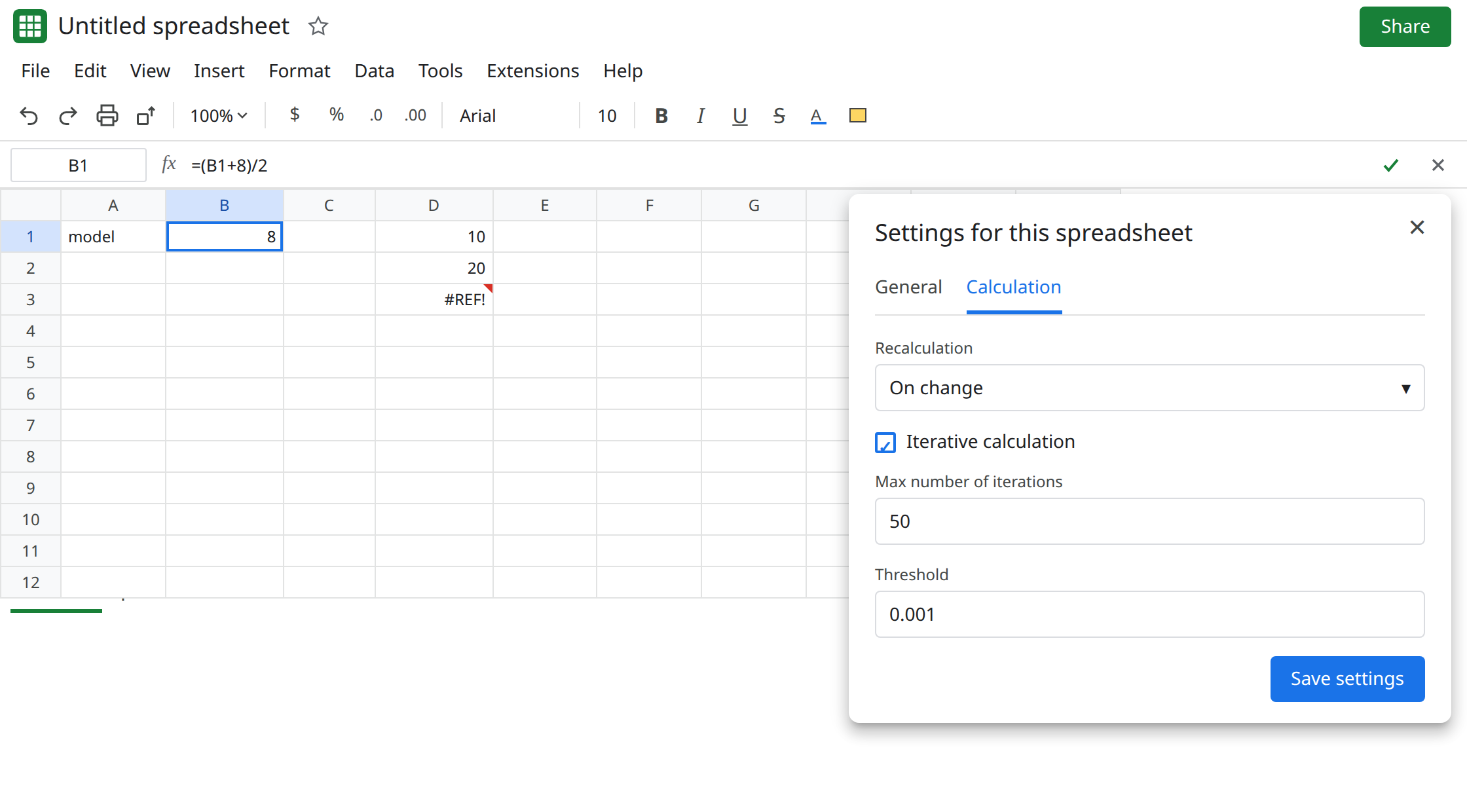
If B1 is still #REF! after a high max, the setting is not on for this file, or the tooltip is no longer the circular one. Read the tooltip before you raise the max again. A different #REF! will not converge.
Do not wrap B1 in IFERROR. You would hide both the short cap and a real broken reference. See IFERROR hides cause.
If the circular formula is intentional and the cell is #REF! or stuck on the first step, raise Max number of iterations and save. If the formula is a SUM that includes its own cell, turn iteration off and shorten the range.