

INDIRECT of a named-range string follows scope, so the same text can point at the wrong cells
Updated
INDIRECT evaluates text as a reference. INDIRECT("qty") opens the named range whose name is the four characters q, t, y. INDIRECT(qty) without quotes does something else first: qty becomes the cells, and INDIRECT receives numbers, not a name. That is #REF!. When the string is correct, scope still decides which qty you get. A file-wide name is one range from every sheet. A sheet-scoped name created by duplicating a tab is another range, and the bare string does not automatically mean “the tab I am looking at.”
A string that is not an address at all, such as "not an address", is INDIRECT #REF!. Duplicating a tab and the two ways a second qty appears are sheet-scoped names. Keep the Google Sheets UI in English. Sheet Error is an independent formula-error library, not a Google product.
Recreate it on a blank sheet
Section titled “Recreate it on a blank sheet”- Open a blank spreadsheet. Leave the first tab named
Sheet1. In A1 typeqty. A22. A34. A46. Select A2:A4. Data → Named ranges. Nameqty. RangeSheet1!A2:A4. Done.
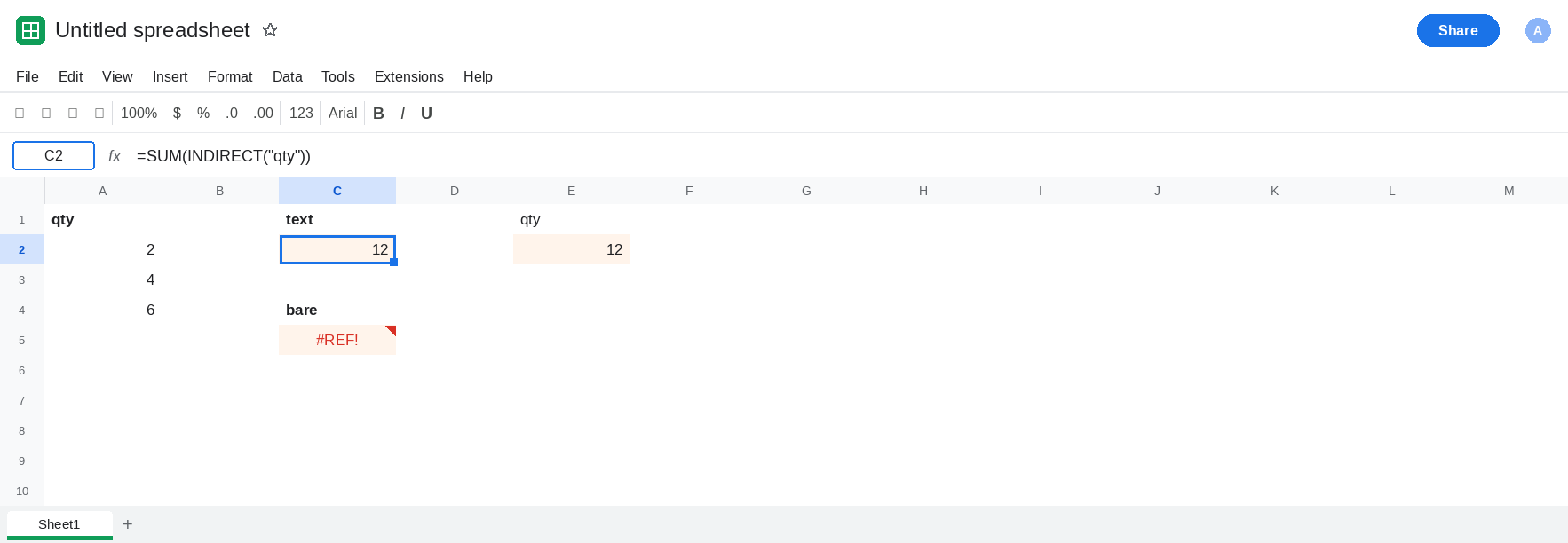
The name as text. In C1 type text. In C2 enter =SUM(INDIRECT("qty")). C2 is 12. The argument is a string. The quotes are the whole mechanism. That cell is the control.
The name without quotes. In C4 type bare. In C5 enter =SUM(INDIRECT(qty)). qty is evaluated before INDIRECT runs, so the function is handed the values 2, 4, and 6. Those numbers are not an A1 address and they are not the text qty. C5 is #REF!. Leave C5 broken.
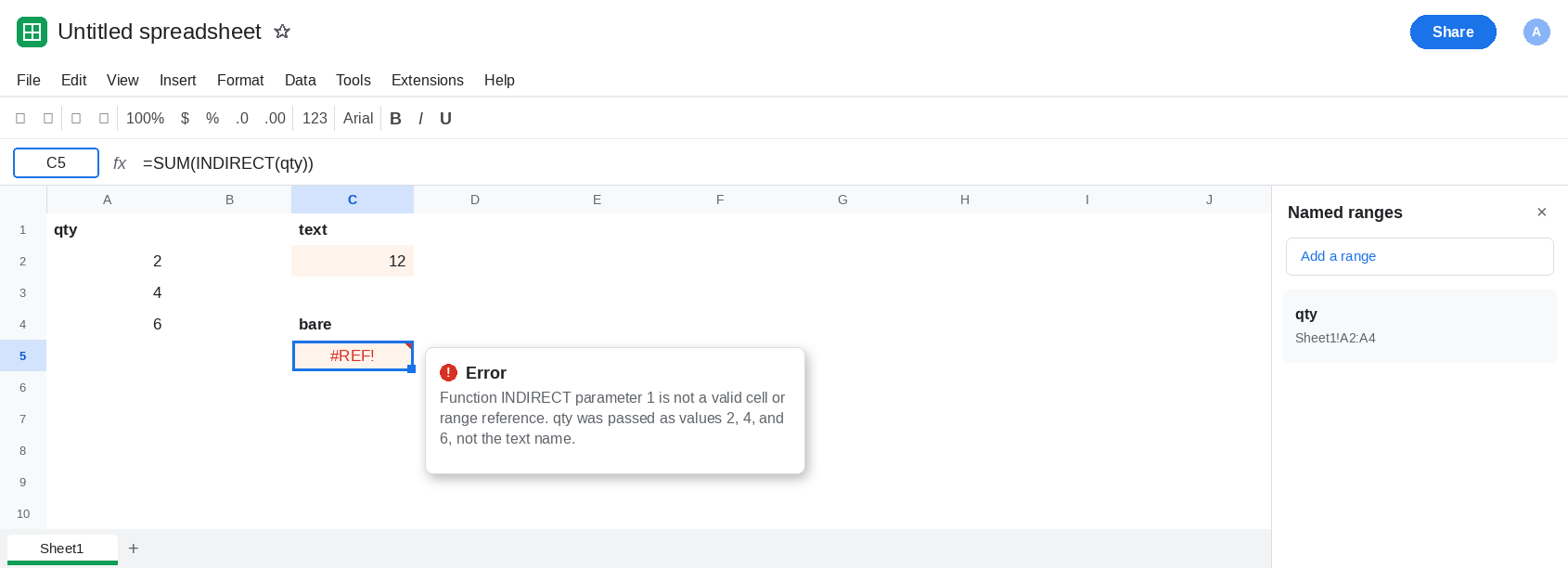
The string lives in a cell. In E1 type qty. In E2 enter =SUM(INDIRECT(E1)). E2 is 12. E1 is text, so this is the same call as C2. In E1 replace the text with qty_old. E2 becomes #REF!. The range is still named qty. The string no longer matches. Put qty back in E1 so E2 returns to 12.
Scope, after a copy. Right-click the Sheet1 tab → Duplicate. The new tab is Copy of Sheet1. On the copy, change A2 to 10. On Sheet1, in G1 type which. In G2 enter =SUM(INDIRECT("qty")). Read G2 and open Data → Named ranges.
- If the sidebar shows a second
qtytied to the copy, G2 on Sheet1 is still12. The string"qty"from Sheet1 is the file-wide name. On the copy,=SUM(INDIRECT("qty"))follows the local name and includes the10when that local name exists. Same four characters. Two ranges. - If the sidebar still shows a single
qtyon Sheet1,INDIRECT("qty")on the copy is also12. The copy’s A2 can be10all day. The string never meant “A2:A4 on this tab.”
On Sheet1, in G4 enter =SUM(INDIRECT("Copy of Sheet1!qty")). If a sheet-scoped qty exists on the copy, G4 totals the copy. If it does not, G4 is #REF!: the string names a scope that was never created. Leave G4 as whichever of those two you actually got. That split is the same one sheet-scoped names records for SUM(qty).
Leave C5 as #REF!. Leave C2 as 12.
What is actually wrong
Section titled “What is actually wrong”INDIRECTdoes not accept a live range and then “look up its name.” C5 passed values. The function wanted the charactersqty. The quotes, or a cell that contains those characters, are required.- A wrong string is
#REF!, including a renamed range. E1 asqty_oldis that miss. It is the same token as a bad address. See INDIRECT #REF! when the string is an A1 reference that does not exist, rather than a name. - Bare
"qty"is file-wide unless the sheet you are on has its own scopedqty. Duplicating the tab is what creates that second scope, and it does not always do it. The sidebar is the proof. Two entries, two targets. One entry, everyINDIRECT("qty")is Sheet1. - The qualified string is
Copy of Sheet1!qty, with the sheet name inside the text. A space in the sheet name belongs inside those quotes. See INDIRECT sheet name when the sheet name itself has an apostrophe. G4 is scope, not punctuation. IMPORTRANGEof a name looks the name up on the source file. A localINDIRECTdoes not satisfy that. See IMPORTRANGE named range.
Leave C5 broken so the missing quotes stay visible.
Pass text. Keep C2. Keep E2 pointed at a cell that contains qty and nothing else. In C7 enter =SUM(INDIRECT("qty")) if you want the repair beside the failure. C7 is 12.
Give each scope its own spelling when both ranges must live. On the copy, delete the scoped duplicate in Data → Named ranges if it is there, and add qty_copy on that tab’s A2:A4. Formulas that mean the copy use INDIRECT("qty_copy"). Formulas that mean Sheet1 use INDIRECT("qty"). A qualified string is only for a scope the sidebar actually lists.
Do not wrap C5 or G4 in IFERROR. You will hide a missing quote and a missing scope the same way. See IFERROR vs IFNA.
If INDIRECT(qty) is #REF! and INDIRECT("qty") totals the range, the argument was not text. If the quoted name totals the original sheet after you edited the copy, the sidebar has one qty, or you are on a sheet that does not own the scoped name. Check Data → Named ranges before you rename the string.