

A recursive LAMBDA hits the calculation limit or #NUM!
Updated
A named function can call its own name. Five steps return a number. A deep chain stops. The tooltip Google documents for that recursive formula is Calculation limit was reached while trying to compute this formula. The cell may show #ERROR! or #NUM!. The formula parsed. Sheets refused to finish the calls. Passing a smaller input is the repair Google’s help gives: use a simpler formula. There is no setting that raises the depth.
The same tooltip on REDUCE / MAP, and on a recursive LET that passes the lambda to itself, is calculation limit. A named function passed into MAP without parentheses is LAMBDA named function. #NAME? because the name was never created is named functions. Keep the Google Sheets UI in English. Helper names stay English.
Recreate it on a blank sheet
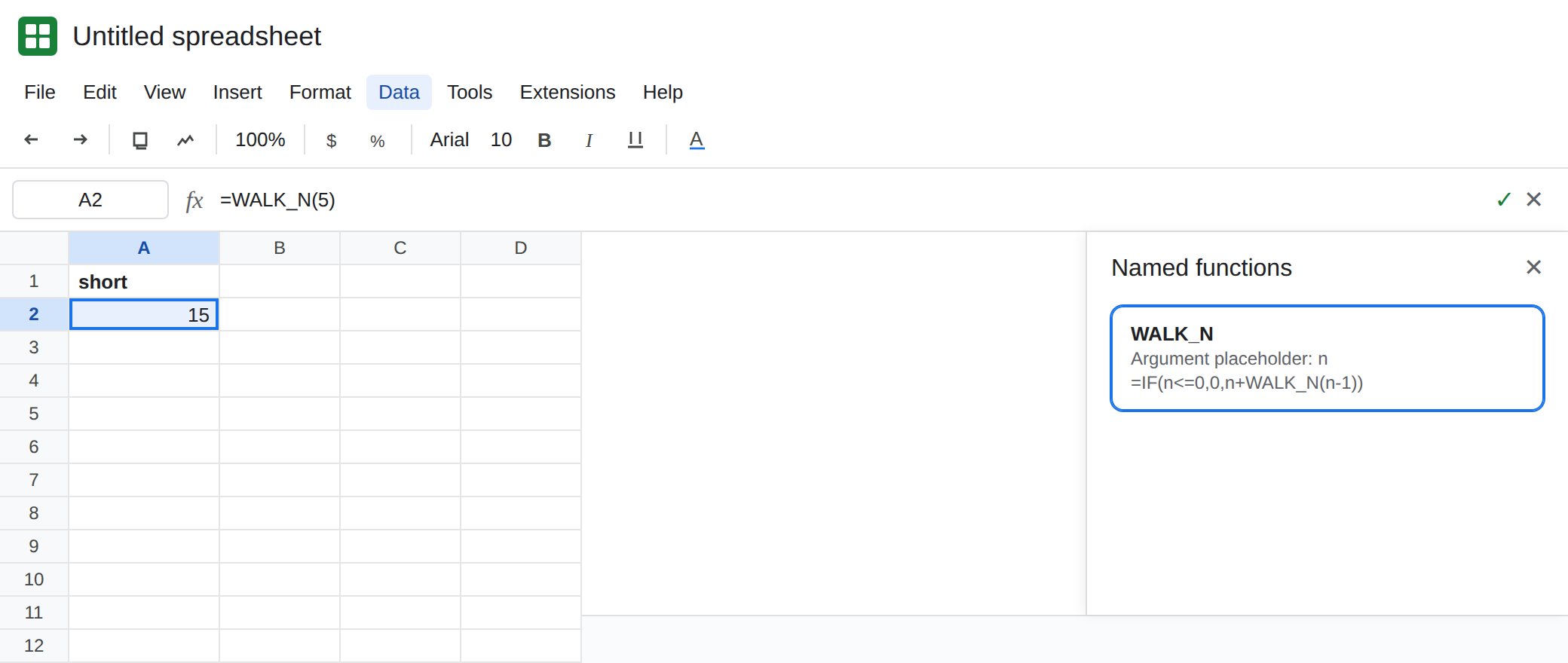
Section titled “Recreate it on a blank sheet”- Open a blank spreadsheet. Do not add this to a file that is already slow. Data → Named functions → Add new function. Name
WALK_N. Argument placeholder:n. Formula definition:
=IF(n<=0,0,n+WALK_N(n-1))
Next, Create. The function adds n + (n-1) + … + 1. It calls WALK_N by name. That is the recursion.
Five steps work. In A1 type short. In A2 enter =WALK_N(5). A2 is 15. That cell is the control. The name exists, the base case n<=0 stops the chain, and five additions fit.
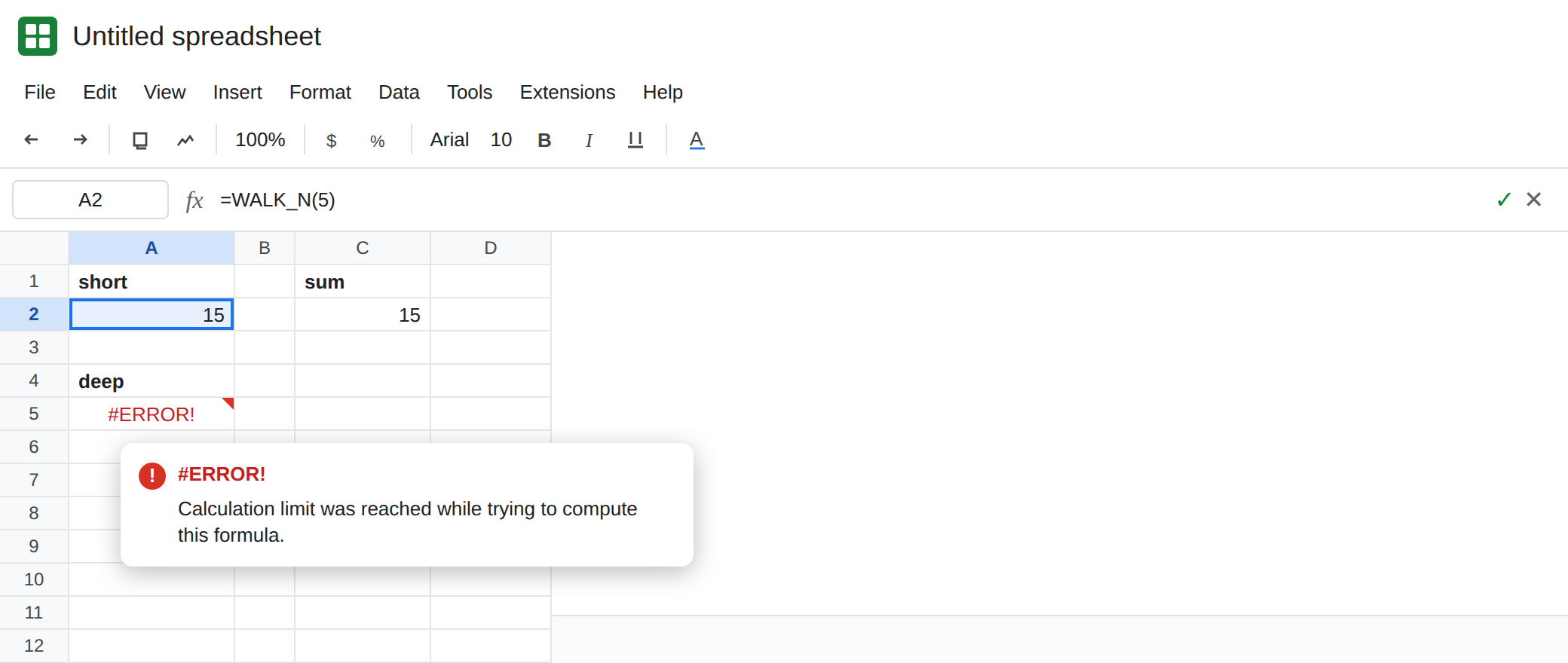
A deep call hits the wall. In A4 type deep. In A5 enter =WALK_N(20000). The cell errors. The hover is Calculation limit was reached while trying to compute this formula. The cell may be #ERROR! or #NUM!. Both mean the recursive call did not finish. Leave A5 broken. If 20000 still returns a number on your account, use a larger n rather than a second copy of the function. Do not memorize the cutoff. Depth and formula weight both spend the budget. The lesson is the tooltip.
The name missing is not the limit. In A7 enter =WALK_MISSING(5). #NAME?. Tooltip: Unknown function: ‘WALK_MISSING’. You never created that name. Leave A7 broken. See named functions. A5’s name is valid. A5 started and was stopped.
A cell that mentions itself is the other #REF!. In C2 enter =C2+1. #REF!, circular dependency. WALK_N does not put A5 inside A5. The recursion is inside the named function. See circular dependency. Leave C2 only if you want the contrast. Delete it if it distracts.
The LET form that passes a lambda as self is the other page’s recreate. It hits the same sentence. It is not a different budget. See calculation limit.
What is actually wrong
Section titled “What is actually wrong”- Each step calls
WALK_Nagain untilnreaches0.WALK_N(5)is five calls.WALK_N(20000)is a deep stack of calls. Google’s named-function help answers this hover with a simpler formula. The causes they list are time and memory. #NUM!on this cell is not a badSQRTor aLARGEindex. It is the recursive formula running out of room. Do not change the base case to “fix” a domain error. The base case is what makes5return15. See out of domain for a real#NUM!domain miss, and do not mix the tooltips.- People search for a phrase about exceeding calculation steps when this happens. On Sheets, read the hover you actually have. The sentence Google documents is Calculation limit was reached while trying to compute this formula. Excel’s recursive
LAMBDAcan land on#NUM!for a deep call as well. The repair is still fewer steps, not a different product’s checkbox. - Naming the function does not give it a larger budget than the
LETrecursion on the calculation-limit page.Data → Named functionsonly makesWALK_Navailable in this spreadsheet. A copy of the formula into a new file is#NAME?until you import or recreate the name. IFERRORaround A5 turns the wall into a blank or a zero and looks like a finished total. See IFERROR vs IFNA.IFNAdoes not catch this.
Leave A5 broken so the tooltip stays. Leave A2 as 15.
Call it with a small n, or do not recurse. Keep A2: =WALK_N(5) is 15. The sum of 1 through 5 is also =SUM(SEQUENCE(5)), which is 15 and does not call a function per step. Prefer SUM / SEQUENCE when the job is a running total. Keep WALK_N for a depth you have already seen succeed.
Shrink the argument. If the real input is large, split it into chunks that each stay near the size of A2, and add those results in an ordinary cell. Deleting the base case makes every call infinite. That is worse. The IF stays.
Do not nest a second recursive name to help. WALK_N calling another recursive function multiplies work. LAMBDA named function is the page when MAP rejects the bare name. It is not a higher limit.
If the hover says Calculation limit was reached, or the cell is #NUM! on a deep WALK_N, pass a smaller n or replace the walk with SUM. If the hover says Unknown function, create the name. If the formula bar contains the cell’s own address, you are on circular dependency. The limit never ran.