

IMPORTXML XPath misses namespaced elements until you use local-name()
Updated
IMPORTXML(url, xpath) returns the nodes the XPath selects. A path written as //title looks for an element named title in no namespace. An Atom feed declares a default namespace (xmlns="http://www.w3.org/2005/Atom"). Every title in that file is in that namespace. //title matches nothing. The cell is #N/A. The tooltip is Imported content is empty. The URL was fetched. The names are the miss.
//h9 on an HTML article, where the tag really is absent, is IMPORTXML XPath. Allow access, Result too large, and a stuck Loading… are Allow access, size, loading. This page is the namespace. Sheet Error is not a Google product. Keep the Google Sheets UI in English.
Recreate it on a blank sheet
Section titled “Recreate it on a blank sheet”- Open a blank spreadsheet. Imports ask once per file.
HTML has no Atom namespace. In A1 type html. In A2 enter:
=IMPORTXML("https://en.wikipedia.org/wiki/Moon","//h1")
If the banner says some formulas are trying to send and receive data, click Allow access. That banner is not a namespace problem. See Allow access, size, loading if A2 stays on the banner. After the click, A2 spills Moon. The article’s h1 is not in http://www.w3.org/2005/Atom. That cell is the control: XPath works when the name is in no namespace.
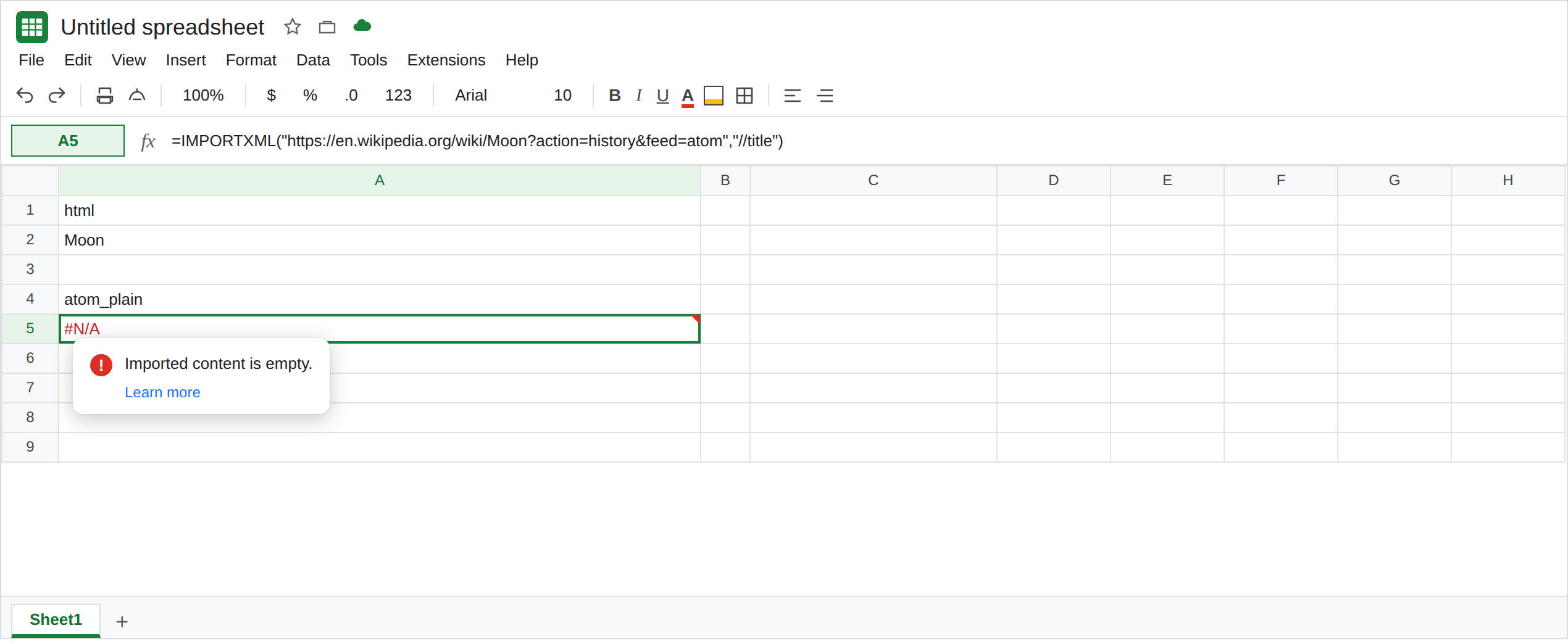
Atom titles are in a namespace. The W3C publishes a small Atom sample at https://validator.w3.org/feed/docs/atom.xml. In A4 type atom_plain. In A5 enter:
=IMPORTXML("https://validator.w3.org/feed/docs/atom.xml","//title")
A5 is #N/A. Tooltip: Imported content is empty. View the document source (the URL itself, not a rendered page). The root element sets xmlns to the Atom namespace, and title is in it. //title does not see those nodes. Leave A5 broken. If that host will not load for you, use any Atom document you are allowed to fetch whose source shows a default xmlns, and keep //title as the failing path. Do not switch the lesson to a file that has no namespace. An RSS 2.0 file often has no default xmlns, and //title on that file can succeed. That success is RSS, not a fix for Atom.
A prefix you did not declare. In C1 type prefix. In C2 enter:
=IMPORTXML("https://validator.w3.org/feed/docs/atom.xml","//atom:title")
atom:title needs a prefix bound to the namespace. IMPORTXML gives you no place to declare that prefix. C2 is #N/A, Imported content is empty, or a parse failure on the path. Leave C2 broken. The prefix in the formula is not the xmlns in the file.
local-name(). In C4 type local. In C5 enter:
=IMPORTXML("https://validator.w3.org/feed/docs/atom.xml","//*[local-name()='title']")
C5 spills the title text from that sample (the feed title and the entry title). local-name() compares the name without the namespace. Leave C5 as that spill. It is the control for a namespaced document.
A tighter test. //*[local-name()='title' and namespace-uri()='http://www.w3.org/2005/Atom'] asks for the Atom namespace only. Use it when the document mixes Atom with another title and the bare local-name() spill is too wide. If C5 is empty because the URL failed to fetch, you are on the transport page, not this one. Could not fetch is not Imported content is empty.
What is actually wrong
Section titled “What is actually wrong”- A default
xmlnsputs every unprefixed element into that namespace. XPath//titlemeans “title in no namespace.” The sample’s titles are in the Atom namespace. Zero nodes.#N/A. Imported content is empty. The same sentence appears when the tag is simply not in the file. See IMPORTXML XPath. A2 shows the path can hit. A5 shows this path misses for a different reason. Open the source and look forxmlns. //atom:titledoes not read the prefix the file happened to use. Many Atom documents use a default namespace and noatom:prefix at all. The formula’s prefix is unbound. C2.local-name()is the comparisonIMPORTXMLcan run without a prefix declaration. It will also return atitlefrom a second namespace if you do not addnamespace-uri().- HTML from Wikipedia is a poor test of this bug. A2’s
//h1succeeds because that tag is not namespaced. Replacing the Atom URL with the Moon article will not explain A5. IMPORTFEEDis the function that already knows feed fields. See IMPORTFEED Atom vs RSS when the goal is title, summary, url, and created, and IMPORTFEED fetch when the URL itself fails.
Leave A5 and C2 broken. Leave A2 as Moon. Leave C5 as the titles if the sample loaded.
Match the local name. Keep C5: //*[local-name()='title']. For entry titles only, tighten the path to the parent you saw in the source, for example //*[local-name()='entry']/*[local-name()='title'].
![C5 selected. Formula bar shows IMPORTXML with XPath //*[local-name()='title']. C5 spills title text. A5 is still #N/A from //title.](/tutorials/importxml-namespace-xpath-fix-local.png)
Prefer IMPORTFEED for a normal feed. =IMPORTFEED("https://validator.w3.org/feed/docs/atom.xml","items title",TRUE,3) asks for the item title field instead of an XPath. If the columns come back blank, that is the Atom field-mapping page, not a reason to go back to //title.
Do not wrap A5 in IFERROR. The empty import would look like a feed with no title. See IFERROR vs IFNA.
If //title is Imported content is empty and the source has xmlns, use local-name(). If //h1 on an HTML page is empty, the tag is absent or the case differs. That is the XPath page. If the tooltip is Could not fetch url, the path never ran.