

Fix VALUE() #VALUE! in Google Sheets (locale-formatted number text)
Updated
VALUE(text) turns a string that looks like a number (or a date/time) into a true number, using this file’s locale. #VALUE! means the string is not a number here: a decimal comma on a United States sheet, a US thousands comma on a decimal-comma locale, or words like pcs. TO_PURE_NUMBER will not parse that string. Generic 10 + pcs is the same error token with no parser involved.
This page is VALUE() and locale-shaped numeric text. It is not wrong type (A2+B2 with pcs, or VALUE("pcs") as a non-number word — mentioned only as contrast). It is not TO_PURE_NUMBER (strips format from a number; passthrough on text). It is not DATEVALUE locale (dates, not 1.234,56). Keep the Google Sheets UI in English. File → Settings → Locale.
Recreate it on a blank sheet
Section titled “Recreate it on a blank sheet”-
Open a blank spreadsheet. File → Settings. Display language English. Locale → United States. Save. United States uses
.decimal and,thousands. -
In A1 type
kind, B1text, C1value.
US text this locale accepts. In A2 type us_ok. In B2 type an apostrophe then 1,234.56 (thousands comma, decimal point). In C2 enter =VALUE(B2). The cell shows 1234.56. That row is the control.
Decimal-comma text on a US sheet. In A3 type eu_on_us. In B3 type an apostrophe then 1.234,56. In C3 enter =VALUE(B3). The cell shows #VALUE!. United States does not treat comma as the decimal mark. Leave C3 broken.
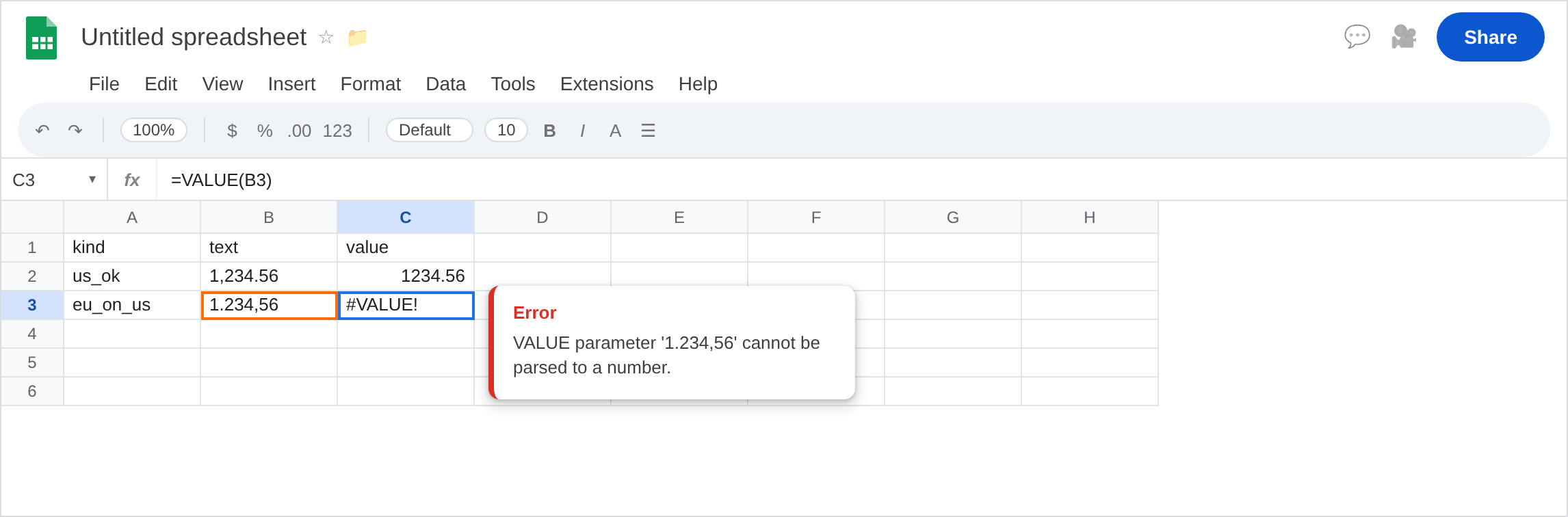
The reverse locale. File → Settings → Locale → Germany (English UI). Germany uses , decimal. C3 may become 1234.56. C2 may become #VALUE! because 1,234.56 is now an illegal thousands/decimal shape. Toggle Locale back to United States so the rest of this page matches a broken C3, or stay on Germany and treat C2 as the broken cell. Do not change Display language.
A word (generic primer). In A5 type word. In B5 type pcs. In C5 enter =VALUE(B5). #VALUE!. That is wrong type, not a locale swap. Leave C5 broken.
TO_PURE_NUMBER on the EU string. In D3 enter =TO_PURE_NUMBER(B3). D3 stays 1.234,56 text. See TO_PURE_NUMBER.
Leave C3 as locale #VALUE!. Leave C2 as the working parse.
What is actually wrong
Section titled “What is actually wrong”VALUEuses the spreadsheet locale, not the character shape you personally learned.1.234,56is a number in Germany and a#VALUE!in the United States.- Thousands separators must match too.
1 234,56(space thousands) can fail on US even after you “know” comma decimals. VALUEof a cell that is already numeric usually works (Sheets coerces). This recreate keeps B-column text with a leading apostrophe.ISTEXT(B3)TRUE.TO_PURE_NUMBERdoes not pick a decimal convention. It only strips format fromISNUMBERcells.- Changing Display language does not change
VALUE. Locale does.
This is not DATEVALUE("13/1/2024"). See DATEVALUE locale. Same locale idea, different parser.
This is not Formula parse error from ; vs ,. See locale parse error.
This is not SUMIFS skipping date text. See SUMIFS date text.
Leave C3 (or C2 on the reverse locale) and C5 broken.
Write the number in this locale’s text shape. On United States, keep B2 / C2. For one thousand two hundred thirty-four and fifty-six hundredths as text, type '1234.56 or '1,234.56, not '1.234,56.
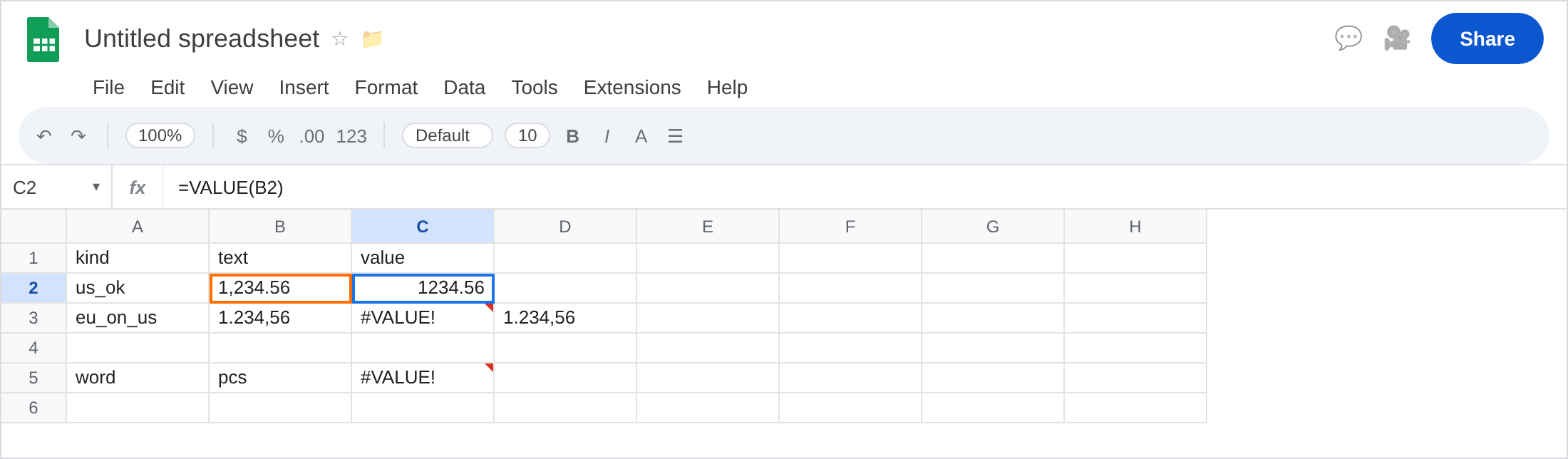
Normalize then VALUE. On a US sheet, in G3 enter =VALUE(SUBSTITUTE(SUBSTITUTE(B3,".",""),",",".")). Dots (thousands) stripped, comma turned into a decimal point. G3 is 1234.56. Only do this when you know the source is decimal-comma. The reverse substitution on a US string will scramble it.
Prefer a real number at import. File → Import with the matching locale, or paste without an apostrophe and let Sheets coerce. Then you do not need VALUE.
Do not switch File → Settings locale as a permanent fix for one column of imported text. You will break VALUE on the US strings next to them. See DATEVALUE locale for the same advice on dates.
If #VALUE! and the string is 1.234,56 or 1,234.56, check Locale. If the string is pcs, leave this page for wrong type. If there is no error and the $ stayed, you used TO_PURE_NUMBER on text.
VALUE vs TO_PURE_NUMBER vs ADD
Section titled “VALUE vs TO_PURE_NUMBER vs ADD”VALUE parses text with locale rules. That is C2 / C3.
TO_PURE_NUMBER does not parse. D3.
A2+B2 with pcs never tries a locale number format. That primer is wrong type. Same #VALUE! token. The tooltip on C3 names VALUE and the unparsed string. Read it before you change Locale for the whole file.