

A bare GOOGLEFINANCE ticker can be the wrong listing, or #N/A, until you add the exchange
Updated
GOOGLEFINANCE identifies a listing with a ticker string. Some symbols resolve with no exchange in front of them. GOOG is one of those. Others do not. A number that is a local code, such as 7203, is #N/A until you write TYO:7203. A symbol that exists on more than one exchange can return a listing you did not mean. BHP and LON:BHP are different requests. Google’s help describes the optional EXCHANGE:SYMBOL form. The prefix is how you name the listing. It is not a formatting detail.
A symbol the service does not have at all (NOTATICKER, or USD/JPY with a slash) is GOOGLEFINANCE #N/A. Attributes and date order are GOOGLEFINANCE attribute. Delay is GOOGLEFINANCE delay. Sheet Error is not a broker and not Google. Do not trade from this page. Do not copy a price into this article.
Recreate it on a blank sheet
Section titled “Recreate it on a blank sheet”- Open a blank spreadsheet. You need a network. Keep the Google Sheets UI in English.
A symbol that works without a prefix. In A1 type symbol. In A2 type GOOG. In B1 type price. In B2 enter =GOOGLEFINANCE(A2,"price"). When the fetch works, B2 is a number. That cell is the control: no NASDAQ: was required for this symbol. If B2 is #N/A, settle the symbol on GOOGLEFINANCE #N/A before you add prefixes. Do not type B2’s number anywhere else.
A local code with no exchange. In A4 type bare. In A5 type 7203. In B5 enter =GOOGLEFINANCE(A5,"price"). The cell shows #N/A. The tooltip says the query for the symbol returned no data. 7203 is not a ticker string the function can use on its own. Leave B5 broken.
The same code with the exchange. In A7 type tokyo. In A8 type TYO:7203. In B8 enter =GOOGLEFINANCE(A8,"price"). When the fetch works, B8 is a number. The digits are a quote for that Tokyo listing, delayed the way GOOGLEFINANCE delay describes. They are not a value to copy into this page. The formula difference from B5 is the prefix TYO:. Leave B8 as a number and B5 as #N/A.
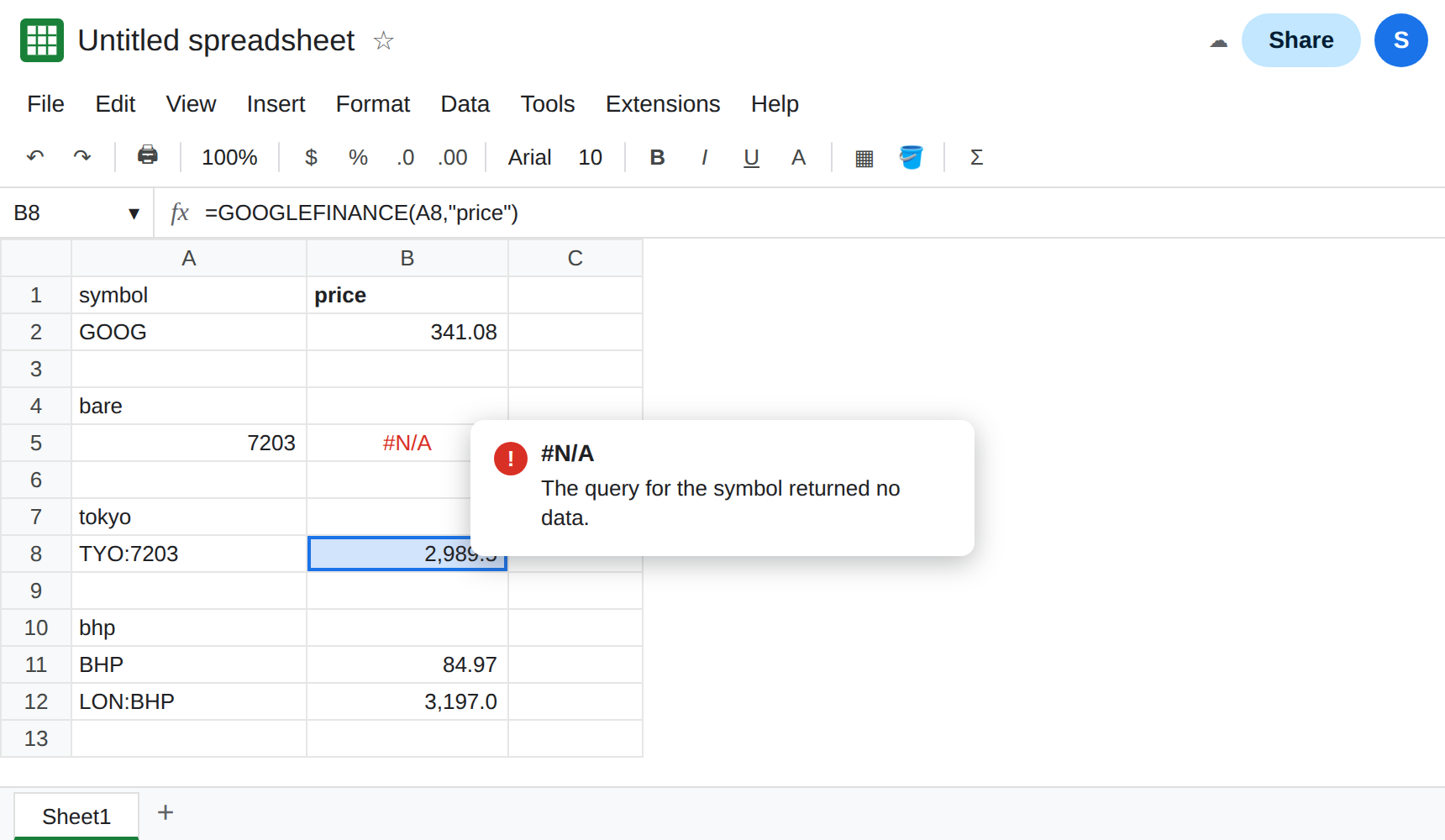
Two prefixes are two listings. In A10 type bhp. In A11 type BHP. In A12 type LON:BHP. In B11 enter =GOOGLEFINANCE(A11,"price"). In B12 enter =GOOGLEFINANCE(A12,"price"). When both return numbers, they are not required to be equal. One request did not name an exchange. The other named London. If one of them is #N/A, that listing is the one the service did not resolve. Leave both formulas. Do not average them.
A currency pair is not this prefix. CURRENCY:USDJPY uses the word CURRENCY, not a stock exchange. USD/JPY is still #N/A. That pattern is GOOGLEFINANCE #N/A and currency pair.
What is actually wrong
Section titled “What is actually wrong”- The ticker argument is the whole listing name.
EXCHANGE:SYMBOLis one string. A colon inside it is not a range and not an argument separator.TYO:7203in A8 is a single text value. - Omitting the exchange asks Google to pick a default, or to return nothing.
7203has no default that this function accepts, so B5 is#N/A.GOOGhas a default, so B2 can be a number. Success onGOOGdoes not mean every other symbol is optional-prefix. - Two exchanges mean two listings. Matching the letters
BHPis not matching the market. A dashboard that mixes B11 and B12 is mixing instruments. The sheet is not “off by a few cents” in a waydatadelayexplains. Delay is how old one quote is. See GOOGLEFINANCE delay. - The prefix does not fix a bad attribute or a reversed history window.
=GOOGLEFINANCE("TYO:7203","close","2024-06-01","2024-01-01")is still#N/Abecause the dates are backwards. See GOOGLEFINANCE attribute. - Spelling the exchange wrong is the same
#N/Aas a bad symbol.TOKYO:7203is notTYO:7203. The tooltip still says the symbol returned no data. You cannot tell “bad exchange” from “bad ticker” by the error value alone. Compare a known-good string.
This is not a VLOOKUP miss. See what #N/A means.
Leave B5 as #N/A on the bare code. Leave B2 as the unprefixed symbol that already works.
Put the exchange in the ticker string. Keep B8: =GOOGLEFINANCE(A8,"price") with A8 set to TYO:7203. For a US listing Google documents the same shape, NASDAQ: or NYSE: plus the symbol, when the bare symbol is the wrong listing or no listing. Use the prefix the venue actually uses. Guessing a city name is how B5 stays #N/A.
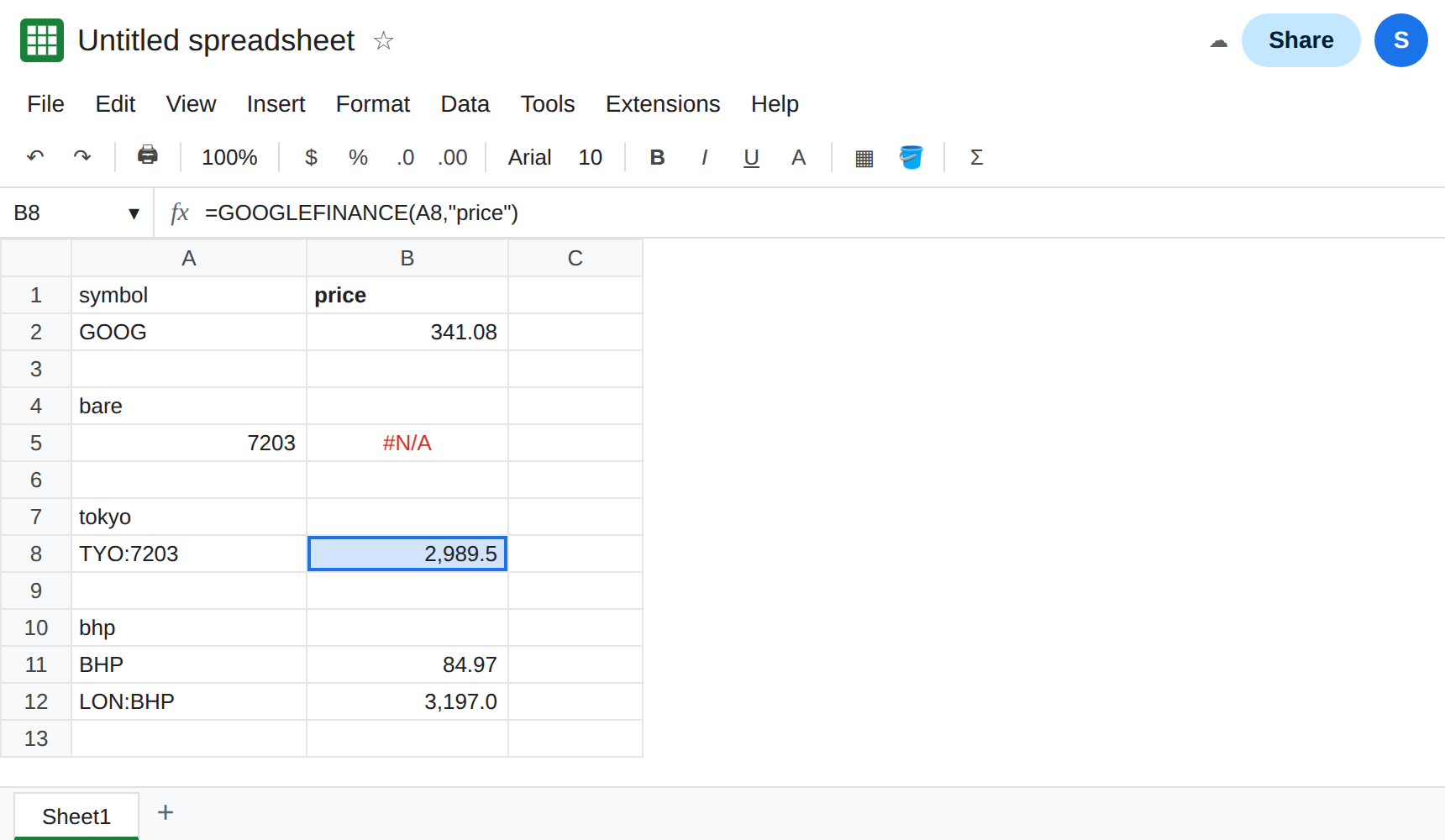
When both listings return numbers, label the column with the full string. Keep A12 as LON:BHP next to the formula that uses it. Do not store BHP in the cell and add the exchange only in a note.
Do not wrap B5 in IFNA and show the GOOG price instead. You would label a missing listing with an unrelated quote. See IFERROR vs IFNA.
If the bare symbol is #N/A and EXCHANGE:SYMBOL returns a number, the prefix was the whole bug. If the prefixed symbol is still #N/A, the exchange code or the attribute is wrong. Reloading does not invent a listing.