

Copying IMPORTXML down the sheet is not a backoff, and it spends the quota faster
Updated
IMPORTXML, IMPORTHTML, IMPORTDATA, and IMPORTFEED share one traffic limit across spreadsheets you created. The cool-down cell is #N/A, and the tooltip says loading may take a while because of the large number of requests. A second IMPORTXML under the first is another request. Filling a column “so one of them gets through,” or wrapping the call in IF and NOW so it “retries later,” adds formulas that count. The query language and the sheet have no sleep argument on IMPORTXML. Waiting is what you do after the extra formulas are gone. It is not a loop you build out of more imports.
The quota sentence itself, and a single legal call, are IMPORT quota. A bad XPath is not this page. Keep the Google Sheets UI in English. Sheet Error is an independent formula-error library, not a Google product. Do not point a stack of new formulas at someone else’s site to force the limit.
Recreate it on a blank sheet
Section titled “Recreate it on a blank sheet”- Open a blank spreadsheet. You want one import, and a clear look at the pattern that makes the quota worse. You do not want a sheet that fires the same URL from every row.
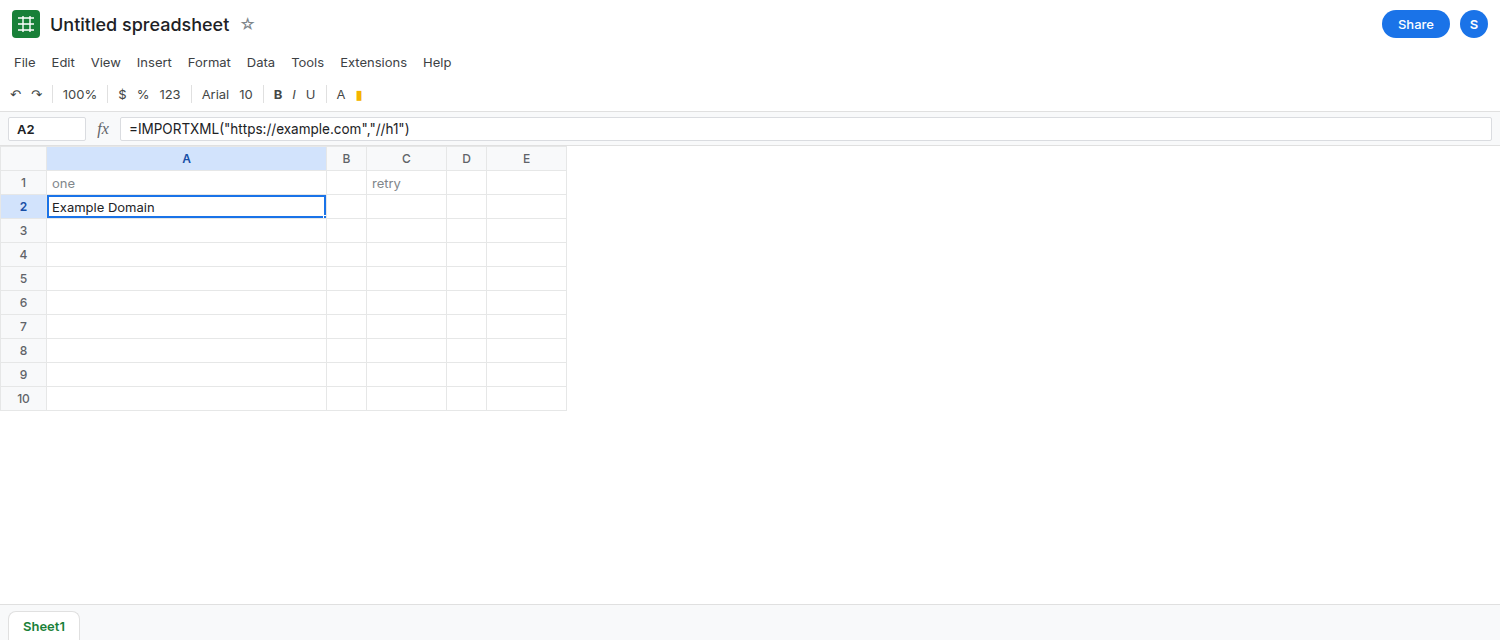
One call. In A1 type one. In A2 enter =IMPORTXML("https://example.com","//h1"). If Sheets shows Allow access, click it once. When the fetch works, A2 shows Example Domain. That cell is the control: this URL and this XPath can succeed. If A2 is #N/A and the tooltip says Could not fetch url, you are offline or the host refused. That is a fetch miss. Fix the network before you talk about retries. A short Loading… is the fetch.
What not to add beside it. In C1 type retry. Leave C2 empty. The anti-pattern is =IMPORTXML("https://example.com","//h1") copied through C2:C50, or the same formula gated by =IF(NOW()>0,IMPORTXML("https://example.com","//h1"),). Each copy is another live import. NOW() is volatile, so the gate recalculates and asks again. See NOW in ARRAYFORMULA for how a volatile stamp repeats. Do not fill C2:C50. Do not press the fill handle on A2. The lesson is the formula you did not create.
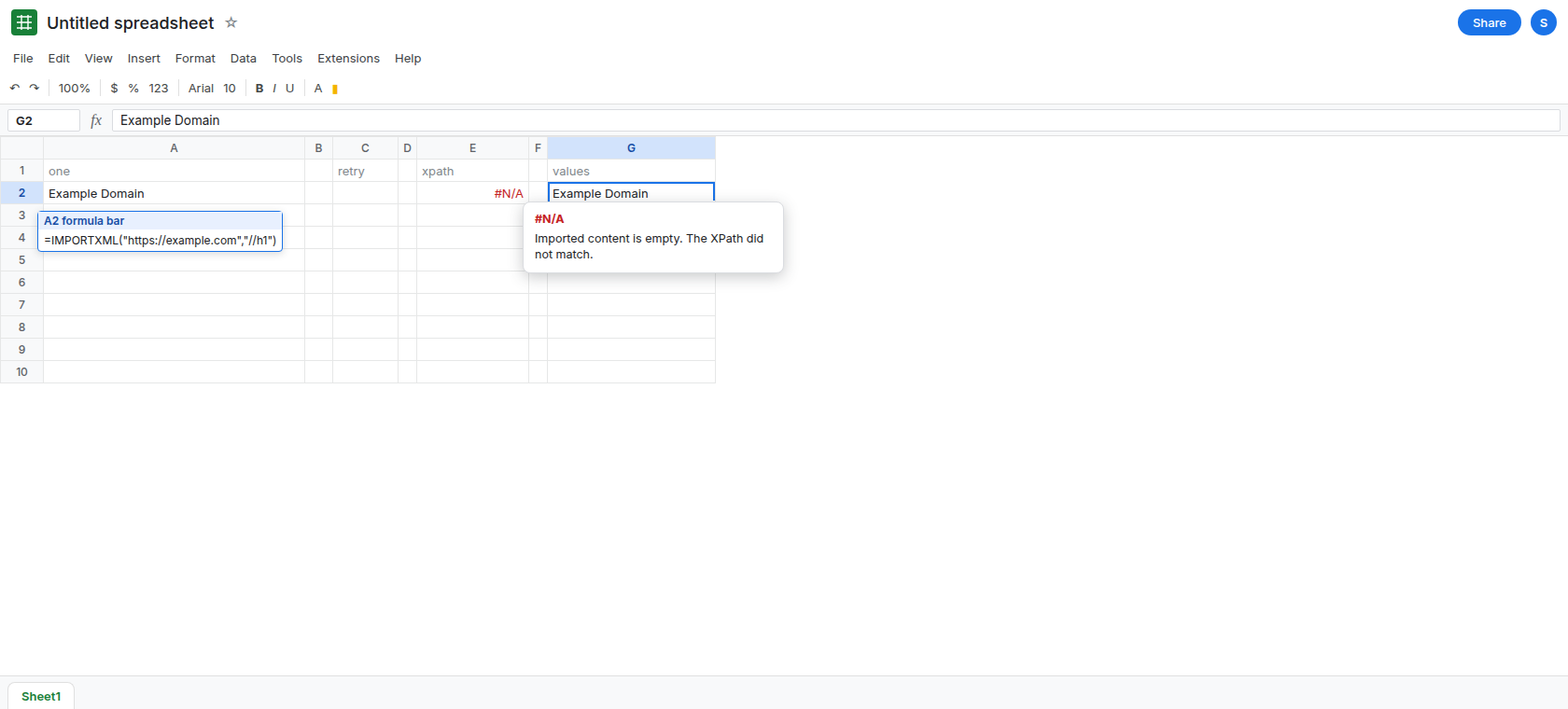
A bad path is not a reason to retry fifty times. In E1 type xpath. In E2 enter =IMPORTXML("https://example.com","//no-such-heading"). E2 is #N/A because the path matched nothing, or the tooltip says the content could not be parsed. The sentence does not mention a large number of requests. Copying E2 down the column will not invent the missing node, and it spends the same quota. Leave E2 as the single bad path. See IMPORTXML XPath.
If you already have the quota sentence, read it and stop. It names IMPORTHTML, IMPORTDATA, IMPORTFEED, and IMPORTXML together. A sheet of “backoff” copies is part of the count, including copies in other files on this account. This page will not ask you to add more calls to reproduce that tooltip. The picture of the sentence is on IMPORT quota.
What is actually wrong
Section titled “What is actually wrong”- The four import functions are external calls. Google’s help tells you the error when those calls create too much traffic. A retry column is more calls. It is the opposite of the sentence in the tooltip.
- There is no argument for delay, jitter, or a second attempt.
IF,NOW,RAND, and a script that writes the formula again all schedule more fetches.RANDbeside imports is the same idea as RAND recalc storm: edits wake the calls. - Refreshing the browser repeats the calls that are still formulas. It does not raise the limit.
IFERRORaround a cool-down turns#N/Ainto a blank and leaves the formula in place, so the next recalc asks again. - One URL with two paths joined by
|is one request://h1 | //p. A column of one path per row is many requests. The pipe is the documented way to ask for two nodes. It is not a scraper.
This is not IMPORTRANGE. See IMPORTRANGE access. A connect button does not reset import traffic.
Leave E2 broken. Leave C2 empty.
Keep a single live formula. A2 is that formula. Delete any duplicate IMPORTXML, IMPORTHTML, IMPORTDATA, or IMPORTFEED you already added as retries, in this file and in other files on this account. Then wait. Google does not publish a button that clears the quota. Do not add NOW() to “check whether it is time to retry.”
Freeze what you already fetched. When A2 shows Example Domain, copy it and Edit → Paste special → Values only into G2. G2 has no formula. It does not refresh, and it does not count as an import. Use that when the page was a reference you meant to capture once.
Do not build a loop in Apps Script to call the same URL until it works. A loop is more traffic, from UrlFetchApp or from formulas the script writes back. Custom functions cannot call UrlFetchApp anyway. See custom function UrlFetch. This page stops at one import and a pasted value.
If the tooltip names the large number of requests, delete the extra import formulas and paste values for anything you already have. If the tooltip names the XPath, you are on the path page. Filling the column will not fix either one.