

Fix named function errors in Google Sheets (arity, A1 placeholder, named range shadow)
Updated
A named function (Data → Named functions) is a formula you name on this spreadsheet, with argument placeholders. #N/A here is usually the wrong number of arguments: you defined hours and rate, then called it with one input. A placeholder named A1 never becomes a cell error — the editor rejects it, because A1 is a cell address. A named range with the same name takes precedence, so the function still sits in the sidebar and the cell no longer calls it.
This page is named functions. It is not unknown function (VLOKUP). It is not named range #REF! / #NAME? as the primer for a missing alias. It is not LET #NAME? (names that exist only inside one formula). Keep the Google Sheets UI in English.
Recreate it on a blank sheet
Section titled “Recreate it on a blank sheet”- Open a blank spreadsheet. In A1 type
hours. A28. In B1 typerate. B212.
Define the function. Data → Named functions → Add new function. Name SHIFT_PAY. Two argument placeholders: hours, then rate. Formula definition: =hours*rate. Next, and Create. Placeholders are the words in the argument list, not cells.
A call that works. In D1 type ok. In D2 enter =SHIFT_PAY(A2,B2). The cell shows 96. That row is the control. The definition is on this file only. Another spreadsheet does not have SHIFT_PAY until you import the named function there.
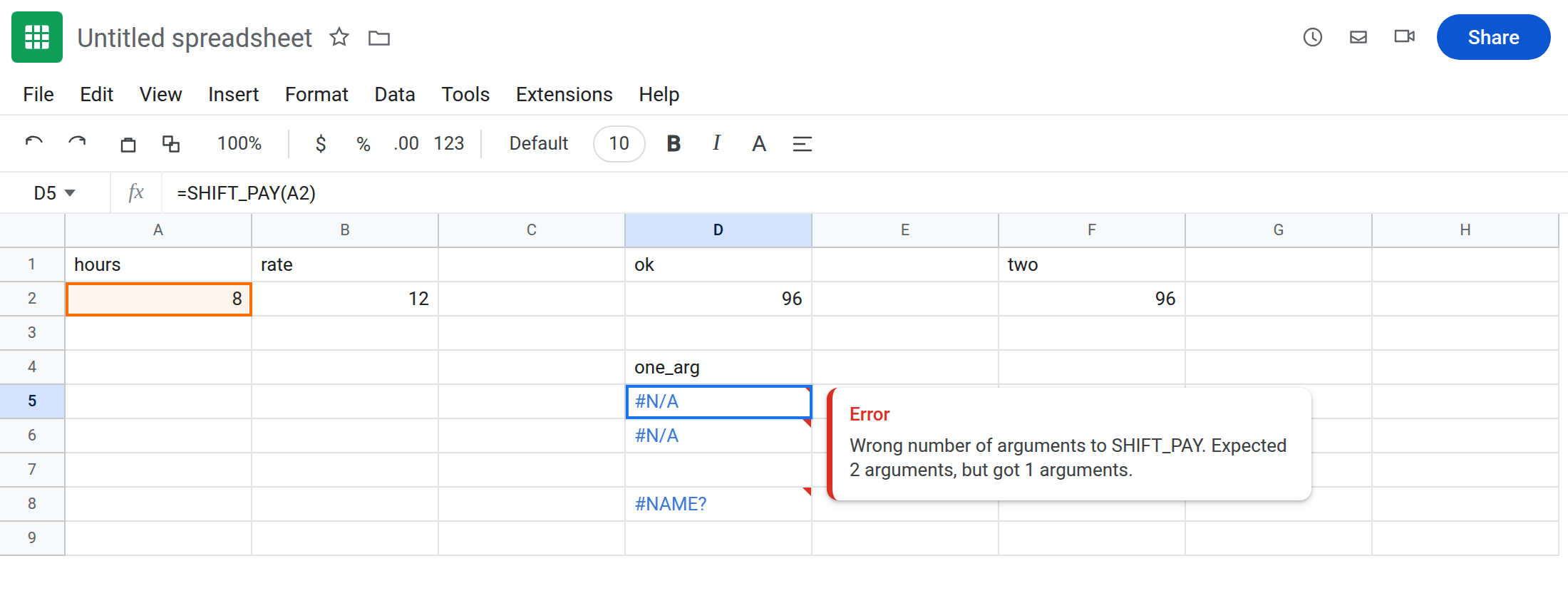
Wrong arity. In D4 type one_arg. In D5 enter =SHIFT_PAY(A2). The cell shows #N/A. The tooltip is Wrong number of arguments to SHIFT_PAY. Expected 2 arguments, but got 1 arguments. A2:B2 as a single range is the same mistake: one argument, and that argument is a range, not “hours and rate.” In D6 enter =SHIFT_PAY(A2:B2). #N/A, expected 2, got 1. Leave D5 and D6 broken.
Placeholder A1. Data → Named functions → Add new function. Name BAD_CELL. Argument placeholder A1. Sheets will not save it. The name is A1 syntax, which is reserved for cells. AA11 fails the same way. You do not get a #NAME? on the grid from a function that was never created. Rename the placeholder to hours (or any word that is not a cell address) if you still want the function. Cancel BAD_CELL.
A name used in the definition but not declared. Edit SHIFT_PAY only if you can undo. Safer: add BONUS_PAY with one placeholder hours and definition =hours*rate. Create it. In D8 enter =BONUS_PAY(A2). The cell shows #NAME?. rate is not an argument and not a named range. The function ran far enough to evaluate its body. Leave D8 broken. SHIFT_PAY is still the one that knows rate.
Named range shadows the function. Data → Named ranges. Name SHIFT_PAY, range A2. Done. Google’s rule: if a named range and a named function share a name, the named range wins. In D10 enter =SHIFT_PAY(A2,B2). The cell no longer shows 96. It errors (#NAME? or #ERROR!), or it treats SHIFT_PAY as the range in A2 and then chokes on (A2,B2). Data → Named functions still lists SHIFT_PAY. The sidebar list is not what the formula calls. Leave D10 broken.
Leave D5, D6, D8, and D10 broken. If you need the control back, the fix section renames the range; until then D2 may also have stopped returning 96. That is the shadow. Note it.
What is actually wrong
Section titled “What is actually wrong”- The argument count is part of the function.
SHIFT_PAY(hours, rate)is two inputs every time you call it. A rangeA2:B2is one input. Expected 2, got 1. That is D5 and D6. It is not aLAMBDAinsideMAKEARRAY. See MAKEARRAY LAMBDA only when the formula bar saysMAKEARRAY. - Placeholders must look like names: letters, numbers, underscores, not
A1, notR1C1, notTRUE, not a built-in such asSUMfor the function name. The editor error never reaches a cell. Hunting#REF!on the sheet will not explain a placeholder the dialog refused. - Names inside the definition must be placeholders you declared, or real functions and ranges.
rateinBONUS_PAYis an unknown name.#NAME?. See LET #NAME? for the same idea insideLET, which does not appear under Data → Named functions. - A named range occupies the name. The function does not override it. Deleting the function will not fix D10 if the range remains, and deleting the range is what gives the function the name back.
- Built-in names are reserved for the function itself. You cannot add a named function called
SUM. That refusal is also the editor, not=SUM(A2)on the sheet.
This is not a misspelled built-in. See unknown function. If the tooltip is Unknown function: ‘SHIFT_PAY’, this file has no named function and no named range by that name — you defined it on a different spreadsheet. Import it (Data → Named functions → Import) or recreate it here.
This is not a named range whose cells were deleted. See named range #REF! / #NAME?. That #REF! still shows the range name in the formula bar and #REF! in the named-range sidebar. D5’s tooltip counts arguments.
Pass every placeholder. In F2 enter =SHIFT_PAY(A2,B2) after the range no longer owns the name (next paragraph). The cell shows 96. To take a row as one argument, redefine the function with a single placeholder pair and =INDEX(pair,1)*INDEX(pair,2), then call =SHIFT_PAY(A2:B2). Do not keep two placeholders and pass one range.
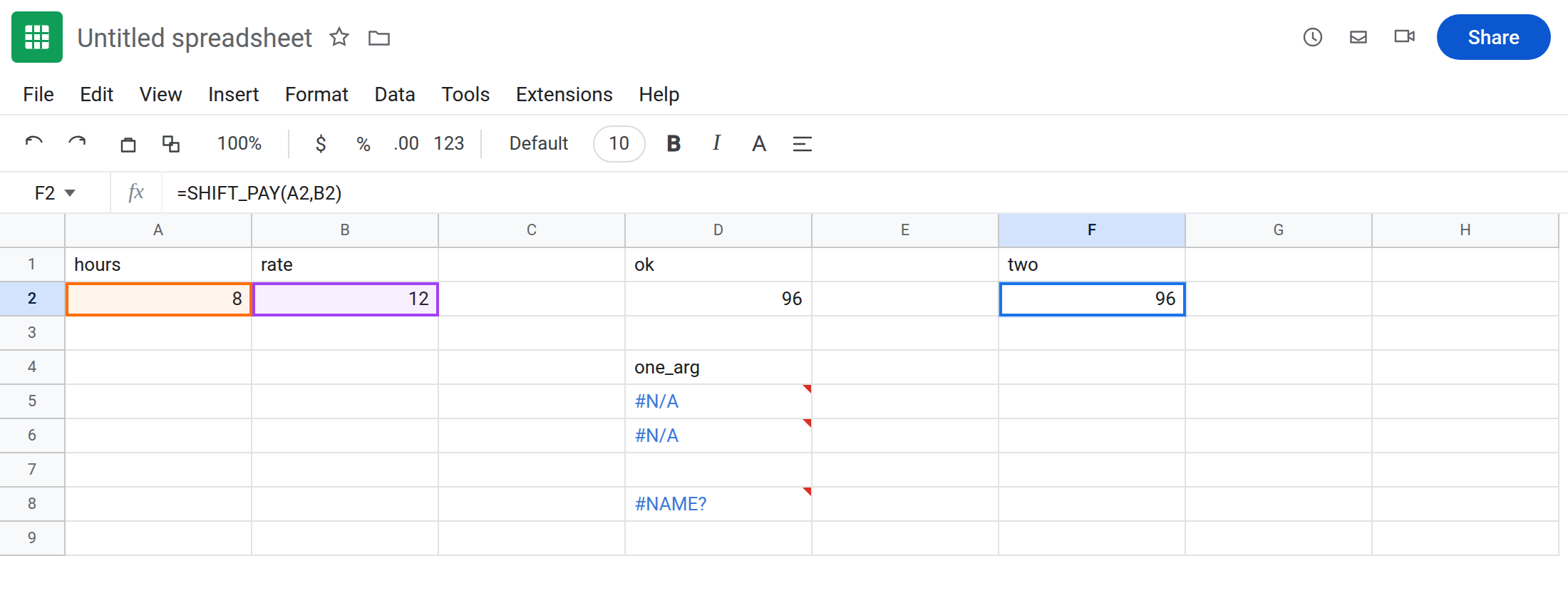
Give the range a different name. Data → Named ranges. Rename SHIFT_PAY to hours_cell (range still A2). =SHIFT_PAY(A2,B2) is the function again. =hours_cell is 8. They no longer share a name.
Declare every word the definition uses. BONUS_PAY needs a rate placeholder, or the definition should be =hours*12 if the rate is fixed. Do not leave rate as a bare name.
Placeholders. Use hours, rate, pair. Do not use A1 or AA11. If the dialog will not create the function, read that message. There is nothing to correct in a cell yet.
Do not wrap D5 in IFERROR. You would hide a missing argument and also hide D8’s #NAME?. See IFERROR vs IFNA. IFNA would hide the arity #N/A only. Prefer passing rate.
If the tooltip counts arguments, match the placeholder list. If the editor rejects A1, rename the placeholder. If the function is listed and the cell still will not call it, look in Data → Named ranges for the same name. The range wins.