

A named function with a LAMBDA inside hits the calculation limit on a wide map
Updated
A named function can call MAP and pass it a LAMBDA. On three cells that returns a number. Point the same name at every column of a large grid and each column runs that inner lambda. The cell stops. The tooltip is Calculation limit was reached while trying to compute this formula. The formula parsed. Sheets refused to finish the steps. The name is not unknown, and the lambda is not the wrong shape.
Passing the bare name into MAP (no inner lambda at all) is LAMBDA named function. A recursive name that is simply too deep is recursive LAMBDA limit. The general tooltip is calculation limit. Keep the Google Sheets UI in English. Helper names stay English: LAMBDA, MAP, BYCOL.
Recreate it on a blank sheet
Section titled “Recreate it on a blank sheet”- Open a blank spreadsheet. Do not add this to a file that is already slow. In A1 type
qty. A22. A34. A41.
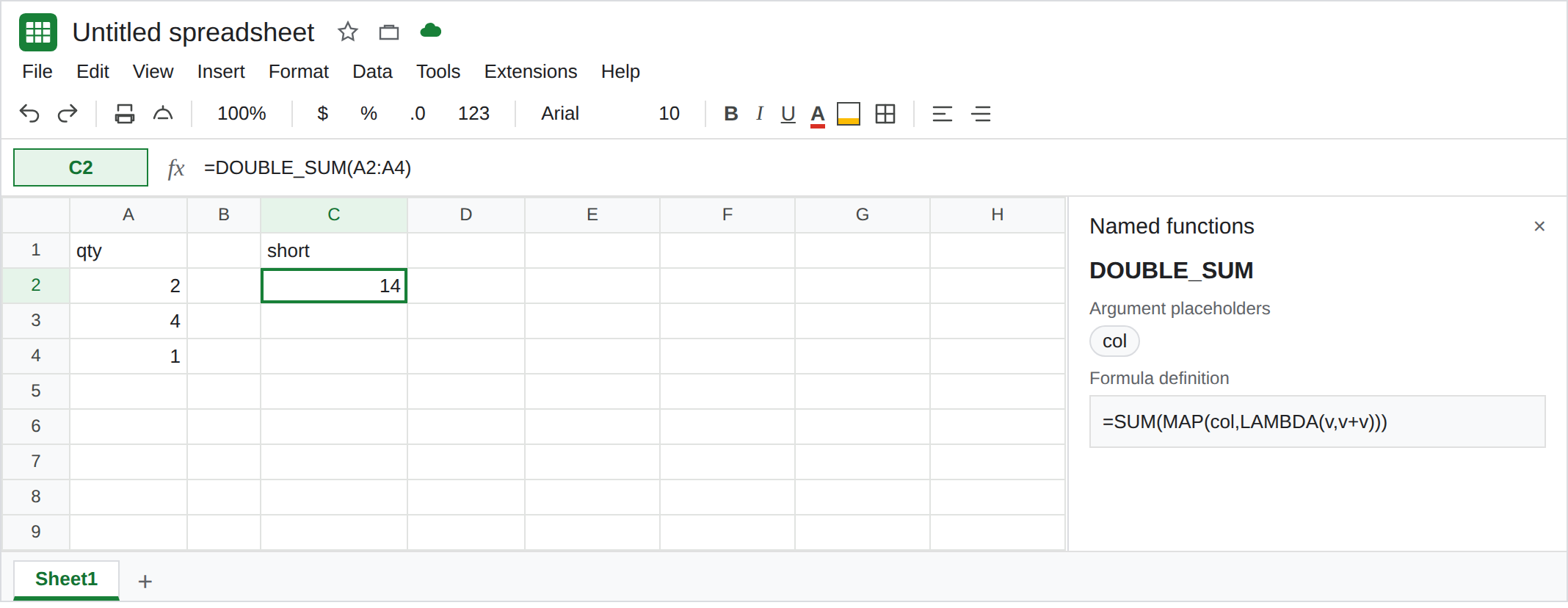
Define the helper. Data → Named functions → Add new function. Name DOUBLE_SUM. One argument placeholder: col. Formula definition:
=SUM(MAP(col,LAMBDA(v,v+v)))
Next, Create. For each value in col, the lambda doubles it, then SUM adds those doubles. 2+4+1 doubled is 14.
Three cells work. In C1 type short. In C2 enter =DOUBLE_SUM(A2:A4). C2 is 14. That cell is the control. The named function ran, the inner LAMBDA ran, and three additions fit.
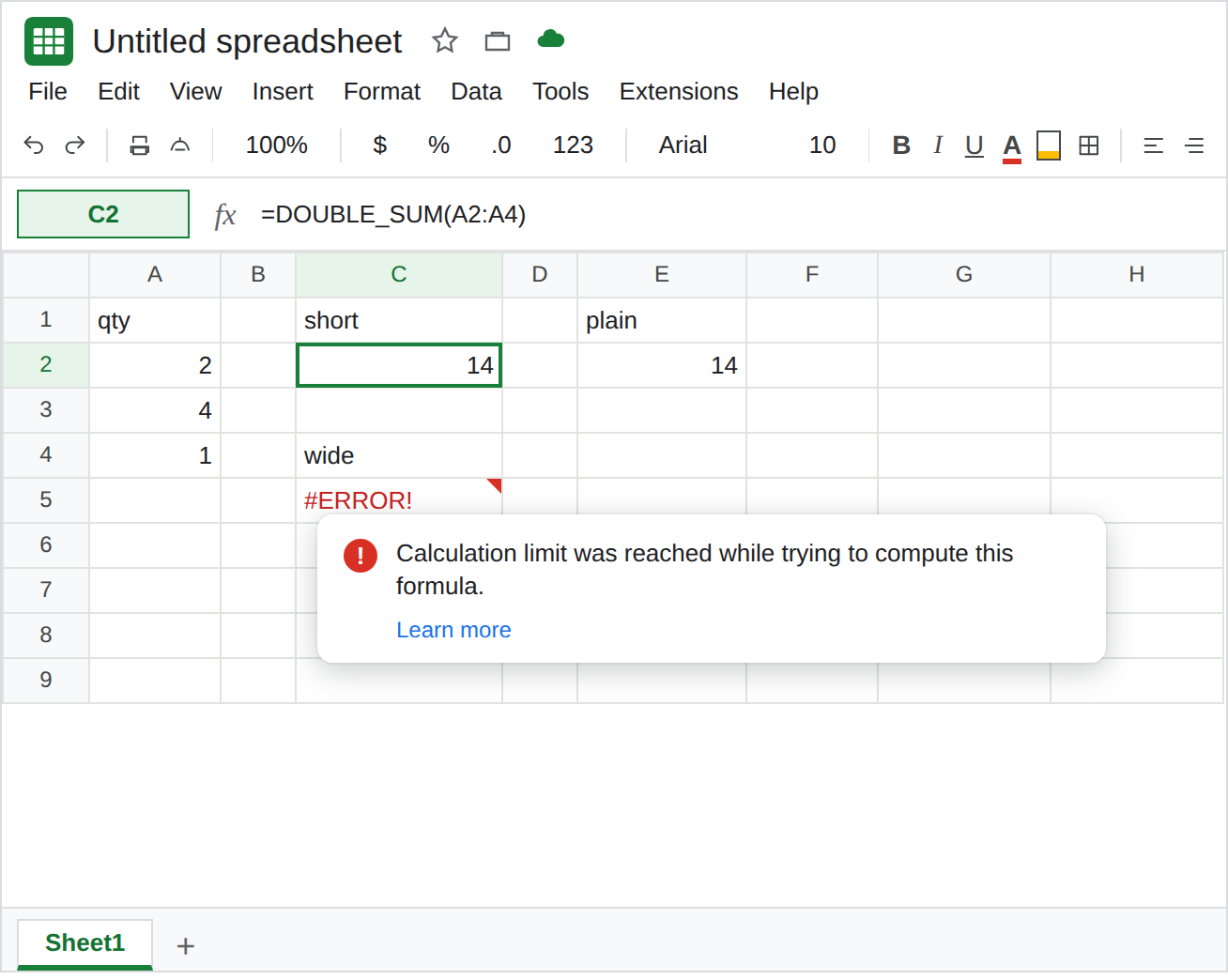
The same helper, one per column, on a large grid. In C4 type wide. In C5 enter =BYCOL(SEQUENCE(200,400),LAMBDA(col,DOUBLE_SUM(col))). SEQUENCE(200,400) is 200 rows and 400 columns. BYCOL calls DOUBLE_SUM once per column, and each call MAPs 200 cells. The cell sits on Loading…, then errors. The tooltip is Calculation limit was reached while trying to compute this formula. It may show as #ERROR! or #NUM!. Leave C5 broken. If this grid still returns a row of totals on your account, raise the size (SEQUENCE(400,800)) rather than wrapping C5 in another copy of the lambda. Do not memorize the cutoff. The lesson is the tooltip.
A bare name is a different error. In C7 enter =MAP(A2:A4,DOUBLE_SUM). #N/A or #VALUE!. MAP wants a LAMBDA, and DOUBLE_SUM is a named function. Leave C7 broken. See LAMBDA named function. C2 already proved the name works when you call it. C5 called it. C5 ran out of budget.
Arity is not the limit. In C9 enter =DOUBLE_SUM(A2). C9 is 4 (2+2). One cell is a legal column. In C11 enter =DOUBLE_SUM(). #N/A, expected 1 argument, got 0. That is named functions. C5’s formula passes col. C5 is not an arity miss.
What is actually wrong
Section titled “What is actually wrong”DOUBLE_SUMhides aMAP. The formula bar of C5 showsBYCOLand one name. The work is the definition: 400 maps of 200 doubles. Google’s help describes this stop as time or memory. The user-visible sentence is the calculation limit.- A small call does not reserve budget for a wide one. C2 is
14on the same name that C5 cannot finish. Deleting C2 does not give C5 more room. - Nesting the helper under
BYCOLmultiplies it by the column count. CallingDOUBLE_SUMonSEQUENCE(200,400)as one column (noBYCOL) is a different amount of work. Either shape can hit the same tooltip. The recreate usesBYCOLbecause that is the “once per column” trap. - The placeholder must not be reused as a
LAMBDAname inside the definition in a way that substitutes values into the name slots. This definition’s lambda name isv, and the placeholder iscol. That split is why C2 returns14. The failure mode where the lambda names are the placeholders is LAMBDA named function. IFERRORon C5 blanks the limit and looks like a row of empty totals. See IFERROR vs IFNA.
Leave C5 broken so the tooltip stays. Leave C2 as 14. Leave C7 as the bare-name contrast.
Call the helper on a column you can sum by hand. Keep C2. For a grid of doubles, skip the named function and double outside: =BYCOL(A2:C4,LAMBDA(col,SUM(col)*2)) on a real block, or =SUM(A2:A4)*2, which is 14 with no MAP.
Shrink the grid the name walks. If you keep DOUBLE_SUM, pass A2:A4, not SEQUENCE(200,400). Split a wide sheet into blocks that each behave like C2, and add those results in an ordinary cell.
Do not stack a second lambda to help. BYCOL(..., LAMBDA(col, MAP(col, LAMBDA(v, DOUBLE_SUM(v))))) runs the helper per cell and per column. That is more work than C5. calculation limit is the same wall.
If the hover says Calculation limit was reached and the named function contains MAP or BYCOL, pass a smaller range. If the hover says the last argument must be a lambda, you handed over the bare name. If the hover says expected 1 argument, the sheet call is empty. The limit never started.