

GOOGLEFINANCE WEEKLY returns week buckets, and MONTHLY is #N/A
Updated
GOOGLEFINANCE(ticker, attribute, start, end, interval) takes an optional interval on a historical call. The documented values are "DAILY" and "WEEKLY". Omit it and the history is daily. Pass "WEEKLY" and the same start and end spill week-sized buckets, not one row per session. That shorter table is not a broken fetch. "MONTHLY", "HOURLY", and a number you hoped meant “every 7 days” are #N/A. They are not a quiet fallback to daily.
An illegal attribute, "HOURLY", and an end date before the start are GOOGLEFINANCE attribute. A bad ticker is GOOGLEFINANCE #N/A. A quote that is behind a broker is GOOGLEFINANCE delay. Sheet Error is not a broker and not Google. Do not trade from this page. Do not copy a close out of a cell into this article.
Recreate it on a blank sheet
Section titled “Recreate it on a blank sheet”- Open a blank spreadsheet. You need a network. Keep the Google Sheets UI in English. A short
Loading…is the fetch, not a bad interval.
Daily history, no fifth argument. In A1 type daily. In A2 enter =GOOGLEFINANCE("GOOG","close","2024-01-02","2024-01-31"). When the fetch works, A2 spills a header and one row per session in that window. Count the data rows. That count is the control. Do not type the closes into another column. If A2 is #N/A before you have added an interval, the symbol or the window failed. See GOOGLEFINANCE attribute and GOOGLEFINANCE #N/A. Fix that before you judge buckets. Leave the daily spill in place. A value sitting under the spill is #REF! (the array was not expanded). Move it. See SORT / UNIQUE spill.
The same window, weekly. In E1 type weekly. In E2 enter =GOOGLEFINANCE("GOOG","close","2024-01-02","2024-01-31","WEEKLY"). When the fetch works, E2 spills the same kind of header and fewer data rows than A2. The dates step by week. Nothing is wrong with GOOG or with "close". You asked for weekly buckets. Leave E2 as that shorter spill. If you expected one row per trading day, the fifth argument is the reason the rows are missing.
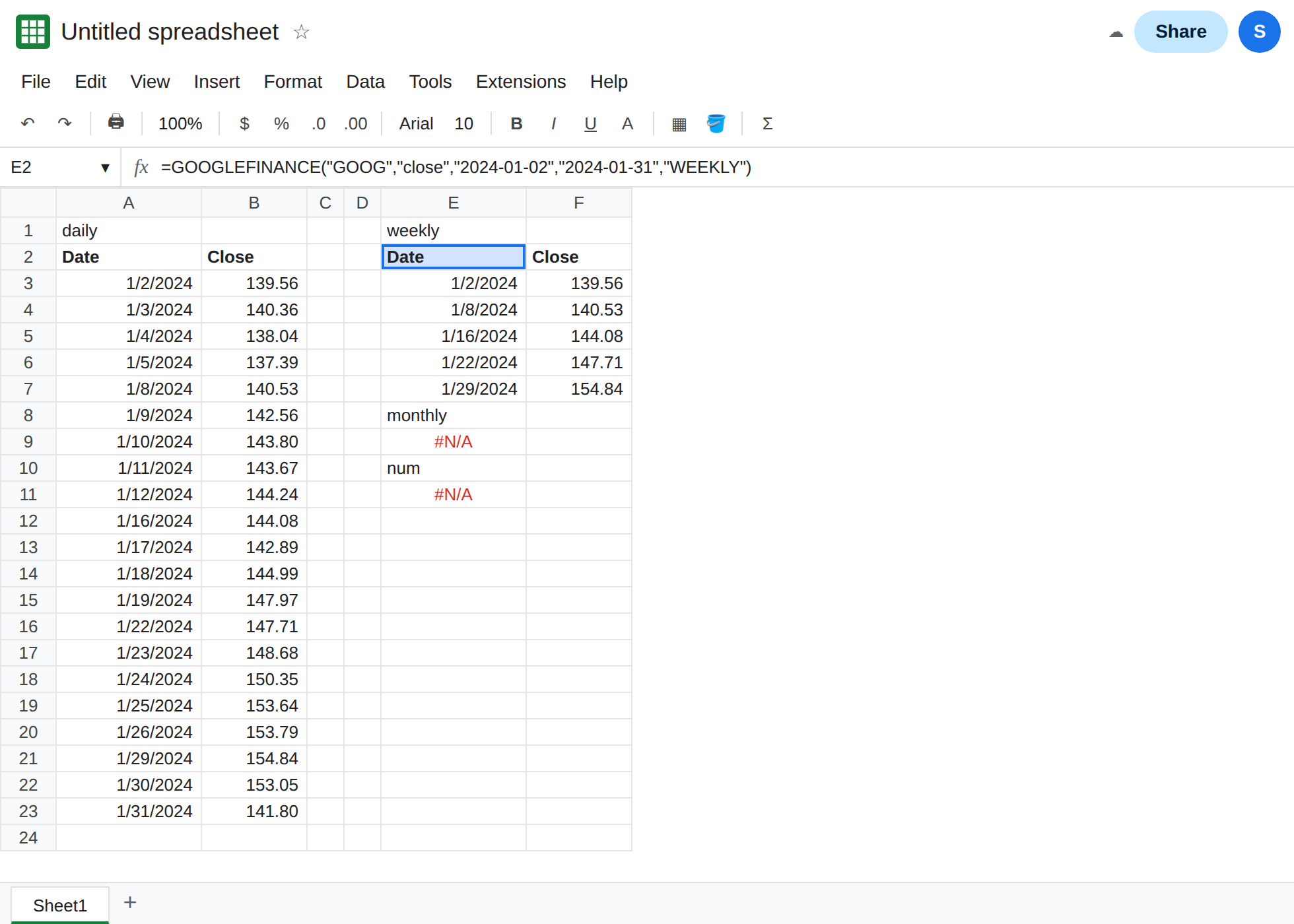
An interval that is not in the list. In E8 type monthly. In E9 enter =GOOGLEFINANCE("GOOG","close","2024-01-02","2024-01-31","MONTHLY"). The cell shows #N/A. "MONTHLY" is not a documented interval. The function does not roll the dailies up for you. Leave E9 broken. In E11 enter =GOOGLEFINANCE("GOOG","close","2024-01-02","2024-01-31",7). A bare 7 is not "WEEKLY". E11 is #N/A. Leave it broken.
"HOURLY" is the same class of #N/A and is already recreated on GOOGLEFINANCE attribute. Do not add it again here. A reversed window ("2024-06-01" then "2024-01-01") is #N/A on that page too. The interval is not what makes June-before-January fail.
The fifth argument is not a quote attribute. =GOOGLEFINANCE("GOOG","price") has no dates and no interval. Adding "WEEKLY" to a price call is the wrong shape. Historical names are open, close, high, low, volume, and all. See GOOGLEFINANCE attribute.
What is actually wrong
Section titled “What is actually wrong”- Start and end pick the window. Interval picks the step inside a window that is already valid. E2 and A2 share start, end, attribute, and ticker. The row count differs because of
"WEEKLY". That is the “unexpected weekly buckets” result. It is a successful historical table. - Only
"DAILY"and"WEEKLY"are accepted."MONTHLY","HOURLY", and7do not mean “please aggregate.” They are#N/A. Case that Sheets does not recognize is the same failure. Use the words as documented. - The interval is the fifth argument. People put
"WEEKLY"in the attribute slot or in place of the end date. Read the commas.num_dayscan stand in for the end date. It is not an extra interval glued on beside an end date you also passed. The attribute page walks that argument order. - Weekly rows are not “the close of each day, with some days hidden.” A chart of E2 will look smoother because the points are weeks. Formatting the date column does not split a week back into sessions.
- A delayed quote is a number from
priceordatadelay, not a shorter history. See GOOGLEFINANCE delay. Currency pairs are currency pair. Do not add an exchange lesson on this page.
Nothing here is advice to buy, sell, or hold. GOOG is a convenient symbol because the interval rules are easy to count. It is not a pick.
Leave E9 and E11 as #N/A. Leave both spills so you can count rows.
Daily is the call without "WEEKLY". Keep A2 when you want sessions. Keep E2 when you want weeks: =GOOGLEFINANCE("GOOG","close","2024-01-02","2024-01-31","WEEKLY"). Delete the fifth argument to return to the daily row count. Do not change the ticker to try to get January’s sessions back.
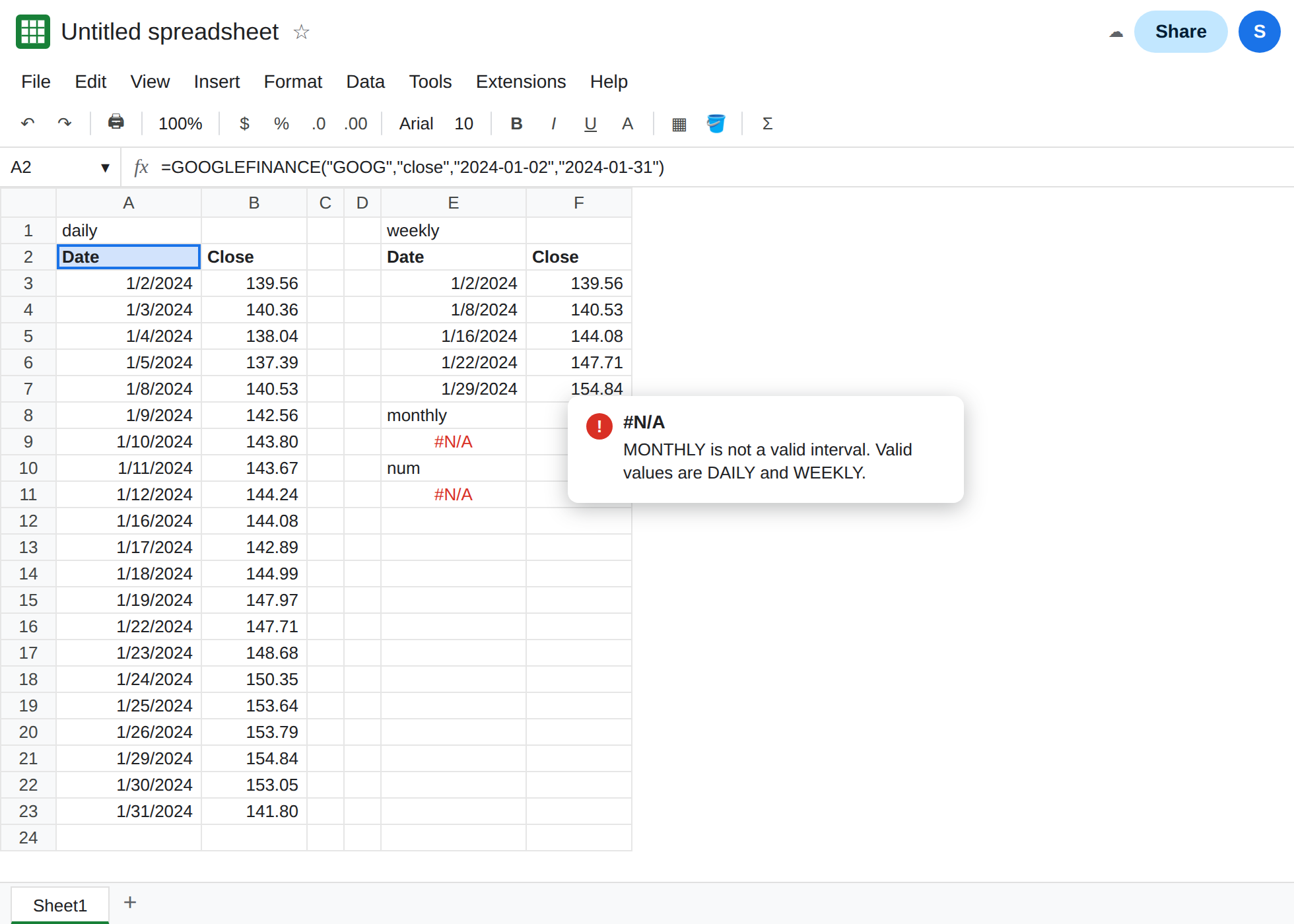
For a month-sized table, narrow the dates or group the daily spill yourself. "MONTHLY" will not start working if you wait. Pull A2’s daily rows into QUERY and aggregate, on the QUERY pages, or set the end date a month after the start and keep "DAILY". Those are different requests. They are not an interval named MONTHLY.
Do not wrap E9 in IFERROR. You would hide an illegal interval and show a blank under a weekly chart that looks complete. See IFERROR vs IFNA.
If the history spills and the dates jump by about seven days, you passed "WEEKLY". If the cell is #N/A and the fifth argument is not DAILY or WEEKLY, replace that argument. If there is no fifth argument and the cell is still #N/A, you are on the attribute or ticker page.