

IFERROR replaces the error before ERROR.TYPE can classify it
Updated
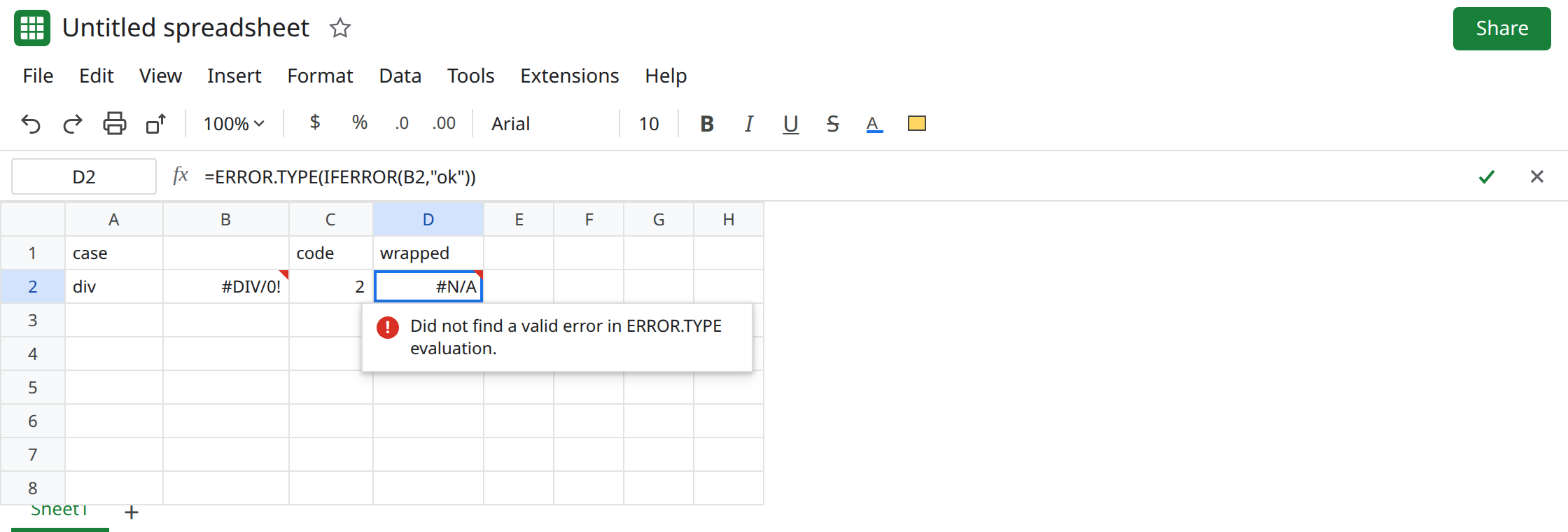
ERROR.TYPE returns a number for an error: #DIV/0! is 2, #N/A is 7. It has to see the error. IFERROR around that error returns the fallback first. ERROR.TYPE then classifies the fallback. A fallback of "ok" or 0 is not an error, so ERROR.TYPE returns #N/A, meaning “no error type.” The #DIV/0! is still on the sheet in the other cell. The wrapper never let the code run on it.
The numbers and the guard for a healthy cell are ERROR.TYPE codes. Wrappers that hide the original error are IFERROR hides cause. Keep the Google Sheets UI in English.
Recreate it on a blank sheet
Section titled “Recreate it on a blank sheet”- Open a blank spreadsheet. In A1 type
case. A2div. In B2 enter=1/0. B2 is#DIV/0!. Leave it.
The code, unwrapped. In C1 type code. In C2 enter =ERROR.TYPE(B2). C2 is 2. That is the control. The function saw #DIV/0!.
IFERROR first, then ERROR.TYPE. In D1 type wrapped. In D2 enter =ERROR.TYPE(IFERROR(B2,"ok")). IFERROR turns B2 into the text ok. ERROR.TYPE of ok is #N/A. It is not 2. The tooltip on D2 is the #N/A from ERROR.TYPE, not the divide tooltip. Leave D2 as #N/A.
A numeric fallback looks like a code and is not. In D4 enter =ERROR.TYPE(IFERROR(B2,0)). D4 is #N/A again, because 0 is not an error. In D5 enter =IFERROR(B2,0). D5 is 0. People read D5 as “code zero” or as a real quotient. It is the fallback. ERROR.TYPE never ran on B2 inside D5. Leave D5 as 0.
IFERROR around ERROR.TYPE is a different formula. In D7 enter =IFERROR(ERROR.TYPE(B2),0). D7 is 2. ERROR.TYPE ran on B2, returned a number, and IFERROR had nothing to replace. In D8 enter =IFERROR(ERROR.TYPE(101),0). D8 is 0. ERROR.TYPE of a normal number is #N/A, and this IFERROR turns that “no error” result into 0. That guard is ERROR.TYPE codes. It is not D2. Leave D2 broken so the two nests stay different.
A miss, so code 7 is not “whatever IFERROR caught.” In B10 enter =NA(). In C10 enter =ERROR.TYPE(B10). C10 is 7. In D10 enter =ERROR.TYPE(IFERROR(B10,"none")). D10 is #N/A. The fallback ate code 7 the same way it ate code 2.
What is actually wrong
Section titled “What is actually wrong”IFERROR(value, fallback)returnsfallbackwhenvalueis any error. The outerERROR.TYPEreceivesfallback. Text and ordinary numbers are not errors, so the result is#N/AfromERROR.TYPEitself. That#N/Adoes not mean the original cell was#N/A. B2 is#DIV/0!. D2 is the “no error type” result.- Nesting the other way,
IFERROR(ERROR.TYPE(B2),0), classifies first. On a real error the code is a number and the wrapper does nothing. On a healthy cell the wrapper turnsERROR.TYPE’s own#N/Ainto0. Use that only when you want a number for “no error.” Do not point it atIFERROR(B2,"ok"). IFNAaround B2 would not hide#DIV/0!.ERROR.TYPE(IFNA(B2,"ok"))is still2, becauseIFNApasses the divide through. It would hide a#N/Abefore you could read code7. See IFERROR vs IFNA. D10 is theIFERRORversion of that loss.- Flags do not classify either.
ISERROR(D5)is FALSE because D5 is0. The divide is gone. See ISERROR vs ISNA.
This is not ERROR.TYPE of a healthy cell as the thing you meant to guard. C2 is 2. D8 is the guard. D2 never produced a code.
Leave D2 as #N/A and D5 as 0. Leave B2 as #DIV/0!.
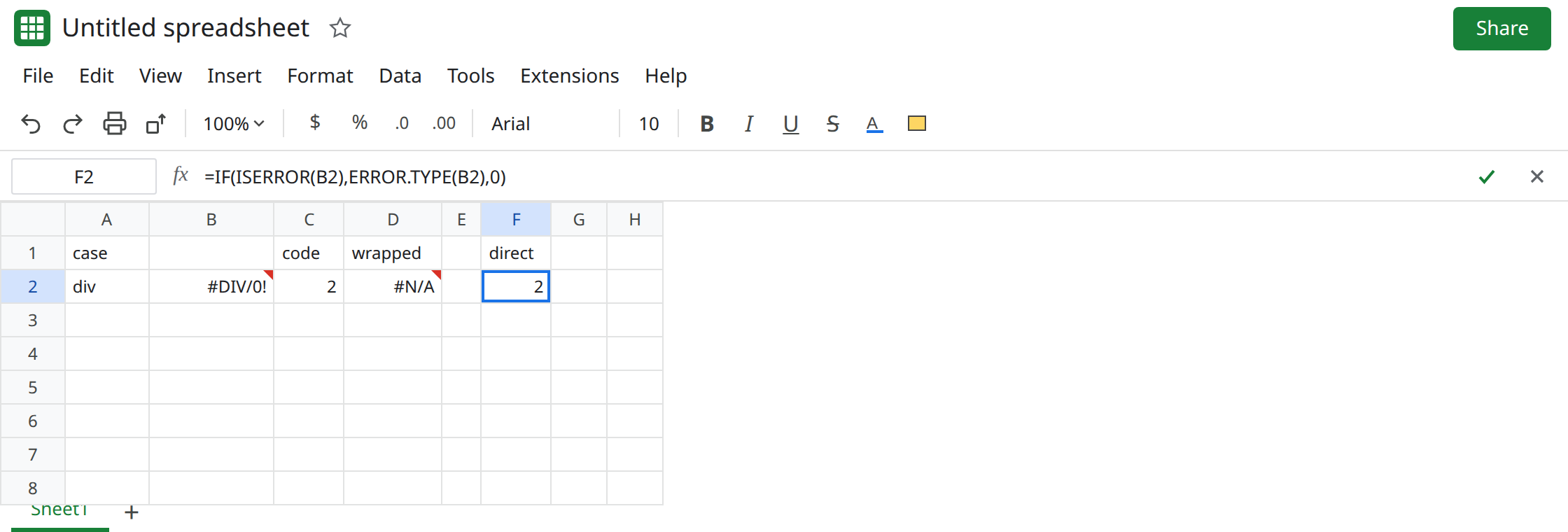
Classify the original cell. Keep C2: =ERROR.TYPE(B2). In F2 enter =IF(ISERROR(B2),ERROR.TYPE(B2),0). F2 is 2. The ISERROR test decides whether to call ERROR.TYPE. The call’s argument is B2, not IFERROR(B2,…). Copy the pattern to B10. The result is 7.
Use the code to choose a page: 2 is divide by zero, 7 is a #N/A you still have to explain. The code does not repair B2.
Do not wrap D2 in another IFERROR to turn that #N/A into 0 and call it “no divide.” You would store the same lie as D5.
If ERROR.TYPE is #N/A and its argument contains IFERROR or IFNA, it classified the fallback. Point it at the cell that still shows the error. If ERROR.TYPE is 2, it saw #DIV/0!.