

Fix SUBSTITUTE #VALUE! in Google Sheets (instance number)
Updated
SUBSTITUTE(text, search_for, replace_with, [occurrence_number]) replaces literal text. Omit the fourth argument and every instance is replaced. Pass a number and only that 1-based instance is replaced. #VALUE! here means that instance number is unusable: 0, negative, or text that is not a number. A number past the last instance is not #VALUE! — the original string comes back unchanged.
This page is SUBSTITUTE’s instance argument. It is not REGEXREPLACE miss (regex, unchanged on miss). It is not FIND / SEARCH miss (#VALUE! because a substring is absent). Keep the Google Sheets UI in English.
Recreate it on a blank sheet
Section titled “Recreate it on a blank sheet”- Open a blank spreadsheet. In A1 type
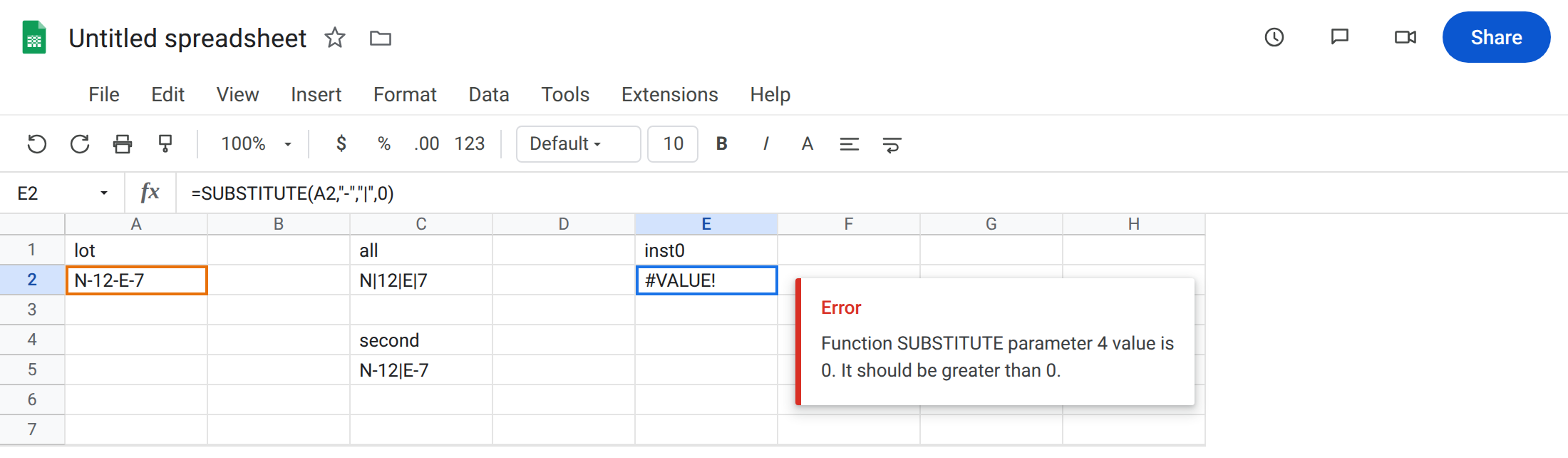
lot. A2N-12-E-7(three hyphens, four pieces).
Replace all (control). In C1 type all. In C2 enter =SUBSTITUTE(A2,"-","|"). The cell shows N|12|E|7. No fourth argument. Every hyphen. That row is the control.
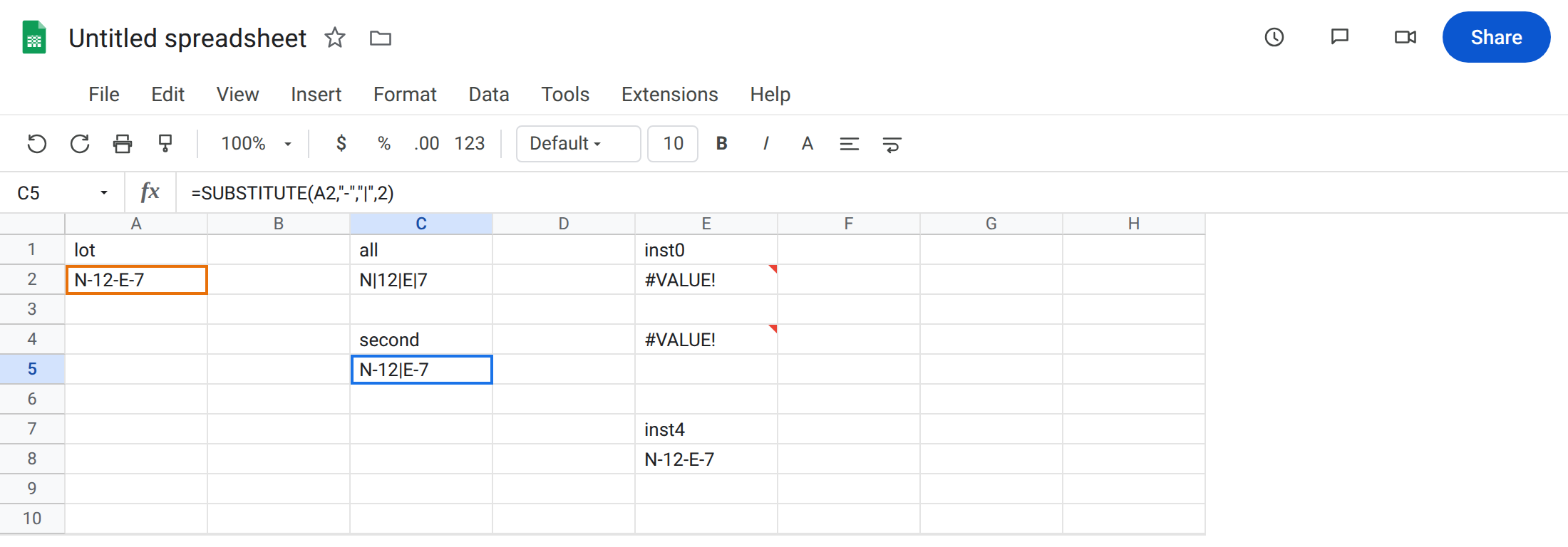
Replace instance 2 only. In C4 type second. In C5 enter =SUBSTITUTE(A2,"-","|",2). The cell shows N-12|E-7. Only the second hyphen. Legal instance.
Instance 0. In E1 type inst0. In E2 enter =SUBSTITUTE(A2,"-","|",0). The cell shows #VALUE!. Instances start at 1. 0 is not “replace none” and not “replace all.” Leave E2 broken.
Negative instance. In E4 enter =SUBSTITUTE(A2,"-","|",-1). #VALUE! again. There is no “from the end” instance. Leave E4 broken.
Instance past the count. In E7 type inst4. In E8 enter =SUBSTITUTE(A2,"-","|",4). Three hyphens in A2. Instance 4 does not exist. The cell shows N-12-E-7 unchanged, no error. Leave E8 as that quiet no-op so you do not debug it as #VALUE!.
Non-numeric instance. In E10 enter =SUBSTITUTE(A2,"-","|","2"). Some Sheets builds coerce "2" to 2 and match C5. If the cell is #VALUE!, the fourth argument was not accepted as a number — keep it broken. Prefer a real number, not a label.
FIND contrast. In G1 type find. In G2 enter =FIND("x",A2). #VALUE! because x is not in the lot. Different function. See FIND / SEARCH miss. Leave G2 as the contrast. Do not change A2 to fix E2.
Leave E2 and E4 broken. Leave C5 as the working instance-2 replace. Leave E8 unchanged.
What is actually wrong
Section titled “What is actually wrong”occurrence_numberis a 1-based count of matches, not a character position.2means the second hyphen, not “character 2.”0and negatives are#VALUE!. Omitting the argument is how you replace all. Passing0does not mean “all” and does not mean “skip.”- Too-large instance is a silent copy of the input, same family of “unchanged” as a
REGEXREPLACEmiss, but here the pattern is literal and the reason is “no fourth hyphen.” SUBSTITUTEdoes not treat*as a wildcard and does not use RE2. To replace a regex, see REGEXREPLACE miss.search_formissing from the text is also unchanged (not#VALUE!).#VALUE!on this page is the instance argument, not a failed search.
This is not LEFT / MID #VALUE! from a negative length. See LEFT / RIGHT / MID.
This is not generic 10 + pcs. See wrong type. E2’s tooltip names SUBSTITUTE and the instance, not ADD.
Leave E2, E4, and G2 broken.
Omit the instance to replace all. Keep C2. Pass 1, 2, 3 for a specific hyphen. Keep C5 for the second.
Too-large instance: if you meant “last hyphen,” count them with LEN(A2)-LEN(SUBSTITUTE(A2,"-","")) and pass that number, or replace all and restore pieces with SPLIT. Do not pass 0.
If E8 is unchanged and you expected a change, the lot has fewer matches than the instance. Fix the number or the text. Do not wrap E8 in IFERROR.
Do not wrap E2 in IFNA. The error is #VALUE!. See IFERROR vs IFNA. IFERROR would also hide G2’s FIND miss.
If #VALUE! and the fourth argument is 0 or negative, that is this page. If the cell equals A2 with a large instance, that is the quiet no-op. If #VALUE! and there is no fourth argument, you are probably on FIND, not SUBSTITUTE.
Instance 0 vs instance too big vs FIND
Section titled “Instance 0 vs instance too big vs FIND”0 / -1 → #VALUE! (E2, E4). The call is illegal.
Instance 4 of three hyphens → original text (E8). Legal call, nothing to replace.
FIND miss → #VALUE! (G2). No instance argument at all. Read the formula name in the bar before you change the lot code.