

VLOOKUP TRUE on a quantity break: wrong price if the first column is unsorted
Updated
VLOOKUP(qty, table, 2, TRUE) returns the price on the last break whose minimum is less than or equal to qty, if the first column is sorted ascending. Omit the fourth argument and Sheets uses TRUE. FALSE on a quantity that sits between breaks is #N/A even when the band price is obvious. TRUE on the same keys shuffled does not return that band price.
This page is the quantity break. It is not VLOOKUP #N/A (exact miss: number vs text, trailing space). It is not VLOOKUP wrong row (sku 200 / Chair / Desk / Lamp). That page shows a wrong name on an unsorted sku list. Use it for skus. Use this page when TRUE is the tool you meant, and the sort is the part that failed.
Recreate it on a blank sheet
Section titled “Recreate it on a blank sheet”- Open a blank spreadsheet. Keep the Google Sheets UI in English. In A1 type
min_qty, B1price.
Sorted breaks. A2 10, B2 8. A3 20, B3 7. A4 50, B4 6. The first column ascends: 10, then 20, then 50. In D1 type qty. D2 25. D3 5. D4 20.
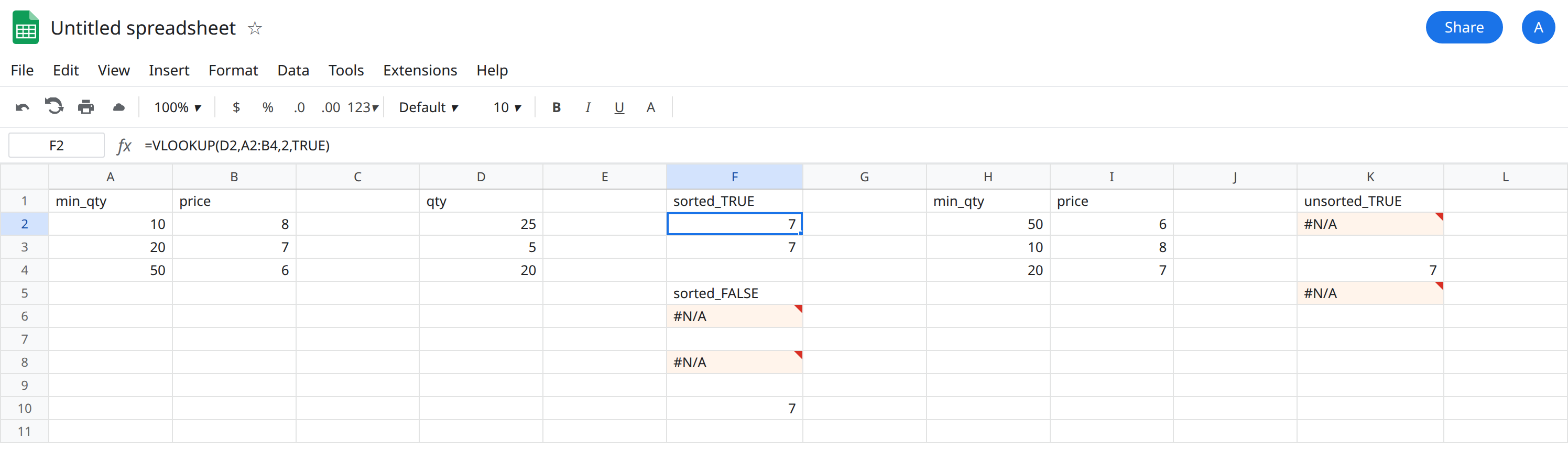
In F1 type sorted_TRUE. In F2 enter =VLOOKUP(D2,A2:B4,2,TRUE). The cell shows 7. Qty 25 is past the 20 break and not yet at 50, so the price is 7. In F3 enter =VLOOKUP(D2,A2:B4,2) with no fourth argument. F3 is also 7. Omitting the fourth argument is TRUE.
FALSE on a qty that is not a listed minimum. In F5 type sorted_FALSE. In F6 enter =VLOOKUP(D2,A2:B4,2,FALSE). The cell shows #N/A. The tooltip is Did not find value ‘25’ in VLOOKUP evaluation. 25 is not in A2:A4. Exact match is the wrong tool for a band. Leave F6 broken.
Below the first break. In F8 enter =VLOOKUP(D3,A2:B4,2,TRUE). Qty 5 is under 10. The cell shows #N/A. Approximate match does not invent a row before the first sorted key. Leave F8 broken.
Exact key. In F10 enter =VLOOKUP(D4,A2:B4,2,FALSE). Qty 20 is listed. The cell shows 7.
Same rows, not sorted. In H1 type min_qty, I1 price. H2 50, I2 6. H3 10, I3 8. H4 20, I4 7. In K1 type unsorted_TRUE. In K2 enter =VLOOKUP(D2,H2:I4,2,TRUE). K2 is not 7. It may be another price from this table, or #N/A. Do not type a guessed price over it. The sorted answer for 25 is F2. K2 is not that cell.
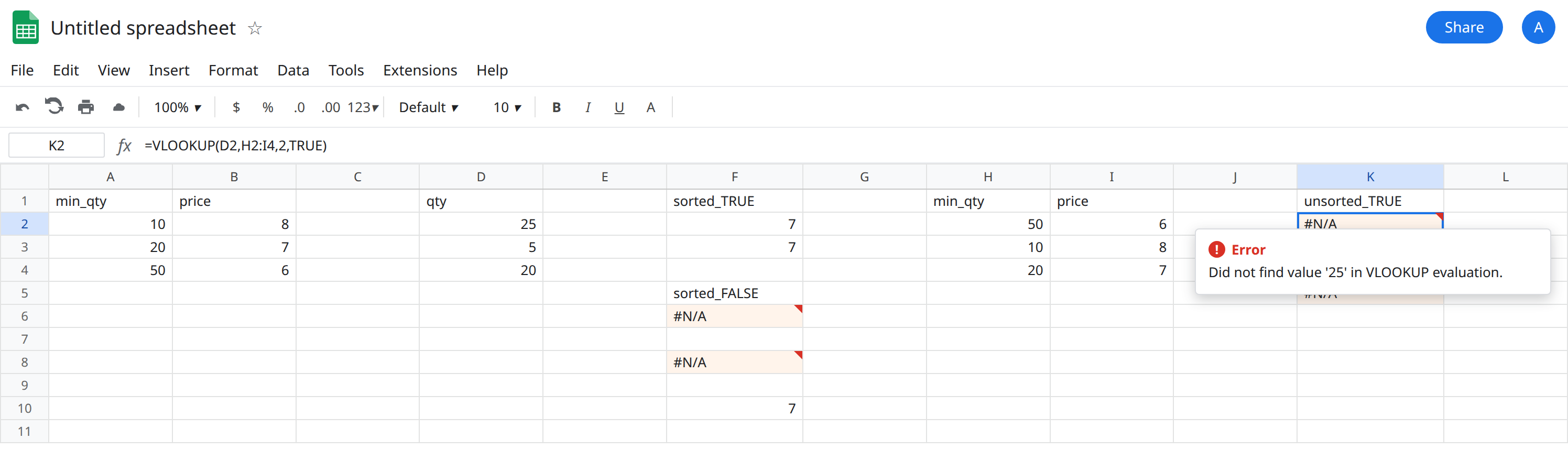
In K4 enter =VLOOKUP(D4,H2:I4,2,FALSE). The cell shows 7. Exact match still finds minimum 20 after the shuffle. In K5 enter =VLOOKUP(D4,H2:I4,2,TRUE). K5 is not required to show 7. TRUE does not become exact just because the key exists. Leave K2 and K5 as they calculated. Leave F6 and F8 broken.
What is actually wrong
Section titled “What is actually wrong”- The fourth argument is the match mode.
TRUEmeans approximate. Leaving it off isTRUE. F3 copies F2 only because A2:A4 is sorted. - Approximate match assumes the first column ascends. 10, 20, 50 does. 50, 10, 20 does not. The price next to
20is still7, andFALSEcan see it (K4).TRUEis not a promise to find that row. - On a sorted band, a key below the first minimum is
#N/A(F8). A key above the last minimum stays on the last price:=VLOOKUP(80,A2:B4,2,TRUE)is6. That is the rule. It is not a reason to leave a shuffled column in place. FALSEof25is#N/Aon the sorted table too (F6). Switching a band toFALSEbecause an unsortedTRUElooked wrong replaces a wrong price with a miss. The in-between quantity is supposed to use the lower break. That requires sort andTRUE.- This is not “25 is missing so any row is fine.” F2 is the defined band. K2 is a different result with no red triangle when it returns a price. A number that is simply the wrong price is worse than
#N/A, because a total will use it.
The sku demonstration — unsorted 200, 100, 150, TRUE returns Lamp — lives on VLOOKUP wrong row. Do not paste Chair and Lamp onto this sheet. Number versus text ('20 versus 20) is VLOOKUP #N/A and fails FALSE as well. Sort will not coerce types.
XLOOKUP’s default is exact. The neighbor modes are XLOOKUP match_mode, not a dropped fourth argument.
Leave K2, K5, F6, and F8 broken.
Keep the band sorted and pass TRUE on purpose. The working formula is F2: =VLOOKUP(D2,A2:B4,2,TRUE). If you add a break, sort column A ascending before you refresh prices. F3 shows you may omit the fourth argument after the sort is real. Prefer typing TRUE so the next reader sees the mode.
Listed keys that must not approximate. Use FALSE, as in F10 and K4. Sku tables belong on that path. Do not sort skus so a forgotten FALSE “works.”
Do not wrap K2 in IFERROR or IFNA. If K2 returned a price, there is no error to catch. If it returned #N/A, IFNA would hide a sort bug and show a blank price. See IFERROR vs IFNA.
If TRUE and FALSE disagree on a key that exists, you are looking at K5 versus K4: approximate versus exact. If TRUE on the shuffled range disagrees with TRUE on the sorted range, sort the first column or stop using TRUE.