

OFFSET height or width that runs past the grid is #REF!
Updated
OFFSET(start, rows, cols, height, width) builds a rectangle. Height and width have to be greater than 0, and the rectangle has to land on cells that exist. Google Sheets has 18,278 columns, A through ZZZ. OFFSET(A1,0,0,1,20000) asks for twenty thousand columns starting at A. Column 20,000 is past ZZZ. The cell is #REF!. The start cell is fine. The size walked off the grid.
A step of -1 from A1, which leaves the sheet upward, is OFFSET off sheet. Height 0 and a negative height are OFFSET height 0. Keep the Google Sheets UI in English. Sheet Error is an independent formula-error library, not a Google product.
Recreate it on a blank sheet
Section titled “Recreate it on a blank sheet”- Open a blank spreadsheet. In A1 type
origin. In B1 typeright. In C1 typefar. You do not need to scroll to column ZZZ. The width argument is enough.
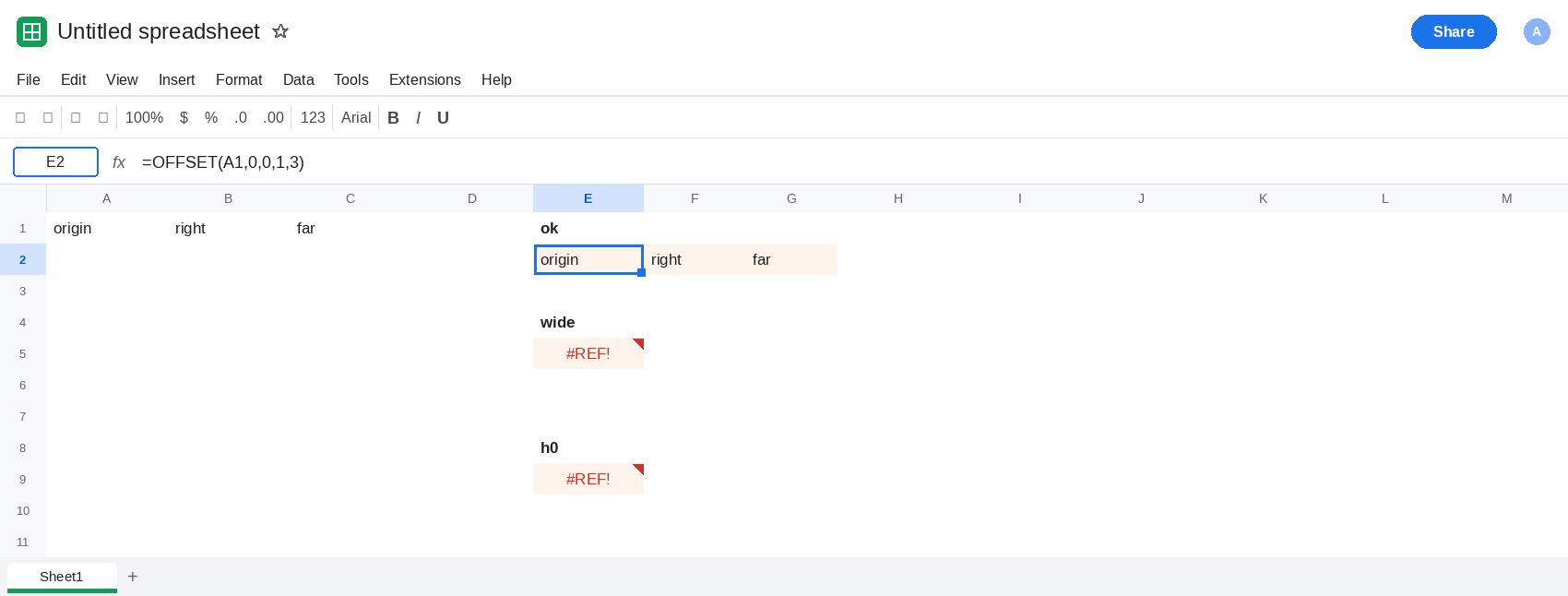
A width that stays on the sheet. In E1 type ok. In E2 enter =OFFSET(A1,0,0,1,3). The formula spills origin, right, far across E2:G2. Height 1, width 3, starting at A1, is A1:C1. That block is the control: a positive size that fits.
A width past the last column. In E4 type wide. In E5 enter =OFFSET(A1,0,0,1,20000). The cell shows #REF!. Width 20000 from column A needs a column that the grid does not have. The tooltip is the invalid-range message, the same family as a step that leaves the sheet. A1 still says origin. Leave E5 broken.
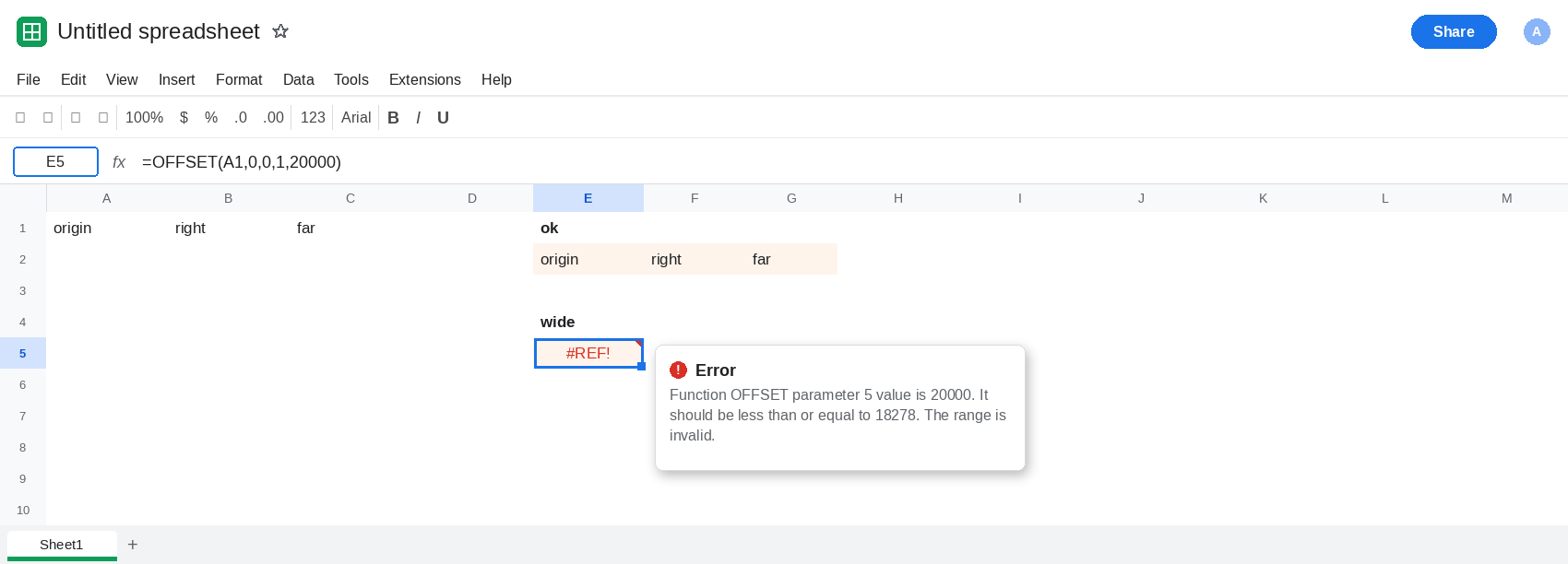
Where the grid ends. Column ZZZ is column 18,278. A width of 18,278 from A is the whole sheet, one row, and it is a miserable thing to spill, so do not enter it. A width of 20,000 is simply past that edge. E5 is the formula to keep. =OFFSET(ZZZ1,0,1) is the same #REF! from the other direction: start at the last column, step one column right. You do not need to visit ZZZ to trust E5.
Height 0 is a different #REF!. In E9 enter =OFFSET(A1,0,0,0,1). #REF!, and the tooltip names parameter 4 and says it should be greater than 0. That refusal happens before the grid edge matters. It is OFFSET height 0. Leave E9 broken so the two tooltips can sit apart: E5 is the edge, E9 is a size of zero.
Leave E5 as #REF!. Leave E2 as the three-cell spill.
What is actually wrong
Section titled “What is actually wrong”- The grid ends. Width counts columns from the start, including the start column. From A, a width of 18,278 reaches ZZZ. A width of 20,000 does not. E5 is that request. The rows and cols offsets are both
0, so this is not “moved up from A1.” - A width of 18,278 from column A would be a legal one-row range, the entire sheet wide, and it is too heavy to spill for a demo.
#REF!starts when the rectangle would include a column the product does not have. E5 is that request. E2 is a width that fits. - Height
0, a negative height, and a negative width are rejected as bad sizes even when the start cell is in the middle of the sheet. E9. Those are not “past ZZZ.” OFFSET(A1,-1,0)is past the top, with a row offset rather than a fat width. See OFFSET off sheet.INDEXpast the last row of a small range is#REF!for a different reason: the index is outside the range you named, not outside the sheet. See INDEX past range.
OFFSET is volatile. A sheet full of them recalculates on edits that do not touch the start cell. See OFFSET volatile. E5 is #REF! even before that cost matters.
Leave E5 as #REF!.
Ask only for columns that exist. Keep E2. In E11 enter =OFFSET(A1,0,0,1,3). It spills origin, right, far. If the width comes from a cell, cap it. In I1 type 3. In E13 enter =OFFSET(A1,0,0,1,I1). E13 matches E2. Change I1 to 20000 and E13 becomes #REF! again. Put 3 back.
Prefer a normal range when the rectangle does not need to move. =A1:C1 is the same three cells as E2 and it is not volatile. Use OFFSET when the start or the size is computed. Keep the computed width inside 1 through the columns that remain to the right of the start.
Do not wrap E5 in IFERROR. You will hide a width past ZZZ and a height of 0 the same way. See IFERROR vs IFNA.
If OFFSET is #REF! and the width is in the tens of thousands, the rectangle runs past column ZZZ. Shrink the width. If the tooltip says the height parameter should be greater than 0, you are on the height-0 page. If the row offset is negative from row 1, you are on the off-sheet page.