

GOOGLEFINANCE #N/A from an illegal attribute or a bad historical window
Updated
GOOGLEFINANCE(ticker, attribute, start, end, interval) returns #N/A when attribute is not legal for that call, or when the historical window is impossible. A bad ticker is a different #N/A. This page does not publish a price. A number in a cell is a delayed quote from Google, not a recommendation, and not a value you should copy into another sheet as “the” close.
Sheet Error is not a broker and not Google. Do not trade from this recreate.
The ticker miss (NOTATICKER, USD/JPY with a slash, "notanattribute" on a currency pair) is GOOGLEFINANCE #N/A. Use that page to repair the symbol. Stay here when the symbol is plausible and the attribute or the dates are not.
Recreate it on a blank sheet
Section titled “Recreate it on a blank sheet”- Open a blank spreadsheet. Keep the Google Sheets UI in English. You need a network. If a formula sits on
Loading…for a moment, that is the fetch, not#N/A.
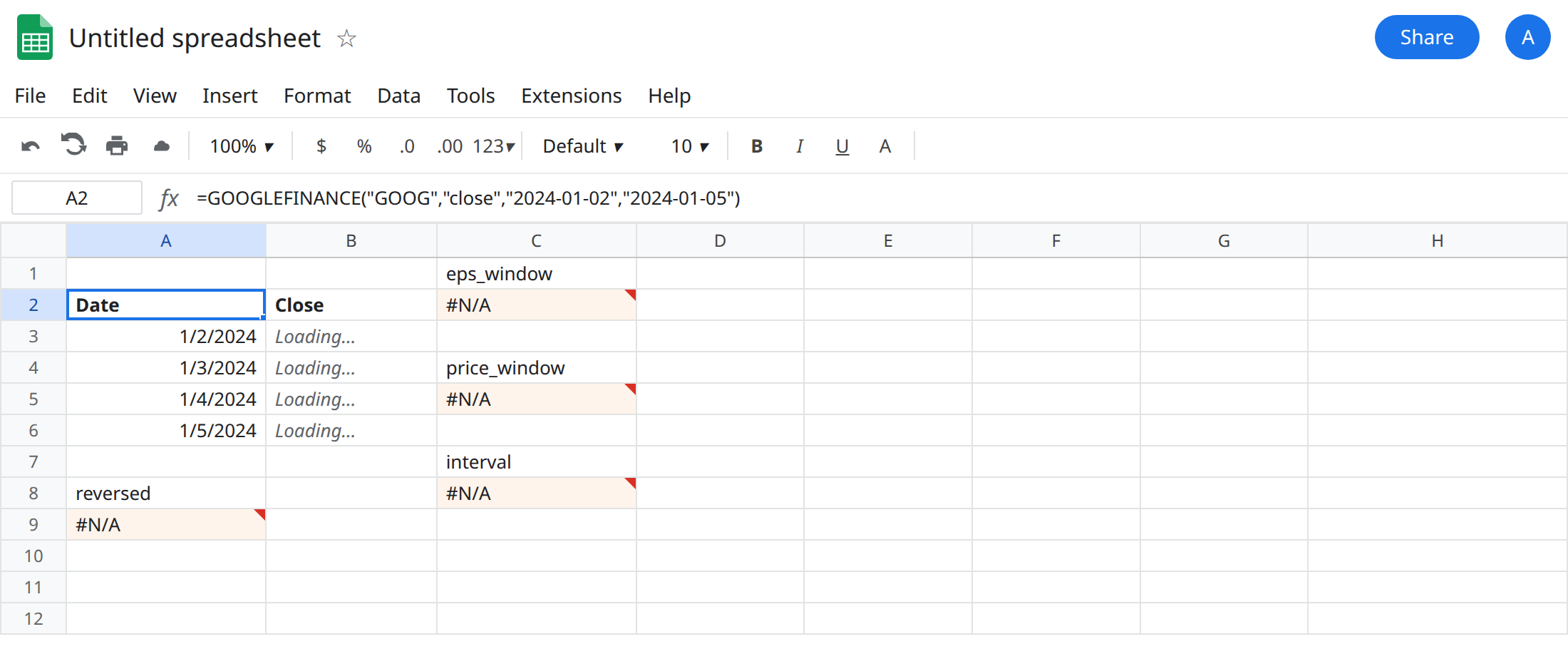
Historical attribute, dates in order. In A1 type window. In A2 enter =GOOGLEFINANCE("GOOG","close","2024-01-02","2024-01-05"). When the fetch works, A2 spills a small table whose first row is headers, including a date header and a close header, and whose next rows are sessions in that window. Do not type those closes into this article or into a second cell to “freeze” them. If your network blocks the fetch, leave A2 and use the error rows below as the lesson. A blocked spill (a value sitting in B3) is #REF! with a tooltip that the array result was not expanded. That is SORT / UNIQUE spill, not a bad attribute. Move the blocker. Do not change "close".
End before start. In A8 type reversed. In A9 enter =GOOGLEFINANCE("GOOG","close","2024-06-01","2024-01-01"). The cell shows #N/A. The start is June and the end is January. The attribute close is a historical attribute. The window is the bug. Leave A9 broken.
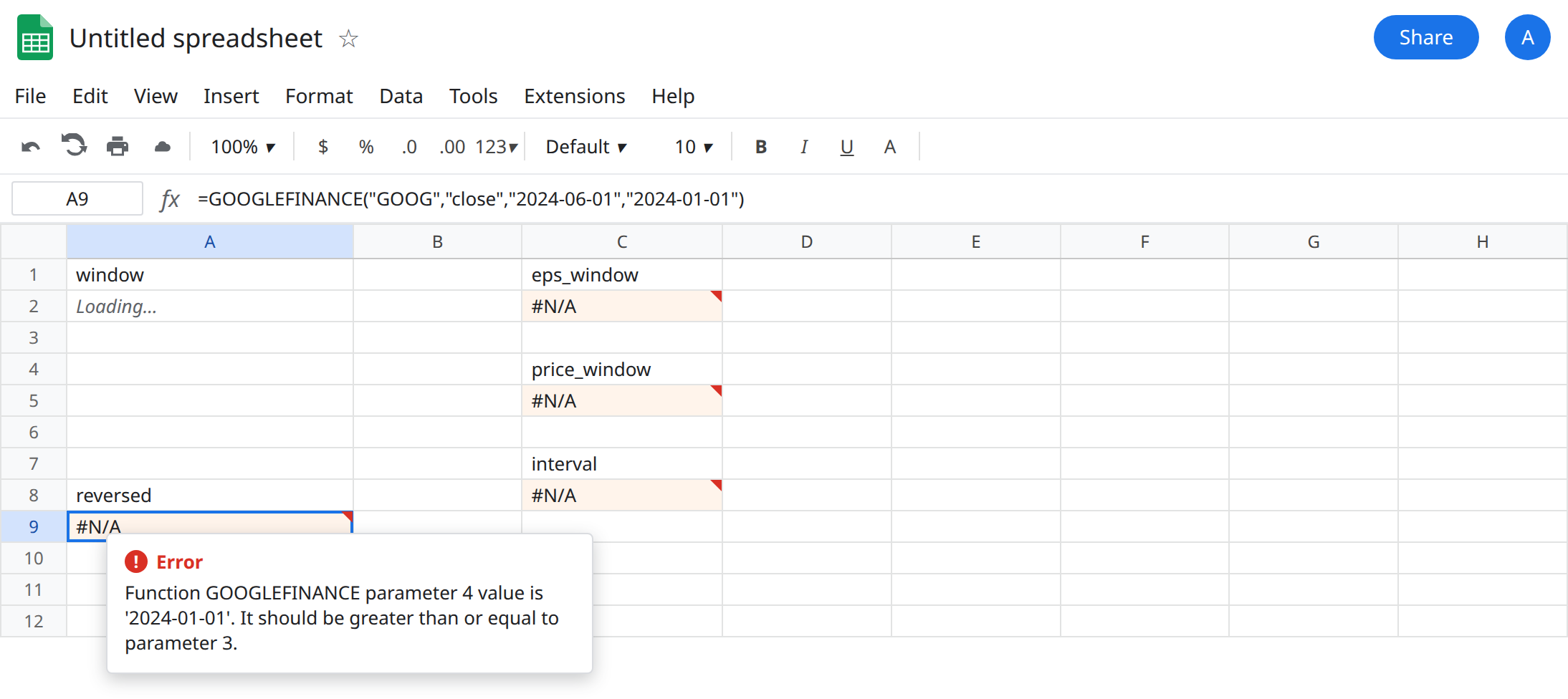
Real-time attribute plus a date window. In C1 type eps_window. In C2 enter =GOOGLEFINANCE("GOOG","eps","2024-01-02","2024-01-05"). The cell shows #N/A. eps is a quote attribute, not a historical series. Passing start and end does not turn it into a history. Leave C2 broken.
Price is not the historical name. In C4 type price_window. In C5 enter =GOOGLEFINANCE("GOOG","price","2024-01-02","2024-01-05"). The cell shows #N/A. Historical names include open, close, high, low, volume, and all. price is the real-time attribute. With no dates, =GOOGLEFINANCE("GOOG","price") is a quote call. With dates, price is the wrong name. Leave C5 broken.
Interval. In C7 type interval. In C8 enter =GOOGLEFINANCE("GOOG","close","2024-01-02","2024-01-31","HOURLY"). The cell shows #N/A. The documented intervals for this historical call are DAILY and WEEKLY. HOURLY is not one of them. Leave C8 broken.
This page will not add a currency pair with eps or close as a second lesson. Unsupported attributes on CURRENCY:USDJPY are already on GOOGLEFINANCE #N/A.
What is actually wrong
Section titled “What is actually wrong”- The function has two shapes. Without dates, the second argument is a quote attribute (
price, and others such aspriceopen,high,low,volume,eps,pe,marketcap,tradetime,datadelay,closeyest). With a start date, the second argument is a historical attribute (open,close,high,low,volume,all). Mixing them is#N/A. C2 and C5 are that mix. - Historical arguments are start, then end or a number of days, then an optional interval. The end must not fall before the start. A9 is a reversed window. Swapping the two dates is the edit. Changing
GOOGto another ticker does not repair June-before-January. num_daysreplaces the end date. It is not a fifth argument next to an end date you also passed. Read the formula’s commas before you addDAILY.- A historical call spills. One price in A2 and a header beside it means the rectangle was blocked (
#REF!) or you are looking at a quote formula. Quote formulas return one cell. History returns a table. Plan empty rows under the formula. #N/Ahere is not “the market is closed.” A delayed last value is still a value. The ticker page covers delay. Do not refresh A9 until it becomes a price. It will not.- Nothing here is advice to buy, sell, or hold.
GOOGis a convenient symbol because the attribute rules are easy to see. It is not a pick.
A misspelled ticker is still #N/A, and it looks like C2. If "close" with a forward window also fails, check the symbol on the ticker page before you keep editing the attribute.
Leave A9, C2, C5, and C8 broken.
History: close, start, end, in that order. Use A2’s shape: =GOOGLEFINANCE("GOOG","close","2024-01-02","2024-01-05"). For a weekly step, the fifth argument is "WEEKLY", not "HOURLY". For every historical field, the attribute is "all", which spills more columns. Keep the landing zone empty.
A quote, with no dates. =GOOGLEFINANCE("GOOG","price") or =GOOGLEFINANCE("GOOG","eps") omits the window. Do not leave the dates in place and only rename eps to price. That is C5.
Do not wrap the #N/A. IFERROR turns a bad window into a blank and a dashboard prints nothing for that ticker. See IFERROR vs IFNA. Fix the attribute list or the date order.
If #N/A appeared as soon as you added dates, the attribute is not a historical one. If the attribute is close and the dates run backwards, swap them. If the fifth argument is not DAILY or WEEKLY, delete it or replace it.